
mcp-server-dust-Py
connect to a dust agent via HTTP call
Documentation
MCP Server for Dust Agent Integration
A custom MCP (Multi-Cloud Provider) server that connects to the Dust.tt agent platform via HTTP calls. This server exposes the capabilities of Dust AI agents through the MCP interface.
Table of Contents
- MCP Server for Dust Agent Integration
Features
- Connect to Dust.tt AI agents via API
- Systems Thinking agent integration with cognitive neuroscience and problem-solving capabilities
- RAG (Retrieval Augmented Generation) support
- Web navigation capability
- Simplified MCP tool interface
- Modular code structure for better maintainability
- Externalized configuration and API client classes
Project Structure
The project follows a modular structure for improved maintainability:
- `server.py`: Main server implementation that registers tools and handles MCP functionality
- `config.py`: Contains the `DustAgentConfig` class for managing configuration settings
- `api_client.py`: Contains the `DustAPIClient` class for handling API interactions with Dust.tt
- `.env`: Environment variables file (not committed to version control)
- `.env.example`: Template for environment variables
- `docs.md`: Comprehensive documentation of the project architecture and API
Documentation
For detailed information about the architecture, API, and troubleshooting, please refer to the comprehensive documentation.
Prerequisites
- Python 3.10 or higher
- `pip` package manager
- A Dust.tt account with API access
- An existing Dust agent configuration
Installation
1. Clone this repository:
git clone https://github.com/Ma3u/mcp-server-dust.git
   cd mcp-server-dust
2. Create and activate a virtual environment:
python3 -m venv .venv

   # On macOS/Linux
   source .venv/bin/activate

   # On Windows
   .venv\Scripts\activate
3. Install required dependencies:
pip install --upgrade pip
   pip install mcp requests python-dotenv
Configuration
Dust Agent Setup
Create a `.env` file in the root directory with your configuration (you can copy from `.env.example` and modify):
# MCP Server Configuration
MCP_NAME=Dust MCP Server
MCP_HOST=127.0.0.1
MCP_PORT=5001
MCP_TIMEOUT=30

# Dust Agent Configuration
DUST_AGENT_ID=your_agent_id
DUST_DOMAIN=https://dust.tt
DUST_WORKSPACE_ID=your_workspace_id
DUST_WORKSPACE_NAME=your_workspace_name
DUST_API_KEY=your_api_key
DUST_AGENT_NAME=your_agent_name
DUST_TIMEZONE=Europe/Berlin
DUST_USERNAME=your_username
DUST_FULLNAME=Your Full Name
> Security Note: Make sure to add `.env` to your `.gitignore` file to prevent committing sensitive information.
MCP Server Settings
The server configuration parameters are now managed by the `DustAgentConfig` class in `config.py`. Parameters are loaded from environment variables with the following defaults:
# MCP Server Configuration
MCP_NAME = "Dust MCP Server"  # Name of your MCP server
MCP_HOST = "127.0.0.1"        # Host to run the server on
MCP_PORT = 5001               # Port to run the server on
MCP_TIMEOUT = 30              # Request timeout in seconds

# Dust Agent Configuration
DUST_AGENT_ID = "8x9nuWdMnR"  # Your Dust agent ID
DUST_DOMAIN = "https://dust.tt" # Dust API domain
# ... and other Dust-specific settings
Running the Server
To start the MCP server:
python server.pyYou should see output similar to:
Starting MCP server 'Dust MCP Server' on 127.0.0.1:5001
Connected to Dust agent 'SystemsThinking' (ID: 8x9nuXXXX)
The server will run until interrupted with Ctrl+C.
Claude Desktop Integration
To configure Claude Desktop for use with this MCP server:
1. Installation
- Download Claude Desktop from the official Anthropic website
- Install the application following the on-screen instructions for your OS
2. Initial Setup
- Launch the app after installation
- Sign in with your Anthropic account (free account is sufficient)
3. Integration with MCP Server
- Launch Claude Desktop and go to Settings
- Select the "Developer" tab on the left sidebar
- Click the "Edit Config" button at the bottom of the screen
- Add your Dust MCP server to the configuration by including it in the `mcpServers` array:
{
    "mcpServers": {
        "dust": {
            "command": "/Users/ma3u/projects/mcp-server-dust/.venv/bin/python",
            "args": [
                "/Users/ma3u/projects/mcp-server-dust/server.py"
            ],
            "host": "127.0.0.1",
            "port": 5001,
            "timeout": 10000
        }
    }
}
> Note: If there are existing entries in the `mcpServers` array, add your configuration as a new item.
4. Applying Configuration Changes
- After making changes to your MCP server configuration:
- For Claude Desktop, quit the application completely
- Relaunch Claude Desktop for the new configuration to take effect
- Verify the connection by checking if your server appears in the list in the Developer settings
5. Testing in Claude Desktop
Type the following in Claude Desktop to test your integration:
Use Systemsthinking Agent to explain MCP Protocol.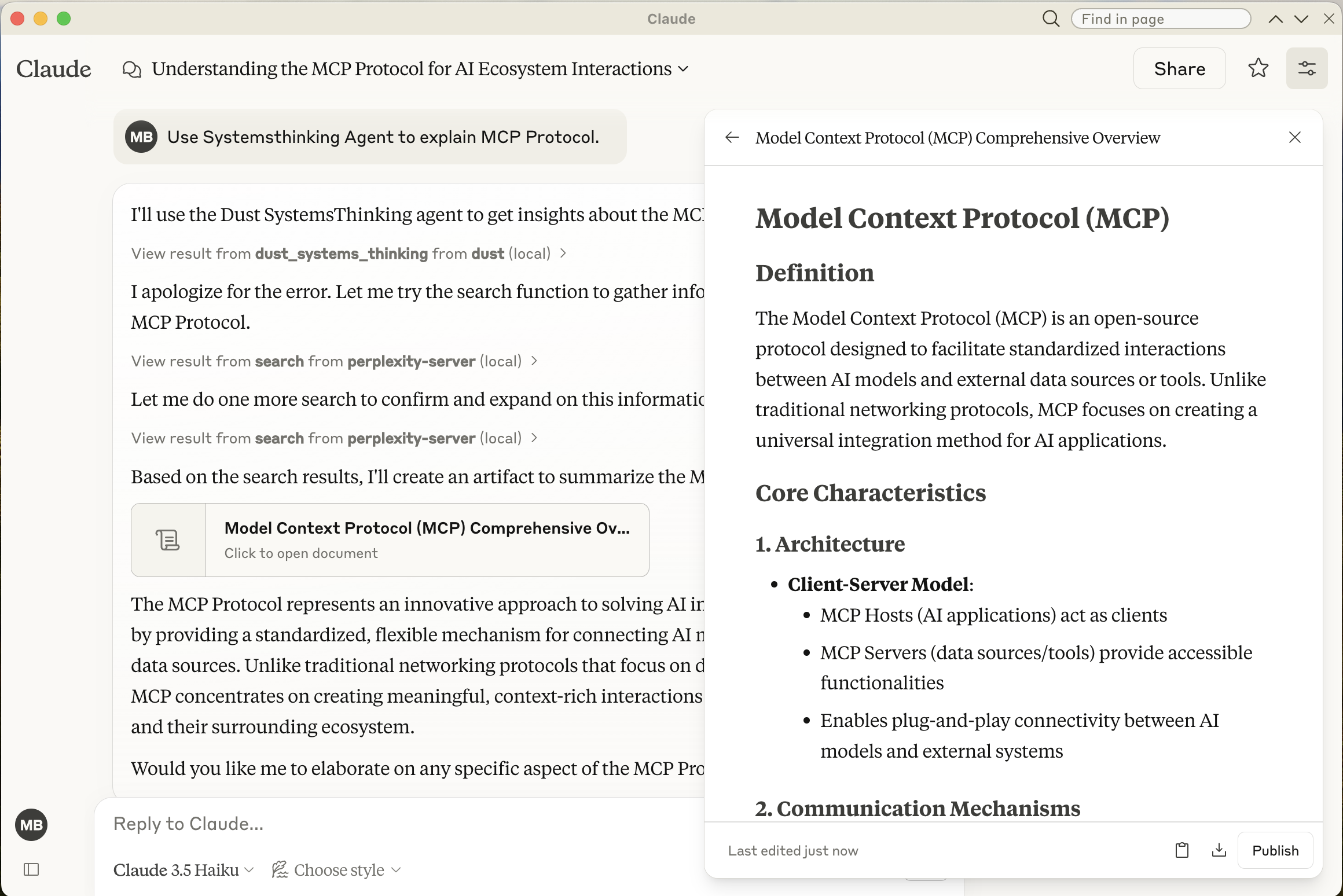
Troubleshooting
View the log file for the Dust MCP server in Claude Desktop:
# macOS/Linux
tail -f ~/Library/Logs/Claude/mcp-server-dust.log

# Windows
Get-Content -Path "C:\Users\{username}\AppData\Local\Logs\Claude\mcp-server-dust.log" -Wait
Dust.tt API Workflow
The MCP Server interfaces with Dust.tt's API through a multi-step workflow. Each Claude request that uses the Dust agent follows this process:
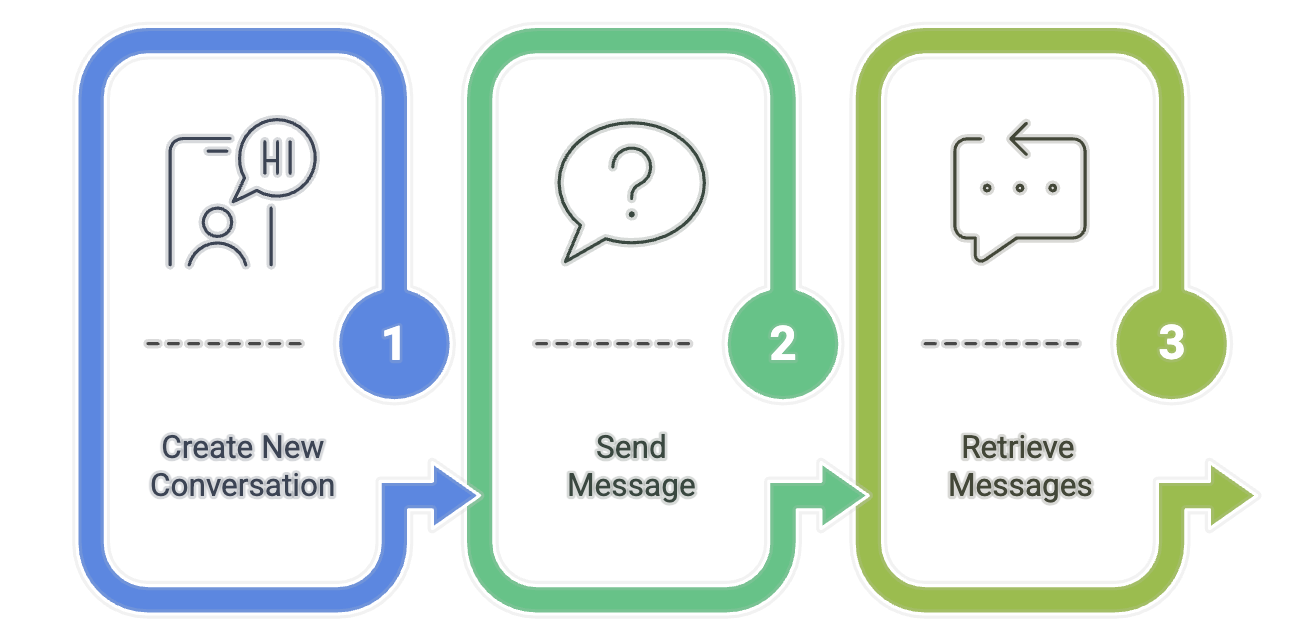
1. Create a New Conversation
First, the server creates a new conversation with the Dust agent:
curl -X POST "https://dust.tt/api/v1/w/{WORKSPACE_ID}/assistant/conversations" \
  -H "Authorization: Bearer {YOUR_API_KEY}" \
  -H "Content-Type: application/json" \
  -d '{
    "title": "Systems Thinking Conversation",
    "model": "claude-3-5-sonnet-20240620"
  }'
This returns a conversation ID that's used in subsequent requests:
{
  "conversation": {
    "sId": "DhvpbhW74S",
    "title": "Systems Thinking Conversation",
    "created_at": 1742923287427
  }
}
2. Send a Message to the Conversation
Next, the server sends the user's query as a message to the conversation:
curl -X POST "https://dust.tt/api/v1/w/{WORKSPACE_ID}/assistant/conversations/{CONVERSATION_ID}/messages" \
  -H "Authorization: Bearer {YOUR_API_KEY}" \
  -H "Content-Type: application/json" \
  -d '{
    "content": "Explain the MCP Protocol in detail",
    "mentions": [{
      "configurationId": "{AGENT_ID}",
      "context": {
        "timezone": "Europe/Berlin",
        "modelSettings": {"provider": "anthropic"}
      }
    }],
    "context": {
      "timezone": "Europe/Berlin"
    }
  }'
The response includes the message ID:
{
  "message": {
    "sId": "qwenj3rusI",
    "conversation_sId": "DhvpbhW74S",
    "content": "Explain the MCP Protocol in detail",
    "author_name": "User",
    "author_type": "user",
    "created_at": 1742923287627
  }
}
3. Retrieve Messages from the Conversation
Finally, the server retrieves the agent's response. This requires a specific format for the message retrieval request:
curl -X POST "https://dust.tt/api/v1/w/{WORKSPACE_ID}/assistant/conversations/{CONVERSATION_ID}/messages" \
  -H "Authorization: Bearer {YOUR_API_KEY}" \
  -H "Content-Type: application/json" \
  -d '{
    "content": "RETRIEVAL_QUERY",
    "mentions": [{
      "configurationId": "{AGENT_ID}",
      "context": {
        "timezone": "Europe/Berlin",
        "modelSettings": {"provider": "anthropic"}
      }
    }],
    "context": {
      "timezone": "Europe/Berlin",
      "username": "api_retrieval",
      "queryType": "history_analysis"
    }
  }'
The response contains all messages in the conversation, including the agent's response:
{
  "messages": [
    {
      "id": "msg_user123",
      "role": "user",
      "content": "Explain the MCP Protocol in detail",
      "timestamp": 1742923287627,
      "status": "processed"
    },
    {
      "id": "msg_agent456",
      "role": "assistant",
      "content": "The MCP (Mission Control Protocol) is a framework designed for...",
      "timestamp": 1742923290000,
      "status": "processed"
    }
  ]
}
Important Notes About the API
- The message retrieval endpoint serves a dual purpose - it can be used to create new messages OR retrieve conversation history
- For message retrieval, a properly structured payload is required even though it's essentially a GET operation
- The content field is required and must be at least one character (we use "RETRIEVAL_QUERY" as a placeholder)
- The mentions and context fields must be structured correctly as shown above
- You need to poll this endpoint multiple times until the agent's response appears
Error Handling
Common errors when working with the Dust.tt API:
- 400 Bad Request: Often indicates malformed JSON or missing required fields in your request payload
- 401 Unauthorized: Check your API key
- 404 Not Found: Verify your workspace ID and conversation ID
- 429 Too Many Requests: You've exceeded API rate limits
For debugging purposes, the server logs all API requests in curl format so you can reproduce and troubleshoot them manually.
Contributing
Contributions are welcome! Please feel free to submit a Pull Request.
Frequently asked questions
What is mcp-server-dust-Py?
mcp-server-dust-Py is connect to a dust agent via HTTP call
How do I install mcp-server-dust-Py?
Open the GitHub repository and follow its README. Most MCP servers are added to your client's MCP config, then called by your agent.
Is mcp-server-dust-Py open source?
Yes — it is hosted on GitHub at https://github.com/ma3u/mcp-server-dust-py.
Related MCP tools
 openhands
🙌 OpenHands: Code Less, Make More for the Model Context Protocol. Enhance AI assistants with powerful integrations. Python-based implementation.
 mem0
mem0Universal memory layer for AI Agents; Announcing OpenMemory MCP - local and secure memory management. Python-based implementation.
 chatgpt-on-wechat
基于大模型搭建的聊天机器人,同时支持 微信公众号、企业微信应用、飞书、钉钉 等接入,可选择ChatGPT/Claude/DeepSeek/文心一言/讯飞星火/通义千问/ Gemini/GLM-4/Kimi/LinkAI,能处理文本、语音和图片,访问操作系统和互联网,支持基于自有知识库进行定制企业智能客服。
 gpt-researcher
An LLM agent that conducts deep research (local and web) on any given topic and generates a long report with citations. Built for the Model Context Protocol to
 fastmcp
🚀 The fast, Pythonic way to build MCP servers and clients Trusted by 19900+ developers. Trusted by 19900+ developers. Trusted by 19900+ developers.
 maxkb
maxkb🔥 MaxKB is an open-source platform for building enterprise-grade agents. MaxKB 是强大易用的开源企业级智能体平台。 for the Model Context Protocol. Enhance AI assistants with po
Run your own MCP server? See who uses it and what to fix.
Measure it with TrackMCP