
mcp-server-for-java
Expose VSCode features such as file viewing and editing as MCP, enabling advanced AI-assisted coding directly from tools like Claude Desktop
Documentation
MCP Server For Java
> ⚠️ v0.0.3 重要更新
>
> MCP 客户端配置需要从:
> ```json
> {
> "command": "npx",
> "args": ["vscode-as-mcp-server"]
> }
> ```
> 或
> ```json
> {
> "url": "http://localhost:60100"
> }
> ```
> 修改为:
> ```json
> {
> "command": "npx",
> "args": ["vscode-to-mcp-server"]
> }
> ```
> 如果不修改配置,将无法自动在多工作区间切换,只能获取第一个打开的工作区的类。
简介
Cursor、Github Copilot、Windsurf 等基于 VSCode 开发的 AI Code Agent 在编写 Java 项目时,可以访问项目本身的源代码,但无法获取项目依赖的类定义与源码。
本插件将 VSCode/Cursor 转变为 MCP 服务器,让 AI Agent 能够:
- 搜索 Java 类型:通过名称或部分名称在项目、外部依赖和 JDK 中搜索类 ————对应mcp工具`searchJavaTypes`
- 获取源代码:通过全限定名获取任意可访问类的源码(包括依赖库和 JDK)————对应mcp工具`getSourceCodeByFQN`
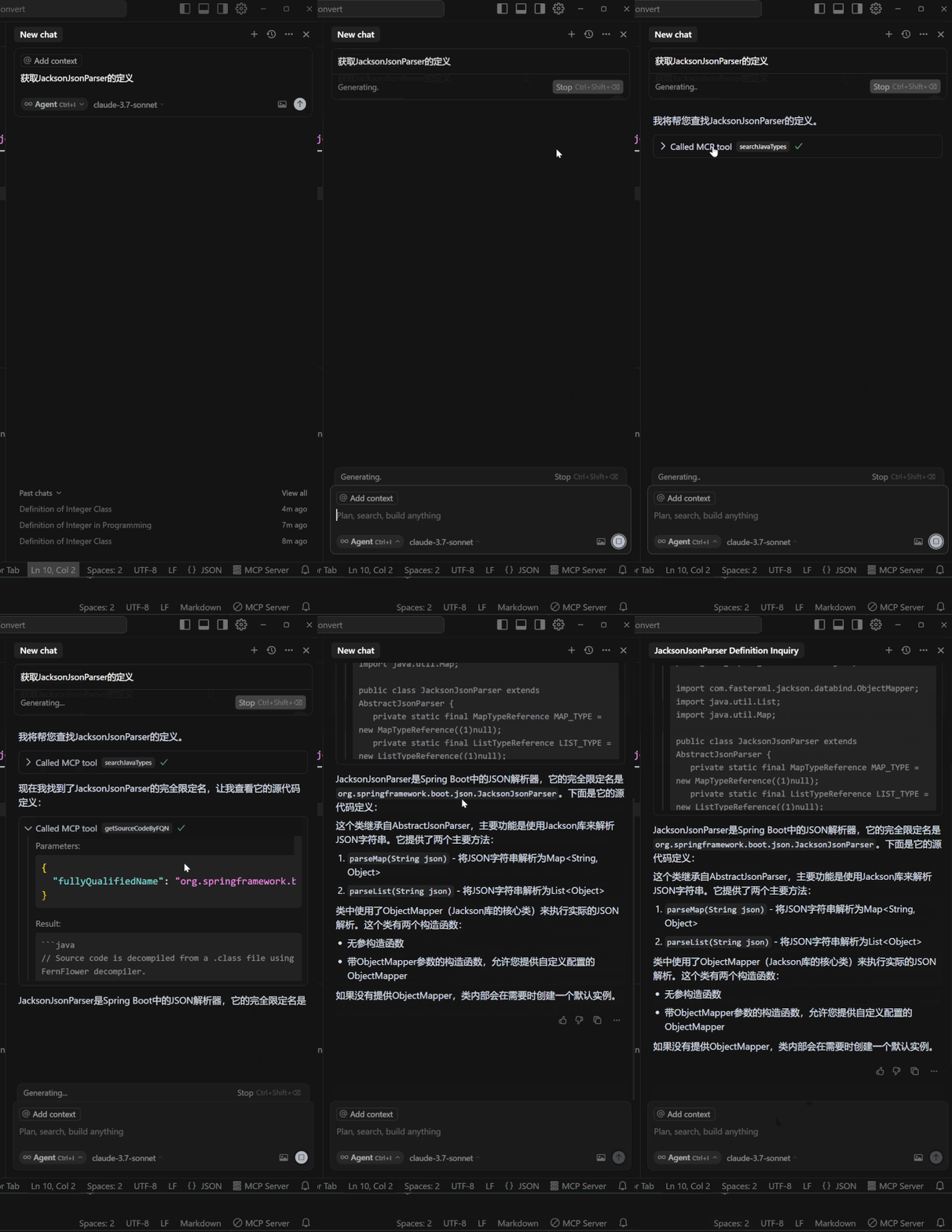
多工作区支持
- v0.0.3 之前:通过点击状态栏在多个 VSCode/Cursor 工作区之间切换 MCP 服务器
- v0.0.3 起:支持同时连接多个工作区,除非用户指定 AI Agent 会自动选择当前活动窗口对应的工作区
首次安装与设置
1. 确认已经安装插件`Extension Pack for Java`微软插件商品版本或Open VSX 版本 且可正常运行java项目
2. 下载安装本插件。
3. 配置您的MCP客户端,重启并确认mcp工具加载完成:
{
      "mcpServers": {
        "vscode-java": {
          "command": "npx",
          "args": [
            "vscode-to-mcp-server"
          ]
        }
      }
    }
4. 打开一个java项目,并确保项目完全加载完毕

提高工具调用率(推荐配置)
为了让 AI Agent 更主动地调用本插件提供的工具,建议在系统提示词中添加以下内容(如果你没有更好或者更适合自己应用场景的提示词):
通过项目源代码找不到的类或类的定义或方法具体实现,且有类名或者部分类名时,可以使用工具 searchJavaTypes 与 getSourceCodeByFQN 判断其是否存在,或获取其源代码> 💡 以 Cursor 为例,可以在 Settings → General → Rules for AI → User Rules 中添加
插件参数声明
| 参数 | 类型 | 默认值 | 说明 |
|---|---|---|---|
| `mcpServer.maxOutputLength` | number | `70000` | 最大输出 Java 源代码字符数。当要获取的类的源代码超过此限制时会报错。不建议设置过大,过大会导致模型 input token 过大无法请求模型,或无法将类的源代码放入上下文中。 |
| `mcpServer.enableRelayVersionCheck` | boolean | `true` | 是否启用 relay 版本更新检查和通知。设置为 `false` 可禁用版本更新提醒。 |
联系
非常欢迎大家对插件的问题,bug或新功能建议进行反馈! 🙇
更新日志
- 0.0.7 多根工作区支持
- 0.0.5 获取源码时,支持按方法名过滤
- 0.0.4 支持获取工作区中存在的全限定名相同但版本不同的类
- 0.0.3 mcp指令执行在多个工作区自动路由,无需手动切换
- 0.0.2 修改了查询全限定名有时候会查出不符合条件的结果的bug
架构说明
整体架构
┌─────────────────────────────────────────────────────────────────────────────┐
│                              MCP 客户端                                      │
│                  (Claude Desktop / Cursor / Windsurf 等)                     │
└─────────────────────────────────────────────────────────────────────────────┘
                                    │
                                    │ stdio (JSON-RPC)
                                    ▼
┌─────────────────────────────────────────────────────────────────────────────┐
│                          Relay (vscode-to-mcp-server)                        │
│  ┌─────────────────────────────────────────────────────────────────────┐    │
│  │  - 接收 MCP 客户端请求                                                │    │
│  │  - 读取路由表,查找目标 Extension                                      │    │
│  │  - 通过 Socket 转发请求到 Extension                                   │    │
│  │  - 返回响应给 MCP 客户端                                              │    │
│  └─────────────────────────────────────────────────────────────────────┘    │
└─────────────────────────────────────────────────────────────────────────────┘
                                    │
                   ┌────────────────┼────────────────┐
                   │                │                │
                   ▼                ▼                ▼
          ┌──────────────┐  ┌──────────────┐  ┌──────────────┐
          │   Named Pipe │  │   Named Pipe │  │   Named Pipe │
          │  (Windows)   │  │  (Windows)   │  │  (Windows)   │
          │    或        │  │    或        │  │    或        │
          │ Unix Socket  │  │ Unix Socket  │  │ Unix Socket  │
          │   (其他)     │  │   (其他)     │  │   (其他)     │
          └──────────────┘  └──────────────┘  └──────────────┘
                   │                │                │
                   ▼                ▼                ▼
┌─────────────────────────────────────────────────────────────────────────────┐
│                      VSCode/Cursor Extension 实例                            │
│  ┌─────────────┐   ┌─────────────┐   ┌─────────────┐                        │
│  │ 工作区 A    │   │ 工作区 B    │   │ 工作区 C    │   ...                  │
│  │ PID: 12345  │   │ PID: 23456  │   │ PID: 34567  │                        │
│  └─────────────┘   └─────────────┘   └─────────────┘                        │
│         │                │                │                                  │
│         ▼                ▼                ▼                                  │
│  ┌─────────────────────────────────────────────────────────────────────┐    │
│  │                    Java Language Server (JDT.LS)                     │    │
│  │            搜索类型 / 获取源代码 / 解析 Java 项目                      │    │
│  └─────────────────────────────────────────────────────────────────────┘    │
└─────────────────────────────────────────────────────────────────────────────┘
核心组件
| 组件 | 包名 | 说明 |
|---|---|---|
| Extension | `packages/extension` | VSCode/Cursor 插件,提供 MCP 服务器功能 |
| Relay | `packages/relay` | 命令行中继程序,桥接 MCP 客户端与 Extension |
Socket 通信机制
平台差异
| 平台 | 通信方式 | 路径格式 |
|---|---|---|
| Windows | Named Pipe (命名管道) | `\\.\pipe\vscode-mcp-{pid}` |
| macOS/Linux | Unix Domain Socket | `~/.vscode-mcp-sockets/{pid}.sock` |
路由表
路由表文件存储在用户主目录:`~/.vscode-mcp-router-v2.json`
{
  "entries": [
    {
      "workspaces": ["d:\\project\\workspace-a"],
      "pid": 12345,
      "lastUpdated": 1700000000000
    }
  ]
}
通信协议
- 格式: JSON-RPC 2.0
- 分隔符: 换行符 `\n`
- 超时: 连接 5秒 / 请求 30秒
请求头
| Header | 说明 |
|---|---|
| `X-Relay-Version` | Relay 版本号,用于兼容性检查 |
| `X-MCP-Client` | MCP 客户端标识 |
数据流
1. MCP 客户端调用工具 (如 searchJavaTypes)
                    │
                    ▼
2. Relay 接收 stdio 请求
                    │
                    ▼
3. Relay 读取路由表,根据 workspacePaths 查找目标 PID
                    │
                    ▼
4. Relay 通过 Socket 发送 JSON-RPC 请求到 Extension
                    │
                    ▼
5. Extension 调用 Java Language Server 执行操作
                    │
                    ▼
6. Extension 返回结果给 Relay
                    │
                    ▼
7. Relay 返回结果给 MCP 客户端
关键文件
| 文件 | 说明 |
|---|---|
| `extension/src/extension.ts` | 插件入口,初始化 MCP 服务器 |
| `extension/src/mcp-server.ts` | MCP 服务器实现,注册工具 |
| `extension/src/sock-transport.ts` | Socket 服务端传输层 |
| `extension/src/utils/router-table.ts` | 路由表管理(读写) |
| `relay/src/index.ts` | Relay 入口,请求转发 |
| `relay/src/socket-client.ts` | Socket 客户端 |
| `relay/src/router-table.ts` | 路由表读取(只读) |
MCP Server For Java
> ⚠️ v0.0.3 Important Update
>
> MCP client configuration needs to be changed from:
> ```json
> {
> "command": "npx",
> "args": ["vscode-as-mcp-server"]
> }
> ```
> or
> ```json
> {
> "url": "http://localhost:60100"
> }
> ```
> to:
> ```json
> {
> "command": "npx",
> "args": ["vscode-to-mcp-server"]
> }
> ```
> Without updating the configuration, automatic multi-workspace switching will not work, and only classes from the first opened workspace will be accessible.
Overview
AI Code Agents based on VSCode (such as Cursor, Github Copilot, Windsurf) can access a Java project's own source code, but cannot retrieve class definitions and source code from project dependencies.
This extension turns VSCode/Cursor into an MCP server, enabling AI Agents to:
- Search Java Types: Search for classes by name or partial name across your project, external dependencies, and JDK — corresponding MCP tool `searchJavaTypes`
- Get Source Code: Retrieve source code of any accessible class by fully qualified name (including dependency libraries and JDK) — corresponding MCP tool `getSourceCodeByFQN`
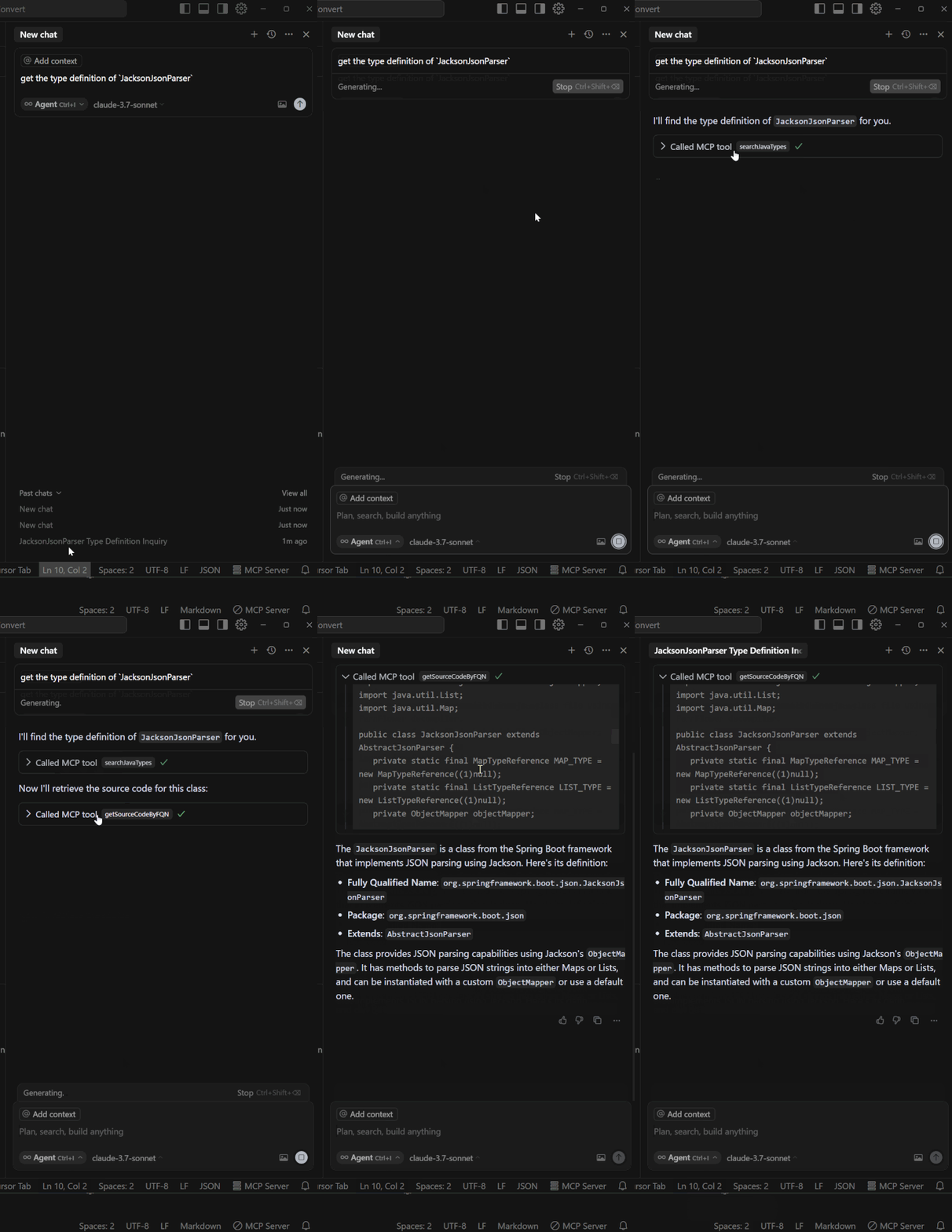
Multi-Workspace Support
- Before v0.0.3: Switch MCP server between multiple VSCode/Cursor workspaces by clicking the status bar
- From v0.0.3: Supports connecting to multiple workspaces simultaneously. Unless specified by the user, AI Agent will automatically select the workspace corresponding to the currently active window
Installation & Setup
1. Confirm that the `Extension Pack for Java` plugin is installed (VS Marketplace or Open VSX) and can run Java projects normally
2. Download and install this extension.
3. Configure your MCP client, restart and confirm MCP tools are loaded:
{
      "mcpServers": {
        "vscode-java": {
          "command": "npx",
          "args": [
            "vscode-to-mcp-server"
          ]
        }
      }
    }
4. Open a Java project and make sure the project is fully loaded
Improve Tool Invocation Rate (Recommended Configuration)
To help AI Agents invoke the tools provided by this extension more proactively, it is recommended to add the following content to your system prompt (if you don't have a better or more suitable prompt for your use case):
When you cannot find the class, class definition, or specific implementation of methods through the project source code, and you have the class name or partial class name, you can use the tools searchJavaTypes and getSourceCodeByFQN to check if it exists or get its source code> 💡 For example, in Cursor, you can add this in Settings → General → Rules for AI → User Rules
Extension Parameters
| Parameter | Type | Default | Description |
|---|---|---|---|
| `mcpServer.maxOutputLength` | number | `70000` | Maximum number of characters for Java source code output. An error will be reported when the source code exceeds this limit. It is not recommended to set it too large, as excessive values may cause the model's input token to be too large or make it impossible to place the class source code in the context. |
| `mcpServer.enableRelayVersionCheck` | boolean | `true` | Whether to enable relay version update check and notification. Set to `false` to disable version update warnings. |
Contact
Feedback on issues, bugs, or suggestions for new features is highly welcomed! 🙇
Changelog
- 0.0.7 Multi-root workspace support
- 0.0.5 Support filtering by method names when retrieving source code
- 0.0.4 Support for retrieving classes with the same fully qualified name from multiple versions
- 0.0.3 MCP commands auto-route to multiple workspaces without manual switching
- 0.0.2 Fixed a bug where querying fully qualified names sometimes returned non-matching results
Architecture
Overview
┌─────────────────────────────────────────────────────────────────────────────┐
│                              MCP Client                                      │
│                  (Claude Desktop / Cursor / Windsurf, etc.)                  │
└─────────────────────────────────────────────────────────────────────────────┘
                                    │
                                    │ stdio (JSON-RPC)
                                    ▼
┌─────────────────────────────────────────────────────────────────────────────┐
│                          Relay (vscode-to-mcp-server)                        │
│  ┌─────────────────────────────────────────────────────────────────────┐    │
│  │  - Receives MCP client requests                                      │    │
│  │  - Reads router table to find target Extension                       │    │
│  │  - Forwards requests to Extension via Socket                         │    │
│  │  - Returns responses to MCP client                                   │    │
│  └─────────────────────────────────────────────────────────────────────┘    │
└─────────────────────────────────────────────────────────────────────────────┘
                                    │
                   ┌────────────────┼────────────────┐
                   │                │                │
                   ▼                ▼                ▼
          ┌──────────────┐  ┌──────────────┐  ┌──────────────┐
          │   Named Pipe │  │   Named Pipe │  │   Named Pipe │
          │  (Windows)   │  │  (Windows)   │  │  (Windows)   │
          │     or       │  │     or       │  │     or       │
          │ Unix Socket  │  │ Unix Socket  │  │ Unix Socket  │
          │   (Others)   │  │   (Others)   │  │   (Others)   │
          └──────────────┘  └──────────────┘  └──────────────┘
                   │                │                │
                   ▼                ▼                ▼
┌─────────────────────────────────────────────────────────────────────────────┐
│                      VSCode/Cursor Extension Instances                       │
│  ┌─────────────┐   ┌─────────────┐   ┌─────────────┐                        │
│  │ Workspace A │   │ Workspace B │   │ Workspace C │   ...                  │
│  │ PID: 12345  │   │ PID: 23456  │   │ PID: 34567  │                        │
│  └─────────────┘   └─────────────┘   └─────────────┘                        │
│         │                │                │                                  │
│         ▼                ▼                ▼                                  │
│  ┌─────────────────────────────────────────────────────────────────────┐    │
│  │                    Java Language Server (JDT.LS)                     │    │
│  │          Search types / Get source code / Parse Java projects        │    │
│  └─────────────────────────────────────────────────────────────────────┘    │
└─────────────────────────────────────────────────────────────────────────────┘
Core Components
| Component | Package | Description |
|---|---|---|
| Extension | `packages/extension` | VSCode/Cursor extension providing MCP server functionality |
| Relay | `packages/relay` | CLI relay program bridging MCP client and Extension |
Socket Communication
Platform Differences
| Platform | Method | Path Format |
|---|---|---|
| Windows | Named Pipe | `\\.\pipe\vscode-mcp-{pid}` |
| macOS/Linux | Unix Domain Socket | `~/.vscode-mcp-sockets/{pid}.sock` |
Router Table
Router table file is stored in user home directory: `~/.vscode-mcp-router-v2.json`
{
  "entries": [
    {
      "workspaces": ["d:\\project\\workspace-a"],
      "pid": 12345,
      "lastUpdated": 1700000000000
    }
  ]
}
Communication Protocol
- Format: JSON-RPC 2.0
- Delimiter: Newline `\n`
- Timeout: Connection 5s / Request 30s
Request Headers
| Header | Description |
|---|---|
| `X-Relay-Version` | Relay version for compatibility check |
| `X-MCP-Client` | MCP client identifier |
Data Flow
1. MCP client calls a tool (e.g., searchJavaTypes)
                    │
                    ▼
2. Relay receives stdio request
                    │
                    ▼
3. Relay reads router table, finds target PID by workspacePaths
                    │
                    ▼
4. Relay sends JSON-RPC request to Extension via Socket
                    │
                    ▼
5. Extension calls Java Language Server to execute operation
                    │
                    ▼
6. Extension returns result to Relay
                    │
                    ▼
7. Relay returns result to MCP client
Key Files
| File | Description |
|---|---|
| `extension/src/extension.ts` | Extension entry point, initializes MCP server |
| `extension/src/mcp-server.ts` | MCP server implementation, registers tools |
| `extension/src/sock-transport.ts` | Socket server transport layer |
| `extension/src/utils/router-table.ts` | Router table management (read/write) |
| `relay/src/index.ts` | Relay entry point, request forwarding |
| `relay/src/socket-client.ts` | Socket client |
| `relay/src/router-table.ts` | Router table reading (read-only) |
Frequently asked questions
What is mcp-server-for-java?
mcp-server-for-java is Expose VSCode features such as file viewing and editing as MCP, enabling advanced AI-assisted coding directly from tools like Claude Desktop
How do I install mcp-server-for-java?
Open the GitHub repository and follow its README. Most MCP servers are added to your client's MCP config, then called by your agent.
Is mcp-server-for-java open source?
Yes — it is hosted on GitHub at https://github.com/saikaNya/mcp-server-for-java.
Related MCP tools
 cherry-studio
🍒 Cherry Studio is a desktop client that supports for multiple LLM providers. Built for the Model Context Protocol to enhance AI capabilities.
 librechat
Enhanced ChatGPT Clone: Features Agents, MCP, DeepSeek, Anthropic, AWS, OpenAI, Responses API, Azure, Groq, o1, GPT-5, Mistral, OpenRouter, Vertex AI, Gemini...
 fastgpt
FastGPT is a knowledge-based platform built on the LLMs, offers a comprehensive suite of out-of-the-box capabilities such as data processing, RAG retrieval, ...
 composio
Composio equips your AI agents & LLMs with 100+ high-quality integrations via function calling for the Model Context Protocol. Enhance AI assistants with powerf
 repomix
📦 Repomix is a powerful tool that packs your entire repository into a single, AI-friendly file. Perfect for when you need to feed your codebase to Large Lan...
 activepieces
AI Agents & MCPs & AI Workflow Automation • (~400 MCP servers for AI agents) • AI Automation / AI Agent with MCPs • AI Workflows & AI Agents • MCPs for AI Ag...
Run your own MCP server? See who uses it and what to fix.
Measure it with TrackMCP