
mcp-server-subagent
MCP for letting agents delegate tasks to sub-agents (Claude Code, Aider, Q)
Documentation
MCP Subagent Server
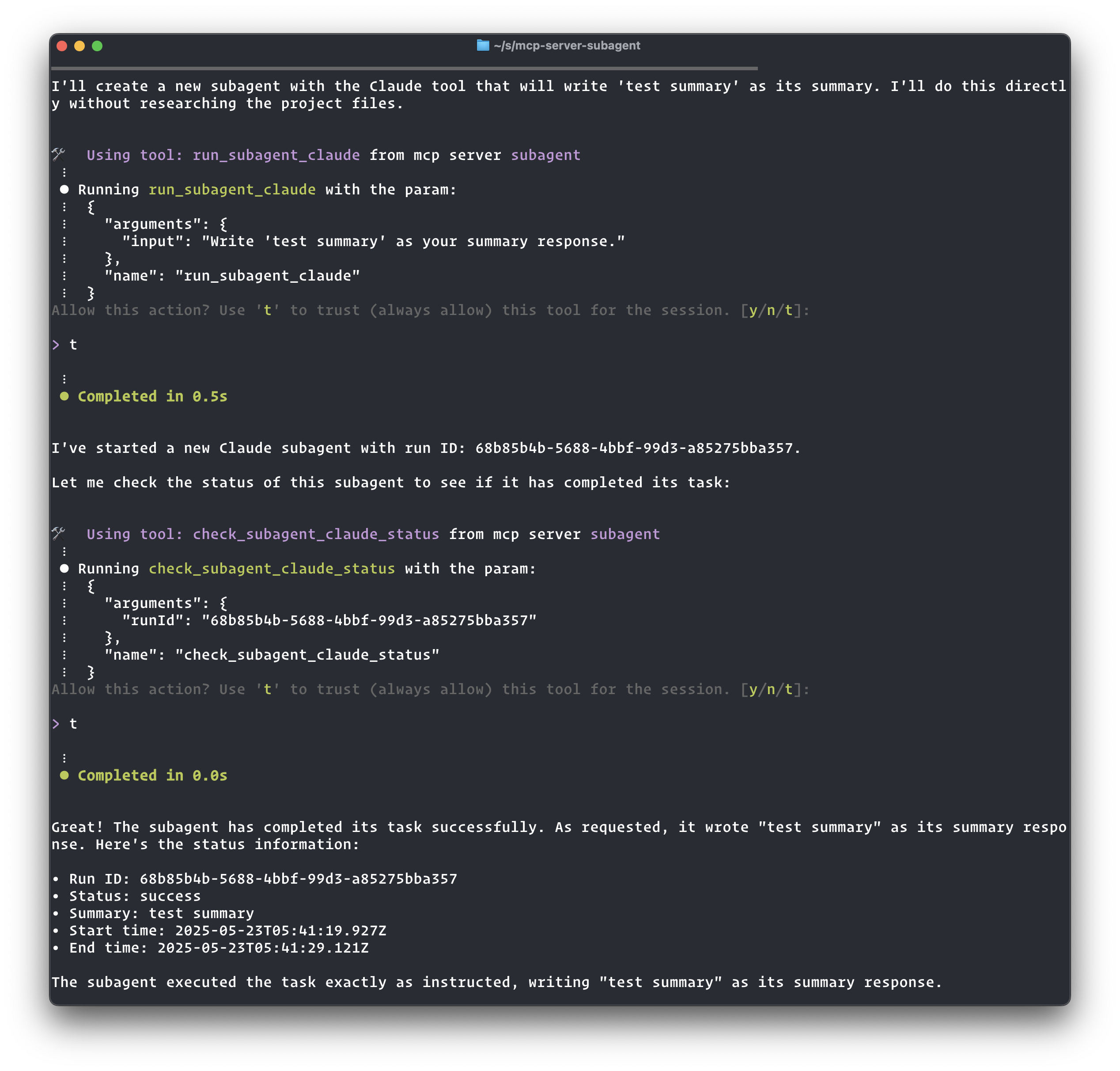
This is a Model Context Protocol (MCP) server that allows dispatching of tasks to sub-agent (like Claude Code, Q or Aider)
The purpose of this MCP is to allow a "planning" agent to delegate tasks to "executor" agents
Features
- Configure and run sub-agents through MCP tools
- Each sub-agent exposes three tools:
- `run_subagent_`: Runs the sub-agent with provided input
- `check_subagent_status`: Allows the agent to check on the status of a sub-agent
- `get_subagent_logs`: Retrieves the logs of a sub-agent run
- `update_subagent_status`: Updates the status and adds a summary of a previous run
- Bi-directional communication: Sub-agents can ask questions to parent agents during execution using `ask_parent`, parents can reply using `reply_subagent`, and sub-agents can check for replies using `check_message_status`
- Currently supports the 'q' sub-agent (Amazon Q CLI) and 'claude' sub-agent (Claude CLI)
- Real-time streaming logs for monitoring sub-agent execution
Installation
Add this to your MCP configuration file (`~/.aws/amazonq/mcp.json`):
{
  "mcpServers": {
    "subagent": {
      "command": "npx",
      "args": ["-y", "mcp-server-subagent"]
    }
  }
}
Or if you installed it locally:
{
  "mcpServers": {
    "subagent": {
      "command": "node",
      "args": ["/ABSOLUTE/PATH/TO/mcp-server-subagent/build/index.js"]
    }
  }
}
Available Tools
Sub-agent Execution Tools
- `run_subagent_q`: Run a query through the Amazon Q CLI
- `run_subagent_claude`: Run a query through the Claude CLI
- `check_subagent_status`: Check the status of a previous run
- `get_subagent_logs`: Get the logs of a previous run
- `update_subagent_status`: Update the status and add a summary of a previous run
Bi-directional Communication Tools
- `ask_parent`: Enables sub-agents to ask questions to the parent agent
- `reply_subagent`: Enables parents to reply to sub-agent questions
- `check_message_status`: Check message status and retrieve replies
- Parameters: `runId` (string), `messageId` (string)
- Returns: Message details and answer if available
Bi-directional Communication
The MCP Subagent Server supports bi-directional communication between parent agents and sub-agents through a message passing system. This allows sub-agents to ask questions during execution and receive guidance from the parent agent.
Communication Tools
- `ask_parent`: Enables sub-agents to ask questions to the parent agent
- `reply_subagent`: Enables parents to reply to specific questions from sub-agents
- `check_message_status`: Check the status of a specific message and retrieve replies
- Parameters:
- `runId` (string) - Run ID to check message status for
- `messageId` (string) - Message ID to check status for
- Returns: Message details and answer if available (acknowledges the message)
- Parameters:
Example Workflow
Here's how bi-directional communication works in practice:
1. Sub-agent asks a question
The sub-agent uses the `ask_parent` tool during execution:
{
  "tool": "ask_parent",
  "arguments": {
    "runId": "abc-123-def",
    "question": "I found multiple config files. Which one should I modify: config.json or settings.yaml?"
  }
}
Response:
{
  "messageId": "msg-456-789",
  "instructions": "Poll for the answer using the 'check_message_status' tool with your runId and messageId. Since this could take a while for the parent to respond, use 'sleep 60' between calls to avoid spamming."
}
2. Parent checks sub-agent status
When the parent checks the sub-agent status, they'll see:
Status: waiting_parent_reply

Question awaiting reply (Message ID: msg-456-789):
  I found multiple config files. Which one should I modify: config.json or settings.yaml?
  (Asked at: 2025-01-15T10:30:00.000Z)
  To reply, use the 'reply_subagent' tool.

Note: This may take a while for the parent to respond. Use 'sleep 60' between status checks to avoid spamming.
3. Parent provides an answer
The parent uses the `reply_subagent` tool:
{
  "tool": "reply_subagent",
  "arguments": {
    "runId": "abc-123-def",
    "messageId": "msg-456-789",
    "answer": "Please modify config.json - it's the main configuration file. The settings.yaml is just for development overrides."
  }
}
4. Sub-agent retrieves the answer
The sub-agent polls for the answer using `check_message_status`:
{
  "tool": "check_message_status",
  "arguments": {
    "runId": "abc-123-def",
    "messageId": "msg-456-789"
  }
}
Response when answer is available:
{
  "messageId": "msg-456-789",
  "questionContent": "I found multiple config files. Which one should I modify: config.json or settings.yaml?",
  "answerContent": "Please modify config.json - it's the main configuration file. The settings.yaml is just for development overrides.",
  "messageStatus": "acknowledged_by_subagent",
  "hasAnswer": true
}
The sub-agent can then continue execution with the parent's guidance.
Best Practices
- Polling Frequency: Use `sleep 30` between status checks and message polling to avoid overwhelming the system
- Question Clarity: Ask specific, actionable questions that help guide the task execution
- Timely Responses: Parents should monitor sub-agent status regularly to provide timely guidance
- Message Acknowledgment: The `check_message_status` tool automatically acknowledges messages when answers are retrieved
Adding New Sub-agents
To add a new sub-agent, modify the `SUBAGENTS` object in `src/index.ts`:
const SUBAGENTS = {
  q: {
    name: "q",
    command: "q",
    getArgs: () => ["chat", "--trust-all-tools", "--no-interactive"],
    description: "Run a query through the Amazon Q CLI",
  },
  claude: {
    name: "claude",
    command: "claude",
    getArgs: () => [
      "--print",
      "--allowedTools",
      "Bash(git*) Bash(sleep*) Edit Write mcp__subagent__update_subagent_status",
      "--mcp-config",
      JSON.stringify(mcpConfig),
    ],
    description: "Run a query through the Claude CLI",
  },
  // Add your new sub-agent here
  newagent: {
    name: "newagent",
    command: "your-command",
    getArgs: () => ["--some-flag", "--other-flags"],
    description: "Description of your new agent",
  },
};
Logs
All sub-agent runs are logged to the `logs` directory with two files per run:
- `.log`: Contains the real-time output logs
- `.prompt.md`: Contains the prompt passed to the agent
- `.meta.json`: Contains metadata about the run (including communication messages)
Frequently asked questions
What is mcp-server-subagent?
mcp-server-subagent is MCP for letting agents delegate tasks to sub-agents (Claude Code, Aider, Q)
How do I install mcp-server-subagent?
Open the GitHub repository and follow its README. Most MCP servers are added to your client's MCP config, then called by your agent.
Is mcp-server-subagent open source?
Yes — it is hosted on GitHub at https://github.com/dvcrn/mcp-server-subagent and has 7 stars.
Related MCP tools
 claude-debugs-for-you
Enable any LLM (e.g. Claude) to interactively debug any language for you via MCP and a VS Code Extension TypeScript-based implementation.
 fastgpt
FastGPT is a knowledge-based platform built on the LLMs, offers a comprehensive suite of out-of-the-box capabilities such as data processing, RAG retrieval, ...
 composio
Composio equips your AI agents & LLMs with 100+ high-quality integrations via function calling for the Model Context Protocol. Enhance AI assistants with powerf
 repomix
📦 Repomix is a powerful tool that packs your entire repository into a single, AI-friendly file. Perfect for when you need to feed your codebase to Large Lan...
 mastra
The TypeScript AI agent framework. ⚡ Assistants, RAG, observability. Supports any LLM: GPT-4, Claude, Gemini, Llama. Built for the Model Context Protocol to enh
 mcp-use
Mcp-use is the easiest way to interact with mcp servers with custom agents TypeScript-based implementation. Trusted by 8100+ developers.
Run your own MCP server? See who uses it and what to fix.
Measure it with TrackMCP