
mcp_server_exe
小智 & Cursor 的 MCP 启动器 - MCP For Cursor&xiaozhi。打包成可执行文件。Turn MCP server into an executable file
Documentation

MCP Server.exe
> 小智 & Cursor 的 MCP 启动器 - MCP For Cursor&xiaozhi
MCP Server.exe 是一个强大的可执行服务器,它不仅能够运行标准的 MCP (Model Context Protocol) 服务,更提供了丰富的高级功能:
- 工具链式调用:支持将多个工具按序组合,实现复杂的自动化流程
- 多 MCP 服务组合:可同时运行和管理多个 MCP 服务,支持 SSE 和 stdio 双模式
- 插件化工具系统:支持自定义工具的动态加载和配置
- 灵活的部署选项:从单机运行到分布式部署,满足各类集成场景
- 自动重载:监听 `--mcp-config` 与 `--mcp-js` 变更,自动重启生效
MCP Server.exe is a powerful executable server that not only runs standard MCP (Model Context Protocol) services, but also provides rich advanced features:
- Tool Chain Execution: Support sequential combination of multiple tools for complex automation
- Multiple MCP Services: Can run and manage multiple MCP services simultaneously, supporting both SSE and stdio modes
- Pluggable Tool System: Support dynamic loading and configuration of custom tools
- Flexible Deployment: From standalone operation to distributed deployment, meeting various integration scenarios
- Auto reload for config changes
Usage
# 推荐:通过 CLI 运行(无需本地构建)
npx mcp_exe --mcp-config ./examples/mcp.json

# 或运行打包后的可执行文件(Windows/macOS)
./executables/mcp_server-win-x64.exe --mcp-config ./examples/mcp.json
🎯 主要使用场景 | Main Usage Scenarios
1. WebSocket 连接模式 | WebSocket Connection Mode
支持通过 WebSocket 连接到其他 MCP 服务,特别适合连接到 xiaozhi.me 等的接入。通过配置文件,可以轻松地将多个 MCP 服务接入到 xiaozhi.me。
Support connecting to other MCP services via WebSocket, especially suitable for connecting to WebSocket-enabled MCP services like xiaozhi.me. Through configuration files, you can easily integrate multiple MCP services with xiaozhi.me.
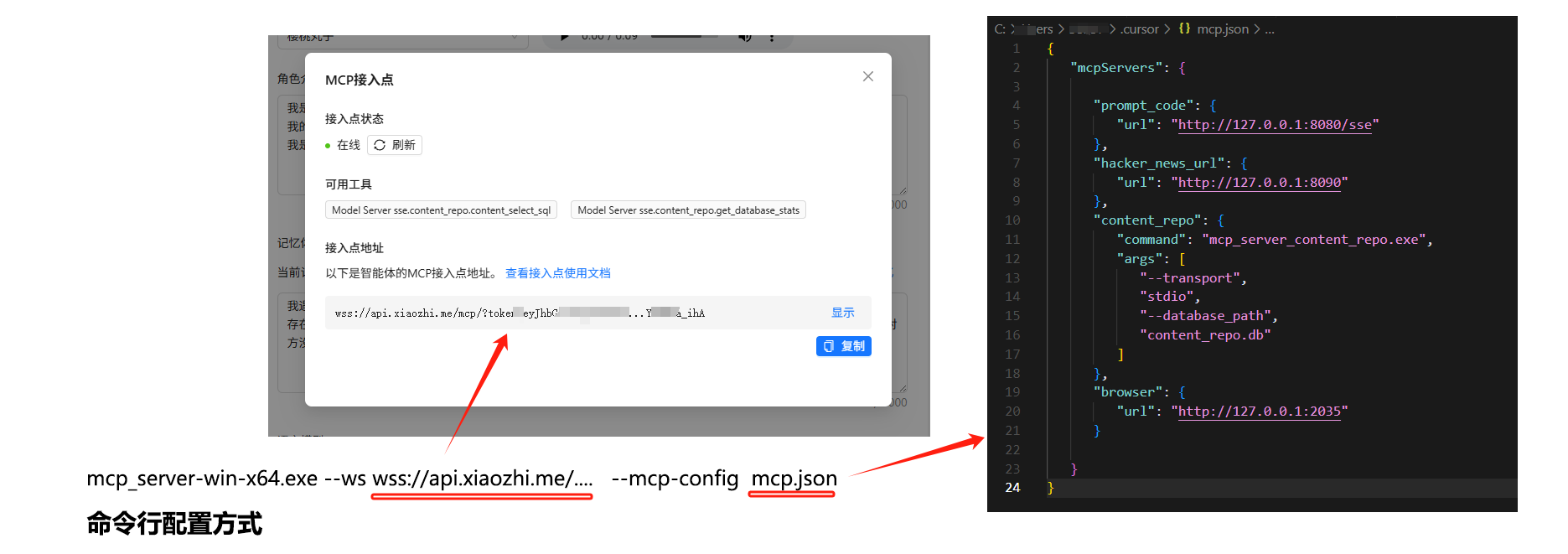
# 使用配置文件连接到 xiaozhi.me / Start in WebSocket mode
npx mcp_exe --ws wss://api.xiaozhi.me/mcp/?token=...xxx --mcp-config ./examples/mcp-sse.json
配置示例 | Configuration Example (mcp-sse.json):
{
    "mcpServers": {
        "Model Server sse": {
            "url": "http://127.0.0.1:3000"
        }
    },
    "serverInfo": {
        "serverName": "ws-client-mcp-server",
        "version": "1.0.0",
        "description": "WebSocket 客户端的 MCP 服务器实例",
        "author": "shadow"
    }
}| WebSocket 模式特性 | WebSocket Mode Features: |
|---|---|
| - 支持实时双向通信 | Support real-time bidirectional communication |
| - 自动重连机制 | Automatic reconnection mechanism |
| - 多服务统一管理 | Unified management of multiple services |
| - 兼容标准 MCP 协议 | Compatible with standard MCP protocol |
2. 快速启动独立服务 | Quick Start Standalone Service
最简单的使用方式 - 双击运行,或使用 npx 即可启动一个标准的 MCP 服务。
The simplest way - double-click to run, or start via npx.
# 双击运行 mcp_server.exe,或通过命令行启动
./executables/mcp_server-win-x64.exe
# 或
npx mcp_exe| 默认配置 | Default Configuration: |
|---|---|
| - 监听端口 | Listen Port: 3000(可通过 `--port` 修改) |
| - SSE 路由 | SSE Endpoints: GET `/` 建立会话,POST `/sessions?sessionId=...` 发送消息 |
| - 内置基础工具集 | Built-in Basic Tools |
| - 自动重载 | Auto reload `--mcp-config` 与 `--mcp-js` |
3. 组合多个 MCP 服务 | Combine Multiple MCP Services
使用与 Cursor 一致的 mcp.json 配置文件,通过配置文件组合多个 MCP 服务,支持同时使用 SSE 和 stdio 两种传输模式。这样可以根据不同的应用场景选择合适的传输方式,提高系统的灵活性和可扩展性。
Use the same mcp.json configuration file as Cursor to combine multiple MCP services, supporting both SSE and stdio transport modes simultaneously.
npx mcp_exe --mcp-config ./examples/mcp.json配置示例 | Configuration Example (mcp.json):
{
  "mcpServers": {
    "Model Server sse": { "url": "http://127.0.0.1:9090" },
    "Model Server - stdio": { "command": "xxx", "args": ["--transport", "stdio"] }
  },
  "serverInfo": { "serverName": "dynamic-mcp-server" },
  "tools": [],
  "namespace": "."
}- `tools`: 允许的工具白名单(为空数组表示不过滤)
- `namespace`: 组合命名空间分隔符,默认 `.`(亦可使用 `::`)
4. 工具链式调用 | Tool Chain Execution
支持将多个工具组合成工具链,实现复杂的自动化流程。工具链可以灵活配置数据流转和结果输出。
Support combining multiple tools into a tool chain to implement complex automation processes. Tool chains can flexibly configure data flow and result output.
npx mcp_exe --mcp-config ./examples/product-hunt/mcp-tools.json配置示例 | Configuration Example(节选,自定义按需调整):
{
  "toolChains": [
    {
      "name": "product_hunt_news",
      "description": "get product hunt news",
      "steps": [
        { "toolName": "get_product_hunt_url", "args": {} },
        { "toolName": "load_product_hunt_js_code", "args": {} },
        { "toolName": "browser_navigate", "args": {}, "outputMapping": { "url": "content.0.text" }, "fromStep": 0 },
        { "toolName": "browser_execute_javascript", "args": {}, "outputMapping": { "code": "content.0.text" }, "fromStep": 1 },
        { "toolName": "browser_close", "args": {} }
      ],
      "output": { "steps": [3] }
    }
  ]
}| 工具链特性 | Tool Chain Features: |
|---|---|
| - 支持多步骤顺序执行 | Support multi-step sequential execution |
| - 灵活的数据流转映射 | Flexible data flow mapping(`outputMapping`/`fromStep`) |
| - 可从任意步骤获取结果 | Can get results from any step(`output.steps`) |
5. 自定义工具的插件机制 | Custom Tools Plugin Mechanism
通过 JavaScript 配置文件,灵活定义工具、资源和提示。
Flexibly define tools, resources, and prompts through JavaScript configuration files.
npx mcp_exe --mcp-js ./examples/custom-mcp-config.js配置示例 | Configuration Example (`custom-mcp-config.js`):
module.exports = {
  // 推荐导出名:configureMcp(也兼容 mcpPlugin)
  configureMcp: function(server, ResourceTemplate, z) {
    server.tool('myTool', '自定义工具示例', { /* zod schema */ }, async (args) => ({ content: [{ type: 'text', text: 'ok' }] }))
    server.resource('custom-echo', new ResourceTemplate('custom-echo://{message}', { list: undefined }), async (uri, { message }) => ({ contents: [{ uri: uri.href, text: message }] }))
    server.prompt('custom-prompt', { /* zod */ }, ({ message }) => ({ messages: [{ role: 'user', content: { type: 'text', text: message } }] }))
  }
}
6. 定时任务模式 | Cronjob Mode
使用 `--cronjob` 定时执行工具。目前支持的操作:`listTools`、`callTool`。任务会在启动时立即执行一次,并按 `schedule` 周期执行,可通过桌面气泡/邮件/ntfy 推送结果。
# 示例:结合自定义工具与定时任务
npx mcp_exe --cronjob ./examples/cronjob.json --mcp-js ./examples/product-hunt/custom-mcp-config.js
配置示例 | Configuration Example(`examples/cronjob.json`):
{
  "tasks": [
    {
      "schedule": "*/30 * * * * *",
      "operations": [
        { "type": "callTool", "name": "get_product_hunt_url", "arguments": {} }
      ],
      "notify": [
        { "type": "desktop", "title": "任务执行结果", "icon": "" }
      ]
    }
  ]
}
通知支持 | Notifications:
- desktop: 系统气泡(需本地桌面环境)
- email: 发送邮件(需提供 `to`、`subject` 等)
- ntfy: 推送到 `ntfy`(需提供 `url`、`topic`、`tags`、`priority`)
注意:定时任务直接调用已组合的工具(含远端 SSE/本地 stdio 工具),无需在任务中指定传输。
7. 嵌入式集成 | Embedded Integration
作为独立进程集成到任何应用程序中。
Integrate as a standalone process into any application.
// Node.js 示例 | Node.js Example
const { spawn } = require('child_process')

const mcpServer = spawn('./executables/mcp_server-win-x64.exe', [
  '--port', '3000',
  '--transport', 'stdio'
])

mcpServer.stdout.on('data', (data) => {
  // 处理 MCP 服务器的输出
})

mcpServer.stdin.write(JSON.stringify({
  // 发送请求到 MCP 服务器
}))
📚 详细文档 | Detailed Documentation
命令行参数 | Command Line Arguments
服务器支持以下命令行参数来自定义其行为:The server supports the following command line arguments:
| 参数 | 说明 | 默认值 |
|---|---|---|
| `--ws ` | WebSocket 服务器地址,启用 WebSocket 连接模式 | 无 |
| `--mcp-js ` | MCP JavaScript 配置文件路径(支持 `configureMcp` 或 `mcpPlugin`) | 无 |
| `--mcp-config ` | MCP JSON 配置文件路径或 JSON 字符串 | 无 |
| `--server-name ` | 服务器名称 | `mcp_server_exe` |
| `--port ` | 服务器监听端口 | 3000 |
|---|---|---|
| `--transport ` | 传输模式,支持 `sse` 或 `stdio`(非 WS 模式下生效) | sse |
| `--cronjob ` | 定时任务配置文件路径或 JSON 字符串 | 无 |
| `--cursor-link` | 启动后在 Cursor 中快捷接入(SSE 模式) | 关闭 |
| `--log-level ` | 日志级别:TRACE/DEBUG/INFO/WARN/ERROR/FATAL/OUTPUT | INFO |
| `--version ` `--description ` `--author ` `--license ` `--homepage ` | 元信息 | - |
提示:若提供 `--ws` 则优先使用 WebSocket 模式;否则未显式指定时默认使用 `sse`。
配置文件格式 | Configuration File Format
服务器支持使用配置文件同时配置服务器参数和 MCP 功能:
module.exports = {
  // MCP 配置函数 | MCP configuration function
  configureMcp: function(server, ResourceTemplate, z) {
    // 配置资源和工具 | Configure resources and tools
  },
  // 可选:提供额外的 mcp 配置对象
  mcpConfig: { /* mcpServers/tools/toolChains/namespace */ }
}
自动重载 | Auto Reload
- 监听 `--mcp-config` 文件变更:自动重新解析并重启服务(含工具链/命名空间/工具白名单等)
- 监听 `--mcp-js` 文件变更:自动重新加载自定义 `configureMcp`/`mcpPlugin`
开发指南 | Development Guide
安装 | Installation
npm install构建 | Build
yarn build # 或 npm run build运行 | Run
npm start
# 或开发模式(SSE):
npm run dev
# WebSocket 开发:
npm run dev-ws
# Cronjob 开发:
npm run dev-cronjob
打包 | Packaging
# Windows 打包
npm run package-win

# macOS 打包(Intel/Apple Silicon)
npm run package-mac-intel
npm run package-mac-arm
打包后的可执行文件将生成在 `executables` 目录中。
日志 | Logging
- 通过 `--log-level` 控制最小输出级别(默认 `INFO`)
- 控制台带时间戳/分类/颜色输出;`OUTPUT` 级别用于原样输出供工具解析
作为库使用 | Library API
自 v0.11.x 起,提供稳定导出:`McpRouterServer`。
// CommonJS
const { McpRouterServer } = require('mcp_exe');

(async () => {
  const server = new McpRouterServer({ name: 'my-app' }, { transportType: 'sse', port: 3000 });
  await server.importMcpConfig(require('./mcp.json'), null);
  await server.start();
})();// TypeScript / ESM
import { McpRouterServer } from 'mcp_exe';
const server = new McpRouterServer({ name: 'my-app' }, { transportType: 'stdio' });
await server.importMcpConfig(mcpJson, null);
await server.start();- 类型声明输出于 `dist/index.d.ts`,通过 `types`/`exports` 自动暴露。
- CLI 仍通过 `bin/cli.js` 提供,库与 CLI 可并行使用。
📝 许可证 | License
MIT
Frequently asked questions
What is mcp_server_exe?
mcp_server_exe is 小智 & Cursor 的 MCP 启动器 - MCP For Cursor&xiaozhi。打包成可执行文件。Turn MCP server into an executable file
How do I install mcp_server_exe?
Open the GitHub repository and follow its README. Most MCP servers are added to your client's MCP config, then called by your agent.
Is mcp_server_exe open source?
Yes — it is hosted on GitHub at https://github.com/shadowcz007/mcp_server_exe and has 94 stars.
Related MCP tools
 mcp-router
A Unified MCP Server Management App TypeScript-based implementation. Trusted by 800+ developers. Trusted by 800+ developers.
 figma-context-mcp
MCP server to provide Figma layout information to AI coding agents like Cursor TypeScript-based implementation. Trusted by 11600+ developers.
 mcp-use
Mcp-use is the easiest way to interact with mcp servers with custom agents TypeScript-based implementation. Trusted by 8100+ developers.
 git-mcp
Put an end to code hallucinations! GitMCP is a free, open-source, remote MCP server for any GitHub project TypeScript-based implementation.
 5ire
5ire5ire is a cross-platform desktop AI assistant, MCP client. It compatible with major service providers, supports local knowledge base and tools via model co...
 deepchat
🐬DeepChat - A smart assistant that connects powerful AI to your personal world for the Model Context Protocol. Enhance AI assistants with powerful integrations
Run your own MCP server? See who uses it and what to fix.
Measure it with TrackMCP