
mcp_vms
MCP server for controlling and accessing a video surveillance system
Documentation
MCP Server - VMS Integration
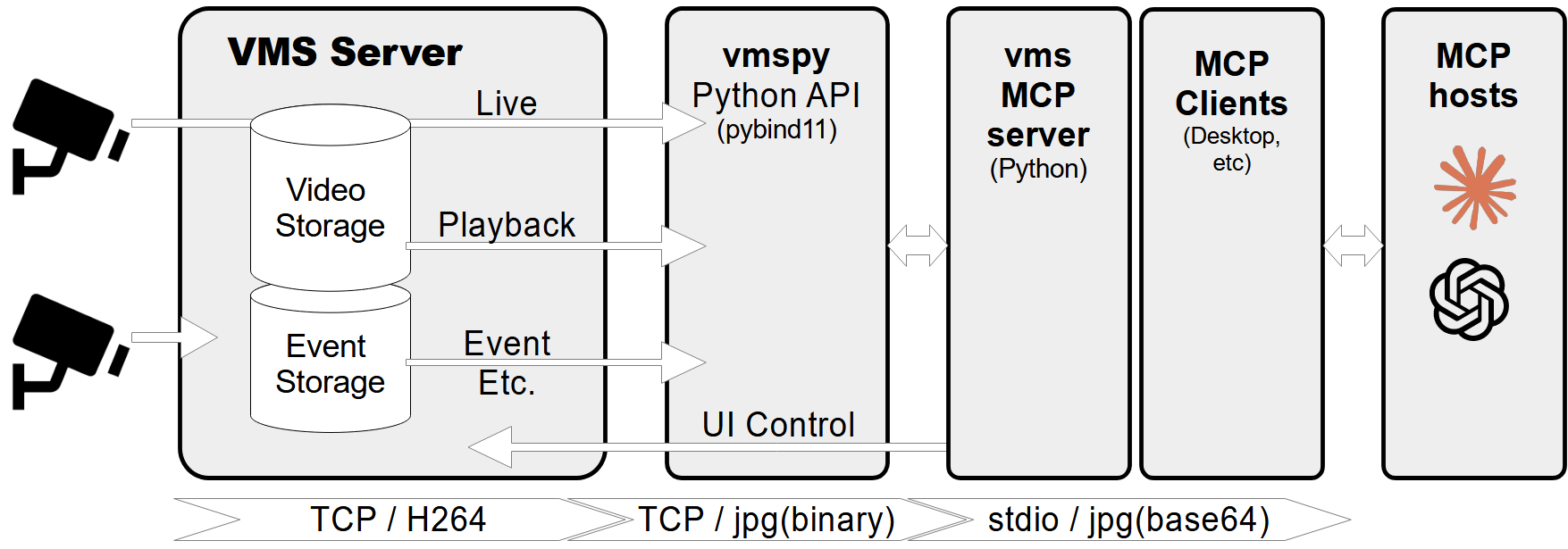
A Model Context Protocol (MCP) server designed to connect to a CCTV recording program (VMS) to retrieve recorded and live video streams. It also provides tools to control the VMS software, such as showing live or playback dialogs for specific channels at specified times.
Features
- Retrieve video channel information, including connection and recording status.
- Fetch recording dates and times for specific channels.
- Fetch live or recorded images from video channels.
- Show live video streams or playback dialogs for specific channels and timestamps.
- Control PTZ (Pan-Tilt-Zoom) cameras by moving them to preset positions.
- Comprehensive error handling and logging.
Prerequisites
- Python 3.12+
- `vmspy` library (for VMS integration)
- `Pillow` library (for image processing)
MCP-server Configuration
If you want to use `mcp-vms` with Claude desktop, you need to set up the `claude_desktop_config.json` file as follows:
{
  "mcpServers": {
	"vms": {
	  "command": "uv",
	  "args": [
		"--directory",
		"X:\\path\\to\\mcp-vms",
		"run",
		"mcp_vms.py"
	  ]
	}
  }
}
VMS Connection Configuration
The server uses the following default configuration for connecting to the VMS:
- mcp_vms_config.py
vms_config = {
    'img_width': 320,
    'img_height': 240,
    'pixel_format': 'RGB',
    'url': '127.0.0.1',
    'port': 3300,
    'access_id': 'admin',
    'access_pw': 'admin',
}
Installation
1. Install UV Package Manager
Run the following command in PowerShell to install `UV`:
powershell -ExecutionPolicy ByPass -c "irm https://astral.sh/uv/install.ps1 | iex"For alternative installation methods, see the official UV documentation.
2.Install VMS Server
Download and install the VMS server from:
http://surveillance-logic.com/en/download.html
(Required before using this MCP server)
3.Install Python Dependencies
Download the vmspy library:
Extract the contents into your `mcp_vms` directory
The mcp-vms directory should look like this:
mcp-vms/
├── .gitignore
├── .python-version
├── LICENSE
├── README.md
├── pyproject.toml
├── uv.lock
├── mcp_vms.py            # Main server implementation
├── mcp_vms_config.py     # VMS connection configuration
├── vmspy.pyd             # VMS Python library
├── avcodec-61.dll        # FFmpeg libraries
├── avutil-59.dll
├── swresample-5.dll
├── swscale-8.dll
Frequently asked questions
What is mcp_vms?
mcp_vms is MCP server for controlling and accessing a video surveillance system
How do I install mcp_vms?
Open the GitHub repository and follow its README. Most MCP servers are added to your client's MCP config, then called by your agent.
Is mcp_vms open source?
Yes — it is hosted on GitHub at https://github.com/jyjune/mcp_vms and has 11 stars.
Related MCP tools
 damn-vulnerable-mcp-server
Damn Vulnerable MCP Server Python-based implementation. Trusted by 1200+ developers. Trusted by 1200+ developers. Trusted by 1200+ developers.
 mysql_mcp_server
A Model Context Protocol (MCP) server that enables secure interaction with MySQL databases Python-based implementation. Trusted by 900+ developers.
 supabase-mcp-server
Query MCP enables end-to-end management of Supabase via chat interface: read & write query executions, management API support, automatic migration versioning...
 mcp-neo4j
Model Context Protocol with Neo4j Python-based implementation. Trusted by 700+ developers. Trusted by 700+ developers. Trusted by 700+ developers.
 android-mcp-server
An MCP server that provides control over Android devices via adb Python-based implementation. Trusted by 500+ developers.
 pg-mcp-server
A Model Context Protocol (MCP) server for PostgreSQL databases with enhanced capabilities for AI agents. Python-based implementation.
Run your own MCP server? See who uses it and what to fix.
Measure it with TrackMCP