
mcp-mux
Configure MCP servers once, connect every AI client through a single local gateway
Documentation
McpMux


One app to manage all your MCP servers across every AI client.
**Website · Download · Discover Servers · Features · Discord**
The Problem
Cursor, Claude Desktop, VS Code, Windsurf — they all support MCP, but each one needs its own config file. None of them talk to each other.
┌─────────────────────────────────────────────────────────────────────────┐
│  Today: every client manages MCP servers independently                  │
│                                                                         │
│  Cursor       → config.json    → github, slack, db  + API keys         │
│  Claude       → config.json    → github, slack, db  + API keys  (dupe) │
│  VS Code      → settings.json  → github, slack, db  + API keys  (dupe) │
│  Windsurf     → config.json    → github, slack, db  + API keys  (dupe) │
│                                                                         │
│  ⚠ 4 config files  ·  4 copies of every API key  ·  all plain text     │
└─────────────────────────────────────────────────────────────────────────┘
Add a server? Edit four files. Rotate an API key? Edit four files. New machine? Start from scratch.
And those API keys? Sitting in plain-text JSON files anyone on your machine can read.
The Fix
McpMux is a desktop app that runs a local MCP gateway. You configure servers once — every AI client connects through a single URL.
┌─────────────────────────────────────────────────────────────────────────┐
│  With McpMux: one gateway, every client                                 │
│                                                                         │
│  Cursor       ─┐                                                        │
│  Claude       ─┤                  ┌──→  GitHub                          │
│  VS Code      ─┼──→  McpMux      ├──→  Slack                           │
│  Windsurf     ─┤   localhost:45818├──→  PostgreSQL                      │
│  Any client   ─┘                  └──→  + all your servers              │
│                                                                         │
│  ✓ 1 config  ·  credentials encrypted in OS keychain  ·  instant sync  │
└─────────────────────────────────────────────────────────────────────────┘
Add a server in McpMux and every connected client picks it up instantly — no restart, no manual refresh. Remove a tool or update a prompt? Every client knows immediately.
Lightweight and cross-platform — built in Rust with Tauri 2, McpMux uses minimal CPU and memory while running quietly in your system tray on Windows, macOS, and Linux.
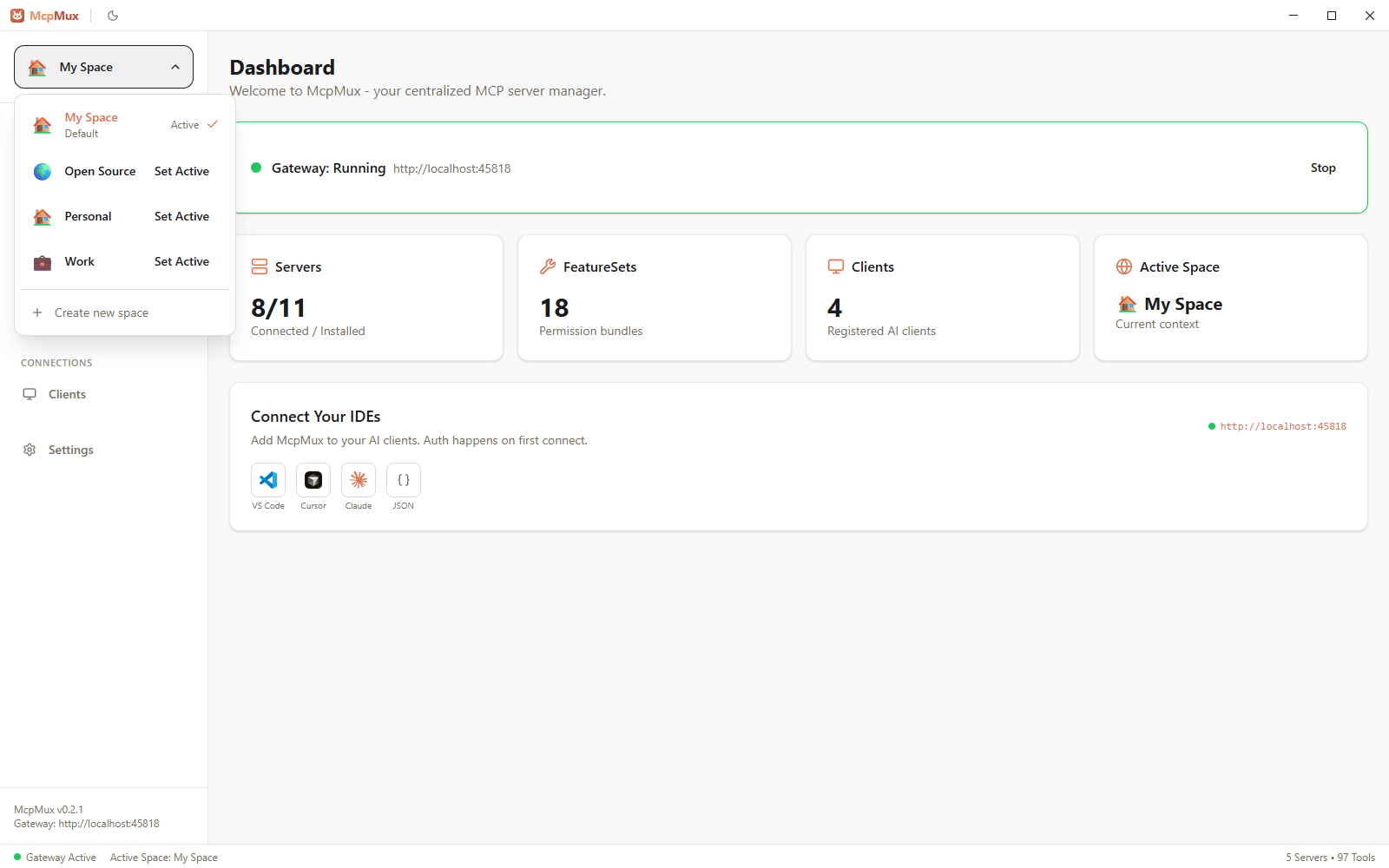
How It Works
1. Install servers from the built-in registry — or add your own
2. Paste one config into each AI client (the last config you'll ever need):
{
  "mcpServers": {
    "mcpmux": {
      "type": "http",
      "url": "http://localhost:45818/mcp"
    }
  }
}
3. Done. Every tool from every server is available in every client, right now.
McpMux routes calls to the right server, refreshes OAuth tokens automatically, and keeps credentials encrypted in your OS keychain — you never think about it again. It also keeps itself current: new versions download and install on launch by default (toggle in Settings), so a restart is all it takes.
Features
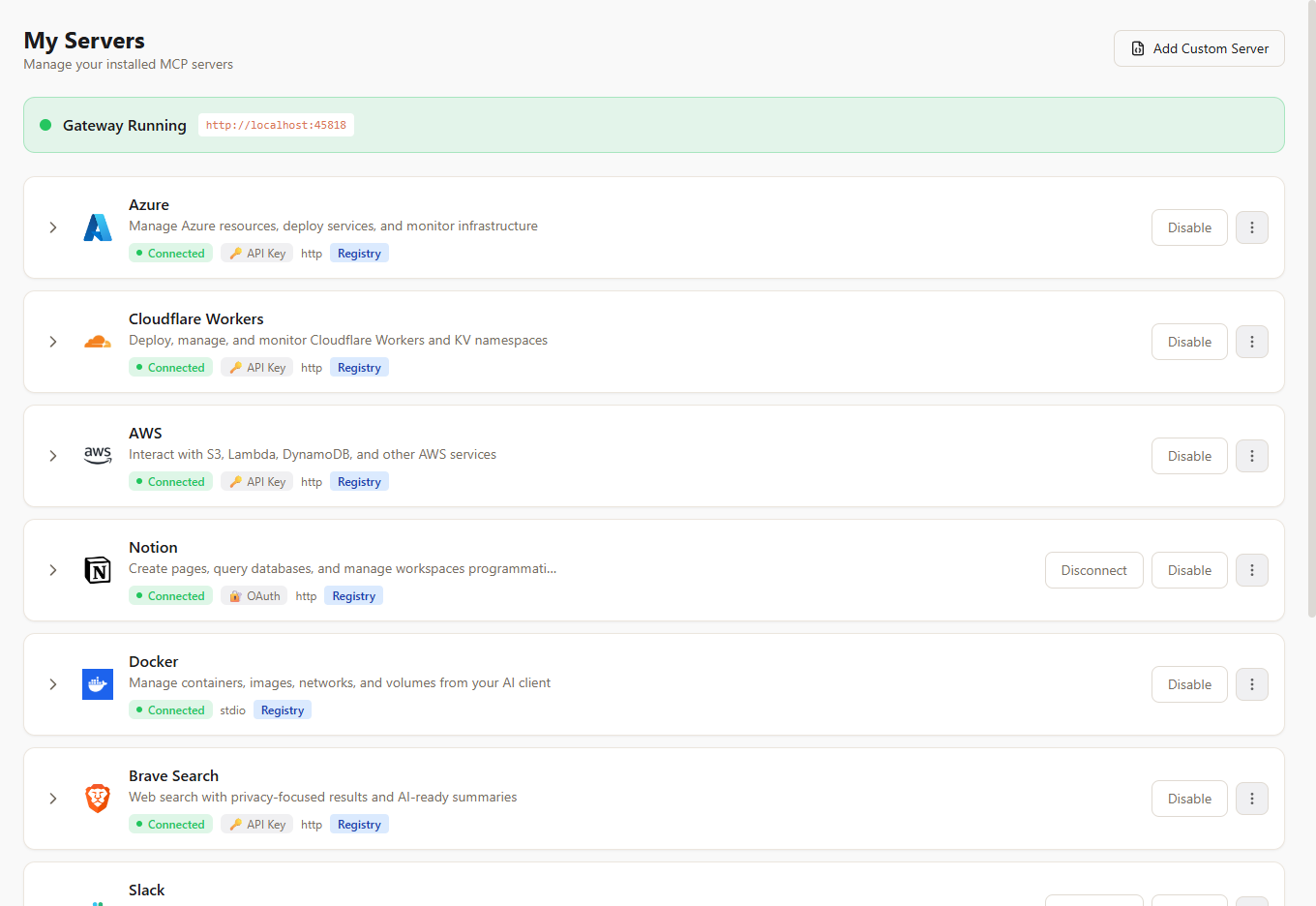
All Your Servers, One Place
No more duplicating server configs across Cursor, Claude, VS Code, and Windsurf. Install a server in McpMux and it's immediately available everywhere. Expand any server to inspect its tools, prompts, and resources. See live connection status. OAuth tokens refresh automatically in the background.
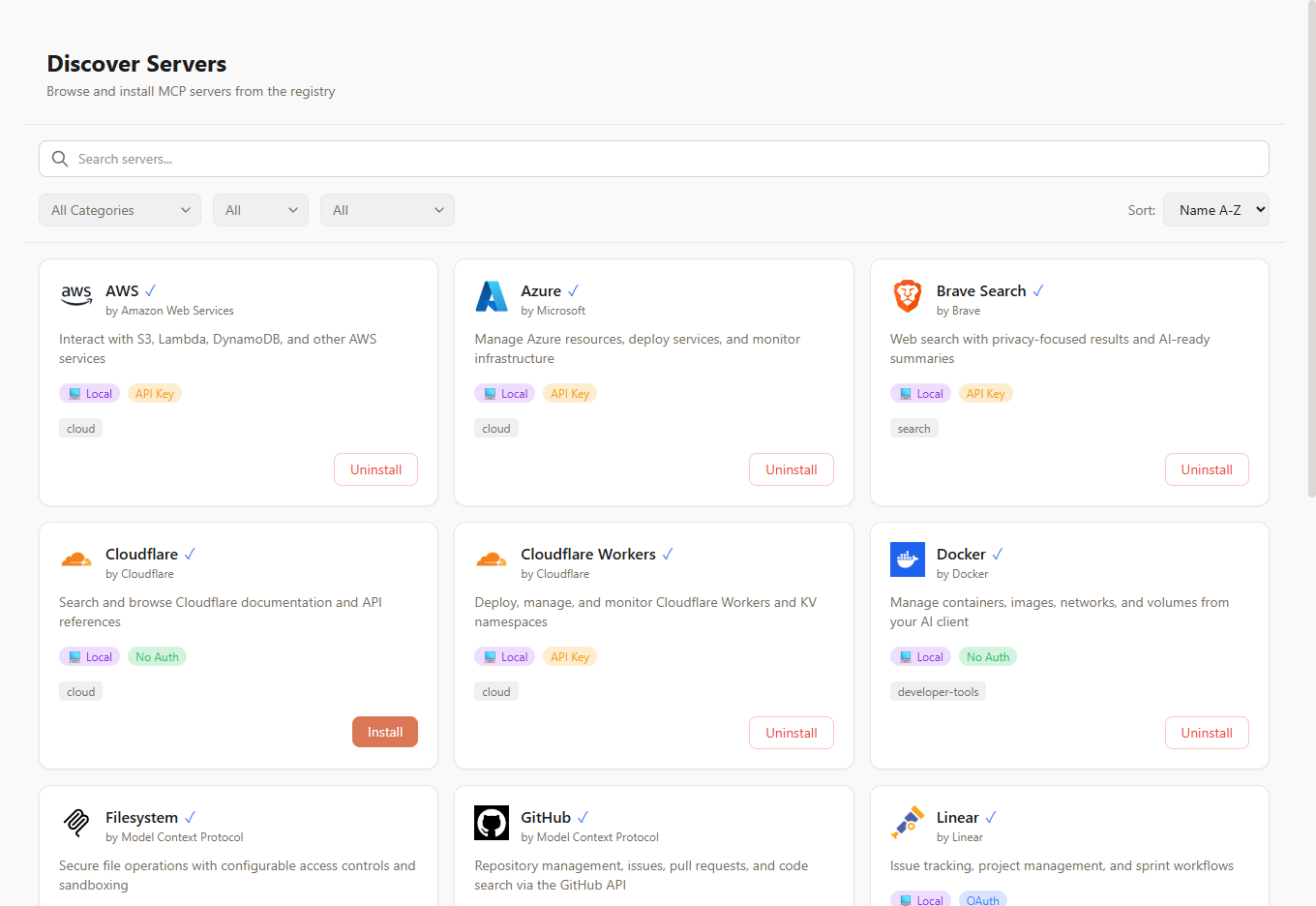
100+ Servers, One Click
Stop hunting for MCP server repos and hand-writing transport configs. Browse a curated registry of 100+ servers — GitHub, Slack, PostgreSQL, Docker, Notion, AWS, Azure, and more. Click install, enter your credentials, and the server is live across every AI client you use. You can also browse the full registry at mcpmux.com.
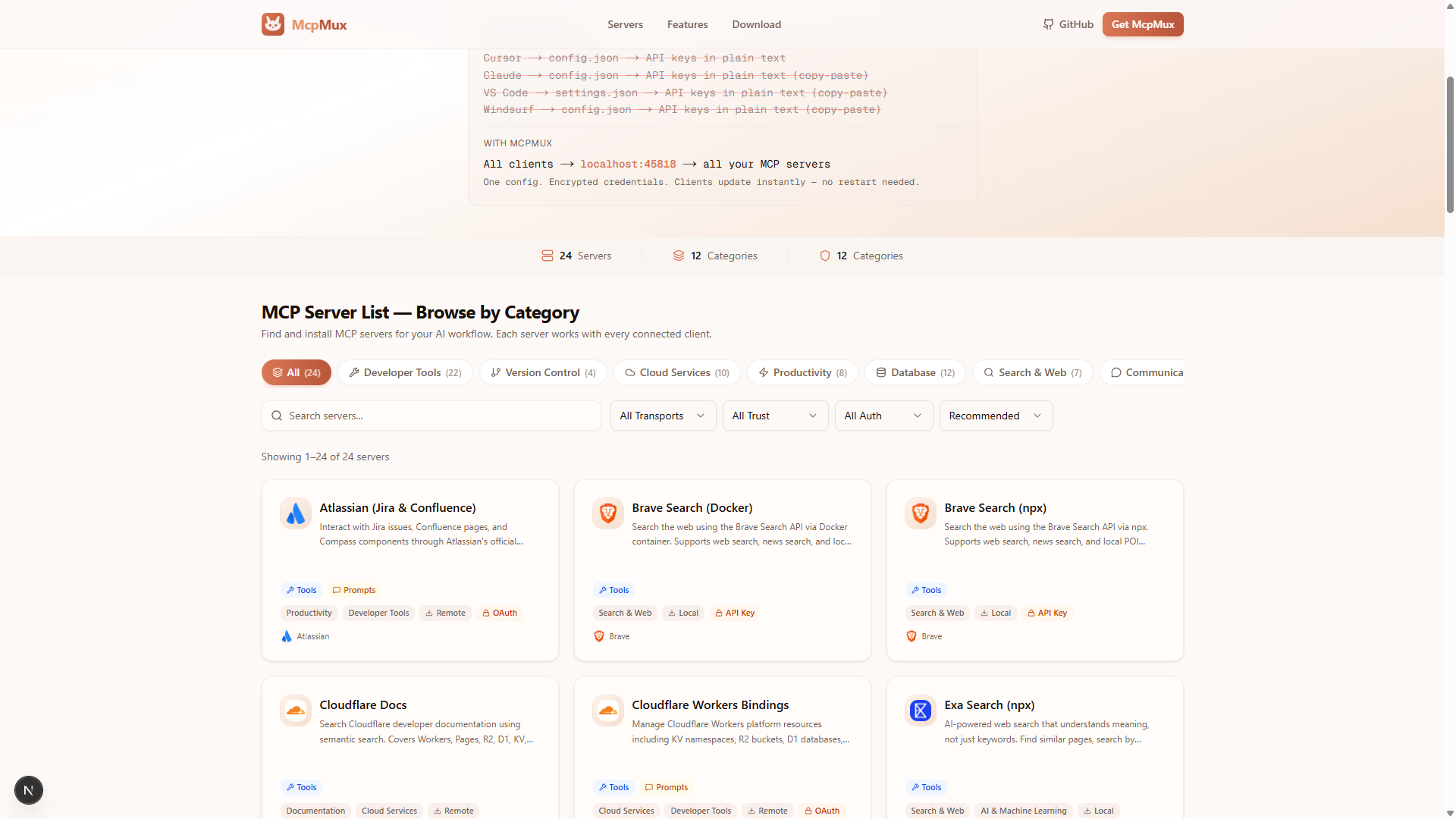
The full registry is also available on the web at mcpmux.com — with search, categories, and one-click install via deep links.
Workspaces That Keep Things Separate
Create isolated Spaces — each with their own servers, credentials, and permissions. A "Work" space for company databases and internal APIs. A "Personal" space for side projects. Switch in one click from the sidebar and every connected AI client follows automatically. No more accidentally querying your personal database from a work project.
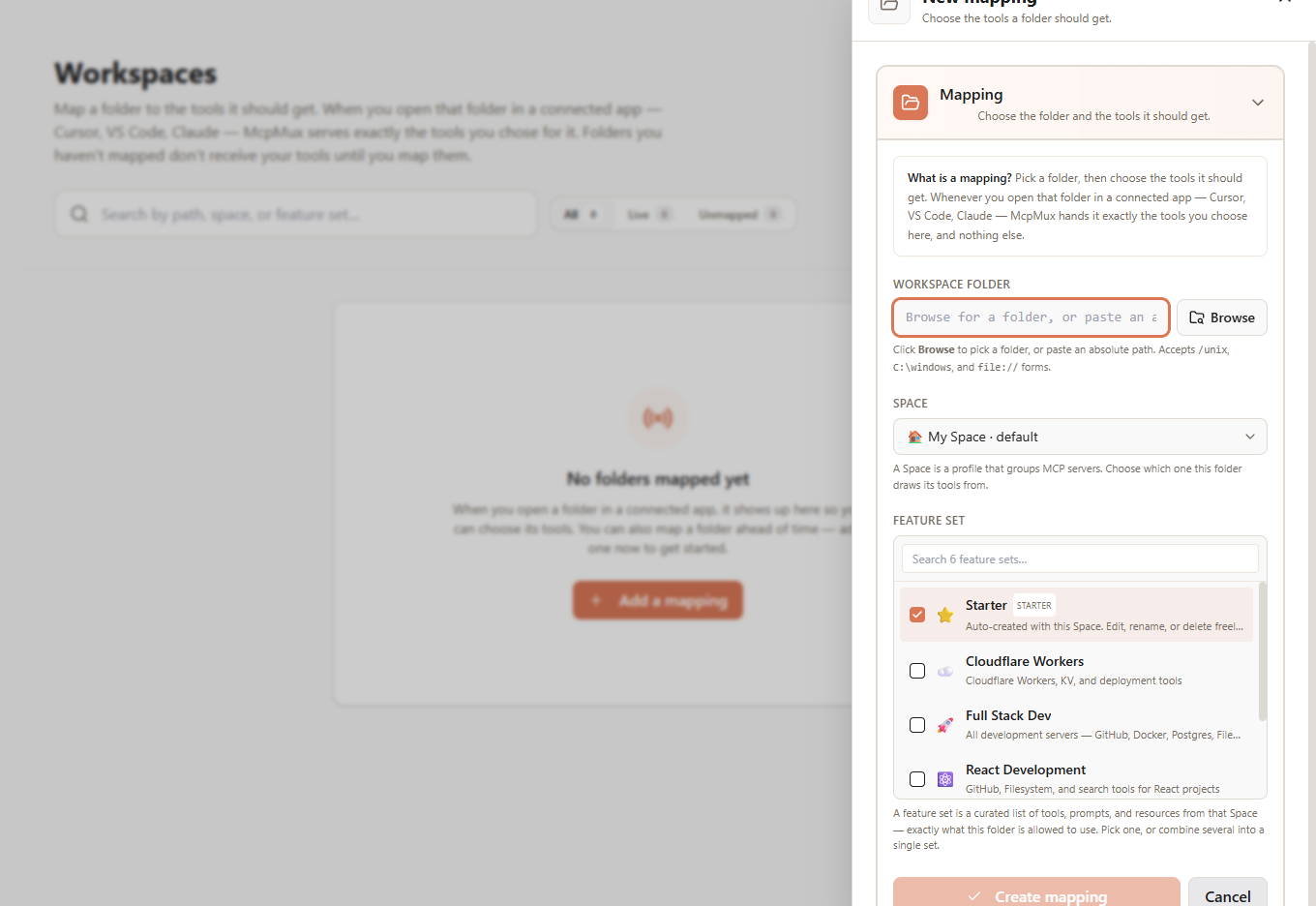
Different Tools for Different Folders
Your AI client tells McpMux which folder it's working in (its MCP *root*). McpMux uses that to route each workspace to its own toolset — open your backend repo and the AI sees your database and deploy tools; open a docs folder and it sees only search and filesystem. Map a folder once in the Workspaces tab (or let the AI do it — see below) and every future session from that exact path resolves automatically. Matching is per-folder and exact, so nothing leaks across projects.
Control What Each Client Can Do
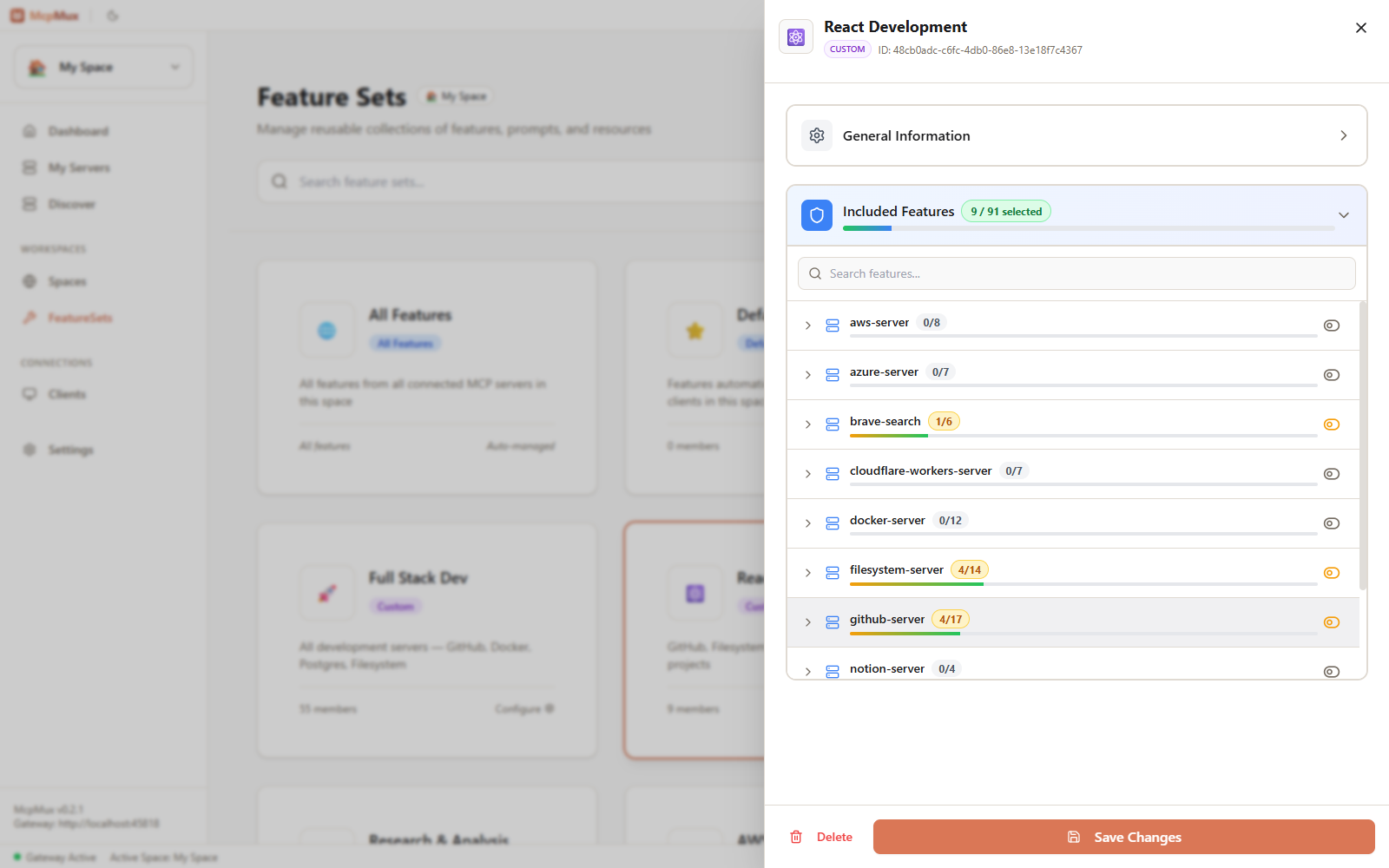
Not every AI client should have the same power. Create Feature Sets — curated bundles that control exactly which tools, prompts, and resources are exposed. Build a "Read Only" set for cautious workflows, a "React Development" set with just GitHub and Filesystem, or a "Full Stack Dev" set with everything — then route a folder to it via a Workspace mapping. A FeatureSet's included features *are* the effective toolset a session resolves to.
See and Manage Every Connected Client
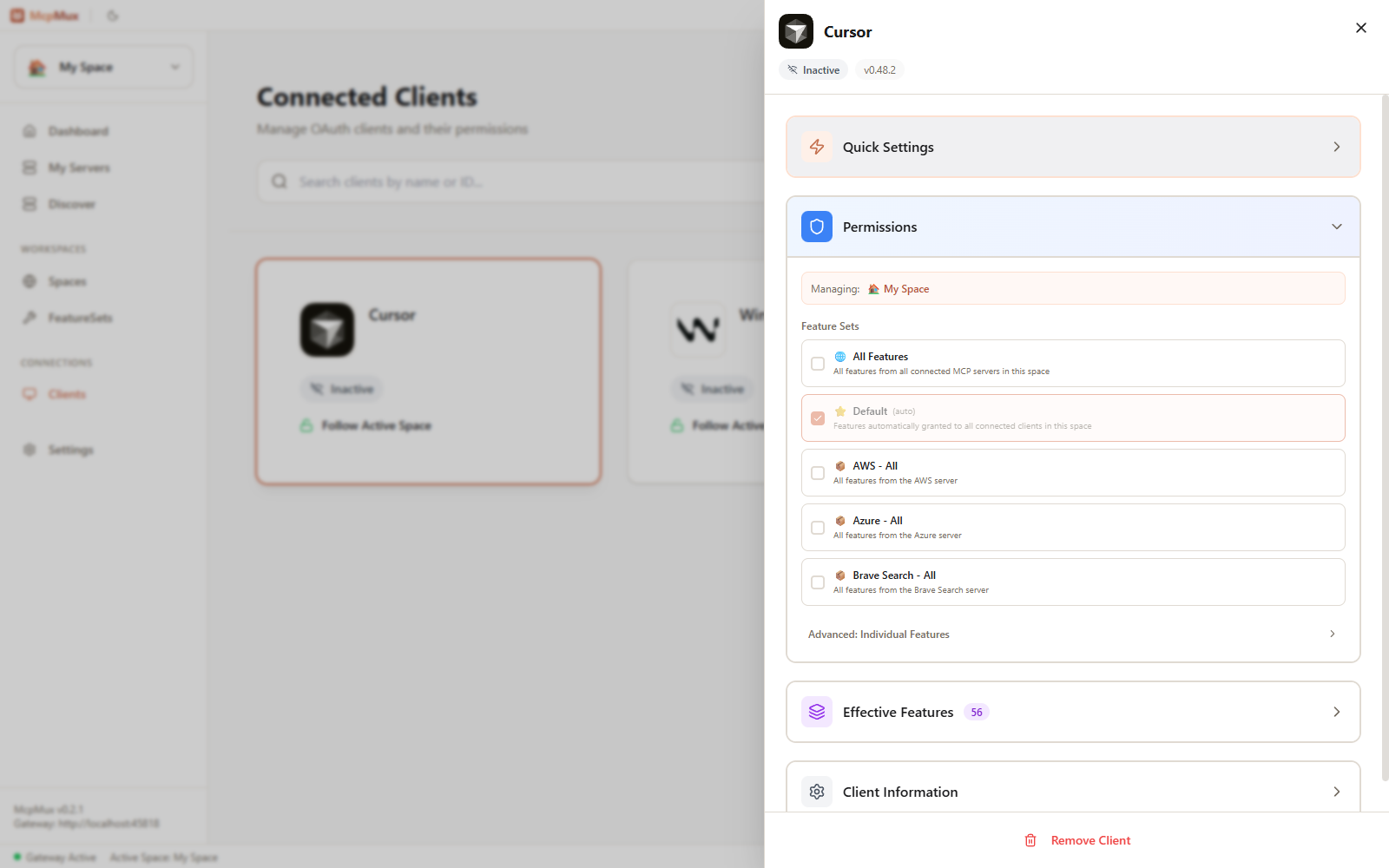
Cursor, VS Code, Windsurf, Claude Code — see every AI app connected to your gateway in real time, with live status. Routing is workspace-driven: each app's toolset is decided by the Workspace binding for the folder it reports, not configured per app. Open any app to rename it, see how it's routed, or revoke its connection. New apps authenticate via OAuth with a one-click approval flow.
Let Your AI Curate Its Own Toolset
Hand an assistant a hundred tools and it burns tokens and reaches for the wrong one. McpMux ships a built-in Tool Optimization capability so the AI can keep *itself* lean — straight from chat, no config files.
Start a request with `@mux` and the assistant can:
- Discover what's available — `mcpmux_list_spaces`, `mcpmux_list_all_tools`, `mcpmux_search_tools`
- Compose a focused FeatureSet of just the tools it needs — `mcpmux_manage_feature_set`
- Pin the current folder to that set so it sticks — `mcpmux_bind_current_workspace`
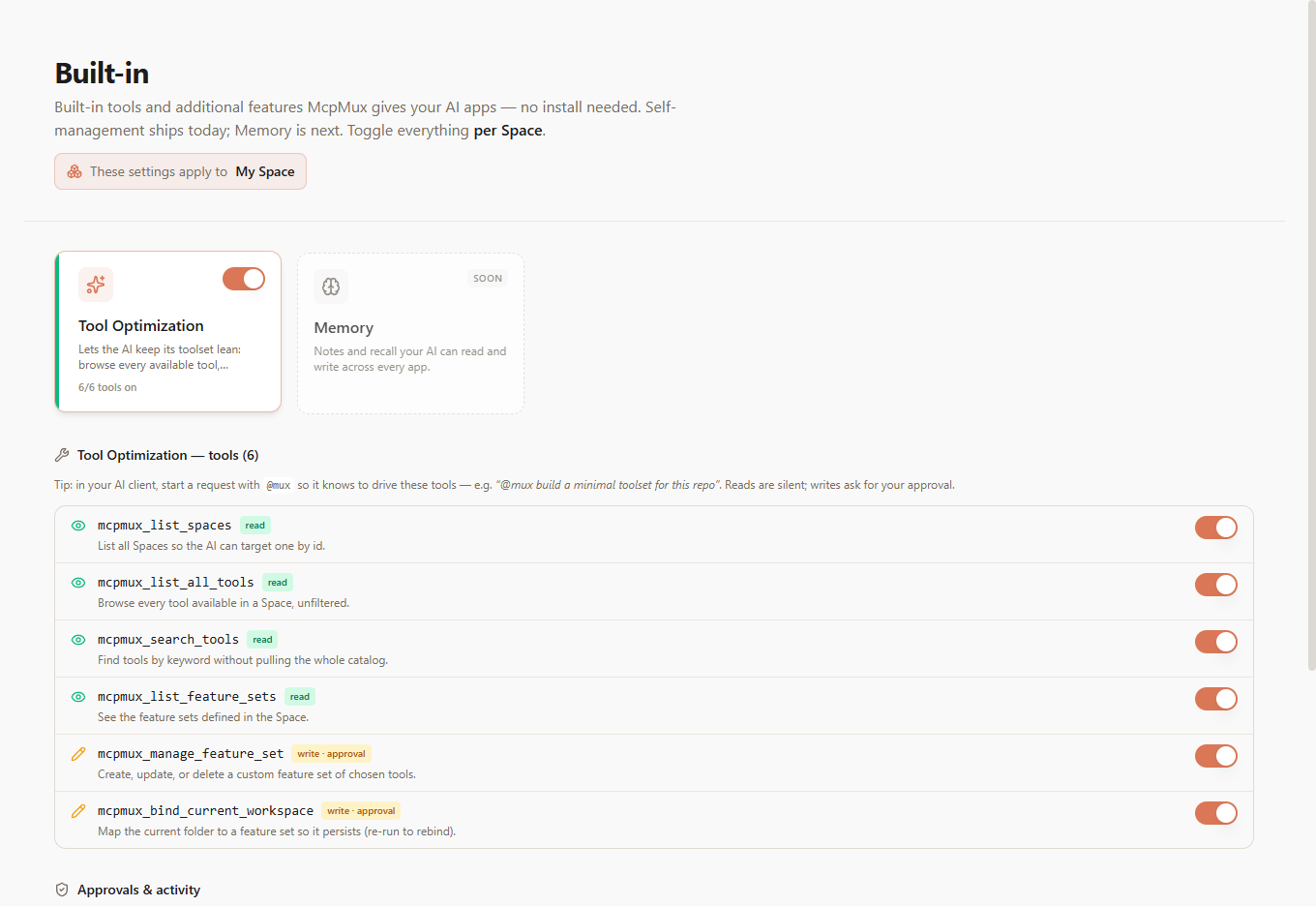
Reads are silent; anything that changes your setup pops a one-click approval dialog that names the exact Space — the AI proposes, you decide. The `@mux` trigger keeps these requests cleanly separated from your real work, and every operation can target a specific Space by id.
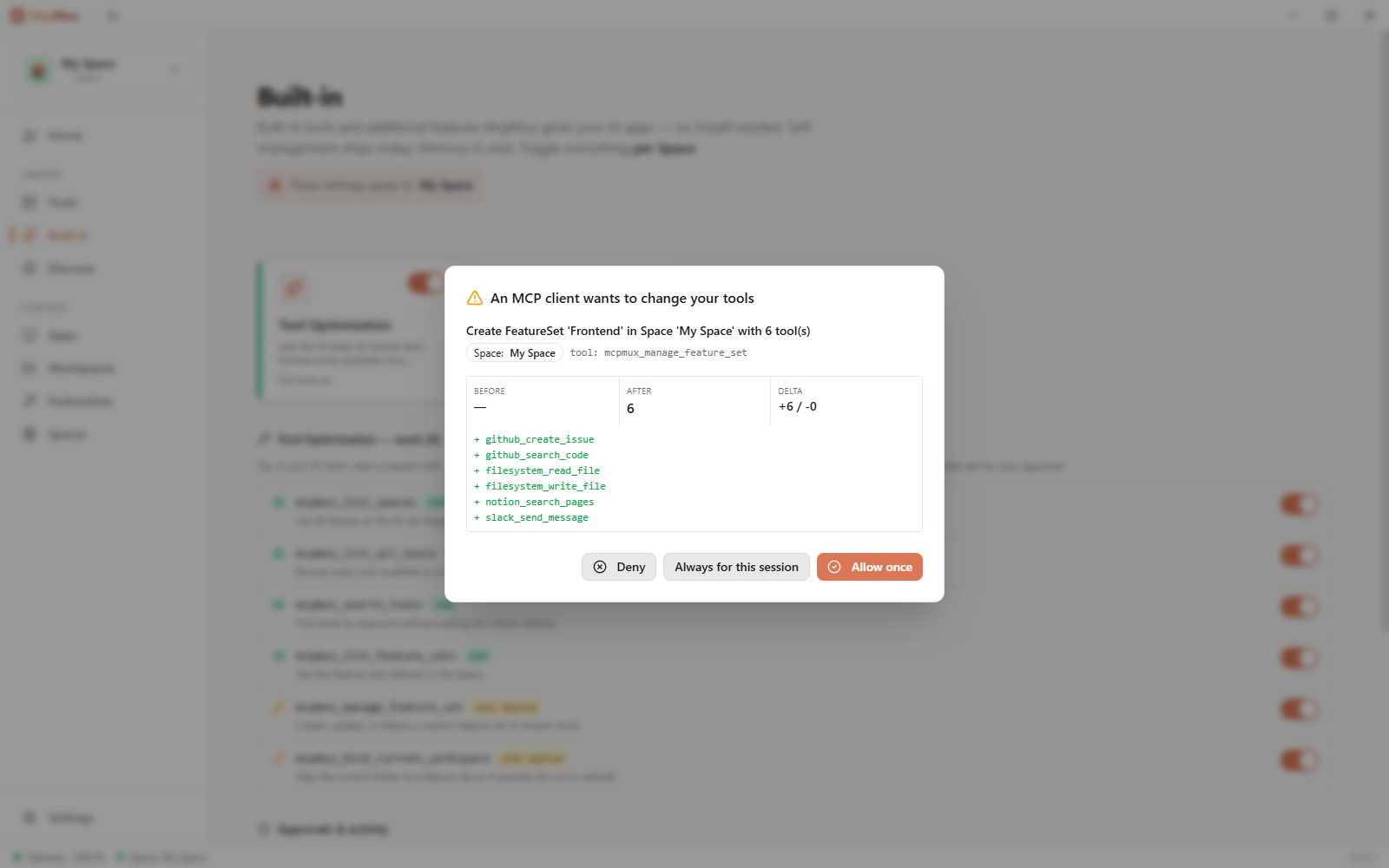
> *"@mux build a minimal toolset for this Next.js repo and pin it to this folder."*
Security
MCP defaults to plain-text config files with raw API keys. McpMux replaces that with defense in depth:
- OS Keychain — secrets in platform-native secure storage (DPAPI on Windows, Keychain on macOS, libsecret on Linux), never in plain-text files
- AES-256-GCM — field-level database encryption for all sensitive data
- OAuth 2.1 + PKCE — standard auth flow with automatic token refresh
- Local-only gateway — binds to `127.0.0.1`, nothing exposed to the network
- Per-client access keys — each AI client authenticates independently with granular permissions
- Sanitized logs — tokens and secrets never appear in log output
- Memory zeroization — secrets wiped from memory after use via `zeroize`
All MCP traffic stays on your machine. Cloud sync (optional, coming soon) only covers config metadata — never credentials or payloads.
Getting Started
**1. Download McpMux** — Windows, macOS, Linux
2. Add servers — use the Discover tab to browse 100+ servers, or explore servers on mcpmux.com and install with one click
3. Paste the config — copy the snippet from the Dashboard into your AI clients
That's the last config file you'll ever touch.
> Linux quick install: `curl -fsSL https://install.mcpmux.com | bash`
>
> macOS via Homebrew: `brew install --cask mcpmux/tap/mcpmux`
>
> See mcpmux.com/download for all platforms and install methods.
Install on Linux
Quick install (detects your distro automatically):
curl -fsSL https://install.mcpmux.com | bashOther install methods
Debian / Ubuntu (APT repository for automatic updates):
curl -fsSL https://install.mcpmux.com/apt | sudo bashFedora / RHEL (from GitHub Releases):
# Download the latest .rpm
sudo dnf install https://github.com/mcpmux/mcp-mux/releases/latest/download/mcpmux-0.0.12-1.amd64.rpm
Arch Linux (AUR):
yay -S mcpmux-binAppImage (any distro):
curl -fsSL https://install.mcpmux.com | bash # auto-detects, falls back to AppImageOr download directly from GitHub Releases.
Development
pnpm setup    # First-time: install dependencies
pnpm dev      # Start development
pnpm build    # Production build
pnpm test     # Run all tests
Prerequisites: Rust 1.75+, Node.js 18+, pnpm 9+. Linux also needs `gnome-keyring libsecret-1-dev librsvg2-dev pkg-config`.
Built with Tauri 2 (Rust + React 19), Axum for the gateway, ring for encryption, rmcp for MCP.
Project structure
mcp-mux/
├── apps/desktop/          # Tauri desktop app (React + Rust)
├── crates/
│   ├── mcpmux-core/       # Domain logic
│   ├── mcpmux-gateway/    # HTTP gateway, OAuth, routing
│   ├── mcpmux-storage/    # SQLite + encryption + OS keychain
│   └── mcpmux-mcp/        # MCP protocol
├── packages/ui/           # Shared UI components
└── tests/                 # Unit, integration, E2E tests
Links
- Website & Server Discovery — mcpmux.com
- Download — mcpmux.com/download
- Features — mcpmux.com/features
- Server Definitions Repo — github.com/mcpmux/mcp-servers
- Community Chat — Discord
Contributing
See CONTRIBUTING.md for guidelines.
License
Frequently asked questions
What is mcp-mux?
mcp-mux is Configure MCP servers once, connect every AI client through a single local gateway
How do I install mcp-mux?
Open the GitHub repository and follow its README. Most MCP servers are added to your client's MCP config, then called by your agent.
Is mcp-mux open source?
Yes — it is hosted on GitHub at https://github.com/mcpmux/mcp-mux and has 20 stars.
Related MCP tools
 Unity-MCP
AI Skills, MCP Tools, and CLI for Unity Engine. Full AI develop and test loop. Use cli for quick setup. Efficient token usage, advanced tools. Any C# method may be turned into a tool by a single line. Works with Claude Code, Gemini, Copilot, Cursor and any other absolutely for free.
 memorix
Open-source cross-agent memory layer for coding agents via MCP. Compatible with Claude Code, Codex, Cursor, Windsurf, Gemini CLI, Antigravity, OpenClaw, Hermes Agent, Oh-my-Pi, Pi, Copilot, Kiro, OpenCode, and Trae.
 jcodemunch-mcp
Cut AI token costs 95%+ on code exploration. The leading MCP server for precise, symbol-level GitHub code retrieval via tree-sitter AST. Works with Claude Code, Cursor & any MCP client. 313B+ tokens saved.
 atlassian-mcp-server
Official remote MCP server for Atlassian. Securely connect Jira, Confluence, Jira Service Management, Bitbucket, and Compass to Claude, ChatGPT, Cursor, VS Code, and other AI tools using OAuth 2.1 or API tokens.
 projectmem
Open-source coding agent memory. Records issues, attempts, fixes and decisions, then warns your agent before it repeats an approach that already failed. Native MCP server for Claude Code, Cursor, Antigravity and Codex. 100% local, no cloud, no telemetry. MIT.
 webclaw
Fast, local-first web content extraction for LLMs. Scrape, crawl, extract structured data — all from Rust. CLI, REST API, and MCP server.
Run your own MCP server? See who uses it and what to fix.
Measure it with TrackMCP