
binaryninja-mcp
Another™ MCP Server for Binary Ninja with superpower 🥵
Documentation
Another™ MCP Server for Binary Ninja
English | 中文
[pypi-badge]: https://img.shields.io/pypi/v/binaryninja-mcp.svg
[pypi-url]: https://pypi.org/project/binaryninja-mcp/
[license-badge]: https://img.shields.io/pypi/l/binaryninja-mcp.svg
[license-url]: https://github.com/MCPPhalanx/binaryninja-mcp/blob/main/LICENSE
[python-badge]: https://img.shields.io/pypi/pyversions/binaryninja-mcp.svg
[python-url]: https://www.python.org/downloads/
[discussions-badge]:
https://img.shields.io/github/discussions/MCPPhalanx/binaryninja-mcp
[discussions-url]: https://github.com/MCPPhalanx/binaryninja-mcp/discussions
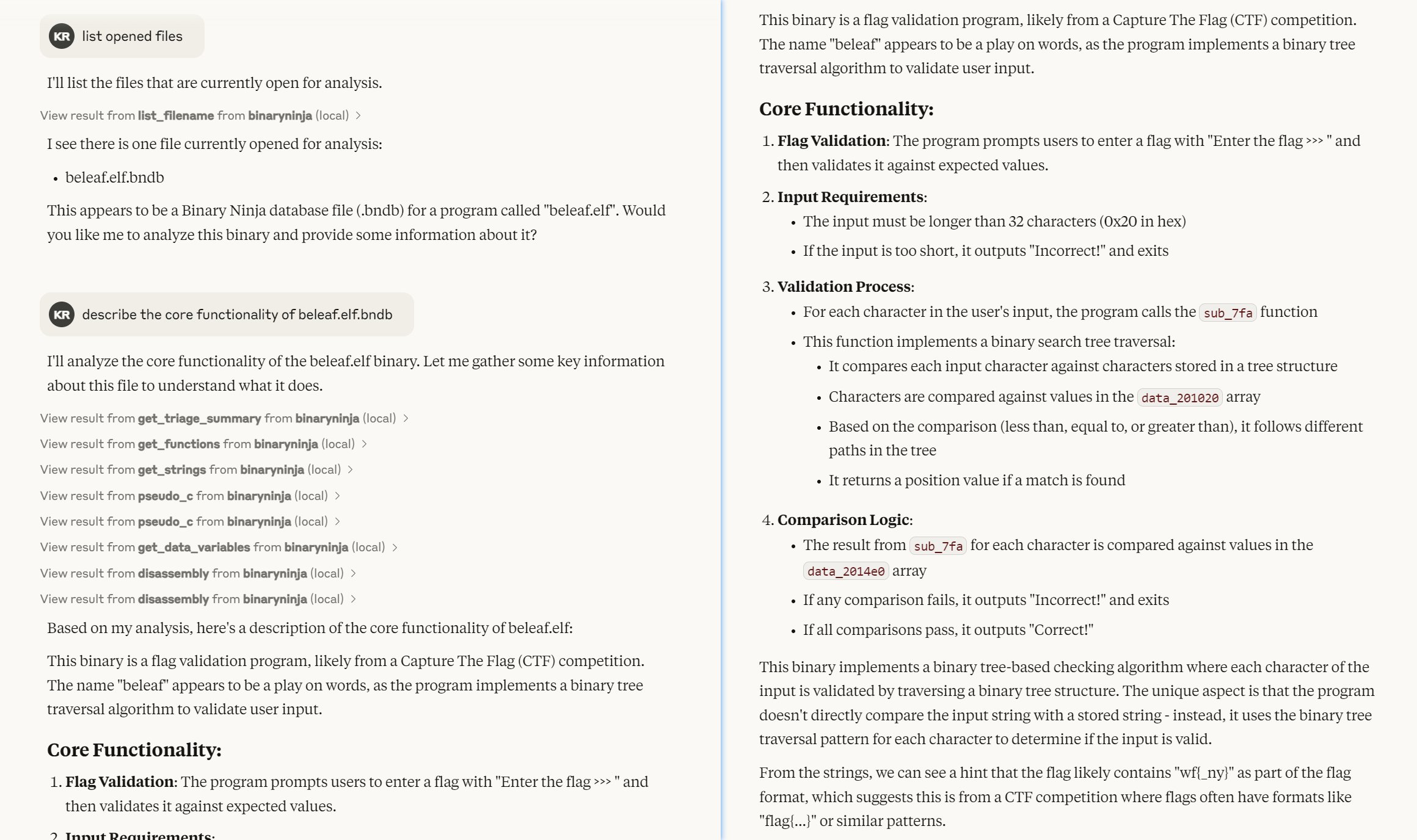
Demo
The tests/binary/beleaf.elf is taken from
You can also find the complete writeup from the link above!
... but why _Another_?
See:
Key Differences from the Existing Plugin
Installation
Server Setup
There are two ways to run the MCP server:
1. Binary Ninja UI Plugin:
`Settings - MCP Server - Server port number`
Available Resources section below
2. Binary Ninja Headless Mode:
uvx binaryninja-mcp install-api  # only run once
   uvx binaryninja-mcp server  [filename]...
files are available to the MCP client.
MCP Client Setup
1. Claude Desktop (stdio relay client): Configure the client to connect via
stdio transport using built-in relay.
{
     "mcpServers": {
       "binaryninja": {
         "command": "uvx",
         "args": ["binaryninja-mcp", "client"]
       }
     }
   }
2. Cherry Studio:
binaryninja-mcp
       client
Add `--port 12345` to both server and client command line if you prefer to run
MCP server on port other than default.
Available Tools for MCP Clients
The MCP server provides the following tools:
- `rename_symbol`: Rename a function or a data variable
- `pseudo_c`: Get pseudo C code of a specified function
- `pseudo_rust`: Get pseudo Rust code of a specified function
- `high_level_il`: Get high level IL of a specified function
- `medium_level_il`: Get medium level IL of a specified function
- `disassembly`: Get disassembly of a function or specified range
- `update_analysis_and_wait`: Update analysis for the binary and wait for
completion
- `get_triage_summary`: Get basic information from BinaryNinja Triage view
- `get_imports`: Get dictionary of imported symbols
- `get_exports`: Get dictionary of exported symbols
- `get_segments`: Get list of memory segments
- `get_sections`: Get list of binary sections
- `get_strings`: Get list of strings found in the binary
- `get_functions`: Get list of functions
- `get_data_variables`: Get list of data variables
Available Resources for MCP Clients
MCP Resources can be accessed via URIs in the format:
`binaryninja://{filename}/{resource_type}`
The server provides these resource types for each binary:
- `triage_summary`: Basic information from BinaryNinja Triage view
- `imports`: Dictionary of imported symbols/functions
- `exports`: Dictionary of exported symbols/functions
- `segments`: List of memory segments
- `sections`: List of binary sections
- `strings`: List of strings found in the binary
- `functions`: List of functions
- `data_variables`: List of data variables
Development
uv is the recommanded package management tool
for this project.
Clone directory to Binary Ninja Plugin Directory
git clone https://github.com/MCPPhalanx/binaryninja-mcp.git "${env:APPDATA}\Binary Ninja\plugins\MCPPhalanx_binaryninja_mcp"Setup Python Environment
Binary Ninja API must be installed into virtualenv manually.
uv venv
uv sync --dev
# install binaryninja API
binaryninja-mcp install-api
# check API is correctly installed
uv run python -c 'import binaryninja as bn; assert bn._init_plugins() is None; assert bn.core_ui_enabled() is not None; print("BN API check PASSED!!")'
Setup MCP Client for Development
For MCP clients with stdio transport like Claude Desktop, change working
directory to development folder.
{
  "mcpServers": {
    "binaryninja": {
      "command": "uv",
      "args": [
        "--directory",
        "C:/path/to/binaryninja-mcp",
        "run",
        "binaryninja-mcp",
        "client"
      ]
    }
  }
}
SSE-enabled MCP clients can connect using: `http://localhost:7000/sse`
Build
uv buildTest
pytest
# To update test snapshots:
pytest --snapshot-update
Version Bump
The PyPI package version is automatically derived from Binary Ninja's
`plugin.json` (using package.json format), maintaining version consistency
between the BN plugin and PyPI package.
# bump alpha version
uvx hatch version a

# bump release version
uvx hatch version minor,rc
uvx hatch version release
See: Versioning - Hatch
Release
uv publishLicense
Frequently asked questions
What is binaryninja-mcp?
binaryninja-mcp is Another™ MCP Server for Binary Ninja with superpower 🥵
How do I install binaryninja-mcp?
Open the GitHub repository and follow its README. Most MCP servers are added to your client's MCP config, then called by your agent.
Is binaryninja-mcp open source?
Yes — it is hosted on GitHub at https://github.com/MCPPhalanx/binaryninja-mcp and has 29 stars.
Related MCP tools
 damn-vulnerable-mcp-server
Damn Vulnerable MCP Server Python-based implementation. Trusted by 1200+ developers. Trusted by 1200+ developers. Trusted by 1200+ developers.
 mysql_mcp_server
A Model Context Protocol (MCP) server that enables secure interaction with MySQL databases Python-based implementation. Trusted by 900+ developers.
 supabase-mcp-server
Query MCP enables end-to-end management of Supabase via chat interface: read & write query executions, management API support, automatic migration versioning...
 mcp-neo4j
Model Context Protocol with Neo4j Python-based implementation. Trusted by 700+ developers. Trusted by 700+ developers. Trusted by 700+ developers.
 android-mcp-server
An MCP server that provides control over Android devices via adb Python-based implementation. Trusted by 500+ developers.
 pg-mcp-server
A Model Context Protocol (MCP) server for PostgreSQL databases with enhanced capabilities for AI agents. Python-based implementation.
Run your own MCP server? See who uses it and what to fix.
Measure it with TrackMCP