
calendly-mcp-server
Open source calendly mcp server
Documentation
Calendly MCP Server
A Model Context Protocol (MCP) server for integrating with the Calendly API. This server provides tools to interact with Calendly's scheduling platform, allowing you to retrieve user information, list events, manage invitees, cancel events, and schedule meetings directly via the new Scheduling API.
Features
Core Calendly Integration
- User Information: Get current authenticated user details
- Event Management: List, retrieve, and cancel scheduled events
- Invitee Management: List and manage event invitees
- Organization: List organization memberships
NEW: Scheduling API Integration
- Direct Meeting Scheduling: Book meetings programmatically without redirects
- Event Type Discovery: List available event types for scheduling
- Real-Time Availability: Check available time slots for any event type
- Complete Booking Flow: End-to-end scheduling with calendar sync and notifications
- Location Support: Zoom, Google Meet, Teams, physical locations, and custom options
Installation
Option 1: NPX (Recommended)
Run directly without installation:
npx calendly-mcp-serverOption 2: Manual Installation
1. Clone this repository:
git clone https://github.com/meAmitPatil/calendly-mcp-server.git
cd calendly-mcp-server
2. Install dependencies:
npm install3. Build the project:
npm run buildConfiguration
Authentication
This server supports two authentication methods:
Option 1: Personal Access Token (PAT)
For internal applications or personal use:
1. Get your Personal Access Token from your Calendly Integrations page
2. Select API and webhooks → Get a token now
3. Set the environment variable:
export CALENDLY_API_KEY="your_personal_access_token_here"Option 2: OAuth 2.0
For public applications that multiple users will use:
1. Create a developer account at developer.calendly.com
2. Create an OAuth application to get your client credentials
3. Set the environment variables:
export CALENDLY_CLIENT_ID="your_client_id_here"
export CALENDLY_CLIENT_SECRET="your_client_secret_here"
4. Optionally, if you already have tokens:
export CALENDLY_ACCESS_TOKEN="your_access_token_here"
export CALENDLY_REFRESH_TOKEN="your_refresh_token_here"
Optional User Context (Recommended)
For better performance and automatic defaults, you can set user-specific URIs:
export CALENDLY_USER_URI="https://api.calendly.com/users/your_user_id"
export CALENDLY_ORGANIZATION_URI="https://api.calendly.com/organizations/your_org_id"
These can be obtained by running `get_current_user` after authentication. When set, the server will automatically use these as defaults for API calls that require user context.
MCP Configuration
Add the server to your MCP client configuration (e.g., Claude Desktop):
Option 1: Using NPX (Recommended)
For Personal Access Token:
{
  "mcpServers": {
    "calendly": {
      "command": "npx",
      "args": ["calendly-mcp-server"],
      "env": {
        "CALENDLY_API_KEY": "your_personal_access_token_here",
        "CALENDLY_USER_URI": "https://api.calendly.com/users/your_user_id",
        "CALENDLY_ORGANIZATION_URI": "https://api.calendly.com/organizations/your_org_id"
      }
    }
  }
}
For OAuth 2.0:
{
  "mcpServers": {
    "calendly": {
      "command": "npx",
      "args": ["calendly-mcp-server"],
      "env": {
        "CALENDLY_CLIENT_ID": "your_client_id_here",
        "CALENDLY_CLIENT_SECRET": "your_client_secret_here",
        "CALENDLY_ACCESS_TOKEN": "your_access_token_here",
        "CALENDLY_REFRESH_TOKEN": "your_refresh_token_here",
        "CALENDLY_USER_URI": "https://api.calendly.com/users/your_user_id",
        "CALENDLY_ORGANIZATION_URI": "https://api.calendly.com/organizations/your_org_id"
      }
    }
  }
}
Option 2: Using Local Installation
For Personal Access Token:
{
  "mcpServers": {
    "calendly": {
      "command": "node",
      "args": ["path/to/calendly-mcp-server/dist/index.js"],
      "env": {
        "CALENDLY_API_KEY": "your_personal_access_token_here",
        "CALENDLY_USER_URI": "https://api.calendly.com/users/your_user_id",
        "CALENDLY_ORGANIZATION_URI": "https://api.calendly.com/organizations/your_org_id"
      }
    }
  }
}
For OAuth 2.0:
{
  "mcpServers": {
    "calendly": {
      "command": "node",
      "args": ["path/to/calendly-mcp-server/dist/index.js"],
      "env": {
        "CALENDLY_CLIENT_ID": "your_client_id_here",
        "CALENDLY_CLIENT_SECRET": "your_client_secret_here",
        "CALENDLY_ACCESS_TOKEN": "your_access_token_here",
        "CALENDLY_REFRESH_TOKEN": "your_refresh_token_here",
        "CALENDLY_USER_URI": "https://api.calendly.com/users/your_user_id",
        "CALENDLY_ORGANIZATION_URI": "https://api.calendly.com/organizations/your_org_id"
      }
    }
  }
}
Available Tools (12 Total)
*All tools work seamlessly through Claude Desktop or any MCP client*
OAuth 2.0 Tools
`get_oauth_url`
Generate OAuth authorization URL for user authentication.
Parameters:
- `redirect_uri` (required): The redirect URI for your OAuth application
- `state` (optional): Optional state parameter for security
`exchange_code_for_tokens`
Exchange authorization code for access and refresh tokens.
Parameters:
- `code` (required): The authorization code from OAuth callback
- `redirect_uri` (required): The redirect URI used in authorization
`refresh_access_token`
Refresh access token using refresh token.
Parameters:
- `refresh_token` (required): The refresh token to use
API Tools
`get_current_user`
Get information about the currently authenticated user.
`list_events`
List scheduled events with optional filtering.
Parameters:
- `user_uri` (optional): URI of the user whose events to list (uses `CALENDLY_USER_URI` if not provided)
- `organization_uri` (optional): URI of the organization to filter events
- `status` (optional): Filter by status ("active" or "canceled")
- `max_start_time` (optional): Maximum start time (ISO 8601 format)
- `min_start_time` (optional): Minimum start time (ISO 8601 format)
- `count` (optional): Number of events to return (default 20, max 100)
`get_event`
Get details of a specific event.
Parameters:
- `event_uuid` (required): UUID of the event to retrieve
`list_event_invitees`
List invitees for a specific event.
Parameters:
- `event_uuid` (required): UUID of the event
- `status` (optional): Filter by status ("active" or "canceled")
- `email` (optional): Filter by email address
- `count` (optional): Number of invitees to return (default 20, max 100)
`cancel_event`
Cancel a specific event.
Parameters:
- `event_uuid` (required): UUID of the event to cancel
- `reason` (optional): Reason for cancellation
`list_organization_memberships`
List organization memberships for the authenticated user.
Parameters:
- `user_uri` (optional): URI of the user (uses `CALENDLY_USER_URI` if not provided)
- `organization_uri` (optional): URI of the organization
- `email` (optional): Filter by email
- `count` (optional): Number of memberships to return (default 20, max 100)
Scheduling API Tools
`list_event_types`
List available event types for scheduling meetings.
Parameters:
- `user` (optional): URI of the user whose event types to list
- `organization` (optional): URI of the organization to filter event types
- `count` (optional): Number of event types to return (default 20, max 100)
`get_event_type_availability`
Get available time slots for a specific event type.
Parameters:
- `event_type` (required): URI of the event type to check availability for
- `start_time` (optional): Start time for availability window (ISO 8601 format)
- `end_time` (optional): End time for availability window (ISO 8601 format)
`schedule_event`
Schedule a meeting by creating an invitee for a specific event type and time.
Requirements: Paid Calendly plan (Standard or higher)
Parameters:
- `event_type` (required): URI of the event type to schedule
- `start_time` (required): Start time for the event (ISO 8601 UTC format)
- `invitee_email` (required): Email address of the invitee
- `invitee_timezone` (required): Timezone of the invitee (e.g., America/New_York)
- `invitee_name` (optional): Full name of the invitee
- `invitee_first_name` (optional): First name of the invitee
- `invitee_last_name` (optional): Last name of the invitee
- `invitee_phone` (optional): Phone number for SMS reminders (E.164 format)
- `location_kind` (optional): Meeting location type (zoom_conference, google_conference, physical, etc.)
- `location_details` (optional): Location details (required for physical meetings)
- `event_guests` (optional): Array of additional email addresses (max 10)
- `questions_and_answers` (optional): Array of question/answer pairs
- `utm_source`, `utm_campaign`, `utm_medium` (optional): UTM tracking parameters
Usage Examples
Once configured with your MCP client, you can use these tools:
Live Demo
Here's the MCP server in action with Claude Desktop:
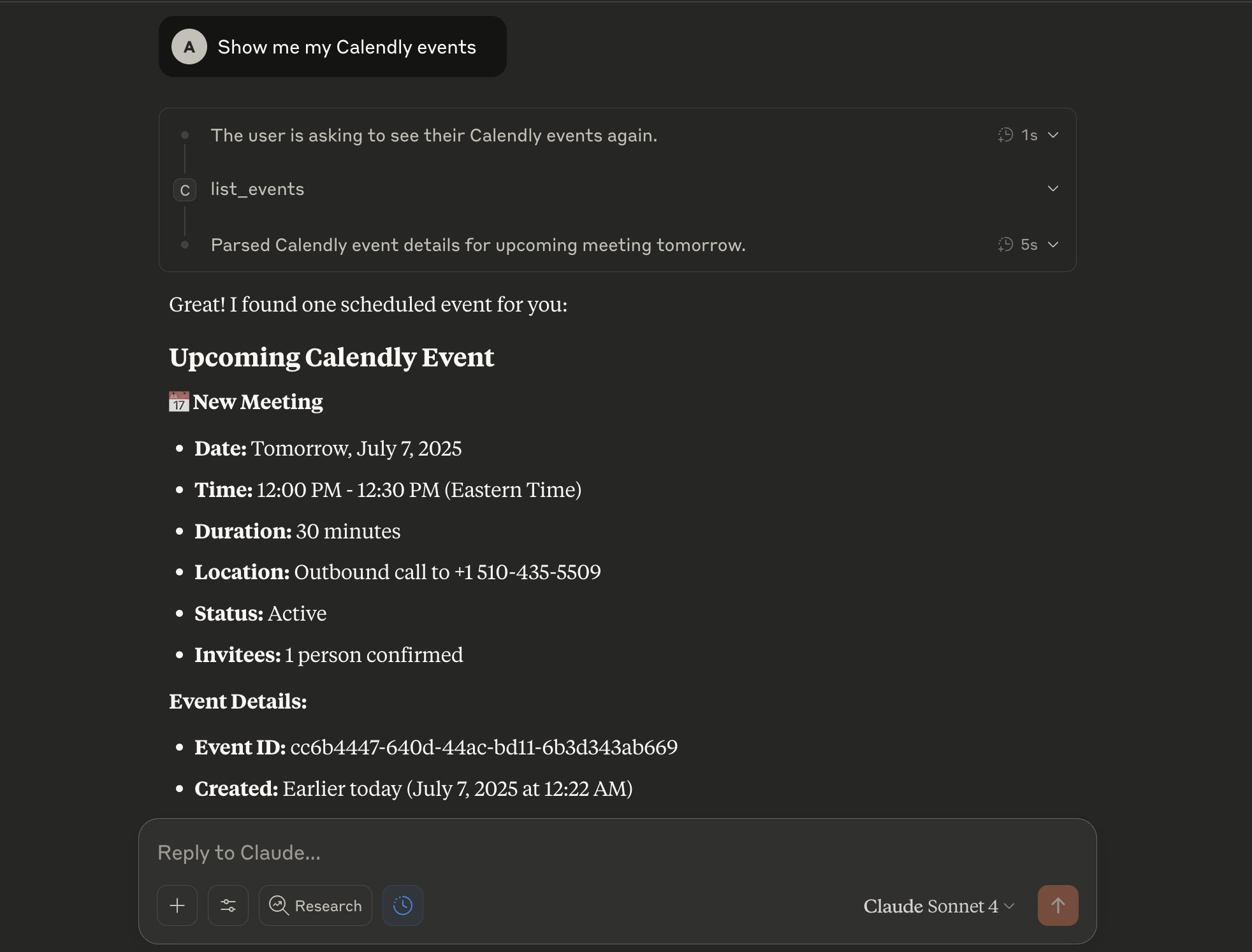
*Example: User asks "Show me my Calendly events" and gets formatted event details including date, time, duration, location, and invitee information.*
OAuth Flow Examples:
# Generate OAuth URL
get_oauth_url redirect_uri="https://myapp.com/auth/callback"

# Exchange code for tokens (after user authorizes)
exchange_code_for_tokens code="AUTHORIZATION_CODE" redirect_uri="https://myapp.com/auth/callback"

# Refresh access token
refresh_access_token refresh_token="REFRESH_TOKEN"
API Examples:
# Get current user information
get_current_user

# List recent events
list_events count=10

# Get specific event details
get_event event_uuid="EVENT_UUID_HERE"

# List invitees for an event
list_event_invitees event_uuid="EVENT_UUID_HERE"

# Cancel an event
cancel_event event_uuid="EVENT_UUID_HERE" reason="Meeting no longer needed"
Scheduling API Examples:
# List available event types
list_event_types

# Check availability for a specific event type
get_event_type_availability event_type="https://api.calendly.com/event_types/AAAAAAAAAAAAAAAA"

# Schedule a meeting (requires paid plan)
schedule_event event_type="https://api.calendly.com/event_types/AAAAAAAAAAAAAAAA" start_time="2025-10-21T19:00:00Z" invitee_email="client@company.com" invitee_name="John Smith" invitee_timezone="America/New_York" location_kind="zoom_conference"
🎯 Claude Desktop Examples:
# Natural language commands that work in Claude Desktop:
"Show me my event types"
"Check availability for my 30-minute consultation next week"
"Schedule a meeting with john@company.com for tomorrow at 2 PM"
"Book a client onboarding call for Friday"
API Limitations
- Scheduling API: Requires paid Calendly plan (Standard or higher)
- Event Rescheduling: Not supported via API (only cancellation)
- Event Type Creation: Cannot create new event types via API
- Rate Limits: Standard Calendly API rate limits apply
Troubleshooting
NPX Issues
- "command not found: npx": Install Node.js 18+ which includes npx
- NPX downloads every time: This is normal behavior; NPX caches packages for faster subsequent runs
- Permission errors: Ensure you have write access to npm cache directory (`npm config get cache`)
- Network issues: Use `npx --offline calendly-mcp-server` to use cached version
Authentication Issues
- "No authentication token available": Set `CALENDLY_API_KEY` environment variable
- 400 errors on `list_events`: Set `CALENDLY_USER_URI` environment variable or provide `user_uri` parameter
- Permission errors: Ensure API key has correct permissions
Scheduling API Issues
- 403 Forbidden on `schedule_event`: Requires paid Calendly plan (Standard or higher)
- 400 Bad Request: Check that event_type URI is valid and start_time is in correct UTC format
- Invalid time slot: Use `get_event_type_availability` to verify the time slot is available
General Issues
- TypeScript errors: Ensure Node.js version 18+ is installed
- Module not found: Run `npm run build` if using local installation
Development
Quick Start for Development
# Test with NPX (recommended for users)
npx calendly-mcp-server

# Test with MCP Inspector
npx @modelcontextprotocol/inspector npx calendly-mcp-server

# Clone for development
git clone
cd calendly-mcp-server
npm install
npm run build
Scripts
- `npm run build`: Build the TypeScript code
- `npm run dev`: Run in development mode with auto-reload
- `npm start`: Run the built server
Project Structure
src/
├── index.ts          # Main server implementation
├── types.ts          # TypeScript type definitions (if needed)
└── utils.ts          # Utility functions (if needed)
Contributing
1. Fork the repository
2. Create a feature branch
3. Make your changes
4. Test thoroughly
5. Submit a pull request
License
MIT License - see LICENSE file for details.
Support
For issues with this MCP server, please create an issue in the repository.
For Calendly API documentation, visit the Calendly Developer Portal.
Frequently asked questions
What is calendly-mcp-server?
calendly-mcp-server is Open source calendly mcp server
How do I install calendly-mcp-server?
Open the GitHub repository and follow its README. Most MCP servers are added to your client's MCP config, then called by your agent.
Is calendly-mcp-server open source?
Yes — it is hosted on GitHub at https://github.com/meAmitPatil/calendly-mcp-server and has 11 stars.
Related MCP tools
 playwright-mcp
Playwright MCP server TypeScript-based implementation. Trusted by 22000+ developers. Trusted by 22000+ developers. Trusted by 22000+ developers.
 notion-mcp-server
Official Notion MCP Server TypeScript-based implementation. Trusted by 3400+ developers. Trusted by 3400+ developers. Trusted by 3400+ developers.
 mcpso
mcpsoDirectory for Awesome MCP Servers TypeScript-based implementation. Trusted by 1900+ developers. Trusted by 1900+ developers.
 unla
unla🧩 MCP Gateway - A lightweight gateway service that instantly transforms existing MCP Servers and APIs into MCP servers with zero code changes.
 metamcp
MCP Aggregator, Orchestrator, Middleware, Gateway in one docker TypeScript-based implementation. Trusted by 1400+ developers.
 mcp-server-kubernetes
MCP Server for kubernetes management commands TypeScript-based implementation. Trusted by 1100+ developers. Trusted by 1100+ developers.
Run your own MCP server? See who uses it and what to fix.
Measure it with TrackMCP