
enedis-linky-mcp-server
Enedis Linky MCP Server
Documentation
Enedis Linky MCP Server ⚡
A production-ready Model Context Protocol (MCP) server written in Go
that wraps the Conso API, giving AI assistants like Claude direct
access to your Enedis Linky smart meter data.
Table of Contents
- Enedis Linky MCP Server ⚡
Features
- 5 MCP tools covering Linky consumption, load curve, max power, and solar production data
- Bearer token authentication via the free Conso API proxy
- Automatic retry with exponential backoff on transient errors
- Rate-limit awareness — respects the 5 req/s and 10k req/h limits
- Dual MCP transports — `stdio` for Claude Desktop, `sse` for HTTP clients
- Structured logging — JSON logs via `log/slog` with configurable levels
- CI/CD — GitHub Actions for testing, linting, and cross-platform releases
Prerequisites
🦫 Go (latest version recommended)
🔑 Conso API token — register for free at
🆔 PRM number — your 14-digit Linky meter identifier (found on your electricity bill)
How to enable data collection on your Enedis account
Log in to your Enedis customer space and enable:
- *Enregistrement de la consommation horaire*
- *Collecte de la consommation horaire*
Then register at conso.boris.sh to get your free API token and authorize your PRM.
Quick Start
1. Build the binary
git clone https://github.com/mjrgr/enedis-linky-mcp-server.git
cd enedis-linky-mcp-server

go mod download
make build
# Binary is at ./bin/enedis-linky-mcp-server
2. Set your credentials
export CONSO_API_TOKEN="your_token_here"
export LINKY_PRM="12345678901234"   # optional but recommended
3. Run (stdio mode)
./bin/enedis-linky-mcp-serverRun in SSE mode
export MCP_TRANSPORT=sse
export PORT=8080
./bin/enedis-linky-mcp-server
# Listening on :8080 — point your MCP client at http://localhost:8080/sse
Using with Claude Desktop
Edit your Claude Desktop config file:
- macOS: `~/Library/Application Support/Claude/claude_desktop_config.json`
- Windows: `%APPDATA%\Claude\claude_desktop_config.json`
{
  "mcpServers": {
    "linky": {
      "command": "/absolute/path/to/bin/enedis-linky-mcp-server",
      "env": {
        "CONSO_API_TOKEN": "your_token_here",
        "LINKY_PRM": "12345678901234"
      }
    }
  }
}
Restart Claude Desktop — the Linky tools will appear in the tool list.
You can then ask things like:
- "Show me my electricity consumption for the past week"
- "What was my peak power usage this month?"
- "Compare my daily consumption over the last 30 days"
- "How much solar energy did I produce today?"
Using with Claude CLI
The server supports two transports: stdio (default) and SSE (HTTP). SSE is the recommended
approach when running via Docker or Podman as it avoids the stdio-in-container overhead.
stdio transport
Docker
claude mcp add linky -s local -- docker run -i --rm \
  -e CONSO_API_TOKEN=your_token_here \
  -e LINKY_PRM=12345678901234 \
  ghcr.io/mjrgr/enedis-linky-mcp-server:latest
Local binary
claude mcp add linky -s local -- /absolute/path/to/bin/enedis-linky-mcp-serverSet `CONSO_API_TOKEN` and optionally `LINKY_PRM` in your shell environment before running.
SSE transport
SSE runs the server as a persistent HTTP process. Start it once, then point Claude CLI at its URL.
1. Prepare your env file
cp .env.example .env.local
# Edit .env.local — set CONSO_API_TOKEN, LINKY_PRM, and MCP_TRANSPORT=sseCONSO_API_TOKEN=your_token_here
LINKY_PRM=12345678901234
MCP_TRANSPORT=sse
PORT=80802. Start the server
Docker
docker run --rm \
  --env-file .env.local \
  -p 8080:8080 \
  ghcr.io/mjrgr/enedis-linky-mcp-server:latest
Podman
podman build -t enedis-linky-mcp -f Containerfile .
podman run --rm \
  --env-file .env.local \
  -p 8080:8080 \
  enedis-linky-mcp
3. Register with Claude CLI
claude mcp add linky --transport sse http://localhost:8080/sseExample usage
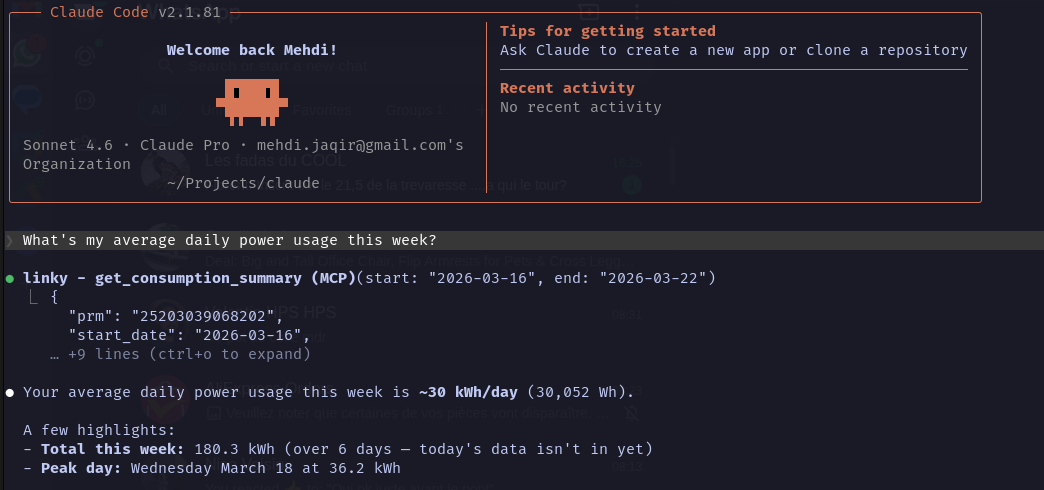
claude "Show me my electricity consumption for today"claude "What's my average daily power usage this week?"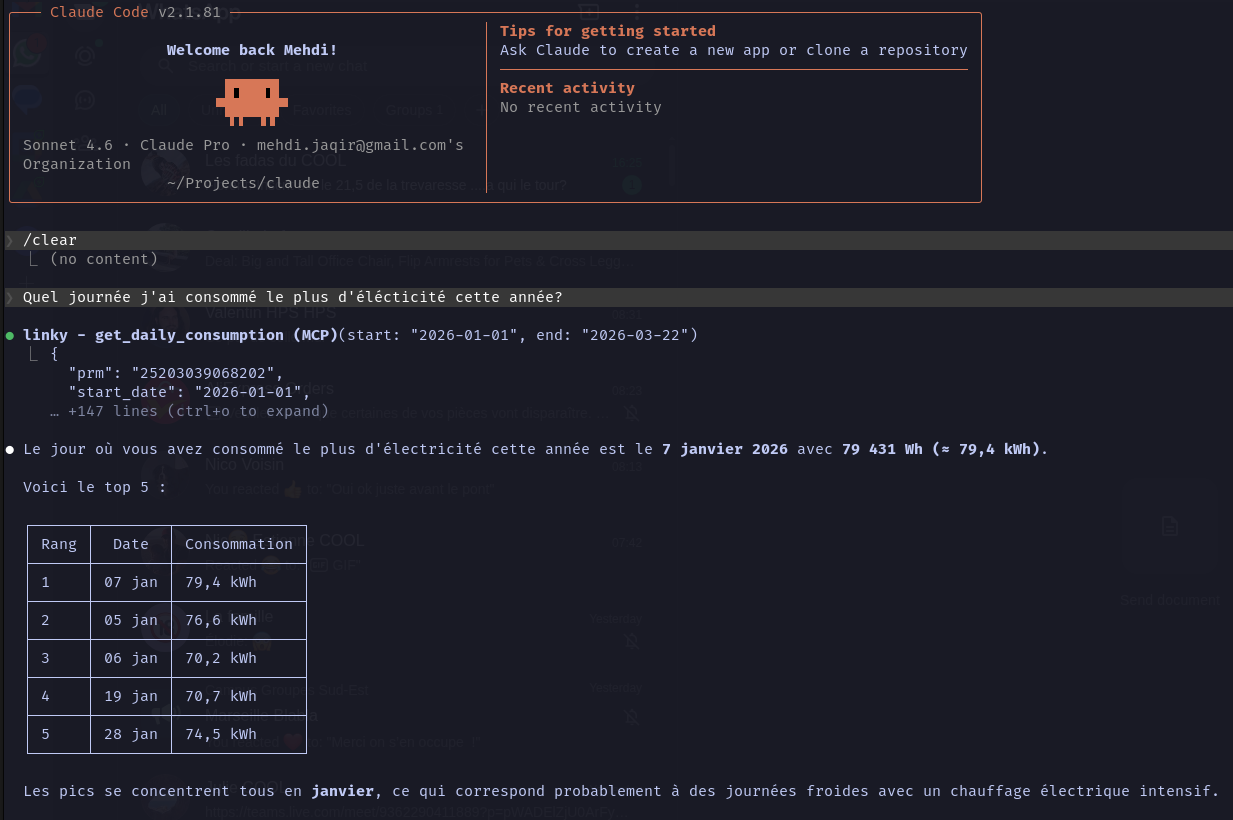
Docker
docker run --rm \
  --env-file .env.local \
  -p 8080:8080 \
  ghcr.io/mjrgr/enedis-linky-mcp-server:latest
Build locally with Podman
podman build -t enedis-linky-mcp -f Containerfile .
podman run --rm \
  --env-file .env.local \
  -p 8080:8080 \
  enedis-linky-mcp
Dashboard
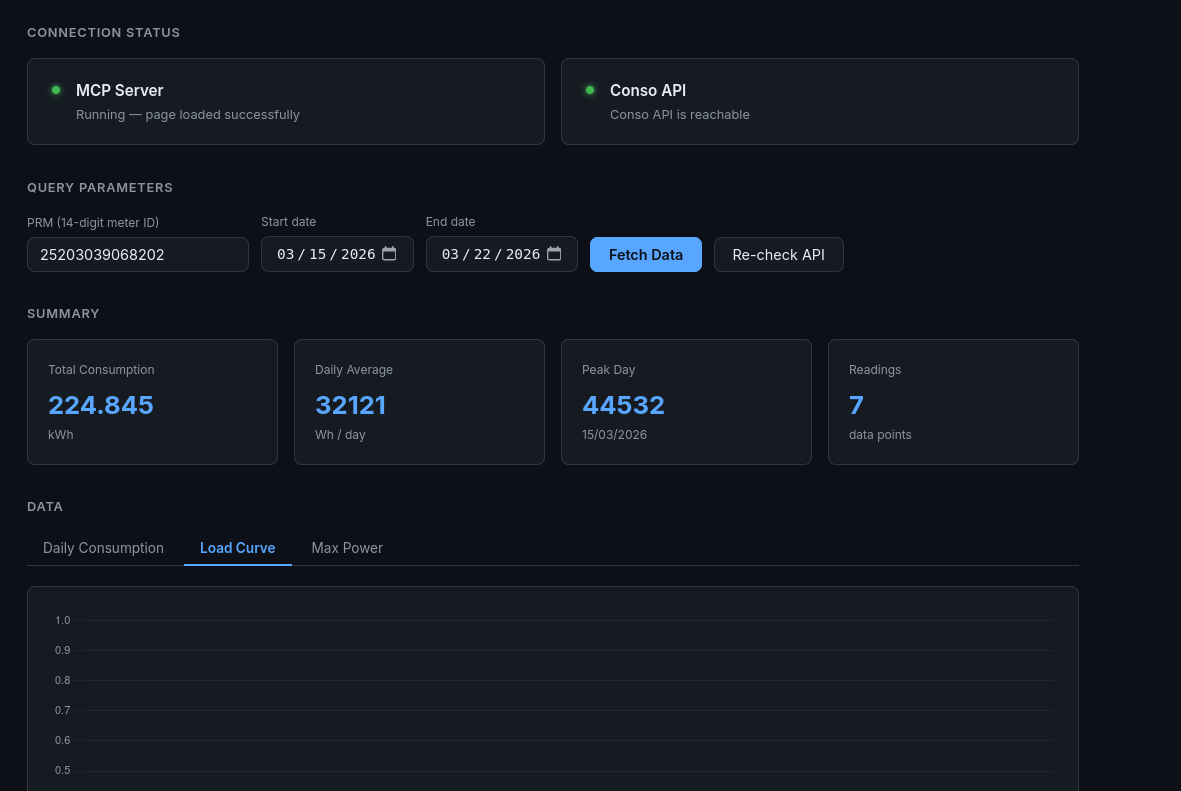
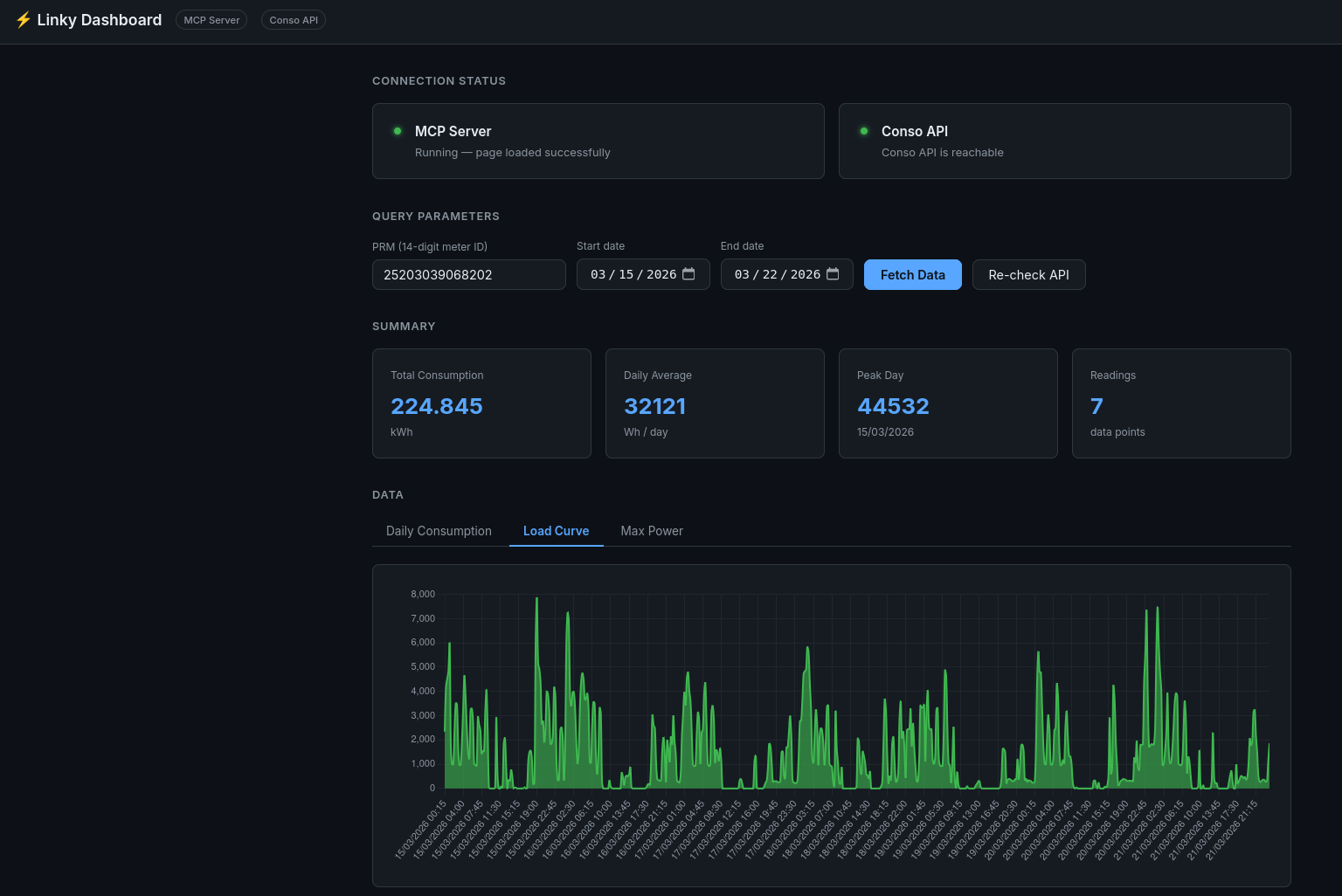
Enable the built-in web dashboard to test your API connection and visualize meter data
directly in the browser — no Claude client required.
export CONSO_API_TOKEN=your_token_here
export LINKY_DASHBOARD=true
export LINKY_PRM=12345678901234   # optional — pre-fills the PRM field in the dashboard
./bin/enedis-linky-mcp-server
# Dashboard available at http://localhost:8081
The dashboard provides:
- Connection status — MCP server health + live Conso API reachability check
- Summary stats — total kWh, daily average, peak day, reading count
- Daily Consumption chart (bar)
- Load Curve chart (30-minute intervals, line)
- Max Power chart (bar)
With Docker
docker run --rm \
  -e CONSO_API_TOKEN=your_token_here \
  -e LINKY_PRM=12345678901234 \
  -e LINKY_DASHBOARD=true \
  -e MCP_TRANSPORT=sse \
  -p 8080:8080 \
  -p 8081:8081 \
  ghcr.io/mjrgr/enedis-linky-mcp-server:latest
The dashboard runs on a separate port from the MCP SSE transport so both can coexist.
Configuration
| Variable | Required | Default | Description |
|---|---|---|---|
| `CONSO_API_TOKEN` | Yes | — | Conso API bearer token (get yours at conso.boris.sh) |
| `LINKY_PRM` | No | — | Default PRM (14-digit meter identifier). When set, the `prm` parameter becomes optional in all MCP tool calls and is pre-filled in the dashboard. |
| `MCP_TRANSPORT` | No | `stdio` | `stdio` (Claude Desktop) or `sse` (HTTP server) |
| `PORT` | No | `8080` | HTTP port for SSE transport |
| `LOG_LEVEL` | No | `info` | Log level: `debug`, `info`, `warn`, `error` |
| `CONSO_API_BASE_URL` | No | `https://conso.boris.sh/api` | API base URL override (for testing) |
| `LINKY_DASHBOARD` | No | `false` | Set to `true` to enable the web dashboard |
| `LINKY_DASH_ADDR` | No | `:8081` | Listen address for the dashboard (e.g. `:8081`) |
> Copy `.env.example` to `.env.local` and fill in your values for local development.
Security
> 🔒 Security Best Practices
- Never commit real API tokens to version control. Use environment variables or `.env.local` for local development.
- Rotate your token if you suspect it is compromised — regenerate it at conso.boris.sh.
- Report vulnerabilities by opening a security issue or emailing the maintainers.
MCP Tools Reference
| Tool | Description |
|---|---|
| `get_daily_consumption` | Daily electricity consumption (Wh) for a date range |
| `get_load_curve` | 30-minute average power readings (W) |
| `get_max_power` | Maximum power reached each day (VA) |
| `get_daily_production` | Daily solar production (Wh) for solar installations |
| `get_production_load_curve` | 30-minute average production power readings (W) |
All tools accept a PRM (meter identifier) and a date range as parameters.
The `prm` parameter is optional when `LINKY_PRM` is set as an environment variable.
Project Structure
enedis-linky-mcp-server/
├── cmd/
│   └── server/
│       └── main.go            # Entrypoint — wires config, client, service, MCP server
├── internal/
│   ├── config/
│   │   └── config.go          # ENV-based configuration with validation
│   ├── client/
│   │   └── client.go          # Typed HTTP client — retry, backoff, User-Agent
│   ├── service/
│   │   └── service.go         # Business logic — validation, aggregation
│   └── mcp/
│       ├── server.go          # MCP server lifecycle (stdio / SSE transport)
│       └── tools.go           # Tool definitions & handlers
├── .github/
│   └── workflows/
│       ├── ci.yml             # lint → test → build
│       └── release.yml        # GoReleaser + Docker (triggered on tags)
├── Containerfile              # Multi-stage, distroless final image
├── Makefile                   # Developer shortcuts
├── .env.example               # Configuration template
└── go.mod
Development
# Install dependencies
go mod download

# Run tests
make test

# Lint
make lint

# Build for all platforms
make build

# Build container image
podman build -f Containerfile .
Troubleshooting
> ℹ️ Check that your `CONSO_API_TOKEN` is valid and your PRM is authorized
> in your conso.boris.sh account before reporting issues.
- Q: I get `401 Unauthorized` errors.
- A: Your token is invalid or expired. Regenerate it at conso.boris.sh.
- Q: I get `403 Forbidden` errors.
- A: Your PRM is not authorized on your Conso API account. Make sure you've added and confirmed it.
- Q: No data is returned for my date range.
- A: Ensure *Collecte de la consommation horaire* is enabled on your Enedis account and that the date range is not in the future.
- Q: Claude CLI can't connect to the MCP server.
- A: Ensure the server is running and the address/port matches your CLI config. Check firewall or container port mappings.
- Q: I get rate limit errors.
- A: The Conso API allows 5 req/s and 10k req/h. The server retries automatically, but reduce query frequency if errors persist.
Community & Support
- GitHub Issues — bug reports and feature requests
- Discussions — Q&A, ideas, and community help
Contributing
Contributions are welcome! To get started:
1. Fork the repository
2. Create a new branch for your feature or fix
3. Make your changes and add tests if needed
4. Open a pull request with a clear description
Please see CONTRIBUTING.md or open an issue to discuss major changes first.
License
Acknowledgements
Frequently asked questions
What is enedis-linky-mcp-server?
enedis-linky-mcp-server is Enedis Linky MCP Server
How do I install enedis-linky-mcp-server?
Open the GitHub repository and follow its README. Most MCP servers are added to your client's MCP config, then called by your agent.
Is enedis-linky-mcp-server open source?
Yes — it is hosted on GitHub at https://github.com/mjrgr/enedis-linky-mcp-server and has 1 stars.
Related MCP tools
 kubeshark
eBPF-powered network observability for Kubernetes. Indexes L4/L7 traffic with full K8s context, decrypts TLS without keys. Queryable by AI agents via MCP and humans via dashboard.
 go-whatsapp-web-multidevice
GOWA - WhatsApp REST API with support for UI, Multi Account, Webhooks, and MCP, and Chatwoot. Built with Golang for efficient memory use.
 radar
radarThe missing open-source Kubernetes UI with a built-in MCP server for AI agents. See what's broken, why, and what changed. Issues, Topology, event timeline, Helm, GitOps, live service traffic, and cluster audits - all in one Go binary.
 mcp-language-server
mcp-language-server gives MCP enabled clients access semantic tools like get definition, references, rename, and diagnostics.
 terraform-mcp-server
The Terraform MCP Server provides seamless integration with Terraform ecosystem, enabling advanced automation and interaction capabilities for Infrastructure as Code (IaC) development.
 matlab-mcp-server
Run MATLAB® using AI applications with the official MATLAB MCP Server from MathWorks®. This MCP server for MATLAB supports a wide range of coding agents like Claude Code® and Visual Studio® Code.
Run your own MCP server? See who uses it and what to fix.
Measure it with TrackMCP