
freecad-mcp
FreeCAD MCP(Model Context Protocol) server Python-based implementation.
Documentation
FreeCAD MCP
This repository is a FreeCAD MCP that allows you to control FreeCAD from Claude Desktop.
Demo
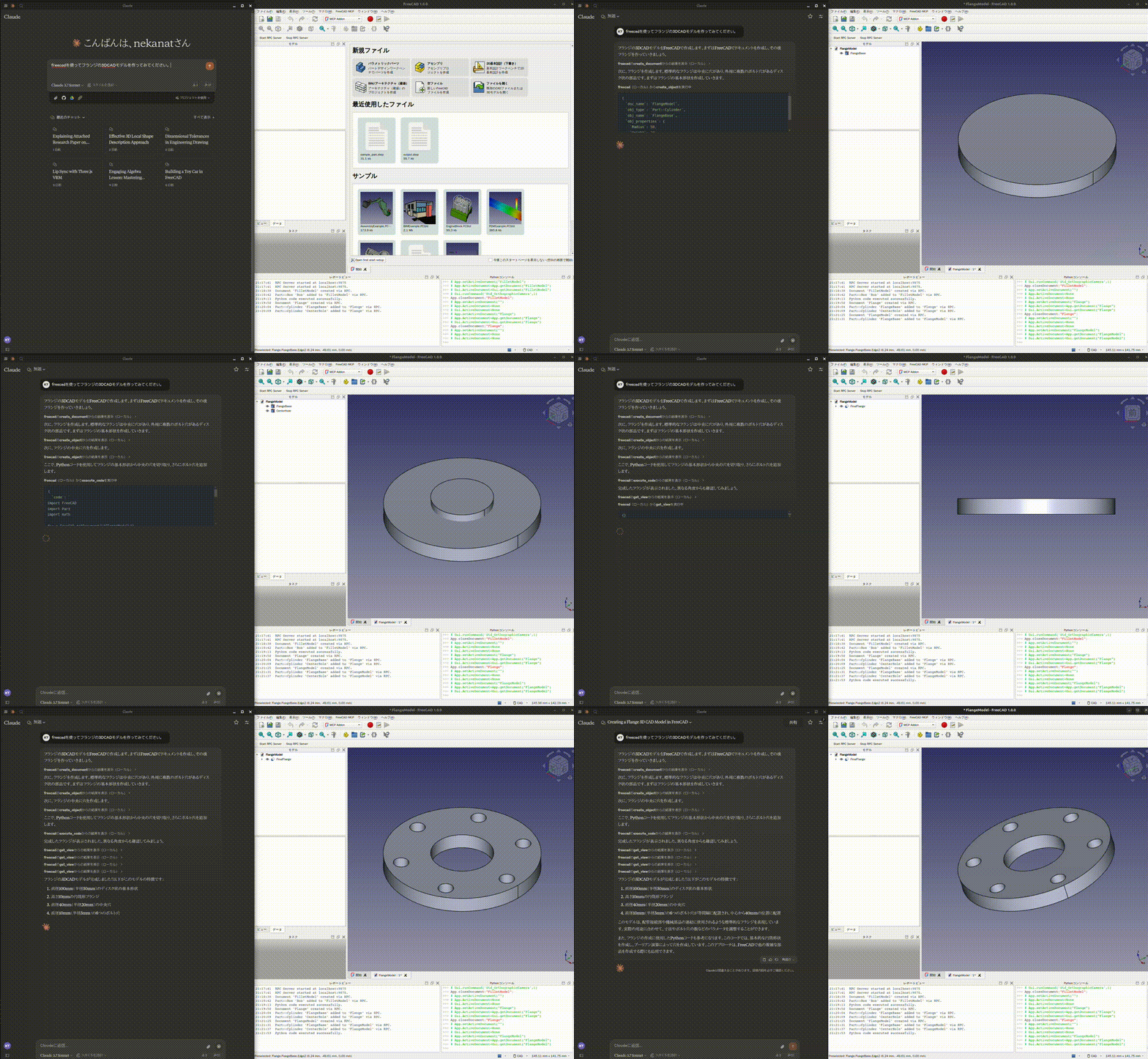
Design a flange
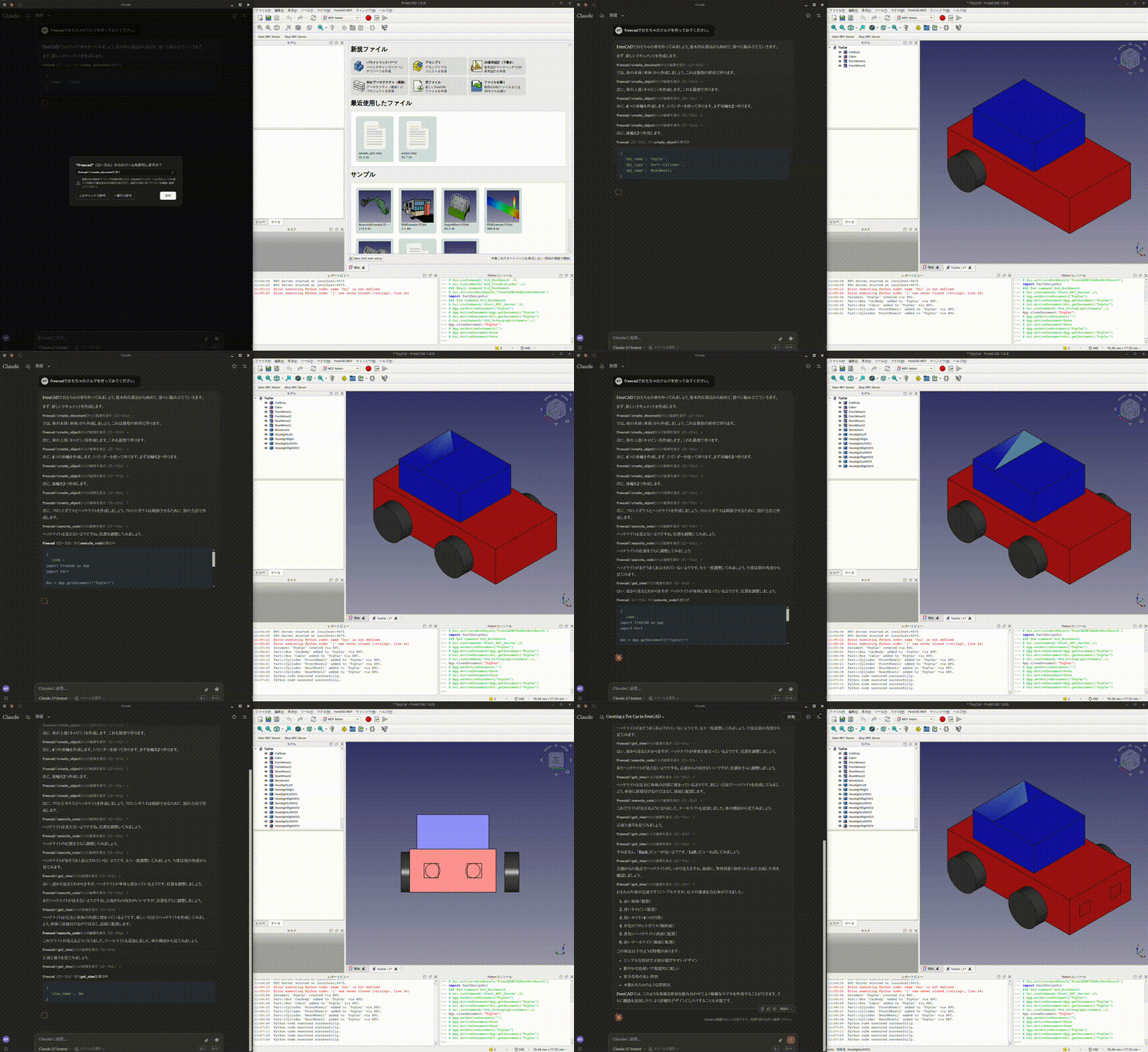
Design a toy car
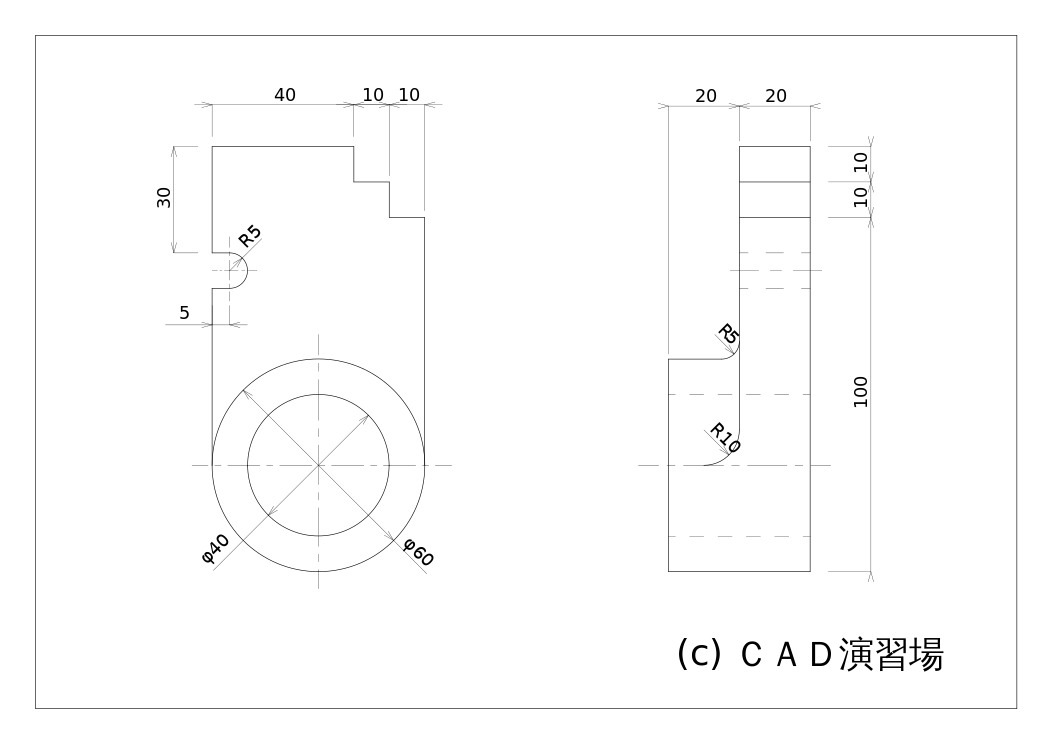
Design a part from 2D drawing
Input 2D drawing
Demo
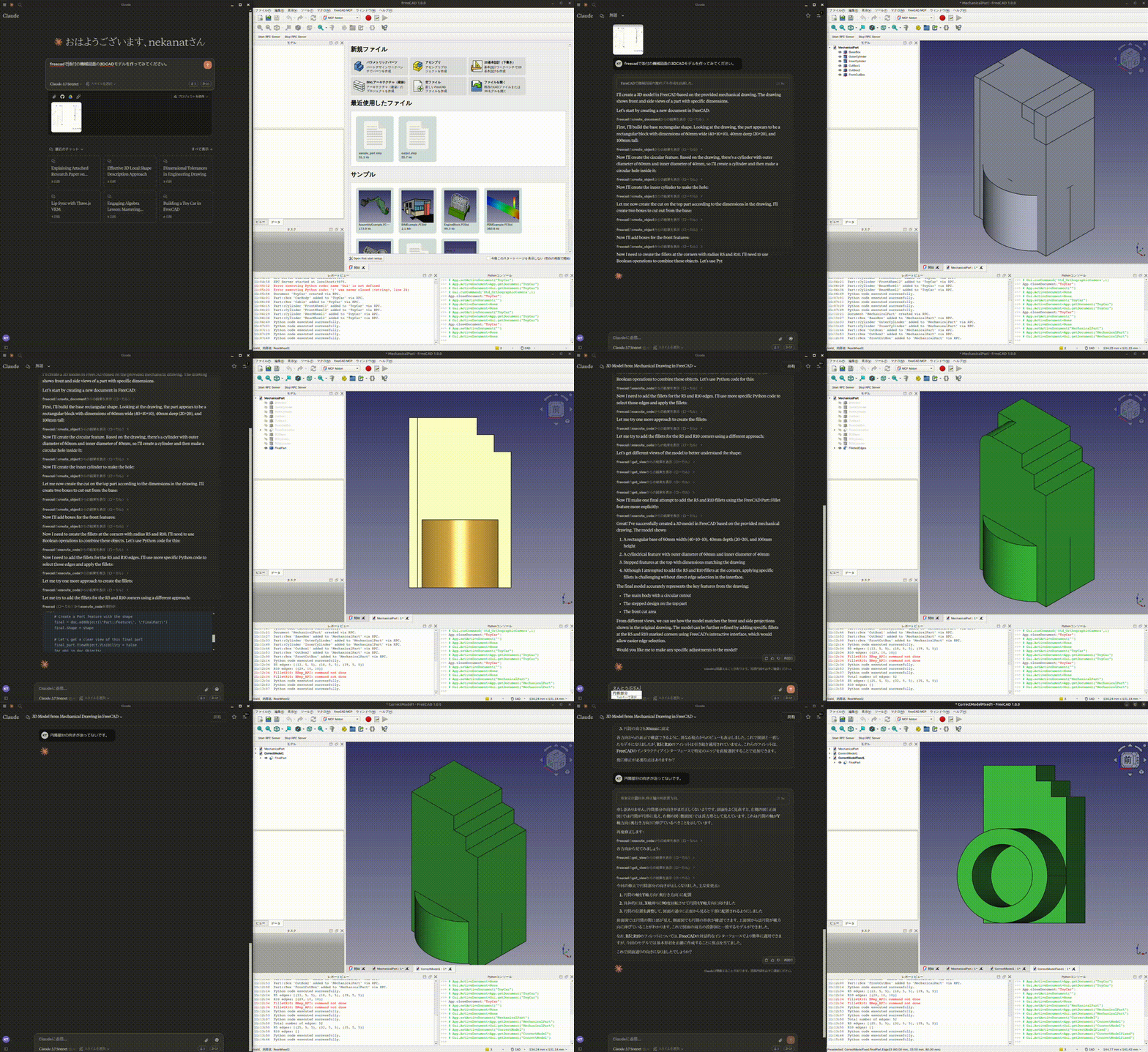
This is the conversation history.
https://claude.ai/share/7b48fd60-68ba-46fb-bb21-2fbb17399b48
Install addon
FreeCAD Addon directory is
- Windows: `%APPDATA%\FreeCAD\Mod\`
- Mac:
- FreeCAD 1.1: `~/Library/Application\ Support/FreeCAD/v1-1/Mod/`
- FreeCAD 1.0: `~/Library/Application\ Support/FreeCAD/v1-0/Mod/`
- Linux:
- Ubuntu: `~/.FreeCAD/Mod/` or `~/snap/freecad/common/Mod/` (if you install FreeCAD from snap)
- Debian: `~/.local/share/FreeCAD/Mod`
- Arch / CachyOS (FreeCAD 1.1 from `extra/freecad`): `~/.local/share/FreeCAD/v1-1/Mod/`
- Flatpak: `~/.var/app/org.freecad.FreeCAD/data/FreeCAD/v1-1/Mod/`
Please put `addon/FreeCADMCP` directory to the addon directory.
git clone https://github.com/neka-nat/freecad-mcp.git
cd freecad-mcp

# For Linux (Ubuntu/Debian)
mkdir -p ~/.FreeCAD/Mod/
cp -r addon/FreeCADMCP ~/.FreeCAD/Mod/

# For Linux (Arch/CachyOS, FreeCAD 1.1 from extra/freecad)
mkdir -p ~/.local/share/FreeCAD/v1-1/Mod/
cp -r addon/FreeCADMCP ~/.local/share/FreeCAD/v1-1/Mod/

# For Linux (Flatpak)
mkdir -p ~/.var/app/org.freecad.FreeCAD/data/FreeCAD/v1-1/Mod/
cp -r addon/FreeCADMCP ~/.var/app/org.freecad.FreeCAD/data/FreeCAD/v1-1/Mod/

# For macOS (FreeCAD 1.1)
mkdir -p ~/Library/Application\ Support/FreeCAD/v1-1/Mod/
cp -r addon/FreeCADMCP ~/Library/Application\ Support/FreeCAD/v1-1/Mod/
When you install addon, you need to restart FreeCAD.
You can select "MCP Addon" from Workbench list and use it.
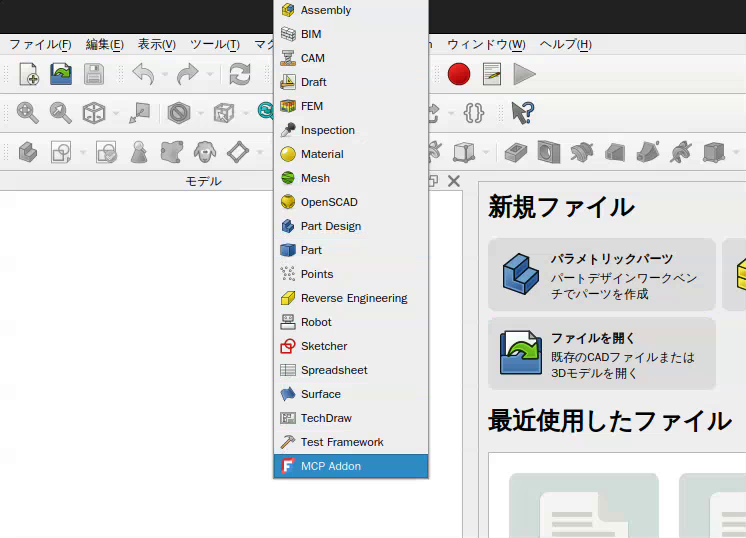
And you can start RPC server by "Start RPC Server" command in "FreeCAD MCP" toolbar.
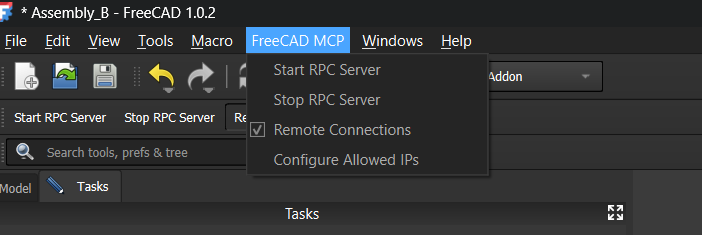
Auto-Start RPC Server
By default, the RPC server must be started manually each time FreeCAD opens. To start it automatically:
1. Open the FreeCAD MCP menu (switch to the MCP Addon workbench first)
2. Check Auto-Start Server
The setting is saved to `freecad_mcp_settings.json` and persists across sessions. On the next FreeCAD launch, the RPC server will start automatically once the application finishes loading.
You can disable it at any time by unchecking Auto-Start Server in the same menu.
Setting up Claude Desktop
Pre-installation of the uvx is required.
And you need to edit Claude Desktop config file, `claude_desktop_config.json`.
For user.
{
  "mcpServers": {
    "freecad": {
      "command": "uvx",
      "args": [
        "freecad-mcp"
      ]
    }
  }
}
If you want to save token, you can set `only_text_feedback` to `true` and use only text feedback.
{
  "mcpServers": {
    "freecad": {
      "command": "uvx",
      "args": [
        "freecad-mcp",
        "--only-text-feedback"
      ]
    }
  }
}
Screenshots can also be controlled per tool call instead of globally: every tool that returns a screenshot accepts an optional `include_screenshot` parameter (pass `false` to get text-only feedback, e.g. for analytical scripts or intermediate steps) and an optional `view_name` parameter to orient the screenshot ("Isometric" by default, or "Front", "Top", "Right", etc.). The `--only-text-feedback` flag always wins: when it is set, no screenshots are returned regardless of `include_screenshot`.
For developer.
First, you need clone this repository.
git clone https://github.com/neka-nat/freecad-mcp.git{
"mcpServers": {
"freecad": {
"command": "uv",
"args": [
"--directory",
"/path/to/freecad-mcp/",
"run",
"freecad-mcp"
]
}
}
}Remote Connections
By default the RPC server does not accept remote connections and listens on `localhost`. To control FreeCAD from another machine on your network:
1. Enable remote connections in FreeCAD
In the FreeCAD MCP toolbar:
1. Check Remote Connections — the RPC server will bind to `0.0.0.0` (all interfaces) on the next restart. For security reasons, it only accepts connections from the IP addresses or CIDR subnets specified in the Allowed IPs field. By default this is `127.0.0.1`.
2. Click Configure Allowed IPs and enter a comma-separated list of IP addresses or CIDR subnets that are allowed to connect, e.g.:
192.168.1.100, 10.0.0.0/24`127.0.0.1` is always the default. Invalid entries are rejected with an error dialog. Restart the RPC server after changing these settings.
2. Point the MCP server at the remote host
Pass the `--host` flag with the IP address or hostname of the machine running FreeCAD:
{
  "mcpServers": {
    "freecad": {
      "command": "uvx",
      "args": [
        "freecad-mcp",
        "--host", "192.168.1.100"
      ]
    }
  }
}
The `--host` value is validated on startup — it must be a valid IPv4/IPv6 address or hostname.
Tools
- `create_document`: Create a new document in FreeCAD.
- `create_object`: Create a new object in FreeCAD.
- `edit_object`: Edit an object in FreeCAD.
- `delete_object`: Delete an object in FreeCAD.
- `execute_code`: Execute arbitrary Python code in FreeCAD.
- `insert_part_from_library`: Insert a part from the parts library.
- `get_view`: Get a screenshot of the active view.
- `get_objects`: Get all objects in a document.
- `get_object`: Get an object in a document.
- `get_parts_list`: Get the list of parts in the parts library.
- `get_rpc_status`: Report RPC and GUI-dispatch health without using the FreeCAD GUI thread.
- `run_fem_analysis`: Run the CalculiX solver on an existing `Fem::FemAnalysis` and return summary results (max von Mises stress, max displacement, node count, working directory). Auto-creates a `SolverCcxTools` if the analysis has none. See `examples/cantilever_fem.py` for an end-to-end usage example.
Tools that return a screenshot (`create_object`, `edit_object`, `delete_object`, `execute_code`, `insert_part_from_library`, `get_objects`, `get_object`, `run_fem_analysis`) accept optional `include_screenshot` (default `true`) and `view_name` (default `"Isometric"`) parameters to suppress or reorient the returned image per call.
GUI dispatch timeouts
If a GUI-thread operation exceeds its timeout after it has started, the bridge
returns `GUI_DISPATCH_STUCK` and rejects later GUI operations immediately. Use
`get_rpc_status` to identify the operation that is still running. FreeCAD GUI
work cannot be force-cancelled safely; if the status does not return to
`healthy` after the operation finishes, restart FreeCAD.
After an `execute_code` exception on a FreeCAD development build, inspect any
new `FeaturePython` object before mutating or deleting it. In particular, do
not continue with an object whose required `Proxy` was never installed, as
touching that broken object can wedge FreeCAD's GUI thread.
Contributors
Made with contrib.rocks.
Frequently asked questions
What is freecad-mcp?
freecad-mcp is FreeCAD MCP(Model Context Protocol) server Python-based implementation.
How do I install freecad-mcp?
Open the GitHub repository and follow its README. Most MCP servers are added to your client's MCP config, then called by your agent.
Is freecad-mcp open source?
Yes — it is hosted on GitHub at https://github.com/neka-nat/freecad-mcp and has 360 stars.
Related MCP tools
 wcgw
wcgwShell and coding agent on claude desktop app for the Model Context Protocol. Enhance AI assistants with powerful integrations. Python-based implementation.
 vibetest-use
Vibetest MCP - automated QA testing using Browser-Use agents Python-based implementation. Trusted by 500+ developers. Trusted by 500+ developers.
 linkedin-mcp-server
This MCP server allows Claude and other AI assistants to access your LinkedIn. Scrape LinkedIn profiles and companies, get your recommended jobs, and perform...
 fastapi_mcp
Expose your FastAPI endpoints as Model Context Protocol (MCP) tools, with Auth! Python-based implementation. Trusted by 11000+ developers.
 upsonic
Agent Framework For Fintech for the Model Context Protocol. Enhance AI assistants with powerful integrations. Python-based implementation.
 basic-memory
AI conversations that actually remember. Never re-explain your project to Claude again. Local-first, integrates with Obsidian.
Run your own MCP server? See who uses it and what to fix.
Measure it with TrackMCP