
simple-psql-mcp
A beginner-friendly MCP server template featuring a PostgreSQL connector with clean, easy-to-understand code. Perfect for developers new to Model Context Protocol who want to experiment and create their own AI tool connectors with minimal setup.
Documentation
Simple PostgreSQL MCP Server
This is a template project for those looking to build their own MCP servers. I designed it to be dead simple to understand and adapt - the code is straightforward with MCP docs attached so you can quickly get up to speed.
What is MCP?
*TL;DR - It's a way to write plugins for AI*
Model Context Protocol (MCP) is a standard way for LLMs to interact with external tools and data. In a nutshell:
- Tools allow the LLM to execute commands (like running a database query)
- Resources are data you can attach to conversations (like attaching a file to a prompt)
- Prompts are templates that generate consistent LLM instructions
Features
This PostgreSQL MCP server implements:
1. Tools
2. Resources
3. Prompts
Prerequisites
- Python 3.8+
- uv - Modern Python package manager and installer
- npx (included with Node.js)
- PostgreSQL database you can connect to
Quick Setup
1. Create a virtual environment and install dependencies:
# Create a virtual environment with uv
   uv venv

   # Activate the virtual environment
   source .venv/bin/activate  # On Windows: .venv\Scripts\activate

   # Install dependencies
   uv pip install -r requirements.txt
2. Run the server with the MCP Inspector:
# Replace with YOUR actual database credentials
   npx @modelcontextprotocol/inspector uv --directory . run postgres -e DSN=postgresql://username:password@hostname:port/database -e SCHEMA=public
> Note: If this is your first time running npx, you'll be prompted to approve the installation. Type 'y' to proceed.
After running this command, you'll see the MCP Inspector interface launched in your browser. You should see a message like:
MCP Inspector is up and running at http://localhost:5173If the browser doesn't open automatically, copy and paste the URL into your browser. You should see something like this:
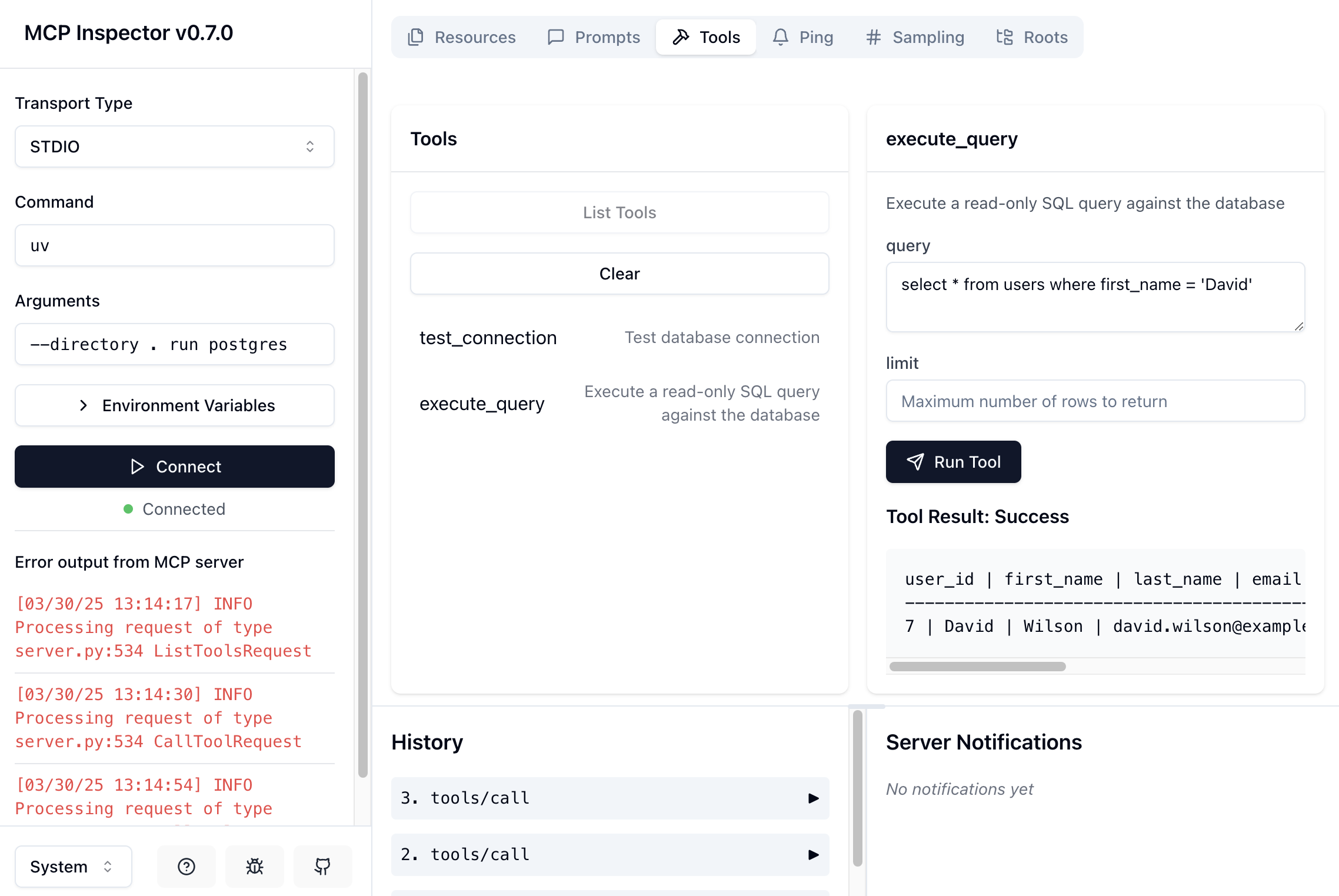
3. Using the Inspector:
4. Take a look at the official docs
Official server developers guide: https://modelcontextprotocol.io/quickstart/server
More on the inspector: https://modelcontextprotocol.io/docs/tools/inspector
Connect Your AI Tool to the Server
You can configure the MCP server for your AI assistant by creating an MCP configuration file:
{
   "mcpServers": {
      "postgres": {
         "command": "/path/to/uv",
         "args": [
            "--directory",
            "/path/to/simple-psql-mcp",
            "run",
            "postgres"
         ],
         "env": {
            "DSN": "postgresql://username:password@localhost:5432/my-db",
            "SCHEMA": "public"
         }
      }
   }
}
Alternatively, you can generate this config file using the included script:
# Make the script executable
chmod +x generate_mcp_config.sh

# Run the configuration generator
./generate_mcp_config.sh
When prompted, enter your PostgreSQL DSN and schema name.
How to use it
You can now ask the LLM questions about your data in natural language:
- "What are all the tables in my database?"
- "Show me the top 5 users by creation date"
- "Count addresses by state"
For testing, Claude Desktop supports MCP natively and works with all features (tools, resources, and prompts) right out of the box.
Example Database (Optional)
If you don't have a database ready or encounter connection issues, you can use the included example database:
# Make the script executable
chmod +x example-db/create-db.sh

# Run the database setup script
./example-db/create-db.sh
This script creates a Docker container with a PostgreSQL database pre-populated with sample users and addresses tables. After running, you can connect using:
npx @modelcontextprotocol/inspector uv --directory . run postgres -e DSN=postgresql://postgres:postgres@localhost:5432/user_database -e SCHEMA=publicNext Steps
To extend this project with your own MCP servers:
1. Create a new directory under `/src` (e.g., `/src/my-new-mcp`)
2. Implement your MCP server following the PostgreSQL example
3. Add your new MCP to `pyproject.toml`:
[project.scripts]
postgres = "src.postgres:main"
my-new-mcp = "src.my-new-mcp:main"
You can then run your new MCP with:
npx @modelcontextprotocol/inspector uv --directory . run my-new-mcpDocumentation
- MCP docs included for easy LLM development
- Based on the approach at: https://modelcontextprotocol.io/tutorials/building-mcp-with-llms
Security
This is an experimental project meant to empower developers to create their own MCP server. I did minimum to make sure it won't die immediately when you try it, but be careful - it's very easy to run SQL injections with this tool. The server will check if the query starts with SELECT, but beyond that nothing is guaranteed. TL;DR - don't run in production unless you're the founder and there are no paying clients.
License
MIT
Frequently asked questions
What is simple-psql-mcp?
simple-psql-mcp is A beginner-friendly MCP server template featuring a PostgreSQL connector with clean, easy-to-understand code. Perfect for developers new to Model Context Protocol who want to experiment and create their own AI tool connectors with minimal setup.
How do I install simple-psql-mcp?
Open the GitHub repository and follow its README. Most MCP servers are added to your client's MCP config, then called by your agent.
Is simple-psql-mcp open source?
Yes — it is hosted on GitHub at https://github.com/NetanelBollag/simple-psql-mcp and has 31 stars.
Related MCP tools
 mcp
mcpAWS MCP Servers — helping you get the most out of AWS, wherever you use MCP. Python-based implementation. Trusted by 6900+ developers.
 mcpo
mcpoA simple, secure MCP-to-OpenAPI proxy server Python-based implementation. Trusted by 3500+ developers. Trusted by 3500+ developers.
 mcp-obsidian
MCP server that interacts with Obsidian via the Obsidian rest API community plugin Python-based implementation. Trusted by 2300+ developers.
 mcp-cli
Default Configuration: MCP CLI defaults to using Ollama with the gpt-oss reasoning model for local, privacy-focused operation without requiring API keys.
 minimax-mcp
Official MiniMax Model Context Protocol (MCP) server that enables interaction with powerful Text to Speech, image generation and video generation APIs.
 mcp-mem0
MCP server for long term agent memory with Mem0. Also useful as a template to get you started building your own MCP server with Python!
Run your own MCP server? See who uses it and what to fix.
Measure it with TrackMCP