
notion-mcp-server
Official Notion MCP Server TypeScript-based implementation. Trusted by 3400+ developers. Trusted by 3400+ developers. Trusted by 3400+ developers.
Documentation
Notion MCP Server
> [!NOTE]
>
> We’ve introduced Notion MCP, a remote MCP server with the following improvements:
>
> - Easy installation via standard OAuth. No need to fiddle with JSON or API tokens anymore.
> - Powerful tools tailored to AI agents, including editing pages in Markdown. These tools are designed with optimized token consumption in mind.
>
> Learn more and get started at Notion MCP documentation.
>
> We are prioritizing, and only providing active support for, Notion MCP (remote). As a result:
>
> - We may sunset this local MCP server repository in the future.
> - Issues and pull requests here are not actively monitored.
> - Please do not file issues relating to the remote MCP here; instead, contact Notion support.
This project implements an MCP server for the Notion API.
⚠️ Version 2.0.0 breaking changes
Version 2.0.0 migrates to the Notion API 2025-09-03 which introduces data sources as the primary abstraction for databases.
What changed
Removed tools (3):
- `post-database-query` - replaced by `query-data-source`
- `update-a-database` - replaced by `update-a-data-source`
- `create-a-database` - replaced by `create-a-data-source`
New tools (7):
- `query-data-source` - Query a data source (database) with filters and sorts
- `retrieve-a-data-source` - Get metadata and schema for a data source
- `update-a-data-source` - Update data source properties
- `create-a-data-source` - Create a new data source
- `list-data-source-templates` - List available templates in a data source
- `move-page` - Move a page to a different parent location
- `retrieve-a-database` - Get database metadata including its data source IDs
Parameter changes:
- All database operations now use `data_source_id` instead of `database_id`
- Search filter values changed from `["page", "database"]` to `["page", "data_source"]`
- Page creation now supports both `page_id` and `database_id` parents (for data sources)
Do I need to migrate?
No code changes required. MCP tools are discovered automatically when the server starts. When you upgrade to v2.0.0, AI clients will automatically see the new tool names and parameters. The old database tools are no longer available.
If you have hardcoded tool names or prompts that reference the old database tools, update them to use the new data source tools:
| Old Tool (v1.x) | New Tool (v2.0) | Parameter Change |
|---|---|---|
| `post-database-query` | `query-data-source` | `database_id` → `data_source_id` |
| `update-a-database` | `update-a-data-source` | `database_id` → `data_source_id` |
| `create-a-database` | `create-a-data-source` | No change (uses `parent.page_id`) |
> Note: `retrieve-a-database` is still available and returns database metadata including the list of data source IDs. Use `retrieve-a-data-source` to get the schema and properties of a specific data source.
Total tools now: 22 (was 19 in v1.x)
Page content as Markdown
The server exposes two tools for working with page content as enhanced Markdown instead of block JSON, which is significantly more token-efficient for AI agents:
- `retrieve-page-markdown` — Read a page's full content as Markdown (`GET /v1/pages/{page_id}/markdown`). Pass `include_transcript: true` to inline meeting-note transcripts.
- `update-page-markdown` — Edit a page's content with Markdown (`PATCH /v1/pages/{page_id}/markdown`). Prefer `replace_content` to overwrite the whole page, or `update_content` for targeted find-and-replace edits.
These endpoints require Notion API version `2026-03-11`. The server now sources the `Notion-Version` header per operation from the OpenAPI spec, so these tools use `2026-03-11` while the rest of the API continues to use `2025-09-03` — no configuration needed. If you set `Notion-Version` yourself via `OPENAPI_MCP_HEADERS`, your value takes precedence for every tool.
Installation
1. Setting up integration in Notion
Go to https://www.notion.so/profile/integrations and create a new internal integration or select an existing one.
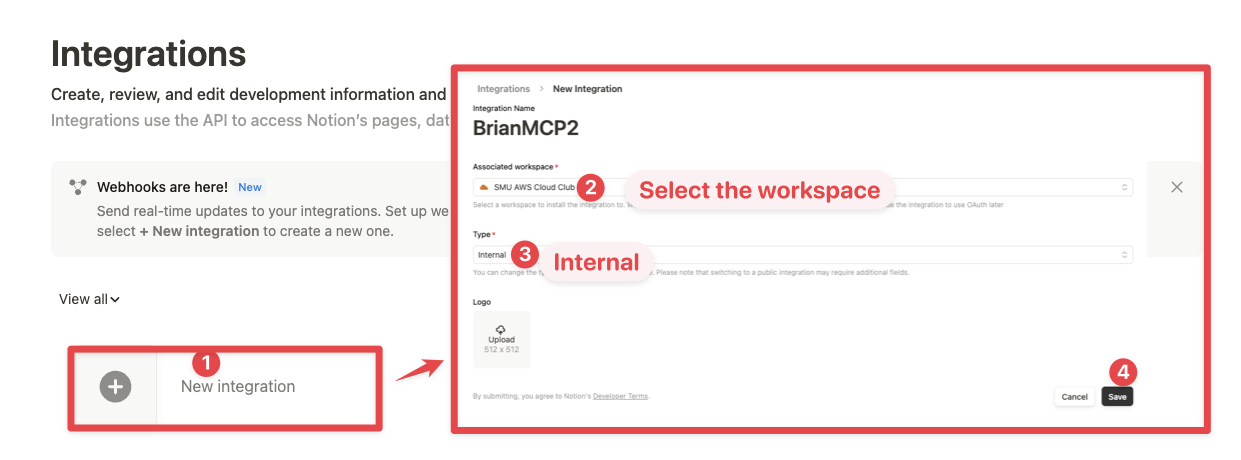
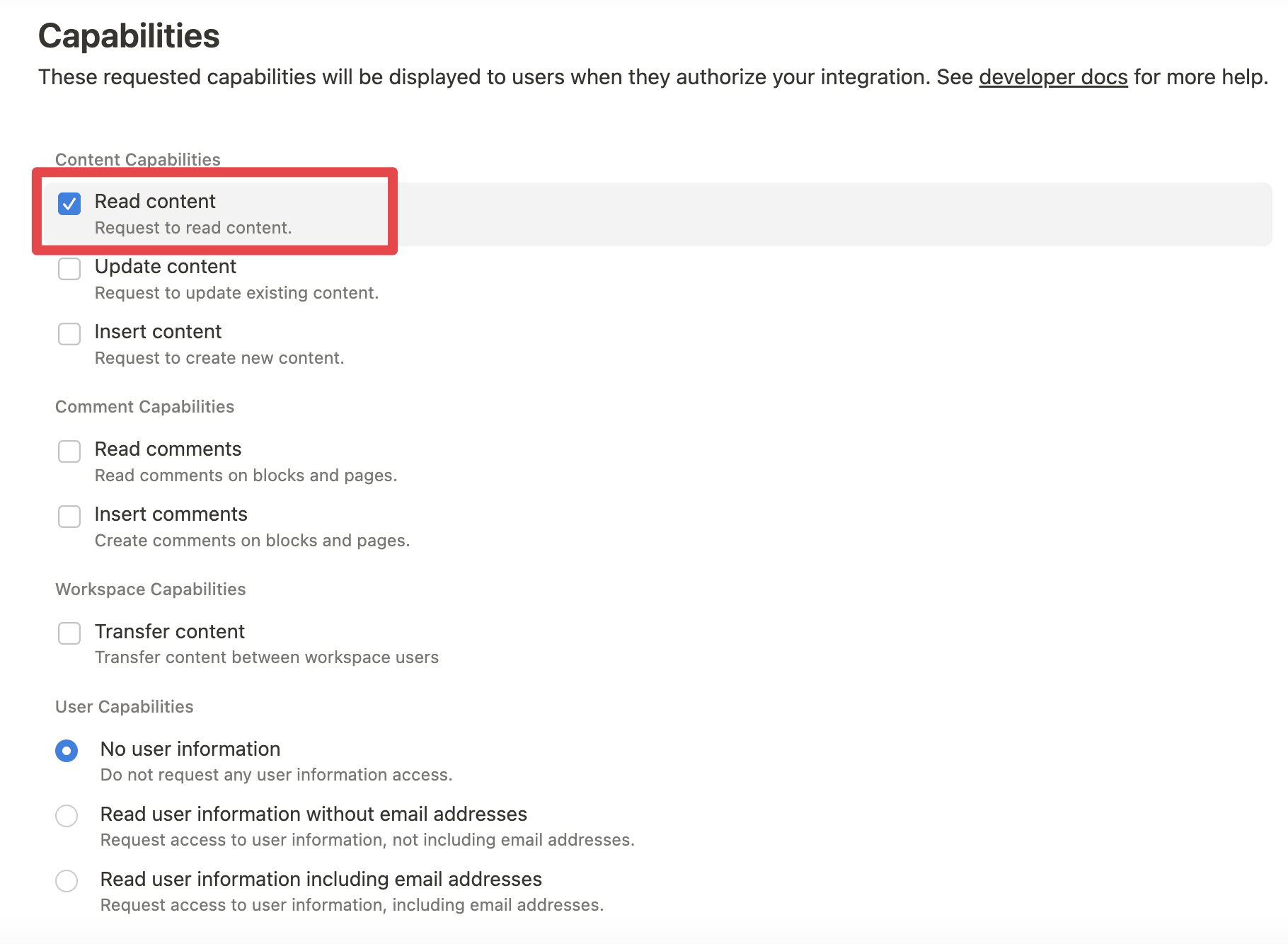
While we limit the scope of Notion API's exposed (for example, you will not be able to delete databases via MCP), there is a non-zero risk to workspace data by exposing it to LLMs. Security-conscious users may want to further configure the Integration's _Capabilities_.
For example, you can create a read-only integration token by giving only "Read content" access from the "Configuration" tab:
2. Connecting content to integration
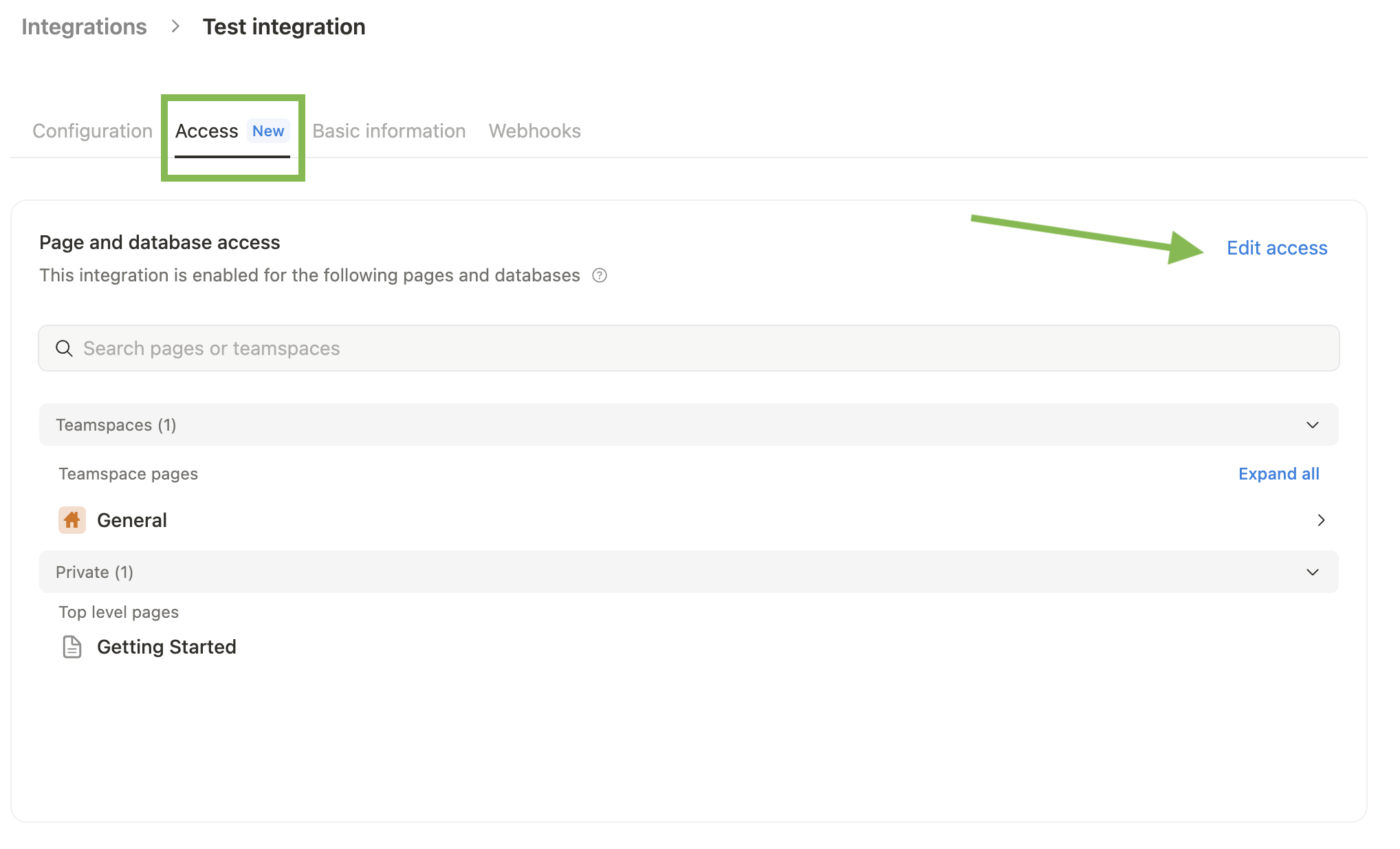
Ensure relevant pages and databases are connected to your integration.
To do this, visit the Access tab in your internal integration settings. Edit access and select the pages you'd like to use.
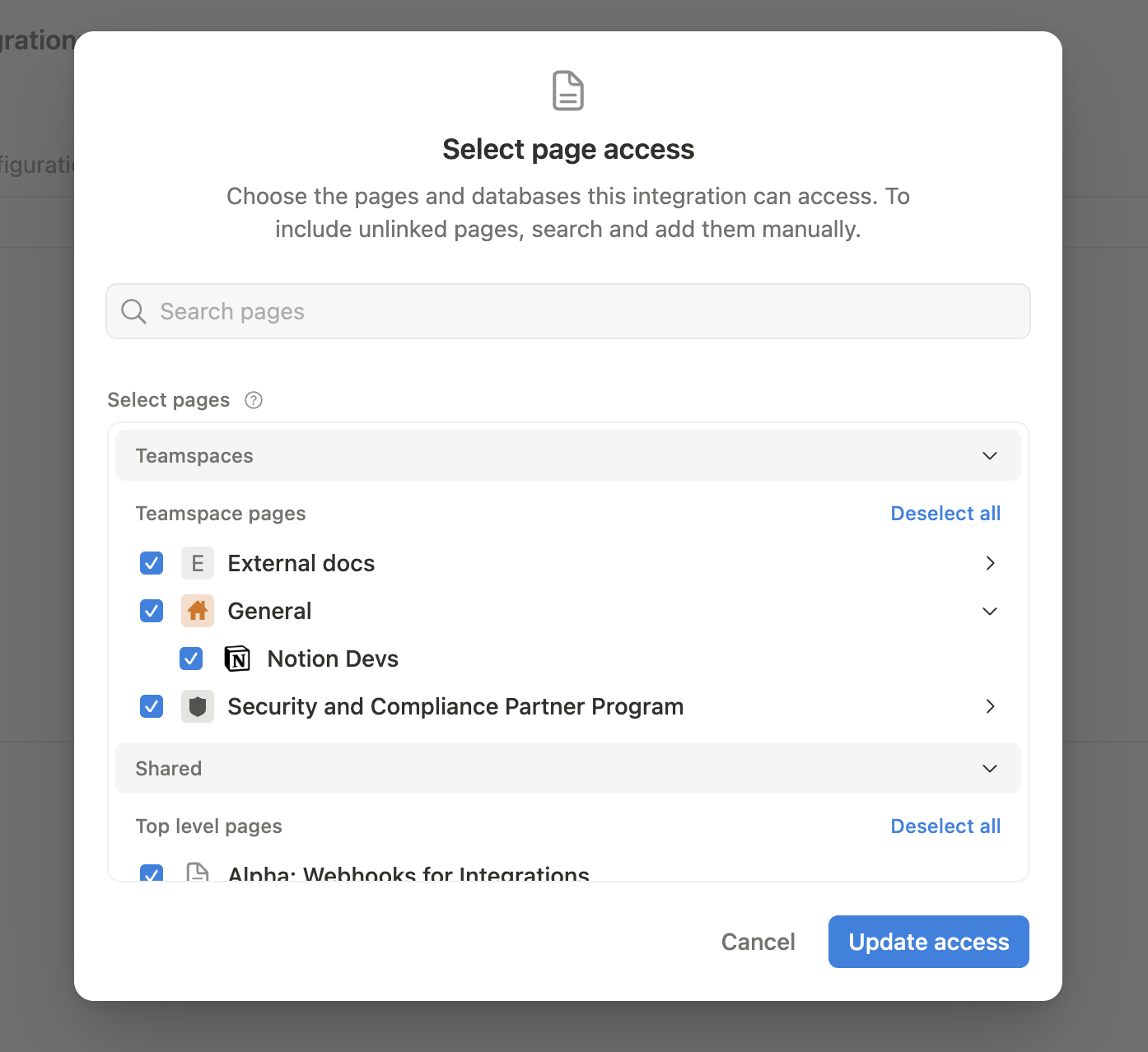
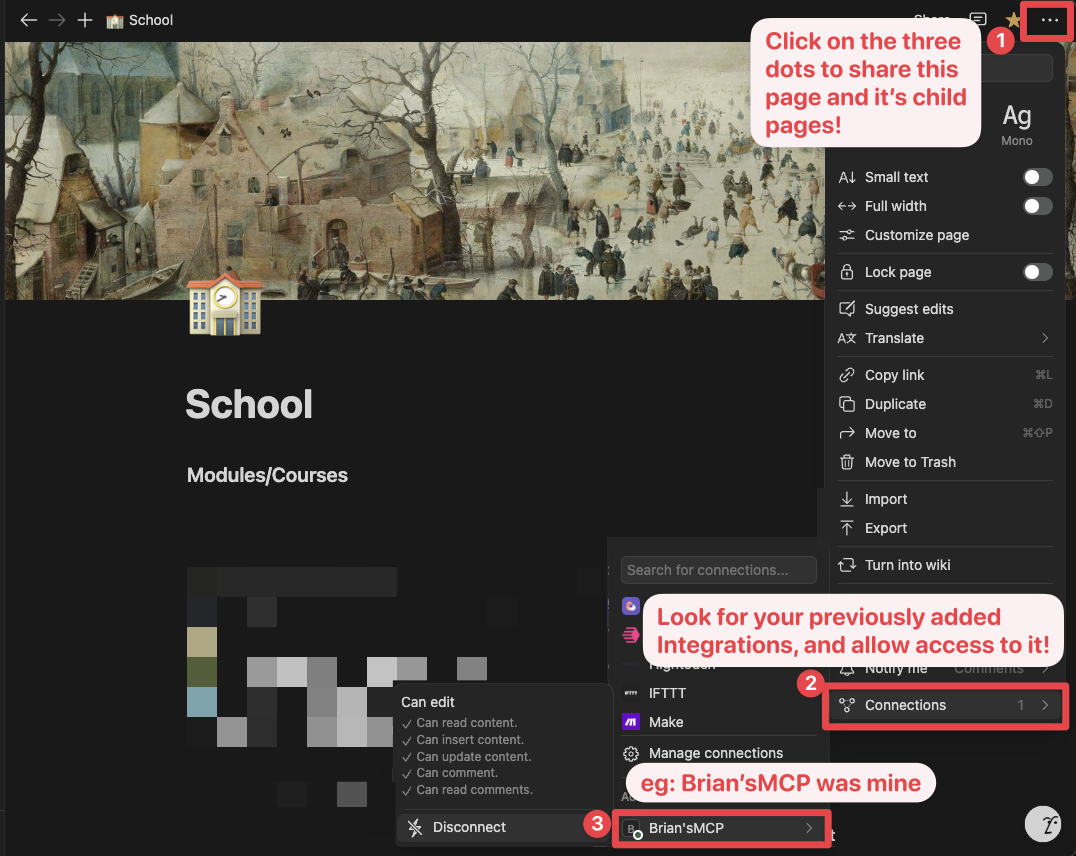
Alternatively, you can grant page access individually. You'll need to visit the target page, and click on the 3 dots, and select "Connect to integration".
3. Adding MCP config to your client
Using npm
Cursor & Claude
Add the following to your `.cursor/mcp.json` or `claude_desktop_config.json` (MacOS: `~/Library/Application\ Support/Claude/claude_desktop_config.json`)
Option 1: Using NOTION_TOKEN (recommended)
{
  "mcpServers": {
    "notionApi": {
      "command": "npx",
      "args": ["-y", "@notionhq/notion-mcp-server"],
      "env": {
        "NOTION_TOKEN": "ntn_****"
      }
    }
  }
}
Option 2: Using OPENAPI_MCP_HEADERS (for advanced use cases)
{
  "mcpServers": {
    "notionApi": {
      "command": "npx",
      "args": ["-y", "@notionhq/notion-mcp-server"],
      "env": {
        "OPENAPI_MCP_HEADERS": "{\"Authorization\": \"Bearer ntn_****\", \"Notion-Version\": \"2025-09-03\" }"
      }
    }
  }
}
Zed
Add the following to your `settings.json`
{
  "context_servers": {
    "some-context-server": {
      "command": {
        "path": "npx",
        "args": ["-y", "@notionhq/notion-mcp-server"],
        "env": {
          "OPENAPI_MCP_HEADERS": "{\"Authorization\": \"Bearer ntn_****\", \"Notion-Version\": \"2025-09-03\" }"
        }
      },
      "settings": {}
    }
  }
}
GitHub Copilot CLI
Use the Copilot CLI to interactively add the MCP server:
/mcp addAlternatively, create or edit the configuration file `~/.copilot/mcp-config.json` and add:
{
  "mcpServers": {
    "notionApi": {
      "command": "npx",
      "args": ["-y", "@notionhq/notion-mcp-server"],
      "env": {
        "NOTION_TOKEN": "ntn_****"
      }
    }
  }
}
For more information, see the Copilot CLI documentation.
Using Docker
There are two options for running the MCP server with Docker:
Option 1: Using the official Docker Hub image
Add the following to your `.cursor/mcp.json` or `claude_desktop_config.json`
Using NOTION_TOKEN (recommended):
{
  "mcpServers": {
    "notionApi": {
      "command": "docker",
      "args": [
        "run",
        "--rm",
        "-i",
        "-e", "NOTION_TOKEN",
        "mcp/notion"
      ],
      "env": {
        "NOTION_TOKEN": "ntn_****"
      }
    }
  }
}
Using OPENAPI_MCP_HEADERS (for advanced use cases):
{
  "mcpServers": {
    "notionApi": {
      "command": "docker",
      "args": [
        "run",
        "--rm",
        "-i",
        "-e", "OPENAPI_MCP_HEADERS",
        "mcp/notion"
      ],
      "env": {
        "OPENAPI_MCP_HEADERS": "{\"Authorization\":\"Bearer ntn_****\",\"Notion-Version\":\"2025-09-03\"}"
      }
    }
  }
}
This approach:
- Uses the official Docker Hub image
- Properly handles JSON escaping via environment variables
- Provides a more reliable configuration method
Option 2: Building the Docker image locally
You can also build and run the Docker image locally. First, build the Docker image:
docker compose buildThen, add the following to your `.cursor/mcp.json` or `claude_desktop_config.json`
Using NOTION_TOKEN (recommended):
{
  "mcpServers": {
    "notionApi": {
      "command": "docker",
      "args": [
        "run",
        "--rm",
        "-i",
        "-e",
        "NOTION_TOKEN=ntn_****",
        "notion-mcp-server"
      ]
    }
  }
}
Using OPENAPI_MCP_HEADERS (for advanced use cases):
{
  "mcpServers": {
    "notionApi": {
      "command": "docker",
      "args": [
        "run",
        "--rm",
        "-i",
        "-e",
        "OPENAPI_MCP_HEADERS={\"Authorization\": \"Bearer ntn_****\", \"Notion-Version\": \"2025-09-03\"}",
        "notion-mcp-server"
      ]
    }
  }
}
Don't forget to replace `ntn_****` with your integration secret. Find it from your integration configuration tab:
Transport options
The Notion MCP Server supports two transport modes:
STDIO transport (default)
The default transport mode uses standard input/output for communication. This is the standard MCP transport used by most clients like Claude Desktop.
# Run with default stdio transport
npx @notionhq/notion-mcp-server

# Or explicitly specify stdio
npx @notionhq/notion-mcp-server --transport stdio
Streamable HTTP transport
For web-based applications or clients that prefer HTTP communication, you can use the Streamable HTTP transport:
# Run with Streamable HTTP transport on port 3000 (default)
npx @notionhq/notion-mcp-server --transport http

# Run on a custom port
npx @notionhq/notion-mcp-server --transport http --port 8080

# Bind to a different host. The default is 127.0.0.1.
npx @notionhq/notion-mcp-server --transport http --host 0.0.0.0

# Run with a custom authentication token
npx @notionhq/notion-mcp-server --transport http --auth-token "your-secret-token"
When using Streamable HTTP transport, the server will be available at `http://127.0.0.1:/mcp` by default.
Authentication
The Streamable HTTP transport requires bearer token authentication for security. You have three options:
Option 1: Auto-generated token (only for development)
npx @notionhq/notion-mcp-server --transport httpThe server will generate a secure random token and write it to a file with restricted permissions:
Generated auth token written to: /tmp/.notion-mcp-auth-token-12345Option 2: Custom token via command line (recommended for production)
npx @notionhq/notion-mcp-server --transport http --auth-token "your-secret-token"Option 3: Custom token via environment variable (recommended for production)
AUTH_TOKEN="your-secret-token" npx @notionhq/notion-mcp-server --transport httpThe command line argument `--auth-token` takes precedence over the `AUTH_TOKEN` environment variable if both are provided.
Unsafe option: disable HTTP authentication
You can disable bearer token authentication only with the explicit unsafe flag:
npx @notionhq/notion-mcp-server --transport http --unsafe-disable-authWARNING: `--unsafe-disable-auth` is unsafe. The server may be reachable to pages you visit via DNS rebinding. Only use it on an isolated network.
When authentication is disabled, the server enables DNS rebinding protection by checking the `Host` and `Origin` headers against the configured local host and loopback hosts. The previous `--disable-auth` flag is still accepted as a deprecated alias, but it will print a warning.
Making HTTP requests
All requests to the Streamable HTTP transport must include the bearer token in the Authorization header:
# Example request
curl -H "Authorization: Bearer your-token-here" \
     -H "Content-Type: application/json" \
     -H "mcp-session-id: your-session-id" \
     -d '{"jsonrpc": "2.0", "method": "initialize", "params": {}, "id": 1}' \
     http://localhost:3000/mcp
Note: Make sure to set either the `NOTION_TOKEN` environment variable (recommended) or the `OPENAPI_MCP_HEADERS` environment variable with your Notion integration token when using either transport mode.
Serving multiple integrations (per-request token passthrough)
By default the server authenticates to Notion with a single token baked in at
startup, which locks one deployment to one Notion integration. To let a single
deployment serve multiple integrations, enable token passthrough so each
client supplies its own Notion integration token per connection:
# Enable per-request Notion tokens (flag or ENABLE_TOKEN_PASSTHROUGH=true)
npx @notionhq/notion-mcp-server --transport http --enable-token-passthrough
Clients then send their Notion token on the initialize request using the
dedicated `Notion-Token` header:
curl -H "Authorization: Bearer " \
     -H "Notion-Token: ntn_****" \
     -H "Content-Type: application/json" \
     -d '{"jsonrpc": "2.0", "method": "initialize", "params": {}, "id": 1}' \
     http://localhost:3000/mcp
How the token is resolved for each connection, in order:
1. The `Notion-Token` header (preferred — unambiguous, and works alongside the
server's own `Authorization` gateway auth). If present it must be a valid
Notion token, otherwise the request is rejected with `401`.
2. `Authorization: Bearer ntn_****` — only when the server's own bearer auth is
turned off (`--unsafe-disable-auth`), so the header is free to carry the
Notion token directly.
3. Otherwise the startup env token (`NOTION_TOKEN` / `OPENAPI_MCP_HEADERS`), if
set, so passthrough and a default integration can coexist on one deployment.
Notes:
- Only values with a Notion token prefix (`ntn_`, legacy `secret_`) are treated
as Notion tokens, so the server's gateway secret and a tenant's Notion token
never collide.
- Each token is bound to its MCP session; tokens are never logged (only a
redacted prefix is emitted).
- This is a deliberate token-passthrough setup. Always deploy it over TLS, and
prefer keeping the server's own bearer auth (`--auth-token`) enabled as a
gateway in front of multi-tenant traffic.
Examples
1. Using the following instruction
Comment "Hello MCP" on page "Getting started"AI will correctly plan two API calls, `v1/search` and `v1/comments`, to achieve the task
1. Similarly, the following instruction will result in a new page named "Notion MCP" added to parent page "Development"
Add a page titled "Notion MCP" to page "Development"1. You may also reference content ID directly
Get the content of page 1a6b35e6e67f802fa7e1d27686f017f2Development
Build & test
npm run build
npm test
Execute
npx -y --prefix /path/to/local/notion-mcp-server @notionhq/notion-mcp-serverTesting changes locally in Cursor:
1. Run `npm link` command from repository root to create a machine-global symlink to the `notion-mcp-server` package.
2. Merge the configuration snippet below into Cursor's `mcp.json` (or other MCP client you want to test with).
3. (Cleanup) run `npm unlink` from repository root.
{
  "mcpServers": {
    "notion-local-package": {
      "command": "notion-mcp-server",
      "env": {
        "NOTION_TOKEN": "ntn_..."
      }
    }
  }
}
Publish
npm login
npm publish --access publicFrequently asked questions
What is notion-mcp-server?
notion-mcp-server is Official Notion MCP Server TypeScript-based implementation. Trusted by 3400+ developers. Trusted by 3400+ developers. Trusted by 3400+ developers.
How do I install notion-mcp-server?
Open the GitHub repository and follow its README. Most MCP servers are added to your client's MCP config, then called by your agent.
Is notion-mcp-server open source?
Yes — it is hosted on GitHub at https://github.com/makenotion/notion-mcp-server and has 3,419 stars.
Related MCP tools
 mcpso
mcpsoDirectory for Awesome MCP Servers TypeScript-based implementation. Trusted by 1900+ developers. Trusted by 1900+ developers.
 unla
unla🧩 MCP Gateway - A lightweight gateway service that instantly transforms existing MCP Servers and APIs into MCP servers with zero code changes.
 playwright-mcp
Playwright MCP server TypeScript-based implementation. Trusted by 22000+ developers. Trusted by 22000+ developers. Trusted by 22000+ developers.
 metamcp
MCP Aggregator, Orchestrator, Middleware, Gateway in one docker TypeScript-based implementation. Trusted by 1400+ developers.
 mcp-server-kubernetes
MCP Server for kubernetes management commands TypeScript-based implementation. Trusted by 1100+ developers. Trusted by 1100+ developers.
 deepwiki-mcp
📖 MCP server for fetch deepwiki.com and get latest knowledge in Cursor and other Code Editors TypeScript-based implementation. Trusted by 1000+ developers.
Run your own MCP server? See who uses it and what to fix.
Measure it with TrackMCP