
Skills-ContextManager
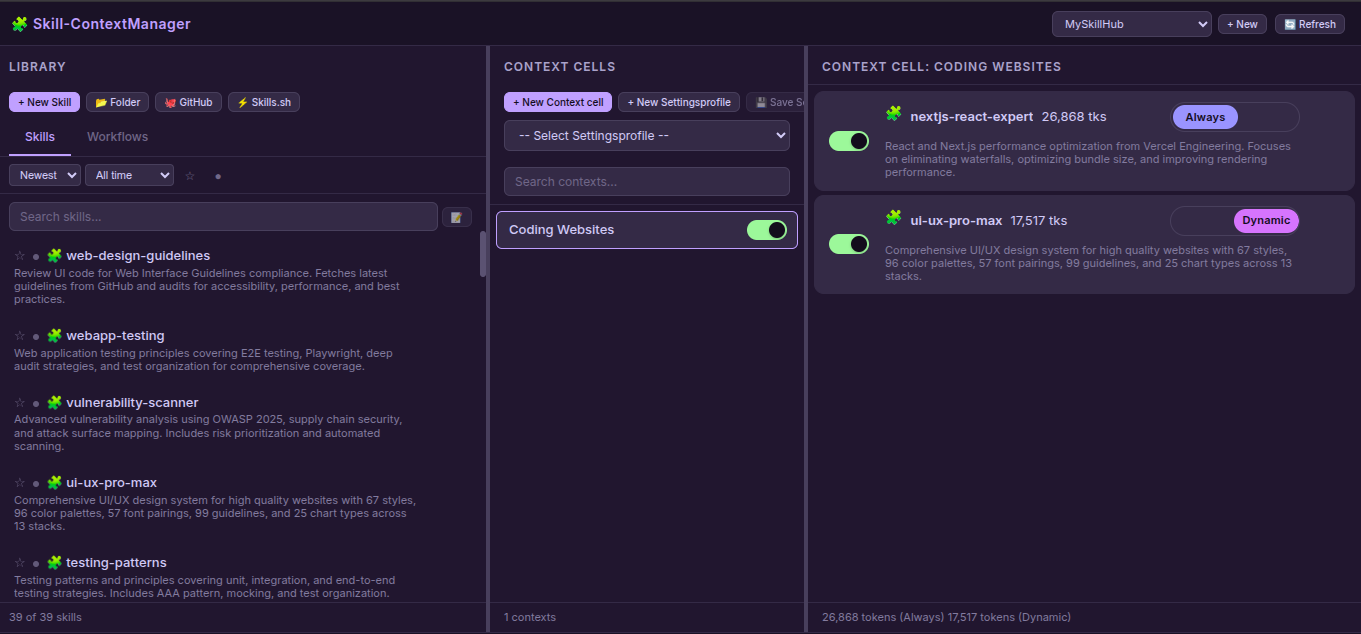
A self-hosted web application for managing AI skills, workflows, and contexts with full MCP (Model Context Protocol) integration. Organize, manage, and dynamically load specialized knowledge bases into any AI Agent just by toggling your Skills On/Off in simple local hosted WEB UI.
Documentation
Skill-ContextManager & MCP Server

A self-hosted web application for managing AI skills, workflows, and contexts with full MCP (Model Context Protocol) integration. Organize, manage, and dynamically load specialized knowledge bases into any AI Agent just by toggling your Skills On/Off in simple local hosted WEB UI.
Features
Web Application
- Skill & Workflow Management: Create, edit, delete, and organize skills and workflows
- Multi-Hub Support: Create isolated workspaces with separate skills/contexts
- Context Cells: Organize skills/workflows into logical groups with enable/disable toggles
- Dual Mode: Choose Always-loaded (auto-loaded) or Dynamic (on-demand) skills by on/off toggle
- File Editor: Built-in editor with file tree, create/delete files & folders
- Import Sources:
- 📂 Folder: Upload from local filesystem
- 🐙 GitHub: Clone from GitHub repositories
- ⚡ Skills.sh: Import from Skills.sh registry
- AI Description Generation: Auto-generate skill descriptions using AI APIs
- Secure API Key Storage: API keys stored with file mode 0600 (owner-only)
- Settings Profiles: Save and load configuration presets
- Search & Filter: Smart search, sort, favorites, active/inactive filters
- Token Counting: Track context size in tokens
- Drag & Drop: Move skills/workflows to contexts
MCP Server
- 3 Essential Tools for AI Agents:
- `get_default_skills()` - Load skills with mode `"always_loaded"`
- `list_available_skills()` - List all enabled skills with modes
- `load_full_skill_context(name)` - Load dynamic skill on-demand
- Hub-Aware: Works with active hub from multiple workspaces
- Mode Support: `"always_loaded"` vs `"dynamic"` skill loading
- Type Support: Both Skills and Workflows
Quick Start
# Clone the repository
git clone https://github.com/One-Man-Company/Skills-ContextManager.git
cd Skills-ContextManager

# Make setup script executable and run it
chmod +x setup.sh
./setup.sh

# Start web application
cd Skill-ContextManager && npm start
Access: `http://localhost:3000`
MCP configuration saved to `mcp_settings.json` - add this to your AI Agent's MCP settings.
> ⚠️ Important: Copy the content of `MCP_instructions.md` to your AI Agent's System prompt or rules configuration.
MCP Configuration
The `setup.sh` script generates `mcp_settings.json` with correct paths. Add it to your AI Agent's MCP settings file:
{
  "Skills-ContextManager": {
    "command": "/absolute/path/Skills-MCP/.venv/bin/python3",
    "args": ["-u", "/absolute/path/Skills-MCP/mcp_server.py"],
    "env": {}
  }
}
MCP Tools
AI Agents need only these 3 tools. Usage details are in `MCP_instructions.md` (system prompt):
| Tool | Description |
|---|---|
| `get_default_skills()` | Load all skills with mode `"always_loaded"` into context |
| `list_available_skills()` | List all enabled skills with descriptions and modes |
| `load_full_skill_context(name)` | Load a specific skill on-demand (for mode `"dynamic"`) |
mcpservers.org Submission
| Field | Value |
|---|---|
| Name | Skills-ContextManager |
| Description | Web UI for managing AI skills with MCP integration |
| Repository | https://github.com/One-Man-Company/Skills-ContextManager |
| Command | `[path]/Skills-MCP/.venv/bin/python3` |
| Args | `-u [path]/Skills-MCP/mcp_server.py` |
Included Skills & Workflows
The repository includes starter content in `MySkillsHUB/`:
Skills (39):
architecture, behavioral-modes, clean-code, code-review-checklist, documentation-templates, frontend-design, game-development, i18n-localization, mobile-design, nextjs-react-expert, nodejs-best-practices, parallel-agents, performance-profiling, python-patterns, seo-fundamentals, server-management, skill-creator, systematic-debugging, ui-ux-pro-max, vulnerability-scanner, webapp-testing, api-patterns, and more.
Workflows (3):
- best-standard-autonomous-coding
- elite-cognitive-operator-system
- plan-mode
All content is automatically copied to your library on first setup.
License
MIT License
Created: February 2026
Frequently asked questions
What is Skills-ContextManager?
Skills-ContextManager is A self-hosted web application for managing AI skills, workflows, and contexts with full MCP (Model Context Protocol) integration. Organize, manage, and dynamically load specialized knowledge bases into any AI Agent just by toggling your Skills On/Off in simple local hosted WEB UI.
How do I install Skills-ContextManager?
Open the GitHub repository and follow its README. Most MCP servers are added to your client's MCP config, then called by your agent.
Is Skills-ContextManager open source?
Yes — it is hosted on GitHub at https://github.com/One-Man-Company/Skills-ContextManager and has 83 stars.
Related MCP tools
 cognee
Cognee is the open-source AI memory platform for agents. Give your AI agents persistent long-term memory across sessions with a self-hosted knowledge graph engine.
 skyvern
Automate browser based workflows with AI
 hindsight
Hindsight: Agent Memory That Learns
 watermarks-remover
A privacy-first app that strips AI watermarks from content you own.
 Qwen-Agent
Agent framework and applications built upon Qwen>=3.0, featuring Function Calling, MCP, Code Interpreter, RAG, Chrome extension, etc.
 pal-mcp-server
The power of Claude Code / GeminiCLI / CodexCLI + [Gemini / OpenAI / OpenRouter / Azure / Grok / Ollama / Custom Model / All Of The Above] working as one.
Run your own MCP server? See who uses it and what to fix.
Measure it with TrackMCP