
open-digger-mcp-server
MCP server of OpenDigger
Documentation
OpenDigger MCP Server
A Model Context Protocol (MCP) server for OpenDigger enabling advanced repository analytics and insights through tools and prompts.
Quick Start
# Setup
git clone https://github.com/X-lab2017/open-digger-mcp-server.git

# (Optional) Ensure you're on the master branch
git checkout master

cd open-digger-mcp-server && cd mcp-server
npm install
npm run build

# Start server
npm start
> [!IMPORTANT]
> Don't forget to configure Cursor (update path in .cursor/mcp.json)
Expected output:
OpenDigger MCP Server running (on stdio)...> [!IMPORTANT]
> If you are using Cursor AI IDE, you should see the MCP server (`open-digger-mcp`) toast in the bottom-left corner. You should _enable_ it, & now you can start using the tools and prompts provided by the MCP server. To verify, open Cursor Settings and check the MCP Servers section → you should see `open-digger-mcp` listed there.
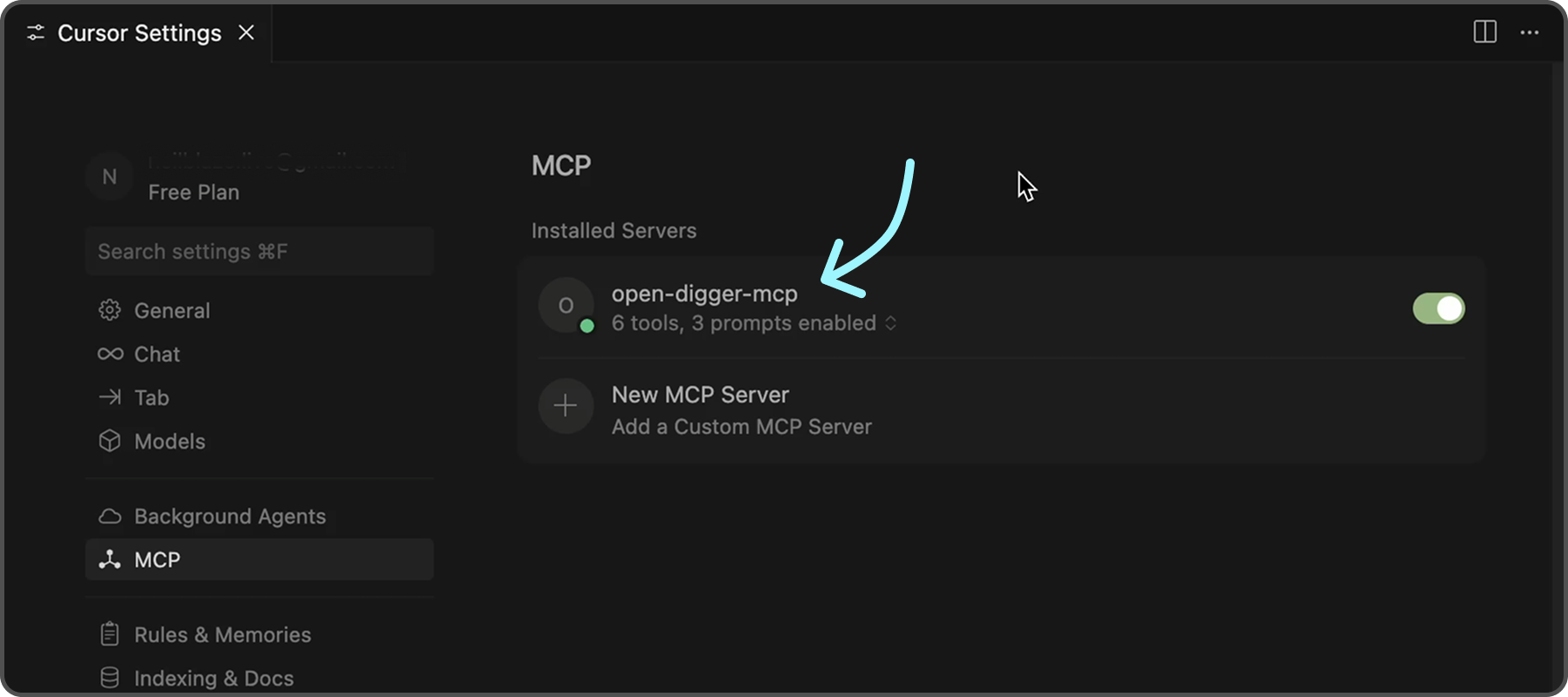
To further confirm that the server is functioning correctly, you can check the following indicators in Cursor:
- ✅ Green dot next to "open-digger-mcp" title
- ✅ "6 tools" displayed in server status
- ✅ "3 prompts" displayed in server status
- ✅ No error messages or red indicators
> [!TIP]
> Please refer to `Installation.md` for detailed installation instructions and configuration options for different IDEs.
Features
Tools (6 Available)
| No. | Tool | Description | |
|---|---|---|---|
| 1 | `get_open_digger_metric` | Fetch single repository metrics | |
| 2 | `get_open_digger_metrics_batch` | Batch operations for multiple metrics | |
| 3 | `compare_repositories` | Multi-repository comparative analysis | |
| 4 | `analyze_trends` | Growth trend analysis over time periods | |
| 5 | `get_ecosystem_insights` | Ecosystem analytics & insights | |
| 6 | `server_health` | System diagnostics and health monitoring (Beta) | d |
Prompts (3 Available)
1. `repo_health_analysis` - Comprehensive repository health reports
2. `repo_comparison` - Competitive repository analysis
3. `developer_insights` - Developer activity and contribution analysis
Metrics
- Core Metrics: `openrank`, `stars`, `forks`, `contributors`, `participants`, `issues_new`, `issues_closed`, `pull_requests`, `commits`, `activity`
- Extended Metrics: `technical_fork`, `bus_factor`, `releases`, `inactive_contributors`, `maintainer_count`, `community_activity`
- Additional Metrics: `change_requests`, `pull_requests_accepted`, `pull_requests_merged`, `issue_comments`, `issue_response_time`, `code_change_lines`, `developer_network`
💡 Usage Examples
💠 Repository Comparison
Compare microsoft/vscode and facebook/react using the compare_repositories tool💠 Health Analysis
Generate a health report for microsoft/vscode using the repo_health_analysis prompt💠 Trend Analysis
Analyze the growth trends for contributors in microsoft/vscode over 2 yearsServer Status Check
After starting the server, verify it's working:
# In a new terminal
echo '{"jsonrpc":"2.0","id":1,"method":"tools/list","params":{}}' | node dist/index.js
Expected response should list all 6 tools.
Configuration
Environment Variables (.env)
# Cache configuration (recommended)
CACHE_TTL_SECONDS=300

# Optional SSE server
SSE_PORT=3001
SSE_HOST=127.0.0.1
Cursor MCP (.cursor/mcp.json)
{
  "mcpServers": {
    "open-digger": {
      "command": "node",
      "args": ["/full/path/to/dist/index.js"],
      "cwd": "/full/path/to/project",
      "env": {
        "CACHE_TTL_SECONDS": "300"
      }
    }
  }
}
> [!TIP]
> Replace `/full/path/to/open-digger-mcp-server` with your actual project directory path. Use `pwd` to get the current directory path.
Development
npm run watch           # Development mode
npm run build           # Compile TypeScript
npm run clean           # Clean build files
npm run sse:test        # Test SSE server
> [!TIP]
> Beside Cursor, you can also use other MCP clients like VS Code, Claude Chat, or the official MCP Inspector.
Troubleshooting
Common Issues
Server not appearing in Cursor:
1. Verify absolute paths in `.cursor/mcp.json`
2. Restart Cursor completely (Cmd+Q / Alt+F4)
3. Check MCP Settings section for error messages
Permission errors:
chmod +x dist/index.jsBuild errors:
npm run clean
npm install
npm run build
Cache issues:
# Clear npm cache
npm cache clean --force

# Rebuild
npm run clean && npm run build
Contributing
1. Fork the repository
2. Create your feature branch (`git checkout -b feature/amazing-feature`)
3. Commit changes (`git commit -m 'Add amazing feature'`)
4. Push to branch (`git push origin feature/amazing-feature`)
5. Open a Pull Request
License
Apache-2.0 License - see LICENSE file for details.
Frequently asked questions
What is open-digger-mcp-server?
open-digger-mcp-server is MCP server of OpenDigger
How do I install open-digger-mcp-server?
Open the GitHub repository and follow its README. Most MCP servers are added to your client's MCP config, then called by your agent.
Is open-digger-mcp-server open source?
Yes — it is hosted on GitHub at https://github.com/X-lab2017/open-digger-mcp-server and has 6 stars.
Related MCP tools
 mcp-installer
An MCP server that installs other MCP servers for you JavaScript-based implementation. Trusted by 1400+ developers. Trusted by 1400+ developers.
 ios-simulator-mcp
MCP server for interacting with the iOS simulator JavaScript-based implementation. Trusted by 1200+ developers. Trusted by 1200+ developers.
 mcp-server-mysql
A Model Context Protocol server that provides read-only access to MySQL databases. This server enables LLMs to inspect database schemas and execute read-only...
 mcp-server-youtube-transcript
This is an MCP server that allows you to directly download transcripts of YouTube videos. JavaScript-based implementation.
 anything-llm
The all-in-one Desktop & Docker AI application with built-in RAG, AI agents, No-code agent builder, MCP compatibility, and more.
 claude-task-master
An AI-powered task-management system you can drop into Cursor, Lovable, Windsurf, Roo, and others. Built for the Model Context Protocol to enhance AI capabiliti
Run your own MCP server? See who uses it and what to fix.
Measure it with TrackMCP