
prometheus_mcp_server
A Model Context Protocol (MCP) server enabling LLMs to query, analyze, and interact with Prometheus databases through predefined routes.
Documentation
MCP Server for Prometheus
A Model Context Protocol (MCP) server for retrieving data from Prometheus databases. This MCP server enables Large Language Models (LLMs) to invoke tool functions that retrieve and analyze vast amounts of metric data, search metric usage, execute complex queries, and perform other related tasks through pre-defined routes with enhanced control over usage.
- Data Retrieval: Fetch specific metrics or ranges of data from Prometheus.
- Metric Analysis: Perform statistical analysis on retrieved metrics.
- Usage Search: Find and explore metric usage patterns.
- Complex Querying: Execute advanced PromQL queries for in-depth data exploration.
Capibilites
✅ Retrieve comprehensive metric information, including names and descriptions, from Prometheus
✅ Fetch and analyze specific metric data using metric names
✅ Analyze metric data within custom time ranges
🚧 Filter and match data using specific labels (in development)
⏳ Additional features planned...
Getting Started
MCP runing requires a python virtual environment(venv), all packages should be installed into this venv so the MCP server can be automically started.
Installing via Smithery
To install Prometheus MCP Server for Claude Desktop automatically via Smithery:
npx -y @smithery/cli install @CaesarYangs/prometheus_mcp_server --client claudeManual Installation
Prepare python env
cd ./src/prometheus_mcp_server
python3 -m venv .venv# linux/macos:
source .venv/bin/activate
# windows:
.venv\Scripts\activateThen it is ready to be used as a dedicated python environment.
Install required packages
Make sure pip is properly isntalled. If your venv is installed without pip, then manually install it using:
wget https://bootstrap.pypa.io/get-pip.py
python3 get-pip.py
Then install all required packages:
pip install -r requirements.txtUsage
With Cursor Env
Ready to update depend on more easy-to-use Cursor environment.
Set this in the MCP section in Cursor Settings:
uv --directory /path/to/prometheus_mcp_server run server.py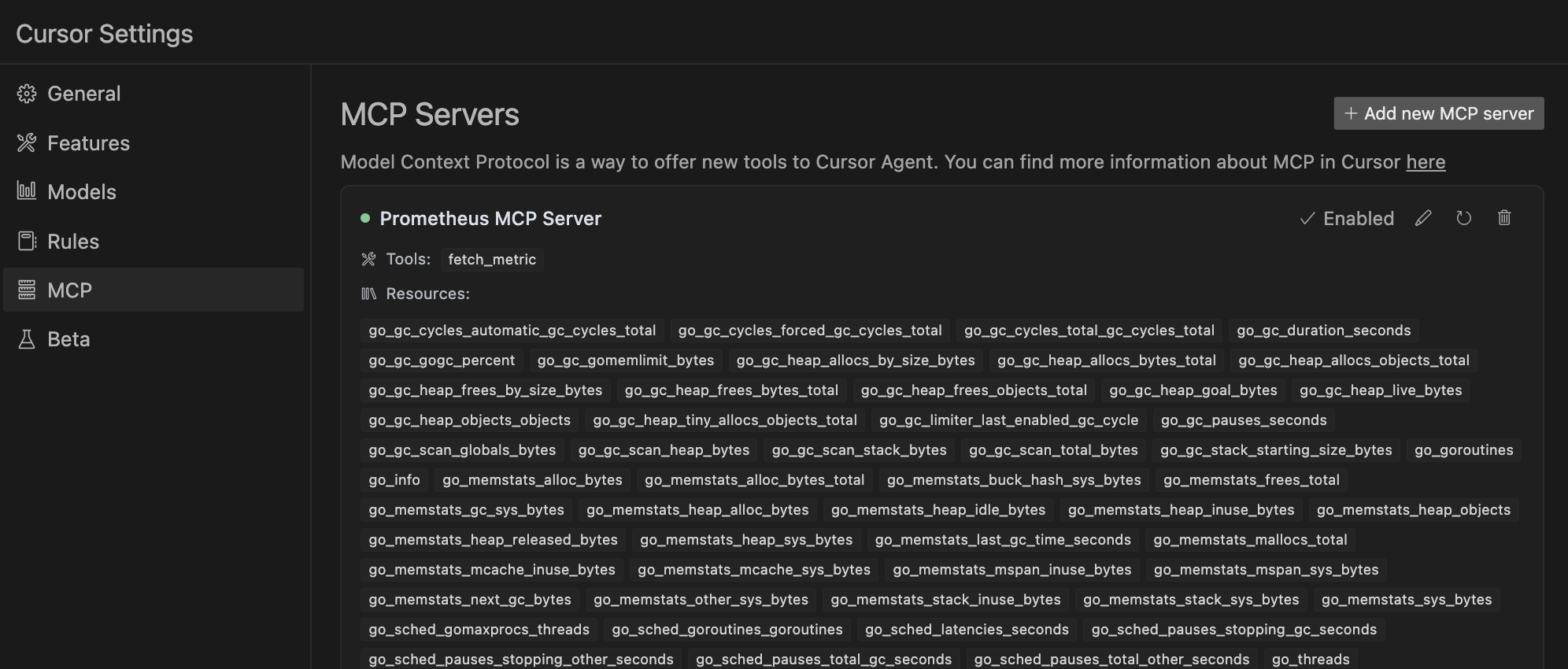
With MCP Client(include Claude Desktop)
Config your Claude Desktop app's configuration at `~/Library/Application Support/Claude/claude_desktop_config.json`(macos)
{
    "mcpServers": {
        "prometheus": {
            "command": "uv",
            "args": [
                "--directory",
                "/path/to/prometheus_mcp_server",
                "run",
                "server.py"
            ],
            "env": {
                "PROMETHEUS_HOST": "http://localhost:9090"
            }
        }
    }
}
Standalone MCP Server
Started this MCP server alone:
uv method
uv --directory /path/to/prometheus_mcp_server run server.pyThis is also a way to make sure this MCP server can be automatically started since the Claude Desktop is using this ux script way to start when the app launches.
regular python method
python3 server.pyContributing
Contributions are welcome! Here's a quick guide:
1. Fork the repo
2. Create your feature branch (`git checkout -b feature/AmazingFeature`)
3. Commit your changes (`git commit -m 'Add some AmazingFeature'`)
4. Push to the branch (`git push origin feature/AmazingFeature`)
5. Open a Pull Request
For major changes, please open an issue first to discuss what you would like to change.
Thank you for your contributions!
License
MIT License
References & Acknowledgments
This project was inspired by or uses code from the following open-source projects:
- Prometheus API Client - The Prometheus API calling code is modified based on this library
- MySQL MCP Server - A similar database oriented MCP server implmentation
Frequently asked questions
What is prometheus_mcp_server?
prometheus_mcp_server is A Model Context Protocol (MCP) server enabling LLMs to query, analyze, and interact with Prometheus databases through predefined routes.
How do I install prometheus_mcp_server?
Open the GitHub repository and follow its README. Most MCP servers are added to your client's MCP config, then called by your agent.
Is prometheus_mcp_server open source?
Yes — it is hosted on GitHub at https://github.com/CaesarYangs/prometheus_mcp_server and has 32 stars.
Related MCP tools
 fastmcp
🚀 The fast, Pythonic way to build MCP servers and clients Trusted by 19900+ developers. Trusted by 19900+ developers. Trusted by 19900+ developers.
 upsonic
Agent Framework For Fintech for the Model Context Protocol. Enhance AI assistants with powerful integrations. Python-based implementation.
 mcp-agent
Build effective agents using Model Context Protocol and simple workflow patterns Python-based implementation. Trusted by 7600+ developers.
 minima
On-premises conversational RAG with configurable containers for the Model Context Protocol. Enhance AI assistants with powerful integrations.
 mcp-bridge
A middleware to provide an openAI compatible endpoint that can call MCP tools Python-based implementation. Trusted by 800+ developers.
 dbt-mcp
A MCP (Model Context Protocol) server for interacting with dbt. Python-based implementation.
Run your own MCP server? See who uses it and what to fix.
Measure it with TrackMCP