
ProxmoxMCP-Plus
Use MCP and OpenAPI to safely control Proxmox VE VMs, LXCs, backups, and snapshots from LLMs and AI agents.
Documentation
ProxmoxMCP-Plus
Operate Proxmox VE from MCP clients, AI agents, and OpenAPI tooling through one security-conscious control plane for VMs, LXCs, snapshots, backups, ISOs, container commands, and persistent long-running jobs.
|
|
|
|
|
|
|
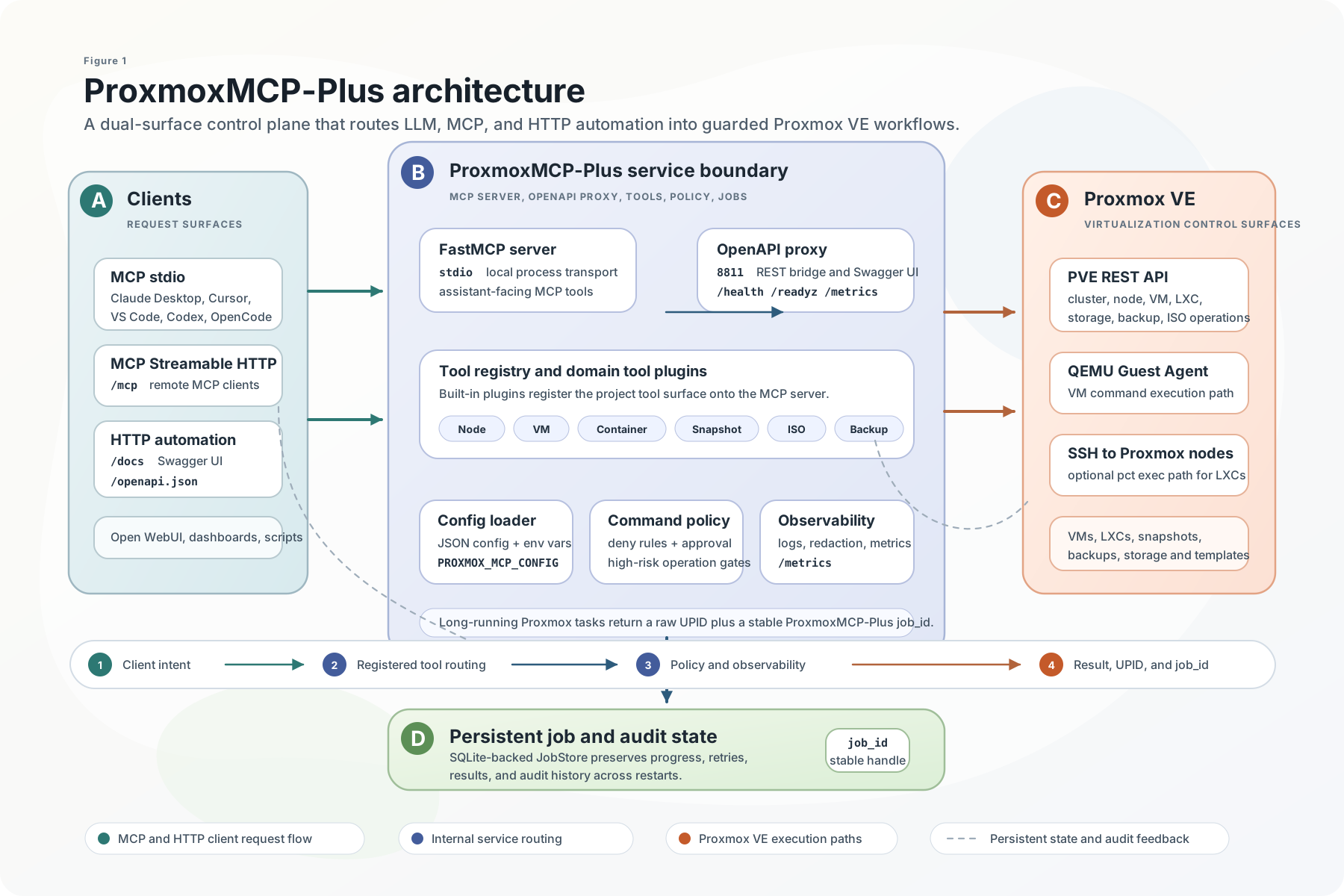
Why ProxmoxMCP-Plus
ProxmoxMCP-Plus sits between AI clients and Proxmox VE so operators do not have to stitch together raw API calls, one-off shell scripts, and custom job polling for every workflow.
It exposes the same operational surface in two ways:
- `MCP` for Claude Desktop, Cursor, VS Code, Open WebUI, Codex, and other MCP-capable agents
- `OpenAPI` for HTTP automation, dashboards, internal tools, and no-code workflows
What you get:
- VM and LXC lifecycle actions
- snapshot create, rollback, and delete
- backup and restore workflows
- ISO download and cleanup
- node, storage, and cluster inspection
- SSH-backed container command execution with guardrails
- persistent job tracking for async Proxmox tasks
What Makes It Different
| Priority | How the project handles it |
|---|---|
| Dual access paths | Native MCP for agent workflows and OpenAPI for standard HTTP automation |
| Proxmox-oriented workflows | Day-2 VM, LXC, snapshot, backup, ISO, storage, and cluster operations |
| Long-running operations | Stable `job_id`s, Proxmox `UPID` tracking, polling, retry, cancel, and audit history |
| Safer execution | Proxmox API tokens, OpenAPI bearer auth, command policy, approval tokens, TLS validation, and MCP HTTP Host/Origin controls |
| Real validation | Unit, integration, Docker/OpenAPI, and live Proxmox e2e entry points are documented in the repo |
Quick Start
1. Prepare Proxmox Credentials
Create a Proxmox API token with only the permissions your workflows need. Then create the local config file:
cp proxmox-config/config.example.json proxmox-config/config.jsonThen edit `proxmox-config/config.json` with your environment. At minimum, it needs:
- `proxmox.host`
- `proxmox.port`
- `auth.user`
- `auth.token_name`
- `auth.token_value`
Add an `ssh` section as well if you want container command execution.
Add a `jobs` section if you want job state persisted somewhere other than the default local SQLite file.
For real live verification, use a separate `proxmox-config/config.live.json` created from `proxmox-config/config.live.example.json`.
Do not point live e2e at a placeholder or local-only `config.json` unless you intentionally run a local API tunnel there.
Optional job persistence config:
{
  "jobs": {
    "sqlite_path": "proxmox-jobs.sqlite3"
  }
}
Optional tool exposure filtering can reduce the schemas sent to MCP clients. It is
disabled by default, so existing configurations continue to expose every available
tool. Configure exactly one mode under `mcp`:
{
  "mcp": {
    "tool_allowlist": ["get_nodes", "get_vms", "get_containers", "get_storage"]
  }
}
Alternatively, use `tool_denylist`, or the comma-separated environment variables
`MCP_TOOL_ALLOWLIST` and `MCP_TOOL_DENYLIST`. Do not configure both modes. Environment
selection replaces the file-level filtering mode. An empty allowlist exposes no tools;
an empty denylist hides none. Exact lowercase tool names are required, and unknown names
fail startup so a typo cannot silently widen access. Restart or reconnect the MCP server
after changing the filter.
2. Choose One Runtime Path
| Path | Best for | Start command | Verify |
|---|---|---|---|
| MCP stdio from PyPI | Claude Desktop, Cursor, VS Code, Codex, local agents | `uvx proxmox-mcp-plus` | client lists `get_nodes`, `get_vms`, and job tools |
| Native MCP HTTP from Docker | remote MCP clients that support Streamable HTTP | `docker compose --profile mcp-http up -d proxmox-mcp-http` | connect to `http://localhost:8000/mcp` |
| OpenAPI bridge from Docker | HTTP clients, dashboards, scripts, no-code tools | `docker compose up -d` | `curl -f http://localhost:8811/livez` |
MCP stdio with PyPI
uvx proxmox-mcp-plusOr install it first:
pip install proxmox-mcp-plus
proxmox-mcp-plus
Use this path when the MCP client launches a local stdio server.
Native MCP HTTP with Docker
Use this path when a remote MCP client supports Streamable HTTP:
export MCP_API_KEY="$(openssl rand -hex 32)"
docker run --rm -p 8000:8000 \
  -e PROXMOX_MCP_MODE=mcp-http \
  -e MCP_HOST=0.0.0.0 \
  -e MCP_PORT=8000 \
  -e MCP_TRANSPORT=STREAMABLE_HTTP \
  -e MCP_API_KEY="$MCP_API_KEY" \
  -v "$(pwd)/proxmox-config/config.json:/app/proxmox-config/config.json:ro" \
  ghcr.io/rekklesna/proxmoxmcp-plus:latest
Point MCP clients at:
http://:8000/mcpSend `Authorization: Bearer ` with every MCP HTTP request. `MCP_API_KEY`
is deliberately separate from the OpenAPI-only `PROXMOX_API_KEY`, so the two surfaces
can be rotated independently. If `MCP_API_KEY` is unset, Streamable HTTP remains
unauthenticated for backward compatibility and logs a security warning at startup.
When serving MCP HTTP behind a reverse proxy, keep DNS rebinding protection enabled and allow only the hostnames you expect:
docker run --rm -p 8000:8000 \
  -e PROXMOX_MCP_MODE=mcp-http \
  -e MCP_HOST=0.0.0.0 \
  -e MCP_PORT=8000 \
  -e MCP_TRANSPORT=STREAMABLE_HTTP \
  -e MCP_API_KEY="$MCP_API_KEY" \
  -e MCP_DNS_REBINDING_PROTECTION=true \
  -e MCP_ALLOWED_HOSTS=mcp.example.com:*,localhost:* \
  -e MCP_ALLOWED_ORIGINS=https://mcp.example.com \
  -v "$(pwd)/proxmox-config/config.json:/app/proxmox-config/config.json:ro" \
  ghcr.io/rekklesna/proxmoxmcp-plus:latest
OpenAPI bridge with Docker
OpenAPI mode is the default Docker runtime and requires an API key:
export PROXMOX_API_KEY="$(openssl rand -hex 32)"
docker run --rm -p 8811:8811 \
  -e PROXMOX_API_KEY="$PROXMOX_API_KEY" \
  -v "$(pwd)/proxmox-config/config.json:/app/proxmox-config/config.json:ro" \
  ghcr.io/rekklesna/proxmoxmcp-plus:latest
Verify the OpenAPI surface:
curl -f http://localhost:8811/livez
curl -f -H "Authorization: Bearer $PROXMOX_API_KEY" http://localhost:8811/health
curl -H "Authorization: Bearer $PROXMOX_API_KEY" http://localhost:8811/openapi.json
For local unauthenticated development only, set `PROXMOX_ALLOW_NO_AUTH=true`.
Source checkout
git clone https://github.com/RekklesNA/ProxmoxMCP-Plus.git
cd ProxmoxMCP-Plus
uv venv
uv pip install -e ".[dev]"
python main.py
The `8811` service is the OpenAPI/REST bridge. The `8000` service is the native MCP HTTP endpoint.
Client Install
Use the one-click buttons when your client supports MCP install deeplinks, or copy the JSON config below.


Recommended stdio config:
{
  "mcpServers": {
    "proxmox-mcp-plus": {
      "command": "uvx",
      "args": ["proxmox-mcp-plus"],
      "env": {
        "PROXMOX_HOST": "your-proxmox-host",
        "PROXMOX_USER": "root@pam",
        "PROXMOX_TOKEN_NAME": "mcp-token",
        "PROXMOX_TOKEN_VALUE": "your-token-secret",
        "PROXMOX_PORT": "8006",
        "PROXMOX_VERIFY_SSL": "true"
      }
    }
  }
}
Use a local config file if you prefer not to keep credentials in the client config:
{
  "mcpServers": {
    "proxmox-mcp-plus": {
      "command": "uvx",
      "args": ["proxmox-mcp-plus"],
      "env": {
        "PROXMOX_MCP_CONFIG": "/path/to/ProxmoxMCP-Plus/proxmox-config/config.json"
      }
    }
  }
}
Client-specific examples for Claude Desktop, Cursor, VS Code, Codex, OpenCode, Open WebUI, Streamable HTTP, and OpenAPI are in the Client Setup Guide and Integrations Guide.
Demo
This demo is a direct terminal recording of `qwen/qwen3.6-plus` driving a live MCP session in English against a local Proxmox lab. It shows natural-language control flowing through MCP tools to create and start an LXC, execute a container command, and confirm the authenticated HTTP `/health` surface.

Choose The Right Tool
Start with read-only discovery, then move to mutating tools only after the target node, storage, VMID, and permissions are clear.
| Operator goal | Start with | Then use | Notes |
|---|---|---|---|
| Inspect the cluster | `get_nodes`, `get_cluster_status` | `get_storage`, `get_vms`, `get_containers` | Best first health check after client install |
| Create or manage a VM | `get_nodes`, `get_storage` | `create_vm`, `start_vm`, `stop_vm`, `delete_vm` | Long-running mutations return `job_id` and Proxmox `task_id` |
| Manage LXCs | `get_containers`, `get_storage` | `create_container`, `start_container`, `stop_container`, `delete_container` | SSH-backed command tools require the optional `ssh` config |
| Roll back risky changes | `list_snapshots` with `vm_type=qemu` or `vm_type=lxc` | `create_snapshot`, `rollback_snapshot`, `delete_snapshot` | Create a snapshot before destructive workflow tests |
| Run commands inside guests | VM or container status tools | `execute_vm_command`, `execute_container_command` | VM path needs QEMU Guest Agent; LXC path needs SSH to the Proxmox node |
| Track async work | mutation response with `job_id` | `poll_job`, `get_job`, `list_jobs`, `retry_job`, `cancel_job` | Use `job_id` for agent/user conversations and `task_id` for raw Proxmox traceability |
| Inspect logs | `get_node_syslog`, `get_cluster_log` | `get_task_log`, `get_node_firewall_log`, `get_guest_firewall_log` | All log tools are read-only; `get_task_log` accepts any Proxmox `UPID` |
| Automate from HTTP tools | `/openapi.json` | `/jobs`, `/health`, generated tool routes | Use bearer auth and keep CORS restricted outside local development |
For the full tool map, see the Tool Selection Guide and API & Tool Reference.
Safety Model
ProxmoxMCP-Plus is an access layer, not a replacement for Proxmox RBAC, network controls, or client-side MCP approval prompts.
The project gives operators several control points:
- Proxmox API tokens decide what the backend can do.
- `PROXMOX_API_KEY` protects the OpenAPI bridge by default.
- `MCP_API_KEY` optionally protects the native Streamable HTTP `/mcp` endpoint with Bearer authentication.
- TLS verification is enforced unless development mode is explicitly enabled.
- `command_policy` controls command execution and high-risk operations.
- `approval_token` can gate command execution and high-risk mutating actions.
- MCP Streamable HTTP deployments can use DNS rebinding protection plus Host and Origin allowlists.
- Optional MCP tool allowlists or denylists reduce the runtime tool surface; they do not replace Proxmox RBAC.
- Logs are designed to avoid exposing command and credential material.
Read the Security Guide before exposing the server outside a trusted local environment.
Core Platform Capabilities
ProxmoxMCP-Plus provides a unified control surface for the operational tasks most teams actually need in Proxmox VE. The same server can expose these workflows to MCP clients for LLM and AI-agent use cases, and to HTTP consumers through the OpenAPI bridge.
Supported workflow areas:
| Capability Area | Availability |
|---|---|
| VM create / start / stop / delete | Available |
| VM snapshot create / rollback / delete | Available |
| Backup create / restore | Available |
| ISO download / delete | Available |
| LXC create / start / stop / delete | Available |
| Container SSH-backed command execution | Available |
| Container authorized_keys update | Available |
| Persistent job store for long tasks | Available |
| MCP job control tools (`list_jobs`, `get_job`, `poll_job`, `cancel_job`, `retry_job`) | Available |
| OpenAPI `/jobs` endpoints with explicit status codes | Available |
| Local OpenAPI `/livez`, `/readyz`, `/health`, and schema | Available |
| Docker native MCP Streamable HTTP at `/mcp` | Available |
| Docker image build and `/livez` | Available |
Validation and contract entry points in this repository:
- `pytest -q --cov=proxmox_mcp --cov-report=term-missing --cov-fail-under=75`
- `ruff check .`
- `mypy src --ignore-missing-imports`
- `pip-audit -r requirements.txt`
- `tests/integration/test_real_contract.py`
- `tests/scripts/run_real_e2e.py`
`tests/scripts/run_real_e2e.py` now prefers `proxmox-config/config.live.json` or `PROXMOX_MCP_E2E_CONFIG`.
This avoids accidentally running live checks against a machine-specific default `config.json`.
Long-Running Jobs
Many Proxmox mutations are asynchronous. ProxmoxMCP-Plus now wraps those tasks in a persistent job layer so MCP and OpenAPI clients can track them through a stable `Job ID`.
Long-running tools such as VM create/start/stop, container create/start/stop, snapshot changes, backup/restore, and ISO download/delete now return both:
- `task_id`: the raw Proxmox `UPID`
- `job_id`: the stable server-side job record
The job record stores:
- current status and progress
- retry count and prior `UPID`s
- latest result payload or failure reason
- audit history for create, poll, retry, and cancel actions
By default the job store persists to `proxmox-jobs.sqlite3`, so restart does not lose in-flight or completed job metadata.
MCP Job Tools
- `list_jobs`
- `get_job`
- `poll_job`
- `cancel_job`
- `retry_job`
OpenAPI Job Routes
When the OpenAPI proxy is enabled and a local `JobStore` is available, these routes are exposed directly:
| Path | Method | Purpose | Success Codes |
|---|---|---|---|
| `/jobs` | `GET` | list persisted jobs | `200` |
| `/jobs/{job_id}` | `GET` | fetch one job, optional `refresh=true` | `200` |
| `/jobs/{job_id}/poll` | `POST` | refresh status from Proxmox | `200` |
| `/jobs/{job_id}/cancel` | `POST` | request cancellation | `202` |
| `/jobs/{job_id}/retry` | `POST` | replay a stored retry recipe | `202` |
Common error codes:
- `404`: unknown `job_id`
- `409`: the job exists but that operation is not valid now
- `503`: the OpenAPI proxy was started without a local `JobStore`
`tests/scripts/run_real_e2e.py` now prefers `proxmox-config/config.live.json` or `PROXMOX_MCP_E2E_CONFIG`.
This avoids accidentally running live checks against a machine-specific default `config.json`.
Positioning Against Common Approaches
| Capability | Official Proxmox API | One-off scripts | ProxmoxMCP-Plus |
|---|---|---|---|
| MCP for LLM and AI agent workflows | No | No | Yes |
| OpenAPI surface for standard HTTP tooling | No | Usually no | Yes |
| VM and LXC operations in one interface | Low-level only | Depends | Yes |
| Snapshot, backup, and restore workflows | Low-level only | Depends | Yes |
| Persistent async job tracking and retry | No | Rare | Yes |
| Container command execution with policy controls | No | Custom only | Yes |
| Docker distribution path | No | Rare | Yes |
| Repository-level live-environment verification | N/A | Rare | Yes |
Scenario Templates
Ready-to-copy examples live in `docs/examples/`:
These are written for both human operators and LLM-driven usage.
Documentation
The README is intentionally optimized for fast GitHub comprehension. Longer operational docs live in `docs/wiki/` and can also be published to the GitHub Wiki.
| If you need to... | Start here |
|---|---|
| Understand the project and deployment flow | Wiki Home |
| Configure and run against a Proxmox environment | Operator Guide |
| Connect Claude Desktop, Cursor, VS Code, Codex, Open WebUI, or HTTP clients | Client Setup Guide |
| Choose the right tool for a workflow | Tool Selection Guide |
| Review docs quality goals, media plan, and publishing checklist | Documentation Quality Plan |
| Review integration patterns and transport details | Integrations Guide |
| Install from MCP-aware IDEs and agents | Agent Installation |
| Enable LXC command execution over SSH | Container Command Execution |
| Review security and command policy | Security Guide |
| Inspect tool parameters, prerequisites, and behavior | API & Tool Reference |
| Debug startup, auth, or health issues | Troubleshooting |
| Work on the codebase or release it | Developer Guide |
| Review release and upgrade notes | Release & Upgrade Notes |
Published wiki:
Repo Layout
- `src/proxmox_mcp/`: MCP server, config loading, security, OpenAPI bridge
- `main.py`: MCP entrypoint for local and client-driven usage
- `docker-compose.yml`: HTTP/OpenAPI runtime
- `requirements/`: auxiliary dependency sources and runtime install lists
- `scripts/`: helper startup scripts for local workflows
- `tests/scripts/run_real_e2e.py`: live Proxmox and Docker/OpenAPI path
- `tests/`: unit and integration coverage
- `docs/examples/`: scenario-driven prompts and HTTP examples
- `docs/wiki/`: longer-form operator, integration, and reference docs
Development Checks
pytest -q --cov=proxmox_mcp --cov-report=term-missing --cov-fail-under=75
ruff check .
mypy src --ignore-missing-imports
pip-audit -r requirements.txt
python -m build
Paramiko 5.0.0 or newer is required so `pip-audit` can run without a `CVE-2026-44405` exception.
License
Frequently asked questions
What is ProxmoxMCP-Plus?
ProxmoxMCP-Plus is Use MCP and OpenAPI to safely control Proxmox VE VMs, LXCs, backups, and snapshots from LLMs and AI agents.
How do I install ProxmoxMCP-Plus?
Open the GitHub repository and follow its README. Most MCP servers are added to your client's MCP config, then called by your agent.
Is ProxmoxMCP-Plus open source?
Yes — it is hosted on GitHub at https://github.com/RekklesNA/ProxmoxMCP-Plus and has 520 stars.
Related MCP tools
 OpenOSINT
AI-powered OSINT agent with interactive REPL, MCP server, and CLI. 19 tools. Works with Claude, GPT-4, or local models. For authorized security research only.
 projectmem
Open-source coding agent memory. Records issues, attempts, fixes and decisions, then warns your agent before it repeats an approach that already failed. Native MCP server for Claude Code, Cursor, Antigravity and Codex. 100% local, no cloud, no telemetry. MIT.
 auto-browser
Give your AI agent a real browser — with a human in the loop. Open-source MCP-native browser agent.
 memora
Give your AI agents persistent, collective memory — with deduplicating absorb, supersession lineage, semantic search, and a graph UI. Speaks MCP.
 google_workspace_mcp
Control Gmail, Google Calendar, Docs, Sheets, Slides, Chat, Forms, Tasks, Search & Drive with AI - Comprehensive Google Workspace MCP Server & CLI Tool
 jcodemunch-mcp
Cut AI token costs 95%+ on code exploration. The leading MCP server for precise, symbol-level GitHub code retrieval via tree-sitter AST. Works with Claude Code, Cursor & any MCP client. 313B+ tokens saved.
Run your own MCP server? See who uses it and what to fix.
Measure it with TrackMCP