
mcp_with_claude
Model Context Protocol with Claude
Documentation
Getting Started
Steps to Make this Project work as MCP
step 1 - install claude desktop in your system
step 2 - upon installation a claude icon will be shown on your desktop
step 3 - run following command in your project
mvn clean package -DskipTests
this command will create a target folder within your project, if it doesn't show
then refresh your project, under this folder you will see a .jar file.
copy the absolute location of .jar file
step 3 - open claude_desktop_config file (use notepad, notepad++ or any text/json editor),
this file will be found in C drive, under the folder (C:\Users\user_name\AppData\Roaming\Claude)
step 4 - put following script inside claude_desktop_config file
{
"mcpServers": {
"dev-build-mcp": {
"command": "java",
"args": [
"-jar",
"location_of_your_jar_file"
]
}
}
}
step 5 - go to application.properties or application.yaml file and paste following script
spring.main.web-application-type=none
spring.ai.mcp.server.name=dev-build-mcp
spring.ai.mcp.server.version=0.0.1
# NOTE: You must disable the banner and the console logging
# to allow the STDIO transport to work !!!
spring.main.banner-mode=off
logging.pattern.console=
For this you can give any name 'spring.ai.mcp.server.name' , in my case i have given dev-build-mcp
step 6 - start your spring boot server by running this command 'mvn spring-boot:run'
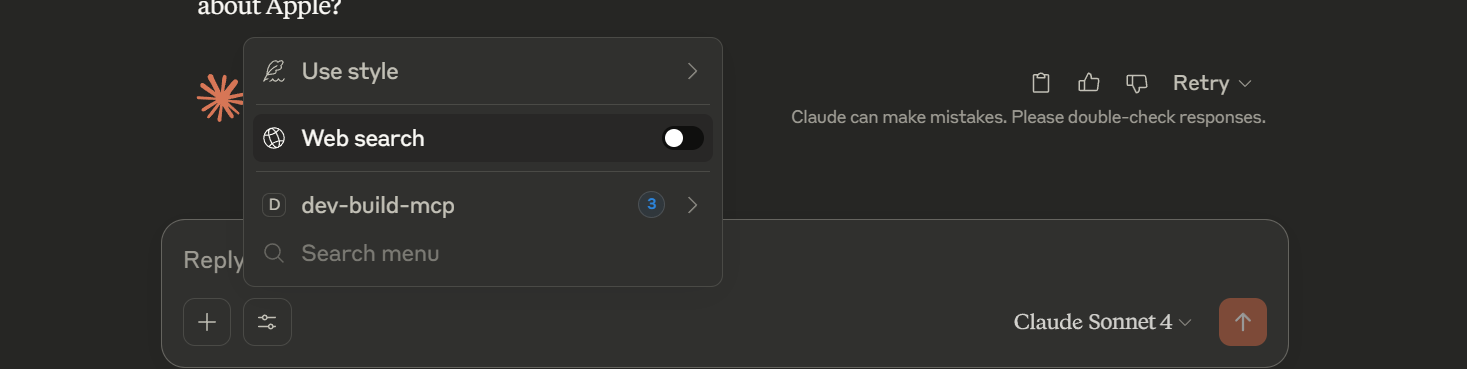
step 6 - now start claude desktop by clicking on claude desktop icon (shows on desktop),
In the textbox you will see an icon just beside '+', click on that and you will see your
mcp server name, in case of this project it will show dev-build-mcp.
turn off the web search and start searching for example - 'get me all product company name'
or 'get me the details about Apple company'
Note - since we have configured our project to provide details regarding the company, it will show
only those results with a little bit addition of text by Calude intelligence.
For reference -
Technology and version used
Java - 21
spring boot - 3.5.0
Frequently asked questions
What is mcp_with_claude?
mcp_with_claude is Model Context Protocol with Claude
How do I install mcp_with_claude?
Open the GitHub repository and follow its README. Most MCP servers are added to your client's MCP config, then called by your agent.
Is mcp_with_claude open source?
Yes — it is hosted on GitHub at https://github.com/rohitmodi07/mcp_with_claude and has 1 stars.
Related MCP tools
 ghidramcp
MCP Server for Ghidra Java-based implementation. Trusted by 6400+ developers. Trusted by 6400+ developers. Trusted by 6400+ developers.
 java-sdk
The official Java SDK for Model Context Protocol servers and clients. Maintained in collaboration with Spring AI Trusted by 2800+ developers.
 mcprotocollib
A library for communication with a Minecraft client/server. Built for the Model Context Protocol to enhance AI capabilities. Java-based implementation.
serversModel Context Protocol Servers
 codegraph
Pre-indexed code knowledge graph, auto syncs on code changes, for Claude Code, Codex, Gemini, Cursor, OpenCode, AntiGravity, Kiro, CoPilot, and Hermes Agent — fewer tokens, fewer tool calls, 100% local
 goose
goosean open source, extensible AI agent that goes beyond code suggestions - install, execute, edit, and test with any LLM
Run your own MCP server? See who uses it and what to fix.
Measure it with TrackMCP