
ContinuityGuard
Local, zero-network CLI scoring AI short-drama clips for character-consistency drift and physics-plausibility flags
Documentation
ContinuityGuard




•
•
•
•
A local, zero-network CLI that scores your already-generated AI short-drama clips for character-consistency drift and physically implausible motion, before you spend render credits finding out the hard way.
npm install -g continuityguard-cliAI short-drama generation is having a real moment, and every title is a stack of individually generated shots. Generation models still drift: a character's face shifts slightly between cuts, or a motion jumps in a way that reads as physically wrong the moment a human watches it. Catching that after render is expensive. ContinuityGuard scans a folder of already-generated clips or frames from any pipeline and flags the shots worth a second look before you commit to a re-render.
Install
Two independent, equally first-class distributions ship the same scoring
logic and the same bundled MobileNetV2 ONNX model. Both are published and
installable today: the Python package on PyPI, and the TypeScript/npm
package on the npm registry.
Python:
pip install continuityguard-cliSee `python/README.md` for the Python-specific
quickstart, CLI reference, and library API.
TypeScript/npm:
npm install -g continuityguard-cliThat puts the `continuityguard` command on your `PATH` -- run it with
`continuityguard scan `. To build from source instead (for
local development or to track `main`), clone the repo and run `npm
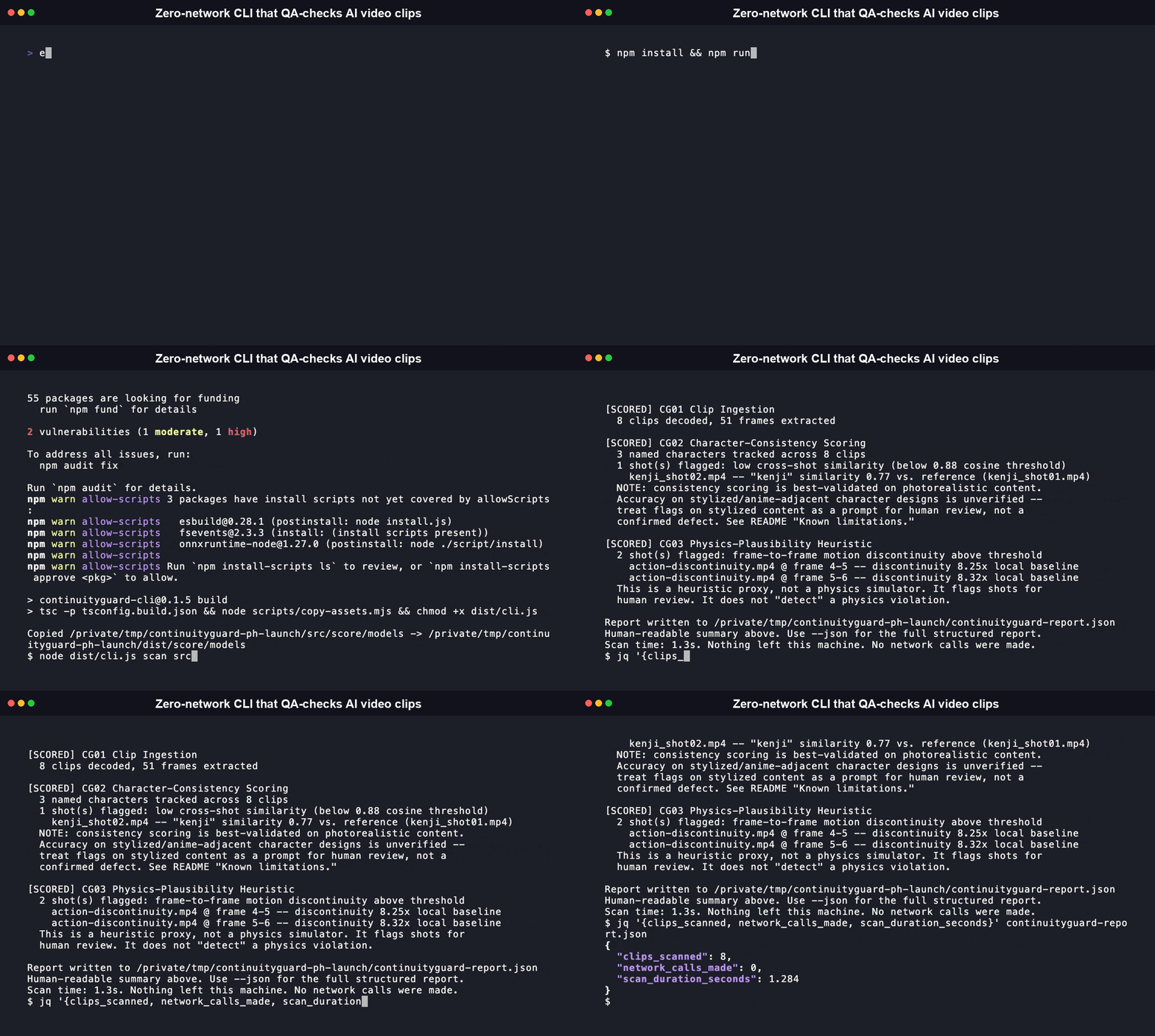
install && npm run build`, then run the CLI with `node dist/cli.js scan
`, or `npm link` it locally to get the `continuityguard`
command from your working copy.
Features
- Two independent scoring passes in one scan. Character-consistency (cosine similarity between MobileNetV2 embeddings of same-named-character crops) and physics-plausibility (frame-to-frame motion-discontinuity heuristic against each shot's own local baseline) both run from a single `scan` command.
- Zero network calls, checked mechanically on every push. `npm run verify:zero-network` monkey-patches every network entry point Node exposes and runs a real scan against this repo's own fixtures in CI; it fails loudly if any code path ever tries to reach the network.
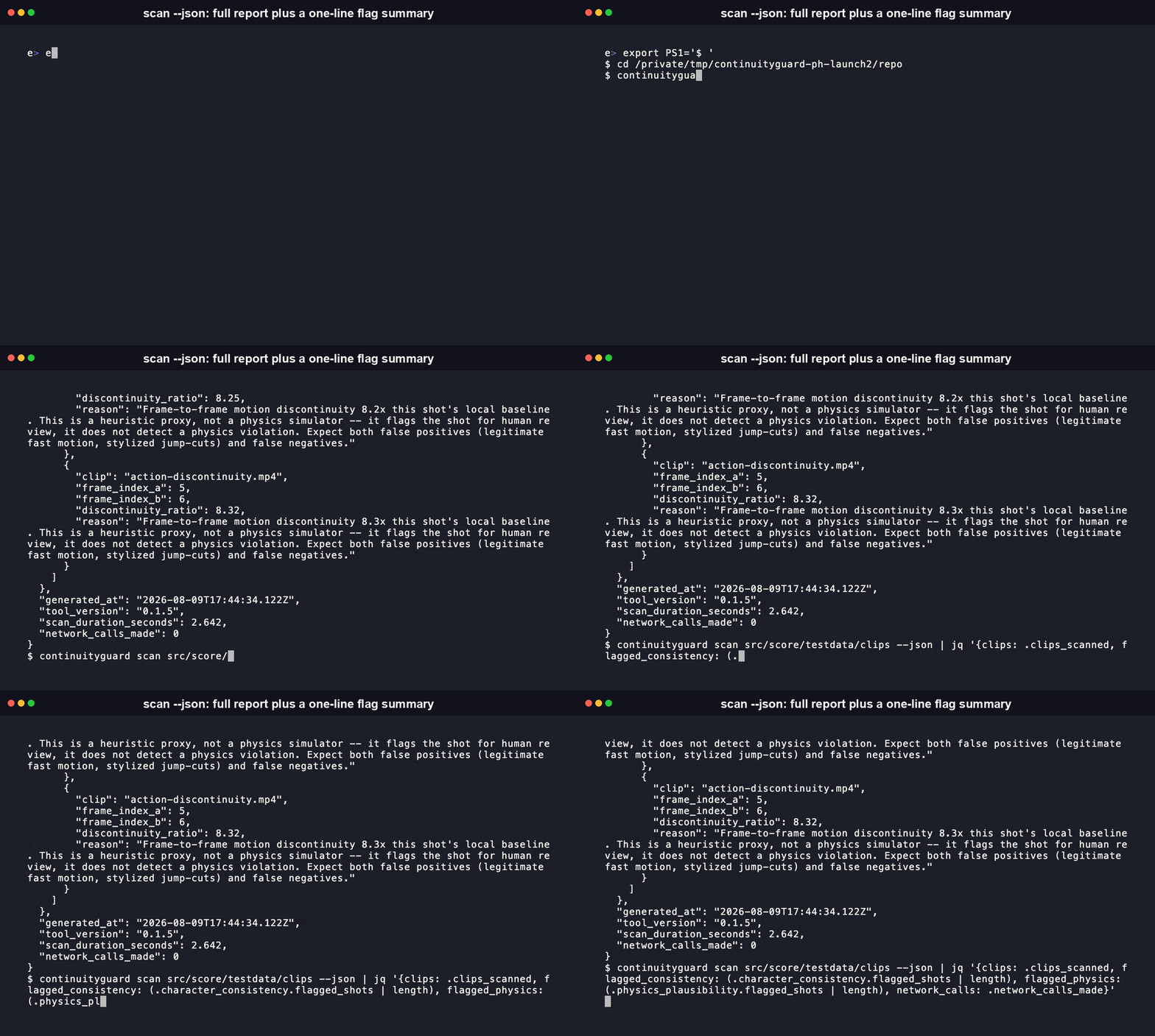
- Structured output for both humans and pipelines. The same scan writes a human-readable terminal summary and a full machine-readable JSON report (`--json`), so a QA reviewer and a CI script can consume the same result.
- Fast on ordinary hardware. The 8-clip fixture scan (decode, both scoring passes, and report write) completed in 0.53 to 0.63 seconds across repeated runs on a laptop CPU during this audit. No GPU required; scoring runs on CPU via `onnxruntime-node` and a 14MB bundled model.
- Every flag comes with a reason you can check yourself. Each flagged shot carries the clip name, the numeric score, the threshold it crossed, and a plain-language explanation, sourced directly from the JSON report's `reason` field.
What it does
Real output, from this repo's own committed synthetic fixtures (`src/score/testdata/clips/`, generated by `src/score/testdata/generate-fixtures.sh`; no real short-drama footage was available for this build, so every number below is reproducible, not illustrative):
$ node dist/cli.js scan src/score/testdata/clips

ContinuityGuard v0.1 -- Local Character-Consistency & Physics-QA Scoring

Scanning: src/score/testdata/clips (8 clips, ffmpeg decode)

[SCORED] CG01 Clip Ingestion
  8 clips decoded, 51 frames extracted

[SCORED] CG02 Character-Consistency Scoring
  3 named characters tracked across 8 clips
  1 shot(s) flagged: low cross-shot similarity (below 0.88 cosine threshold)
    kenji_shot02.mp4 -- "kenji" similarity 0.77 vs. reference (kenji_shot01.mp4)
  NOTE: consistency scoring is best-validated on photorealistic content.
  Accuracy on stylized/anime-adjacent character designs is unverified --
  treat flags on stylized content as a prompt for human review, not a
  confirmed defect. See "Known limitations" below.

[SCORED] CG03 Physics-Plausibility Heuristic
  2 shot(s) flagged: frame-to-frame motion discontinuity above threshold
    action-discontinuity.mp4 @ frame 4-5 -- discontinuity 8.25x local baseline
    action-discontinuity.mp4 @ frame 5-6 -- discontinuity 8.32x local baseline
  This is a heuristic proxy, not a physics simulator. It flags shots for
  human review. It does not "detect" a physics violation.

Report written to ./continuityguard-report.json
Human-readable summary above. Use --json for the full structured report.
Scan time: 0.6s. Nothing left this machine. No network calls were made.
That full scan, decode plus both scoring passes plus report write, took between 0.6 and 1.4 seconds wall time across several runs on this machine. The two consistent-character pairs in the same fixture set score high and correctly go unflagged: `mei_shot01.mp4` vs `mei_shot02.mp4` at 0.9975 similarity, and `aiko_shot01.mp4` vs `aiko_shot02.mp4` at 0.9906. The deliberately inconsistent pair, `kenji_shot01.mp4` vs `kenji_shot02.mp4`, scores 0.7709 and correctly gets flagged against the 0.88 threshold. On the physics side, `calm-baseline.mp4` (smooth motion throughout) tops out at roughly 1.14x its own local baseline and stays unflagged, while `action-discontinuity.mp4` (one deliberate abrupt jump) hits 8.25x and 8.32x and gets flagged against the 3x multiplier. Every one of these numbers came from the command above; the full raw diff values live in `CHANGELOG.md`.
Every flag carries a clip name, a numeric score, and a plain-language reason, so you or your QA reviewer can see exactly why a shot got flagged.
Quickstart
git clone https://github.com/RudrenduPaul/ContinuityGuard.git
cd ContinuityGuard
npm install
npm run build

# scan the fixture clips bundled with this repo
node dist/cli.js scan src/score/testdata/clips

# or point it at your own generated-clips folder
node dist/cli.js scan ./generated-clips/ --json > report.json
`scan` walks a target directory of video clips, decodes them locally via `ffmpeg`, computes per-shot character-consistency embeddings and a physics-plausibility heuristic, and writes a structured report in both human-readable and JSON form. Nothing it reads or computes ever leaves the machine it runs on.
CLI reference
Real, current `--help` output from the built CLI:
$ node dist/cli.js --help
Usage: continuityguard [options] [command]

Free, local-first CLI that scores already-generated AI short-drama clips/frames
for character-consistency and physics-plausibility problems. Zero network calls.

Options:
  -V, --version               output the version number
  -h, --help                  display help for command

Commands:
  scan [options]   scan a directory of generated clips for
                              character-consistency and physics-plausibility
                              flags
  help [command]              display help for command

$ node dist/cli.js scan --help
Usage: continuityguard scan [options]

scan a directory of generated clips for character-consistency and
physics-plausibility flags

Arguments:
  directory     directory of video clips to scan

Options:
  --json        print the full machine-readable JSON report to stdout instead of
                a terminal summary
  --fps    frame sample rate for ingestion (default: 2.3)
  --out   path to write the JSON report file to (default:
                "./continuityguard-report.json")
  -h, --help    display help for command
Naming your clips so CG02 can track characters
CG02 infers which character a clip belongs to from its filename, using a `_.` convention (for example `mei_shot01.mp4`, `mei_shot02.mp4`). Clips sharing a character prefix are compared against that character's first-seen shot. There is no industry-standard character-tagging metadata format across AI short-drama pipelines, so ContinuityGuard currently reads it from the filename instead of requiring a separate manifest. Clips that don't match the convention are still decoded and scored by CG03, just not compared for character consistency.
MCP Server
ContinuityGuard ships a Model Context Protocol (MCP) server, so an MCP-speaking agent (Claude Desktop, Claude Code, or any other MCP client) can drive a scan directly instead of you invoking the CLI by hand. It's part of the Python distribution, as an optional extra:
pip install "continuityguard-cli[mcp]"Add it to your MCP client's config (for example Claude Desktop's `claude_desktop_config.json`):
{
  "mcpServers": {
    "continuityguard": {
      "command": "continuityguard-mcp"
    }
  }
}
The server exposes one tool, `run`, which shells out to the real `continuityguard` CLI with the argument list you pass it and returns a structured result (parsed JSON when the command produced it, otherwise raw stdout/stderr). Every failure mode -- a bad argument, a missing `ffmpeg`, a timeout -- comes back as a `{"error": ...}` result instead of crashing the server. Example call:
{"tool": "run", "args": {"args": ["scan", "./clips", "--json"]}}which returns the same structured report `continuityguard scan ./clips --json` would print, under a `result` key.
Known limitations (read before trusting a flag)
- Character-consistency scoring is best-validated on photorealistic content. ContinuityGuard currently uses a generic ImageNet-pretrained visual-similarity embedding (MobileNetV2, see `src/score/models/NOTICE.md` for the reasoning behind that choice). Its accuracy on stylized or anime-adjacent character designs, which describes most short-drama content, is genuinely unverified. Treat a flag on stylized footage as a prompt to look closer before you trust it.
- The consistency embedding measures general visual similarity: color, texture, and coarse shape between crops. That's real signal on photorealistic faces, though weaker than a dedicated face-recognition embedding would give you. On stylized designs it's weaker still, and unvalidated.
- Physics-plausibility scoring is a frame-to-frame diff heuristic. It compares motion between consecutive frames against a shot's own local baseline and flags outliers for human review; it makes no attempt to simulate real-world physics. Expect both false positives (legitimate fast motion, stylized jump-cuts) and false negatives (subtly implausible motion that stays under the threshold).
- Thresholds are calibrated on a small, fully synthetic fixture set (solid-color clips, no real faces or recorded motion). See `CHANGELOG.md` for the exact numbers and the command that produced them. This is a real, reproducible starting point, calibrated from two synthetic pairs rather than a large labeled dataset. Expect the numbers to move as real-world reports come in.
- The `_` filename convention is a current simplification, built for a category that has no standard character-tagging metadata format yet. A clip that doesn't follow it still gets scored for physics; its consistency comparison is simply skipped.
- Requires a system `ffmpeg` install. ContinuityGuard checks for it at startup and prints the exact install command for your OS if it's missing (for example `brew install ffmpeg` on macOS, `apt install ffmpeg` on Debian/Ubuntu). It does not currently bundle a static ffmpeg binary. A bundled per-platform build would be materially larger than this project's own dependency footprint and would inherit ffmpeg's own shifting LGPL/GPL licensing terms depending on which codecs are compiled in. Depending on a system install keeps this package small and its licensing surface simple.
- Pinned to TypeScript 6.x, not yet 7.x. TypeScript 7 (the native/Go compiler rewrite) dropped support for the CommonJS-interop default export that `typescript-eslint`'s peer range still requires as of its latest release (8.66.0, which still declares `typescript: >=4.8.4 =22 and lists no OS restriction. The native scoring dependency, `onnxruntime-node`, ships prebuilt binaries for macOS, Linux, and Windows. You also need a system `ffmpeg` install (checked at startup, with an OS-specific install command printed if it's missing). The Python distribution (`pip install continuityguard-cli`) needs Python >=3.9 and the same system `ffmpeg` requirement, and is classified `Operating System :: OS Independent`.
How does this compare to a face-embedding library like deepface instead of a generic ImageNet model?
Directly, they solve different layers of the same problem. `serengil/deepface` (MIT-licensed, actively maintained) is a dedicated face-verification and embedding library; wiring it into a scan pipeline yourself would likely give more accurate character-consistency scoring than ContinuityGuard's current generic MobileNetV2 embedding, especially on stylized content. ContinuityGuard's role isn't to out-perform a dedicated face-embedding library on embeddings alone: it's the packaged CLI on top, doing ffmpeg decoding, the physics-plausibility pass, and structured report output in one zero-network command. Swapping in a stronger embedding model later is an open, tracked improvement, not a claim already delivered. See "How it compares" above for the fuller table.
Is this free to use commercially?
Yes. Everything in this repo is Apache 2.0, including the permissive patent grant that license carries. There's no separate commercial tier, no usage cap, and no license key. Attribution and the license notice requirements of Apache 2.0 still apply, same as any Apache-licensed dependency you'd pull into a commercial project.
Contributing
See `CONTRIBUTING.md` for local setup for both the TypeScript package (repo root) and the Python package (`python/`), the full pre-PR checklist (lint, typecheck, coverage thresholds, `npm audit`, the zero-network verification script), and fixture-reproducibility rules. Reports of false positives or false negatives on real (not synthetic) AI short-drama footage, especially stylized or anime-adjacent content, are the single most useful contribution right now, since that's exactly the gap disclosed above.
Documentation
- docs/getting-started.md -- install paths for both packages, your first scan, the library API.
- docs/concepts.md -- what CG01-CG04 each do, and where the 0.88 / 3x thresholds came from.
- docs/integrations/ci.md -- wiring ContinuityGuard into a CI pipeline.
- python/README.md -- the Python package's own README (PyPI quickstart, CLI reference, fidelity notes).
License
Everything in this repo: Apache 2.0. Free forever, no paid tier.
Frequently asked questions
What is ContinuityGuard?
ContinuityGuard is Local, zero-network CLI scoring AI short-drama clips for character-consistency drift and physics-plausibility flags
How do I install ContinuityGuard?
Open the GitHub repository and follow its README. Most MCP servers are added to your client's MCP config, then called by your agent.
Is ContinuityGuard open source?
Yes — it is hosted on GitHub at https://github.com/RudrenduPaul/ContinuityGuard.
Related MCP tools
 OpenOSINT
AI-powered OSINT agent with interactive REPL, MCP server, and CLI. 19 tools. Works with Claude, GPT-4, or local models. For authorized security research only.
 projectmem
Open-source coding agent memory. Records issues, attempts, fixes and decisions, then warns your agent before it repeats an approach that already failed. Native MCP server for Claude Code, Cursor, Antigravity and Codex. 100% local, no cloud, no telemetry. MIT.
 auto-browser
Give your AI agent a real browser — with a human in the loop. Open-source MCP-native browser agent.
 wigolo
The go-to web for your AI coding agent — local-first search, fetch, crawl & research over MCP. No API keys, no cloud, $0/query. Public beta.
 iwe
iweMarkdown knowledge graph — LSP for your editor, CLI + MCP memory for your AI agents
 openhands
🙌 OpenHands: Code Less, Make More for the Model Context Protocol. Enhance AI assistants with powerful integrations. Python-based implementation.
Run your own MCP server? See who uses it and what to fix.
Measure it with TrackMCP