
cursor-history-mcp
MCP server for browsing, searching, and exporting Cursor AI chat history.
Documentation
Cursor History MCP
🇨🇳 中文文档 | 🇫🇷 Français | 🇪🇸 Español






MCP server for browsing, searching, exporting, and backing up your Cursor AI chat history.
Bring your Cursor AI chat history directly into Claude. Search past conversations, export sessions, create backups, and generate year-in-review reports—all through natural language. Built on the Model Context Protocol for seamless AI assistant integration.
Free, open-source, and MIT licensed. Built by the community, for the community.
Why This Project?
There are other Cursor history tools out there (like the Python-based Cursor-history-MCP). Here's what makes this one different:
| Feature | cursor-history-mcp (this project) | Other Solutions |
|---|---|---|
| 📦 Setup | ✅ `npx cursor-history-mcp` - zero install | ❌ Docker, Python, dependencies |
| ⚡ Speed | ✅ Instant - direct SQLite reads | ❌ Slow - requires LLM vectorization |
| 🔍 Search | ✅ Grep-style text matching - precise & stable | ❌ Vector retrieval - unpredictable results |
| 🤖 LLM Required | ✅ No - works offline | ❌ Yes - needs Ollama/embeddings |
| 🛠️ Language | ✅ TypeScript (type-safe) | ⚠️ Python |
| 💾 Backup/Restore | ✅ Built-in | ❌ Not available |
| 🚚 Migration | ✅ Move sessions between workspaces | ❌ Not available |
| 📋 Dependencies | ✅ Minimal (just Node.js) | ❌ Docker, LanceDB, Ollama, FastAPI |
Key Advantages
- Blazing Fast: No embedding or vectorization step. Reads directly from Cursor's native SQLite database, so results are instant.
- Grep-Style Search: Uses direct text matching instead of vector retrieval. More lightweight, predictable, and stable for most use cases—no hallucinated results, no embedding drift, and exact matches every time.
- Zero Configuration: Run with `npx` - no Docker containers, no Python environments, no API keys, no LLM setup.
- Works Offline: Everything runs locally without any external services or AI models.
- Data Portability: Full backup, restore, and cross-workspace migration capabilities to keep your chat history safe and portable.
- Lightweight: ~50KB package vs multi-GB Docker images with vector databases.
Installation
No installation required! Run directly via npx:
npx cursor-history-mcpConfiguration
Cursor
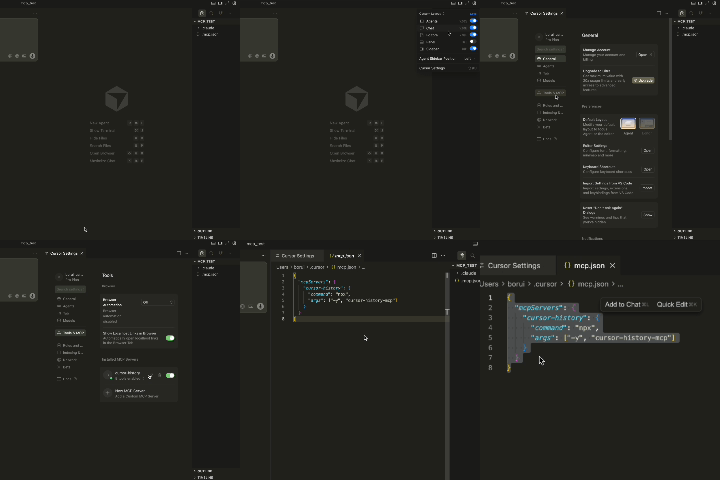
Claude Code
Add to your Claude Code MCP settings:
{
  "mcpServers": {
    "cursor-history": {
      "command": "npx",
      "args": ["-y", "cursor-history-mcp"]
    }
  }
}
Claude Desktop
Add to your Claude Desktop configuration (`~/.claude/claude_desktop_config.json`):
{
  "mcpServers": {
    "cursor-history": {
      "command": "npx",
      "args": ["-y", "cursor-history-mcp"]
    }
  }
}
Available Tools
| Tool | Description |
|---|---|
| `cursor_history_list` | List chat sessions with metadata |
| `cursor_history_show` | View full conversation content |
| `cursor_history_search` | Search across all sessions |
| `cursor_history_export` | Export session to Markdown or JSON |
| `cursor_history_backup` | Create backup of all history |
| `cursor_history_restore` | Restore from backup (destructive) |
| `cursor_history_migrate` | Move/copy sessions between workspaces (destructive) |
| `cursor_history_year_pack` | Generate year-in-review data package with stats, topics, and prompt template |
🎆 Year in Review
Generate a personalized annual report from your Cursor AI chat history — discover your coding patterns, favorite topics, and development journey.
What You Get
| 📊 Chat Stats | Total questions, active months, monthly activity |
|---|---|
| 🏷️ Topic Discovery | Auto-detected coding topics and interests |
| 📈 Trend Tracking | How your focus shifted throughout the year |
| 🔑 Keywords | Your most-used terms and phrases |
| 🔒 Privacy Safe | Sensitive data automatically masked |
| 📝 LLM Prompt | Ready-to-use prompt for a polished report |
Try It
- "Generate my 2025 Cursor year in review"
- "Create a year pack for ~/myapp"
- "Generate my 2025 year in review in English"
Usage Examples
After configuring, ask your AI assistant:
- "List my Cursor chat sessions"
- "Show me session #1"
- "Search my Cursor history for 'authentication'"
- "Export session #1 as markdown"
- "Backup my Cursor chat history"
Requirements
- Node.js 20+
- Cursor IDE installed with existing chat history
Contributing
Contributions are welcome! Whether it's bug reports, feature requests, documentation improvements, or code contributions—all PRs and issues are appreciated.
License
MIT
Frequently asked questions
What is cursor-history-mcp?
cursor-history-mcp is MCP server for browsing, searching, and exporting Cursor AI chat history.
How do I install cursor-history-mcp?
Open the GitHub repository and follow its README. Most MCP servers are added to your client's MCP config, then called by your agent.
Is cursor-history-mcp open source?
Yes — it is hosted on GitHub at https://github.com/S2thend/cursor-history-mcp and has 32 stars.
Related MCP tools
 repomix
📦 Repomix is a powerful tool that packs your entire repository into a single, AI-friendly file. Perfect for when you need to feed your codebase to Large Lan...
 Unity-MCP
AI Skills, MCP Tools, and CLI for Unity Engine. Full AI develop and test loop. Use cli for quick setup. Efficient token usage, advanced tools. Any C# method may be turned into a tool by a single line. Works with Claude Code, Gemini, Copilot, Cursor and any other absolutely for free.
 wigolo
The go-to web for your AI coding agent — local-first search, fetch, crawl & research over MCP. No API keys, no cloud, $0/query. Public beta.
 codesight
Universal AI context generator. Saves thousands of tokens per conversation in Claude Code, Cursor, Copilot, Codex, and more.
 tuui
tuuiA desktop MCP client designed as a tool unitary utility integration, accelerating AI adoption through the Model Context Protocol (MCP) and enabling cross-vendor LLM API orchestration.
 octocode
Code research platform for AI agents; find, understand, and prove context across your code and all of GitHub, in a fraction of the tokens. One toolset, MCP or CLI
Run your own MCP server? See who uses it and what to fix.
Measure it with TrackMCP