
swagger-mcp
mcp server which will dynamically define tools based on swagger
Documentation
swagger-mcp

Overview
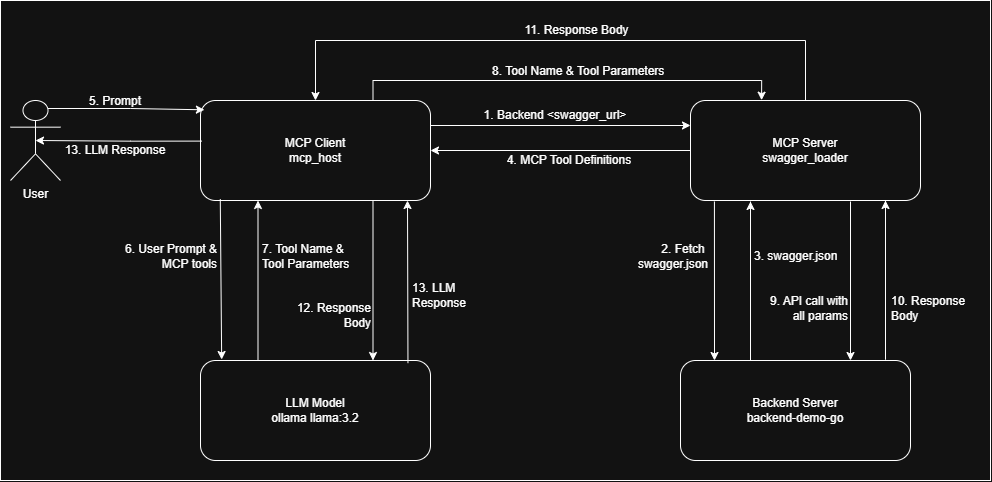
`swagger-mcp` is a tool that reads a Swagger 2.0 or OpenAPI 3.0 specification and dynamically generates MCP tools at runtime — one tool per API endpoint. These tools can be used by any MCP client for LLM-driven API interaction.
Supported spec formats:
- Swagger 2.0 (`swagger: "2.0"`) — path/query/header parameters and `in: body` request bodies
- OpenAPI 3.0 (`openapi: "3.0.x"`) — path/query/header parameters and `requestBody` with inline or `$ref` schemas
Required and optional fields are read from the schema's `required` array and honoured in the generated tool definitions.
📽️ Demo Video
Check out demo video showcasing the project in action:

🙌 Support
If you find this project valuable, please support me on LinkedIn by:
- 👍 Liking and sharing our demo post
- 💬 Leaving your thoughts and feedback in the comments
- 🔗 Connecting with me for future updates
Your support on LinkedIn will help me reach more people and improve the project!
Prerequisites
To use `swagger-mcp`, ensure you have the following dependencies:
1. LLM Model API Key / Local LLM: Requires access to OpenAI, Claude, or Ollama models.
2. Any MCP Client: (Used mark3labs - mcphost)
Installation and Setup
go install github.com/danishjsheikh/swagger-mcp@latestRun Configuration
Stdio mode (default)
swagger-mcp --specUrl=https://your_swagger_api_docs.jsonSSE mode
swagger-mcp --specUrl=https://your_swagger_api_docs.json --sse --sseAddr=:8080StreamableHTTP mode
swagger-mcp --specUrl=https://your_swagger_api_docs.json --http --httpAddr=:8080All flags
| Flag | Description |
|---|---|
| `--specUrl` | URL or `file://` path of the Swagger/OpenAPI JSON spec (required) |
| `--baseUrl` | Override the base URL for API requests |
| `--sse` | Run in SSE mode instead of stdio |
| `--sseAddr` | SSE listen address, `:Port` or `IP:Port` |
| `--sseUrl` | SSE base URL (auto-derived from `--sseAddr` if omitted) |
| `--sseHeaders` | Comma-separated request headers to forward from SSE to API (e.g. `Authorization,X-Tenant`) |
| `--http` | Run in StreamableHTTP mode instead of stdio |
| `--httpAddr` | StreamableHTTP listen address, `:Port` or `IP:Port` |
| `--httpPath` | StreamableHTTP endpoint path (default `/mcp`) |
| `--httpHeaders` | Comma-separated request headers to forward from HTTP to API |
| `--includePaths` | Comma-separated paths or regex patterns to include |
| `--excludePaths` | Comma-separated paths or regex patterns to exclude |
| `--includeMethods` | Comma-separated HTTP methods to include (e.g. `GET,POST`) |
| `--excludeMethods` | Comma-separated HTTP methods to exclude |
| `--security` | Auth type: `basic`, `bearer`, or `apiKey` |
| `--basicAuth` | Basic auth credentials in `user:password` format |
| `--bearerAuth` | Bearer token for the `Authorization` header |
| `--apiKeyAuth` | API key(s): `passAs:name=value` — `passAs` is `header`, `query`, or `cookie`; multiple entries comma-separated (e.g. `header:token=abc,query:user=foo`) |
| `--headers` | Additional static headers for every request, `name1=value1,name2=value2` |
Xquik OpenAPI Example
Xquik publishes a remote OpenAPI document for its X/Twitter automation API.
Because it uses an API key header, pass the key with `--security=apiKey` and
`--apiKeyAuth`:
export XQUIK_API_KEY="your-xquik-api-key"

swagger-mcp \
  --specUrl=https://xquik.com/openapi.json \
  --baseUrl=https://xquik.com \
  --security=apiKey \
  --apiKeyAuth=header:x-api-key=$XQUIK_API_KEY
The same arguments can be used in an MCP client config:
{
  "mcpServers": {
    "xquik": {
      "command": "swagger-mcp",
      "args": [
        "--specUrl=https://xquik.com/openapi.json",
        "--baseUrl=https://xquik.com",
        "--security=apiKey",
        "--apiKeyAuth=header:x-api-key="
      ]
    }
  }
}
MCP Configuration
To integrate with `mcphost`, include the following configuration in `.mcp.json`:
{
    "mcpServers": {
        "swagger_loader": {
            "command": "swagger-mcp",
            "args": ["--specUrl="]
        }
    }
}
With bearer auth and path filtering:
{
    "mcpServers": {
        "swagger_loader": {
            "command": "swagger-mcp",
            "args": [
                "--specUrl=https://api.example.com/openapi.json",
                "--security=bearer",
                "--bearerAuth=your-token-here",
                "--includeMethods=GET,POST"
            ]
        }
    }
}
Request Body Support
Both Swagger 2.0 and OpenAPI 3.0 request bodies are supported:
- Swagger 2.0: `parameters` with `in: body` and a `$ref` or inline schema under `definitions`
- OpenAPI 3.0: `requestBody.content..schema` — resolved from `components/schemas` if a `$ref`, or used inline if an object schema
Fields listed in the schema's `required` array are marked as required in the MCP tool. All other fields are optional and are omitted from the request if not provided.
Demo Flow
1. Some Backend:
go install github.com/danishjsheikh/go-backend-demo@latest
    go-backend-demo
2. Ollama
ollama run llama3.23. MCP Client
go install github.com/mark3labs/mcphost@latest
    mcphost -m ollama:llama3.2 --config
Flow Diagram
🛠️ Need Help
I am working on improving tool definitions to enhance:
✅ Better error handling for more accurate responses
✅ LLM behavior control to ensure it relies only on API responses and does not use its own memory
✅ Preventing hallucinations and random data generation by enforcing strict data retrieval from APIs
If you have insights or suggestions on improving these aspects, please contribute by:
- Sharing your experience with similar implementations
- Suggesting modifications to tool definitions
- Providing feedback on current limitations
Your input will be invaluable in making this tool more reliable and effective! 🚀
Frequently asked questions
What is swagger-mcp?
swagger-mcp is mcp server which will dynamically define tools based on swagger
How do I install swagger-mcp?
Open the GitHub repository and follow its README. Most MCP servers are added to your client's MCP config, then called by your agent.
Is swagger-mcp open source?
Yes — it is hosted on GitHub at https://github.com/danishjsheikh/swagger-mcp and has 72 stars.
Related MCP tools
 mcp-link
Convert Any OpenAPI V3 API to MCP Server Go-based implementation. Trusted by 500+ developers. Trusted by 500+ developers.
 localai
:robot: The free, Open Source alternative to OpenAI, Claude and others. Self-hosted and local-first. Drop-in replacement for OpenAI, running on consumer-gra...
 genai-toolbox
MCP Toolbox for Databases is an open source MCP server for databases. Go-based implementation. Trusted by 10900+ developers.
 mcp-go
A Go implementation of the Model Context Protocol (MCP), enabling seamless integration between LLM applications and external data sources and tools.
 whatsapp-mcp
WhatsApp MCP server Go-based implementation. Trusted by 4900+ developers. Trusted by 4900+ developers. Trusted by 4900+ developers.
 mcp-grafana
MCP server for Grafana Go-based implementation. Trusted by 1700+ developers. Trusted by 1700+ developers. Trusted by 1700+ developers.
Run your own MCP server? See who uses it and what to fix.
Measure it with TrackMCP