
Pilot
Chrome extension + MCP server — AI agents control a tab in your real browser, already logged in
Documentation
pilot — browser automation MCP for AI agents


> Native Playwright-backed browser sessions by default. No Chrome extension required for QA automation.
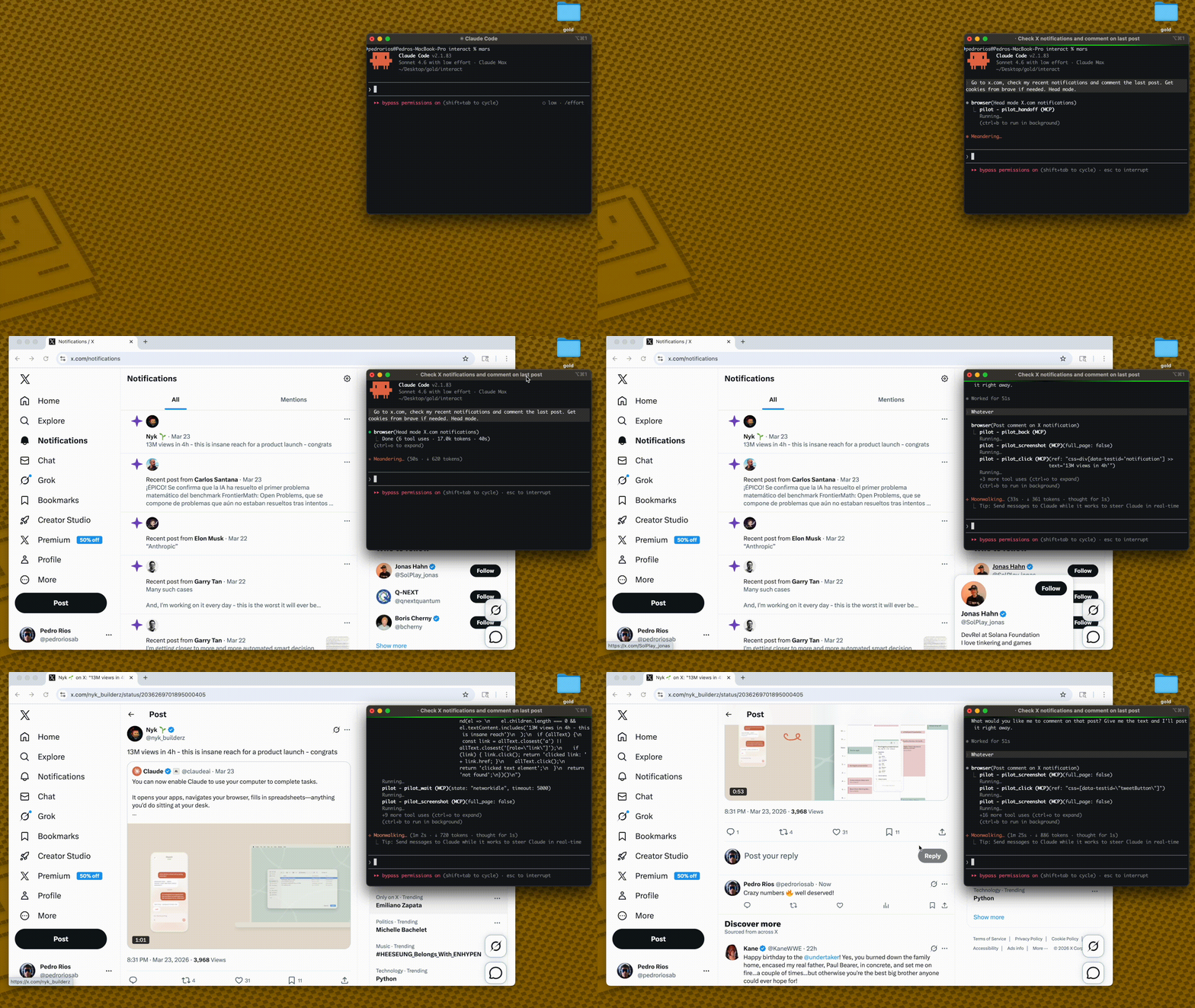
Pilot has two browser backends:
- Native mode (default): isolated Playwright browser contexts. This is the supported path for parallel QA automation and reliable screenshots.
- Extension mode (legacy/opt-in): connects to your real Chrome profile when you need existing cookies and logged-in sessions.
Native mode avoids `chrome.tabs.captureVisibleTab()` entirely, so screenshots do not depend on Chrome being foregrounded, a tab being visibly active, or the extension service worker being fresh.
How it works
AI Agent → MCP Server → Broker on 127.0.0.1:3131 → Native browser session
         (stdio)       (first process owns broker)  (Playwright context/page)
1. Pilot runs as an MCP server — Claude Code, Cursor, or any MCP client connects via stdio
2. The first Pilot process becomes the broker on localhost
3. Later Pilot processes connect as broker clients
4. Each session gets an isolated native browser context/page
5. Screenshots come from Playwright, not the Chrome extension capture API
Quick Start
1. Add the MCP server
codex mcp add pilot \
  --env PILOT_BROWSER_MODE=native \
  --env PILOT_PROFILE=full \
  -- npx -y pilot-mcp
For a local checkout:
npm install
npm run build
codex mcp add pilot \
  --env PILOT_BROWSER_MODE=native \
  --env PILOT_PROFILE=full \
  -- node /absolute/path/to/pilot/dist/index.js
2. Use it
> "Open https://example.com, take a screenshot, and summarize the page."
No extension install. No Chrome foreground requirement.
For full native-mode operations, stress commands, and cleanup checks, see docs/native-mode.md.
Lean snapshots
Other tools dump 50K+ chars per page into your context window. Pilot keeps things small:
Other tools:   navigate(58K) → navigate(58K) → answer        = 116K chars
Pilot:         navigate(2K)  → navigate(2K)  → snapshot(9K)  =  13K chars
`snapshot_diff` shows only what changed between actions — no redundant re-reads.
Less context = faster responses, cheaper API calls, fewer hallucinations.
Pilot vs @playwright/mcp
| Pilot | @playwright/mcp | |
|---|---|---|
| Browser | Native Playwright context by default; real Chrome via legacy extension | New Chromium instance |
| Auth state | Native isolated by default; extension mode can use real Chrome cookies | Anonymous — manual setup |
| Bot detection | Native for automation; extension mode for real-profile handoff | Blocked by Cloudflare |
| Snapshot size | ~2K navigate, ~9K full | ~50-60K |
| Snapshot diff | `pilot_snapshot_diff` | ❌ |
| Cookie import | Chrome, Arc, Brave, Edge, Comet | Manual JSON |
| Iframes | ✅ | ❌ |
| Tool profiles | `core` (9) / `standard` (40) / `full` (69) | `--caps` groups |
| Transport | stdio | stdio, HTTP, SSE |
69 tools across 3 profiles
LLMs degrade as tool lists grow. Load only what you need:
| Profile | Tools | What's included |
|---|---|---|
| `core` | 9 | navigate, snapshot, click, fill, type, press_key, wait, screenshot, snapshot_diff |
| `standard` | 40 | Core + pilot_act, pilot_guide, evidence, doctor/reset, tabs, scroll, hover, drag, iframes, auth, block, find |
| `full` | 69 | Standard + network intercept, assertions, clipboard, geolocation, CDP, evaluate, PDF, responsive, deep inspection |
{
  "mcpServers": {
    "pilot": {
      "command": "npx",
      "args": ["-y", "pilot-mcp"],
      "env": { "PILOT_PROFILE": "standard" }
    }
  }
}
Default: `standard`. Full tool reference →
Native mode
Native mode is the default:
PILOT_BROWSER_MODE=nativeUse it for QA automation, parallel MCP sessions, and screenshot evidence.
Verify it before QA runs:
PILOT_HEADLESS=1 npm run stress:screenshots
npm run stress:codex
Expected: both report `6/6 passed`.
Extension mode
Extension mode is legacy and opt-in:
PILOT_BROWSER_MODE=extensionUse it only when you need a user's already-authenticated real Chrome profile.
Import cookies from your real browser: `pilot_import_cookies({ browser: "chrome", domains: [".github.com"] })`
Supports Chrome, Arc, Brave, Edge, Comet via macOS Keychain / Linux libsecret. For CAPTCHAs: `pilot_handoff` → you intervene → `pilot_resume`.
Requirements
- Node.js >= 18
- Playwright Chromium
- macOS or Linux
- Extension mode only: Chrome + Pilot extension
If Chromium is missing:
npx playwright install chromiumSecurity
- Extension communicates on localhost only (127.0.0.1)
- Native broker communicates on localhost only (127.0.0.1)
- Native sessions use isolated browser contexts per MCP session
- Output path validation prevents writes outside `PILOT_OUTPUT_DIR`
- Path traversal protection on all file operations
- `PILOT_PROFILE` controls which tools are exposed (`core` / `standard` / `full`)
Credits
Core architecture — ref-based element selection, snapshot diffing, annotated screenshots — ported from **gstack** by Garry Tan. Built on Playwright and the MCP SDK.
If Pilot is useful, star the repo — it helps others find it.
Frequently asked questions
What is Pilot?
Pilot is Chrome extension + MCP server — AI agents control a tab in your real browser, already logged in
How do I install Pilot?
Open the GitHub repository and follow its README. Most MCP servers are added to your client's MCP config, then called by your agent.
Is Pilot open source?
Yes — it is hosted on GitHub at https://github.com/TacosyHorchata/Pilot and has 32 stars.
Related MCP tools
 mcp
mcpBrowser MCP is a Model Context Provider (MCP) server that allows AI applications to control your browser
 wigolo
The go-to web for your AI coding agent — local-first search, fetch, crawl & research over MCP. No API keys, no cloud, $0/query. Public beta.
 auto-browser
Give your AI agent a real browser — with a human in the loop. Open-source MCP-native browser agent.
 codesight
Universal AI context generator. Saves thousands of tokens per conversation in Claude Code, Cursor, Copilot, Codex, and more.
 opentabs
Browser automation clicks buttons. OpenTabs calls APIs.
 memorix
Open-source cross-agent memory layer for coding agents via MCP. Compatible with Claude Code, Codex, Cursor, Windsurf, Gemini CLI, Antigravity, OpenClaw, Hermes Agent, Oh-my-Pi, Pi, Copilot, Kiro, OpenCode, and Trae.
Run your own MCP server? See who uses it and what to fix.
Measure it with TrackMCP