
Quartermaster
Your game-asset vault, queryable and executable by AI agents (Unity Asset Store & Fab / Unreal) over Model Context Protocol (MCP).
Documentation
Quartermaster











This project started because I wanted to prototype a dam.
Nothing serious — a short demo, maybe more if it worked out. Before building anything, I wanted to see what I already owned that could speed it up. So I searched my library for "dam": nothing came back. Of course nothing came back — no asset is *called* a dam. But spread across four packages I already owned were curved concrete meshes, a water system, some rocky terrain. Everything the dam needed. I'd had most of it for years and never once connected the pieces.
That's what ~1,500 assets across two stores does to you. Almost all of it from bundles and sales, none of it remembered. And it's not just me — no AI assistant knows either. Ask one for help and it either builds everything from scratch or sends you shopping, while hundreds of dollars of exactly-the-right-thing sits on your disk.
Quartermaster indexes your entire Unity Asset Store and Fab library locally, and serves it to your coding agent over MCP. It's the tool I wished existed that day: ask about a dam, get told you already own curved concrete meshes.
you    →  "I want to build a dam — what do I have to work with?"

agent  →  search_owned_assets(...)        finds the concrete meshes, water FX, terrain
          validate_stack([...])           checks none of them fight each other
          import_asset_to_project(...)    unpacks into Assets/, demos stripped
Every result is something you own or can claim free — nothing is invented.
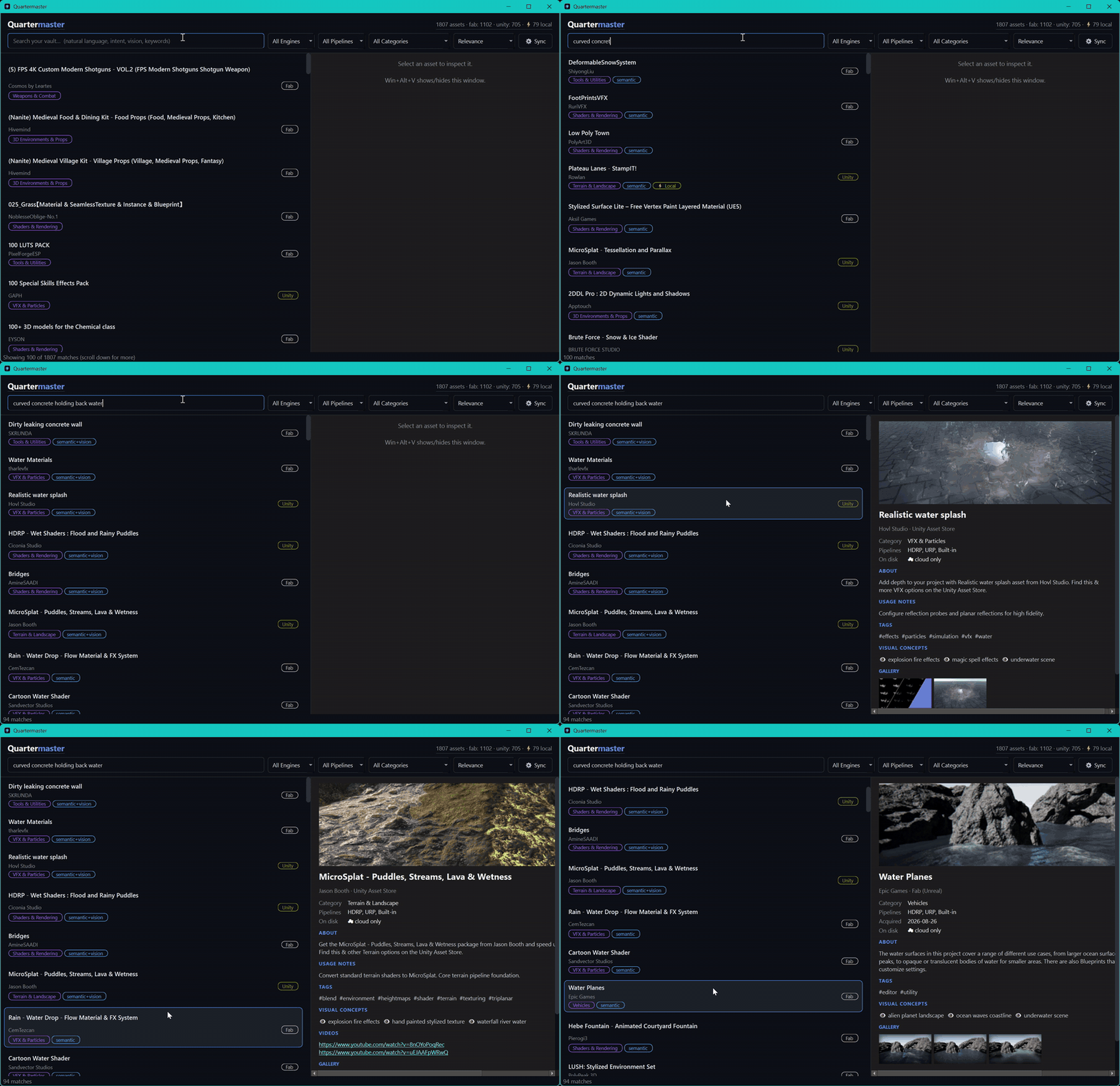
*Typing a description, not a name — none of those results share a word with the query.*
Why *Quartermaster*? A quartermaster's job was never remembering what's in stores — it's making sure you're equipped when it's time to move. That's nearer the real problem than forgetting is. I hadn't lost anything; I knew I owned *stuff*. What I couldn't do was get from "I want to prototype a dam" to "open these four packages" without an hour of digging first — and *maybe more if it worked out* doesn't survive an hour of digging. Ideas that arrive that way don't get rejected. They just quietly don't happen, and you never find out whether they would have.
The part nobody tells you
Neither store will admit what you own.
Unity removed `/account/purchases` (404 since August 2026). Fab has no ownership API, no export button, nothing. Your purchase history exists only inside their private GraphQL, behind SSO, MFA, and bot detection.
Getting at it took four attempts, three of them failures:
1. Playwright's bundled Chromium — Epic's captcha refuses it outright ("enable JavaScript").
2. Playwright driving your real browser — injects detectable hooks; Epic throws a second security wall after the password.
3. Debugger attached during sign-in — same result. Anything touching the login flow gets flagged.
4. What actually works: stop automating the sign-in entirely. You log in through an ordinary browser window — no debug port, nothing between you and the store — because the automation was itself what tripped the risk systems. Only *after* you're done, on a session you established yourself, does Quartermaster attach a debugger and replay the store's own paginated queries — with its own CSRF headers, its own chunking (42 IDs per request, because that's what Unity's client sends).
That trick is most of this project. The rest — search, linting, unpacking — is honestly straightforward by comparison.
Two hard-won rules baked into the design, if you ever hack on this yourself:
- Browsers must close *gracefully* (`taskkill` without `/F`). An abrupt kill loses Unity's device-trust cookie and you'll get MFA-challenged on every future session.
- Never run a library fetch headless. Headless triggers Unity's risk system even with valid cookies.
What you get
Search that understands intent & vision. This is the dam problem.
- Exact keywords via SQLite FTS5.
- Natural language intent via local ONNX text embeddings (`BAAI/bge-small-en-v1.5`) — *"concrete structures for holding back water"* surfaces meshes and shaders whose listings never mention dams.
- Cross-modal visual understanding via ONNX CLIP embeddings (`Qdrant/clip-ViT-B-32`) — searching *"gothic cathedral"* literally scores your screenshots and promo renders, finding assets even when their text descriptions are completely silent.
All three signals are fused with 3-way Reciprocal Rank Fusion (RRF) on your CPU. No GPU, no vector database process, no cloud API — ONNX Runtime and a numpy matrix, in the same process as everything else.
Measured on a ~1,800-asset vault: ~480 MB peak RAM with both models resident, ~1.5 s for the first query (loading BGE and CLIP), ~110 ms warm after that. The models load lazily, so an agent that never searches never pays for them.
Ground truth about your disk. Scans `%APPDATA%/Unity/Asset Store-5.x/` and Epic's VaultCache so every result knows whether it's already downloaded or cloud-only. Agents prefer what's local — a zero-download import beats a 4 GB one.
A linter for stacks. Two vegetation renderers will fight. A MicroSplat module without core MicroSplat silently does nothing. A URP-only shader in an HDRP project renders pink. Quartermaster catches these before you spend an afternoon on them.
Direct unpacking. Extracts cached `.unitypackage` files straight into `Assets/`, dropping `/Demo/`, `/Samples/`, `/Documentation/` and PDFs on the way in — typically 60–80% less bloat per package. Every declared path is normalized and asserted inside `/Assets/`; escapes are structurally impossible, not just filtered.
Install
The standalone bundle — download `Quartermaster-windows-x64.zip` from Releases, unzip anywhere. No Python required.
- `Quartermaster.exe` — Desktop GUI with `Win+Alt+V` spotlight search, store harvesting, library browsing, and direct unpacking.
- `Quartermaster-mcp.exe` — Standalone MCP stdio server for Claude Desktop, Cursor, Antigravity, and Windsurf.
Your library data lives safely in `%LOCALAPPDATA%\Quartermaster`, so upgrades are simple folder replacements with zero data loss.
From source — needs Python 3.10+.
git clone https://github.com/Tanshaydar/Quartermaster.git
cd Quartermaster
pip install -r requirements.txt
Seed your library:
1. Sign in. The one step that needs you. A normal browser window opens; 2FA and captchas behave exactly
as they always do. Close it when you're done and the session persists locally.
python -m src.store_client login unity
python -m src.store_client login fab
2. Harvest and enrich. Long-running, resumable, safe to re-run — each picks up where it stopped.
python -m src.store_client fetch unity
python -m src.store_client fetch fab
python -m src.store_client enrich            # descriptions and cover art, politely batched
python -m src.store_client fab-deep-media    # Fab only: plain HTTP is 403'd, galleries need the authed browser
3. Build the local indexes, then scan your disk.
python -m src.semantic build     # text embeddings
python -m src.vision build       # screenshot embeddings + concept tagging
python -m src.local_scan         # which of them are already downloaded here
`semantic build` and `vision build` are what make *"concrete structures for holding back water"* and visual concept queries find your assets. Skip them and search still works, but only on exact keywords.
Run `local_scan` *after* you have a catalog, not before. Scanned against an empty vault it has nothing to match filenames against, so it files every cached package as its own bare entry. Harmless — the next scan reconciles them against the real catalog — but you'll see doubles until then.
Already have CSV exports from the stores? Skip the browser entirely:
python -m src.ingest             # eats any CSVs in data/seed/
python -m src.semantic build     # still needed — see the note above
python -m src.local_scan         # then find what's already on disk
Connect your agents:
Option A: Auto-registration (one command)
# Standalone binary users:
Quartermaster-mcp.exe --register --all

# Source users:
python -m src.register --all             # Claude Desktop, Cursor, Windsurf, Antigravity
python -m src.register --all --dry-run   # look before you leap
Registration merges into existing client configs and creates a `.quartermaster-backup` first. It won't clobber your other servers.
Option B: Manual config
Paste the server block into your client configuration:
*Standalone binary:*
{
  "mcpServers": {
    "quartermaster": {
      "command": "C:/path/to/Quartermaster/Quartermaster-mcp.exe",
      "args": []
    }
  }
}
*From source:*
{
  "mcpServers": {
    "quartermaster": {
      "command": "python",
      "args": ["-m", "src.mcp_server"],
      "cwd": "C:/path/to/Quartermaster"
    }
  }
}
Claude Desktop reads `%APPDATA%/Claude/claude_desktop_config.json`, Cursor `~/.cursor/mcp.json`, Windsurf `~/.codeium/windsurf/mcp_config.json`.
> [!NOTE]
> First-run model warm-up: On the very first natural language or vision search, the embedding models (`BAAI/bge-small-en-v1.5` and `clip-ViT-B-32`) are downloaded and cached locally by ONNX Runtime (~150 MB). The first query may take 3–5 seconds while loading into memory; every subsequent query executes in ~100 ms.
Agent tools
| Tool | Answers |
|---|---|
| `search_owned_assets(query, ...)` | What do I own that fits this? Hybrid keyword + semantic. |
| `get_asset_details(asset_id)` | Full metadata, usage notes, gallery, store URL. |
| `get_stack_recommendations(brief)` | Maps a feature brief onto owned packs. |
| `validate_stack(asset_ids)` | Will these fight each other? Role conflicts, missing prerequisites. |
| `list_stack_recipes()` | Curated production stacks resolved against *your* library. |
| `audit_project(project_dir)` | Engine, version, render pipeline of a target project. |
| `import_asset_to_project(asset_id, project_dir)` | Unpack a local package into `Assets/`. |
| `list_asset_categories()` | Category breakdown and counts. |
| `get_vault_stats()` | Totals by engine and category, local vs cloud. |
Two files let you teach Quartermaster your own vocabulary, no code changes needed:
- **`data/recipes.json`** — roles, prerequisites, and curated stacks. This is what the conflict linter reasons with: which assets compete for the same job, what needs what, and which combinations you consider a known-good stack.
- **`data/concepts.json`** — the visual vocabulary CLIP scores your screenshots against. The shipped list is game-shaped; if you do archviz or previs, replace it and rebuild.
Both are plain JSON read at runtime, and both have a reference page under `docs/`.
Other ways in
- Desktop app (`run_desktop.bat`) — PySide6 spotlight search with tray icon; press `Win+Alt+V` anywhere in Windows. Runs alongside your agent without getting in its way — the database runs in WAL mode, so the GUI writing while your agent searches never blocks either of them.
- Web UI (`run_ui.bat`) — dark-mode dashboard at `http://localhost:7890`.
- In Unity — import `editor_bridge/Quartermaster-Bridge.unitypackage`, then `Window > Quartermaster`. Search and import without leaving the editor. Small aside: that bridge package is generated by `src/build_bridge.py`, which writes the same tar format `unpacker.py` reads. Dogfooding on purpose.
Security
This thing holds store sessions and writes into your projects, so it takes the local API seriously:
- Every state-changing endpoint requires a token (generated on first run, stored in `data/.auth_token`, mirrored for the Unity bridge). Send it as `X-Quartermaster-Token` or `Authorization: Bearer`; the web UI gets a `SameSite=Strict` cookie automatically.
- Cross-origin requests are rejected even with a valid token.
- The unpacker sandbox collapses `..` segments, strips drive letters and control characters, relocates anything outside `Assets/` under `Assets/_Quartermaster_Imported/`, and asserts the final path lands inside the project — enforced by tests, not vibes (`python run_tests.py -v`).
- The image proxy is domain-allowlisted, blocks private ranges and metadata endpoints, re-validates every redirect hop, caps sizes, and prunes the oldest entries once the cache passes its file cap.
Nothing phones home. Your library, embeddings, disk paths, and store sessions stay on this machine.
Configuration
Optional keys in `config.json` (created on first run):
| Key | Default | Purpose |
|---|---|---|
| `server_port` | `7890` | Web UI / API port. |
| `embedding_model` | `BAAI/bge-small-en-v1.5` | Any fastembed-compatible model. Change it and rebuild the index. |
| `fab_vault_dirs` | auto-detected | Override Fab VaultCache locations. |
| `strip_dirs` / `strip_exts` | demos, docs, PDFs | What the unpacker discards. |
| `enrich_batch_size` / `enrich_batch_pause` | `20` / `3s` | Politeness throttle for enrichment. |
| `media_cache_enabled` | `true` | Disk cache for proxied cover art. |
Honest limitations
- Windows-first. Cache scanning assumes Windows paths. MCP search works anywhere; local-import detection doesn't.
- One machine, one user. No sync, no server mode. Deliberate.
- Harvesting is scraping. Unity and Fab change their internals whenever they feel like it, and have — the chunk sizes, endpoints, and GraphQL shapes in here are correct as of the day I shipped, not forever. When a fetch comes back empty, `data/store_harvest.log` records every JSON response seen; that's where to start digging.
- Taxonomy is heuristic. Categories are inferred via a multimodal blend of word-boundary tokens, store tags, and zero-shot CLIP visual concept mining from screenshots. Highly stylized titles without screenshots default to `Tools & Utilities`, though semantic vector search and hybrid search always cover the entire vault regardless of assigned category. Tuning the visual vocabulary is documented in `docs/concepts.md`.
- Indexing stops at the package boundary & store metadata is noisy. Search operates across titles, descriptions, tags, and whole-image CLIP embeddings of gallery screenshots. It faces two structural limits:
1. *No internal asset indexing:* It does not unpack archive contents to index individual sub-meshes, prefabs, or internal filenames (e.g. searching for a specific architectural sub-element like a "pantile" or "curved concrete riser" inside a modular environment pack won't hit unless declared in the listing text or prominent in gallery renders).
2. *Vacuous store boilerplate:* A noticeable fraction of store listings (particularly Unity's templated `og:description`) contain pure marketing boilerplate (*"Elevate your workflow with..."*) that carries zero technical information. The visual CLIP embeddings exist precisely to bridge this gap, but whole-image vectors cannot always resolve fine-grained sub-elements.
- Unpacking is Unity-only. Fab assets are indexed and searchable, but `.unitypackage` extraction obviously doesn't apply.
When it breaks
Open an issue. It's a solo project, so I can't promise a
response time, but I do read them.
What helps, by symptom:
- A fetch came back empty or short. This is the most likely thing to break, because the stores change their
internals without notice. `data/store_harvest.log` records every JSON response the harvest saw — the tail of
that file is the whole diagnosis. Include it.
- Search returns nothing sensible. Check `python -m src.vision status` first. An unbuilt index degrades to
keyword-only silently, and that accounts for most "search is broken" reports.
- Wrong categories, or a conflict that isn't real. That's usually the knowledge base rather than the code —
`docs/recipes.md` and `docs/concepts.md` cover how to fix it yourself,
and a PR to `data/recipes.json` with a rule I don't own the assets to test is genuinely welcome.
- The standalone won't start. It's `--windowed`, so it fails silently. `%LOCALAPPDATA%\Quartermaster\data\crash.log`
is where it lands.
If you build something cool with this, I'd genuinely like to hear about it.
A note on the stores
Quartermaster reads your own account, from your own machine, in a browser you signed into yourself. It holds
no credentials, ships nothing to any server of mine, and has no telemetry — the session lives in a local browser
profile and the library in a local SQLite file. There is no shared backend to leak.
It is not affiliated with, endorsed by, or connected to Unity Technologies or Epic Games. Unity, the Unity Asset
Store, Fab and Unreal Engine are trademarks of their respective owners. Automating access to any service is your
call to make against that service's terms, and this tool doesn't make it for you.
License
MIT. See LICENSE.
Frequently asked questions
What is Quartermaster?
Quartermaster is Your game-asset vault, queryable and executable by AI agents (Unity Asset Store & Fab / Unreal) over Model Context Protocol (MCP).
How do I install Quartermaster?
Open the GitHub repository and follow its README. Most MCP servers are added to your client's MCP config, then called by your agent.
Is Quartermaster open source?
Yes — it is hosted on GitHub at https://github.com/Tanshaydar/Quartermaster and has 2 stars.
Related MCP tools
 projectmem
Open-source coding agent memory. Records issues, attempts, fixes and decisions, then warns your agent before it repeats an approach that already failed. Native MCP server for Claude Code, Cursor, Antigravity and Codex. 100% local, no cloud, no telemetry. MIT.
 Unity-MCP
AI Skills, MCP Tools, and CLI for Unity Engine. Full AI develop and test loop. Use cli for quick setup. Efficient token usage, advanced tools. Any C# method may be turned into a tool by a single line. Works with Claude Code, Gemini, Copilot, Cursor and any other absolutely for free.
 unity-mcp
Unity MCP acts as a bridge between AI assistants and your Unity Editor. Give your LLM tools to manage assets, control scenes, edit scripts, and automate tasks within Unity.
 jcodemunch-mcp
Cut AI token costs 95%+ on code exploration. The leading MCP server for precise, symbol-level GitHub code retrieval via tree-sitter AST. Works with Claude Code, Cursor & any MCP client. 313B+ tokens saved.
 memora
Give your AI agents persistent, collective memory — with deduplicating absorb, supersession lineage, semantic search, and a graph UI. Speaks MCP.
 unity-mcp
An MCP server that allows MCP clients like Claude Desktop or Cursor to perform actions in the Unity Editor C#-based implementation.
Run your own MCP server? See who uses it and what to fix.
Measure it with TrackMCP