
taskboardai
A lightweight, file-based kanban board with AI integration through Claude
Documentation
TaskBoardAI
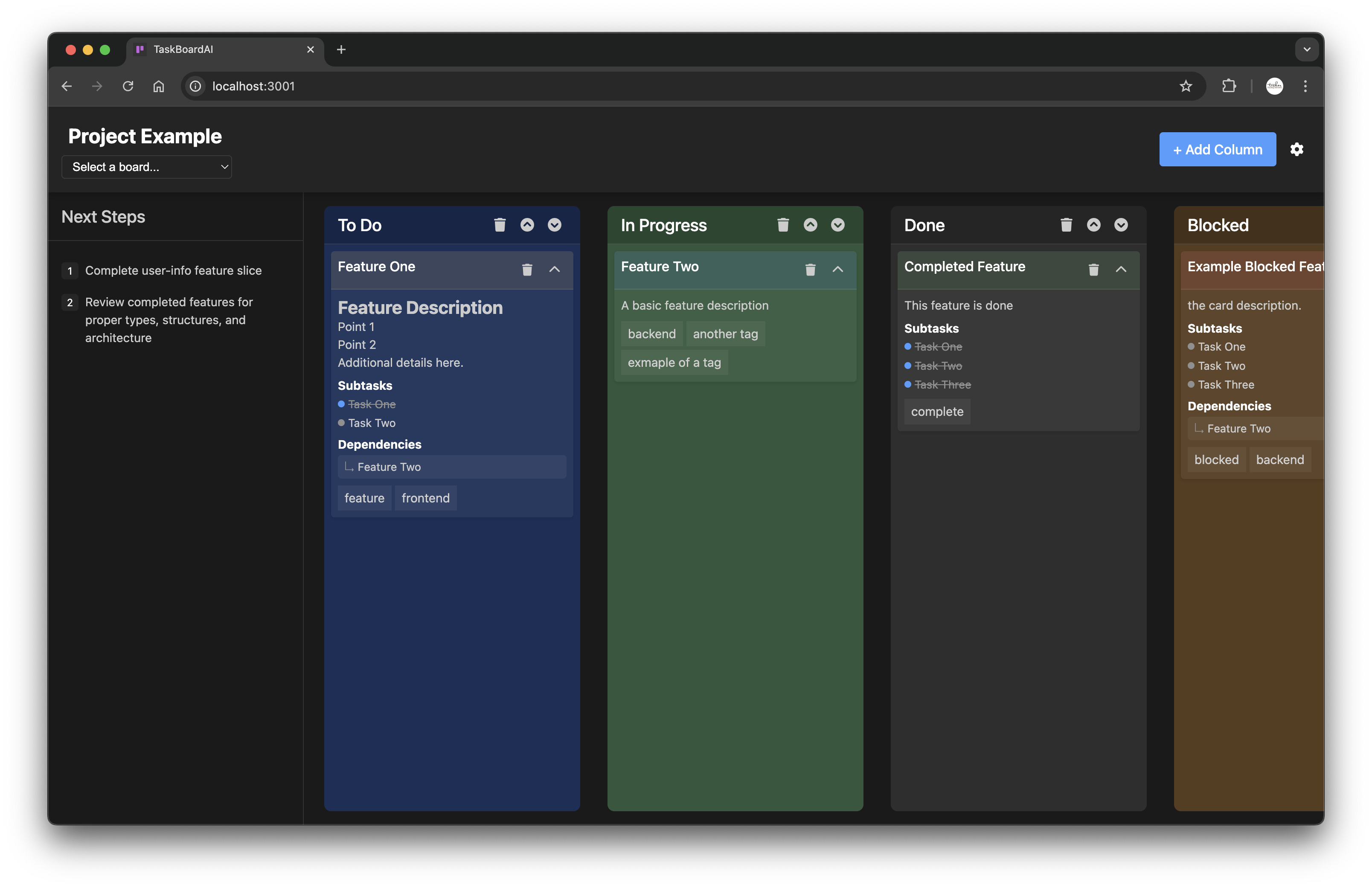
A lightweight, file-based kanban board designed for AI Agents.
Includes web interface for HIL collaboration.
AIX Features:
- JSON board files to allow for full project context
- MCP Server for access to create/delete/update/read boards
HIL Features:
- Drag-and-drop sorting of cards and columns
- Add/Delete cards and columns
- Drop down selection of available boards
Note
TaskBoardAI doesn't have it's own llm integration.
You'll want to use context of your project to update the board.
Features
- Markdown Support: Rich card content with full markdown syntax
- Subtasks: Track and mark completion within cards
- Tags & Dependencies: Organize and link related cards
- Drag and Drop: Intuitive interface for card management
- Next Steps: Track upcoming priorities at the board level
- Webhooks: Integrate with other services via webhooks
- AI Integration: Connect with Claude for Desktop using MCP
Installation
Option 1: Install via npm (Recommended)
Install globally for command-line access from anywhere:
npm install -g taskboardaiOr install locally in your project:
npm install taskboardaiOption 2: Clone the Repository (Development)
1. Clone the repository:
git clone https://github.com/TuckerTucker/TaskBoardAI.git
cd TaskBoardAI
2. Install dependencies:
npm installUsage
Using npm-installed Version
When installed globally via npm, you can use the following commands:
1. List available boards:
taskboard --list2. Create a new board:
taskboard --new my-project3. Open an existing board:
taskboard my-project4. Start the MCP server:
taskboard-mcp5. Start both the board server and MCP server:
taskboard-allUsing Repository Version
If you've cloned the repository, use the included scripts:
1. List available boards:
./_start_kanban --list2. Create a new board:
./_start_kanban --new my-project3. Open an existing board:
./_start_kanban my-project4. Access your board at `http://localhost:3001` (default port)
Using an External Board Location
_*not yet supported via MCP_
1. Create a new board directory in your project's repo
2. Copy the example board:
If installed via npm:
# First, create an example board in your home directory
   taskboard --new example

   # Then copy it to your desired location
   cp ~/.taskboardai/boards/example.json /your/board/location/board_name.json
If using the repository:
cp /path/to/TaskBoardAI/boards/_kanban_example.json /your/board/location/board_name.json3. Start the server with your external board location:
If installed via npm:
taskboard --external /your/board/location/board_name.jsonIf using the repository:
./_start_kanban --external /your/board/location/board_name.jsonBoard Structure
The kanban board is defined in a JSON file with the following structure:
This allows the Agent to have full context of the project
{
  "projectName": "Project Name",
  "id": "unique-board-id",
  "columns": [
    {
      "id": "column-id",
      "name": "Column Name"
    }
  ],
  "cards": [
    {
      "id": "card-id",
      "title": "Card Title",
      "content": "Markdown supported content",
      "columnId": "column-id",
      "position": 0,
      "collapsed": false,
      "subtasks": [
        "✓ Completed task",
        "Pending task"
      ],
      "tags": ["feature", "frontend"],
      "dependencies": ["other-card-id"],
      "created_at": "2025-01-18T10:00:00.000Z",
      "updated_at": "2025-01-19T12:30:00.000Z",
      "completed_at": "2025-01-19T18:12:35.604Z"
    }
  ],
  "next-steps": [
    "Next priority task",
    "Future focus area"
  ],
  "last_updated": "2025-01-19T19:20:14.802Z"
}
> Note: The board structure has been updated to a card-first architecture, where cards are stored in a top-level array rather than nested within columns.
MCP Server for AI Integration
_What Is Model Context Protocol (MCP)?_
TaskBoardAI includes an MCP (Model Context Protocol) server that allows you to create and manage boards using any tools supporting MCP (i.e. Claude Code, Cursor, Windsurf ... ).
Starting the MCP Server
If installed via npm:
# Start only the MCP server
taskboard-mcp

# Or start both the board server and MCP server
taskboard-all
If using the repository:
# Start only the MCP server
./_start_mcp

# Or start both servers
./_start_all
The MCP server runs on port 3002 by default.
See the documentation for your IDE or CLI tool on how to add MCP servers.
Using with Agents
Once configured, you can ask the agent to:
- List all boards: "Show me all my kanban boards"
- Create a new board: "Create a new kanban board called 'Project X'"
- Get a specific board by Name: "Show me the details of Project X"
- Update a board: "Update the Project X board with our progress"
- Delete a board: "Delete the Project X board"
Webhook Integration
TaskBoardAI supports webhooks for integrating with other services:
1. Create webhook configurations to trigger on events like board updates
2. Test webhook connections through the API
3. Receive real-time updates when changes occur on your boards
Running Tests
1. Run all tests:
npm test2. Generate coverage report:
npm run test:coverage3. Run tests in watch mode (for development):
npm run test:watch4. Run specific test categories:
# Run MCP server tests
npm test -- --testPathPattern 'tests/.*mcp'

# Run only unit tests
npm test -- tests/unit

# Run only integration tests
npm test -- tests/integration
Generating Docs
To generate documentation:
# Install dependencies (if not already installed)
npm install

# Generate docs (docs/api directory)
npm run docs
Data Directory
When installed via npm, TaskBoardAI stores user data in the following location:
- Linux/macOS: `~/.taskboardai/`
- Windows: `C:\Users\\.taskboardai\`
The data directory contains:
- `boards/`: Your kanban board JSON files
- `config/`: Configuration files
- `webhooks/`: Webhook configurations
You can access or back up these files directly if needed.
Contributing
Contributions are welcome! Please see CONTRIBUTING.md for guidelines.
License
Apache License 2.0 - See LICENSE for details.
Frequently asked questions
What is taskboardai?
taskboardai is A lightweight, file-based kanban board with AI integration through Claude
How do I install taskboardai?
Open the GitHub repository and follow its README. Most MCP servers are added to your client's MCP config, then called by your agent.
Is taskboardai open source?
Yes — it is hosted on GitHub at https://github.com/TuckerTucker/TaskBoardAI and has 1 stars.
Related MCP tools
 cherry-studio
🍒 Cherry Studio is a desktop client that supports for multiple LLM providers. Built for the Model Context Protocol to enhance AI capabilities.
 librechat
Enhanced ChatGPT Clone: Features Agents, MCP, DeepSeek, Anthropic, AWS, OpenAI, Responses API, Azure, Groq, o1, GPT-5, Mistral, OpenRouter, Vertex AI, Gemini...
 fastgpt
FastGPT is a knowledge-based platform built on the LLMs, offers a comprehensive suite of out-of-the-box capabilities such as data processing, RAG retrieval, ...
 composio
Composio equips your AI agents & LLMs with 100+ high-quality integrations via function calling for the Model Context Protocol. Enhance AI assistants with powerf
 repomix
📦 Repomix is a powerful tool that packs your entire repository into a single, AI-friendly file. Perfect for when you need to feed your codebase to Large Lan...
 activepieces
AI Agents & MCPs & AI Workflow Automation • (~400 MCP servers for AI agents) • AI Automation / AI Agent with MCPs • AI Workflows & AI Agents • MCPs for AI Ag...
Run your own MCP server? See who uses it and what to fix.
Measure it with TrackMCP