
teradata-mcp-server
The community development of a MCP server for a Teradata database
Documentation
Teradata MCP Server
Connect AI agents directly to Teradata with enterprise security and extensibility.
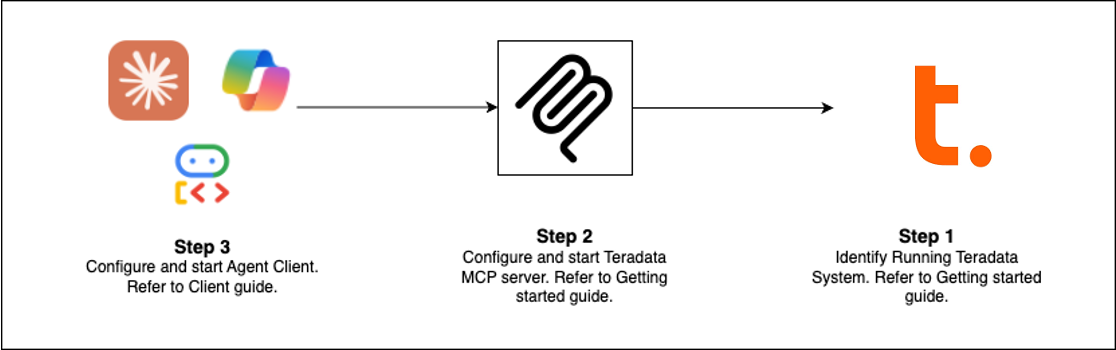
Quick Start (Choose Your Path)
| Client | Best For | Setup Time |
|---|---|---|
| Claude Desktop | Exploratory analysis, platform admin | 5 min |
| VS Code + Copilot | Data engineering, agent development | 5 min |
| Open WebUI | Testing new LLMs locally | 5 min |
| Code Examples | Build your own client | varies |
| Flowise | Visual agent builder | 10 min |
Pre-requisites: Teradata database (or free sandbox) + uv
Claude Desktop Setup (No Installation)
Add this to `claude_desktop_config.json` (Settings > Developer > Edit Config):
{
  "mcpServers": {
    "teradata": {
      "command": "uvx",
      "args": ["teradata-mcp-server"],
      "env": {
        "DATABASE_URI": "teradata://:@:1025/"
      }
    }
  }
}
What You Can Do
| Use Case | Capabilities | Tools |
|---|---|---|
| Query & Analyze | Explore tables, profile data, explain results, visualize patterns—no SQL needed | base, dba, qlty, plot |
| Semantic Layer | Generate custom semantic layers and tools from YAML or with our Agent Skill | Learn more → |
| AI & RAG Pipelines | Semantic search, retrieval-augmented generation, vector storage | rag, tdvs, fs |
| Database Admin | Manage security, monitor capacity, automate backups | dba, sec, bar |
What's New (Latest Release)
- FastMCP v3 — Guaranteed resource cleanup with improved lifespan management
- Hooks Capability — Intercept tool calls for custom monitoring, audit, or rate-limiting
- Row Limit Protection — Configurable caps (`DEFAULT_ROW_LIMIT`, `MAX_ROW_LIMIT`) prevent LLM token overflow
- Enhanced Security — VX views for fine-grained row-level access control
Extend & Deploy
Add Custom Logic
Use hooks to intercept tool calls for monitoring, audit trails, or validation → Hooks Guide
Define Semantic Layers
Create domain-specific tools, prompts, and cubes in YAML → Customization Guide
Deploy Everywhere
Run as CLI (uv), HTTP server, Docker container, or cloud service → Installation Guide
See It In Action
- Voice Agent — Real-time bidirectional audio with Amazon Nova Sonic
- Web Agent — Interactive chat UI with Google ADK framework
- Flowise Builder — Visual drag-and-drop workflows
- Custom Middleware — Performance monitoring patterns
Learn More
- Full Documentation — Installation, configuration, architecture, security
- Video Tutorials — Step-by-step walkthroughs
- Developer Guide — Extend and contribute
- Architecture — How components work together
Contributing
We welcome contributions! See our Contributing Guide and Developer Guide to get started.
Frequently asked questions
What is teradata-mcp-server?
teradata-mcp-server is The community development of a MCP server for a Teradata database
How do I install teradata-mcp-server?
Open the GitHub repository and follow its README. Most MCP servers are added to your client's MCP config, then called by your agent.
Is teradata-mcp-server open source?
Yes — it is hosted on GitHub at https://github.com/Teradata/teradata-mcp-server and has 55 stars.
Related MCP tools
 cognee
Cognee is the open-source AI memory platform for agents. Give your AI agents persistent long-term memory across sessions with a self-hosted knowledge graph engine.
 skyvern
Automate browser based workflows with AI
 hindsight
Hindsight: Agent Memory That Learns
 watermarks-remover
A privacy-first app that strips AI watermarks from content you own.
 Qwen-Agent
Agent framework and applications built upon Qwen>=3.0, featuring Function Calling, MCP, Code Interpreter, RAG, Chrome extension, etc.
 pal-mcp-server
The power of Claude Code / GeminiCLI / CodexCLI + [Gemini / OpenAI / OpenRouter / Azure / Grok / Ollama / Custom Model / All Of The Above] working as one.
Run your own MCP server? See who uses it and what to fix.
Measure it with TrackMCP