
term_mcp_deepseek
A MCP‑like server using the DeepSeek API for Terminal
Documentation
Term MCP DeepSeek







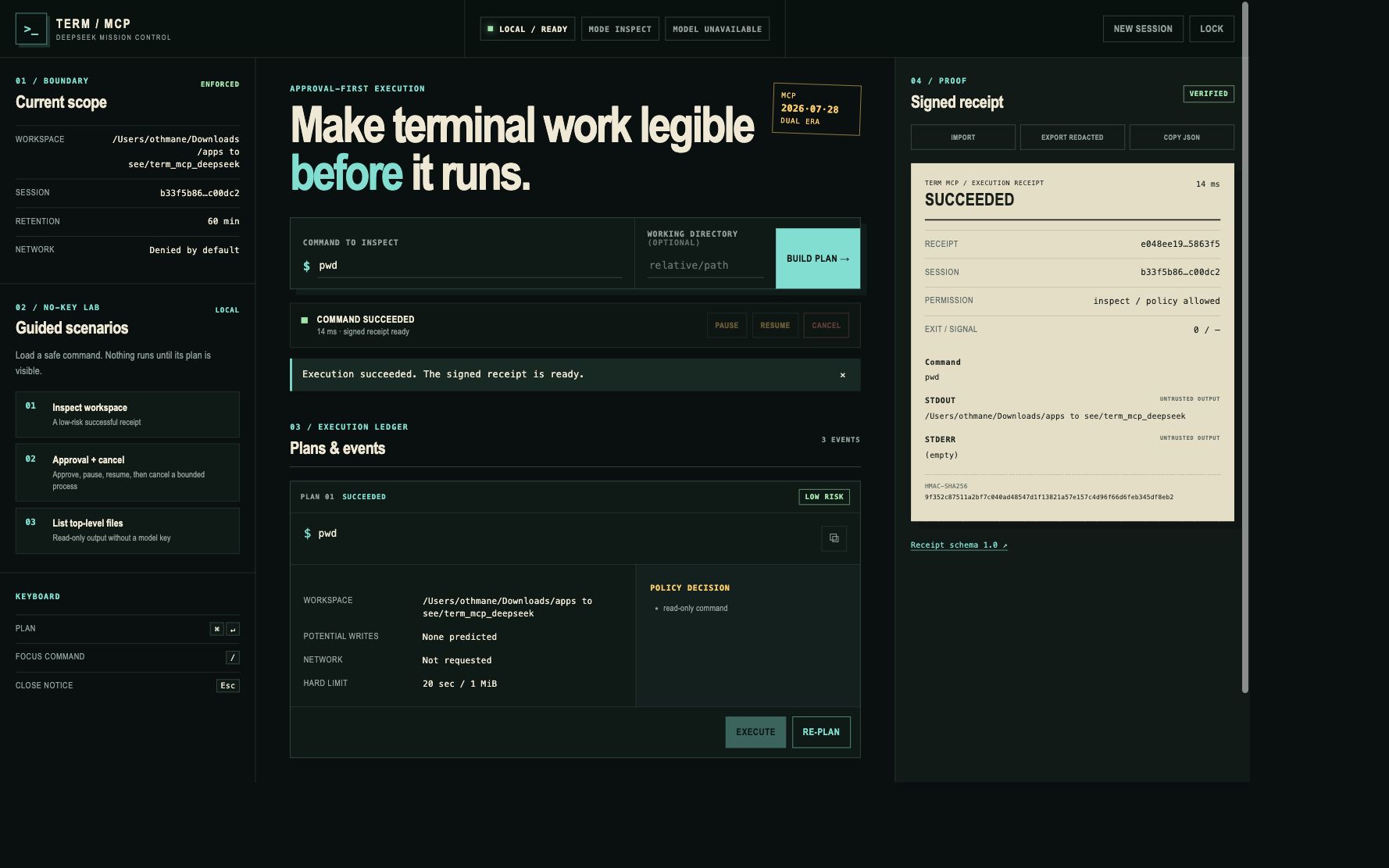
See the command, risk, workspace, and limits before anything runs. Then keep a signed receipt of what actually happened.
Term MCP DeepSeek is a local, approval-first terminal control plane for MCP clients and humans. It gives DeepSeek an isolated advisory role while deterministic policy owns command planning, approval, bounded execution, live events, and signed evidence.
**Explore the interactive project website →**
Why this project
Most terminal agents collapse suggestion and execution into one opaque moment. Term MCP DeepSeek makes the boundary visible:
intent → versioned plan → policy decision → human approval → bounded process → signed receipt- Model text never executes directly.
- Inspect mode is read-only by default.
- Every command is parsed without a shell and scoped to one workspace.
- Pause, resume, cancel, timeout, output limits, and process isolation are first-class states.
- DeepSeek can be absent or offline without disabling local MCP tools.
- Receipts separate command, stdout, stderr, exit code, signal, permission, and signature.
- Shareable exports remove command text, workspace paths, arguments, and output, then receive a new valid signature.
First result in 60 seconds
Requirements: macOS or Linux, Python 3.10–3.13, and pipx.
pipx install "git+https://github.com/OthmaneBlial/term_mcp_deepseek.git@v1.0.0"
cd /path/to/the/repository/you/want/to/inspect
term-mcp serve
The server prints a one-time bearer token. Open http://127.0.0.1:8000, paste that token, choose Inspect workspace, then select Build plan and Execute.
Expected result: the UI shows a low-risk `pwd` plan before execution, then a `succeeded` receipt with exit code `0`, separate stdout/stderr, and a verified HMAC signature. No DeepSeek key is required.
Stop the server with `Ctrl+C`. The generated token and in-memory sessions disappear with the process.
Install from a clone
Use this path when contributing or testing unreleased changes:
git clone https://github.com/OthmaneBlial/term_mcp_deepseek.git
cd term_mcp_deepseek
./startup.sh token
./startup.sh
`startup.sh` creates `.venv`, installs the package, and delegates to the same `term-mcp` CLI used by packaged installations.
Safety boundary
The default is `APPROVAL_MODE=inspect` with network disabled.
| Mode | Intended use | Writes | Project code | Approval |
|---|---|---|---|---|
| `inspect` | Repository discovery | Blocked | Blocked | Long-running processes only |
| `confirm` | Deliberate local work | Policy-scoped | Allowed by policy | Required for risky actions |
| `trusted` | Pre-approved automation | Policy-scoped | Allowed by policy | Pre-approved, always receipted |
Confirm and trusted modes are not an operating-system sandbox. Test untrusted repositories in a disposable container or VM. Keep `WORKSPACE_ROOT` narrow, `ALLOW_NETWORK=false`, and never expose the HTTP service directly to an untrusted network.
Read SECURITY.md and the threat model before enabling a wider command surface.
CLI
term-mcp serve                       production HTTP server (Waitress)
term-mcp serve --debug               Flask development server
term-mcp stdio                       JSON-RPC over STDIO
term-mcp doctor --json               config, permissions, shell, and transport checks
term-mcp doctor --connectivity        optional DeepSeek endpoint check
term-mcp demo                        no-key guided scenarios
term-mcp receipt validate FILE       schema and HMAC validation
term-mcp receipt show FILE           privacy-aware summary
term-mcp recipe validate FILE...     schema and policy validation
term-mcp recipe run FILE             inspect-only recipe execution
term-mcp token                       strong bearer token generator
term-mcp version                     installed version
Run a complete local quality gate with:
./local_ci.shSafe recipe catalog
The repository includes six small workflows for repository inspection, Python and JavaScript test discovery, log inventory, port configuration, and proof of the read-only boundary. Every recipe is schema-versioned, inspect-only, network-free, write-free, bounded, and checked by the production policy before it can run.
term-mcp recipe validate examples/recipes/*.json --workspace .
term-mcp recipe run examples/recipes/inspect-repository.json --workspace .
Browse the recipe catalog and contribution template. CI executes the complete catalog and runs the no-model benchmark.
See the proof gallery for signed, sharing-redacted success, cancellation, and timeout receipts. The three short demos apply the recipes to an unfamiliar repository, a test surface, and local incident evidence.
MCP clients
The server targets modern MCP `2026-07-28` and supports the legacy `2025-11-25` initialize lifecycle. HTTP and STDIO share one dispatcher and tool catalog.
Recommended local STDIO configuration:
{
  "mcpServers": {
    "term-mcp-deepseek": {
      "command": "/absolute/path/to/term-mcp",
      "args": ["stdio"],
      "env": {
        "WORKSPACE_ROOT": "/absolute/path/to/your/project",
        "APPROVAL_MODE": "inspect"
      }
    }
  }
}
STDOUT contains JSON-RPC messages only; diagnostics go to STDERR. See the MCP compatibility matrix for protocol details and dated client evidence.
HTTP and web API
Protected routes require `Authorization: Bearer $AUTH_TOKEN`. Public routes are intentionally limited to the UI shell, health, demos, static assets, and receipt schema.
| Method | Path | Auth | Purpose |
|---|---|---|---|
| `GET` | `/health` | Public | Readiness and package version |
| `GET` | `/` | Public | Approval-first mission control |
| `GET` | `/demo/scenarios` | Public | No-key local demo catalog |
| `GET` | `/schemas/receipt-1.0.json` | Public | Receipt JSON Schema |
| `POST` | `/mcp` | Bearer | Modern or legacy MCP calls |
| `DELETE` | `/mcp` | Bearer | Close a legacy MCP transport session |
| `GET` | `/mcp/info` | Bearer | Runtime, limits, model, and protocol information |
| `POST` | `/sessions` | Bearer | Create an isolated web execution session |
| `DELETE` | `/sessions/{id}` | Bearer | Close a web session and stop its process |
| `GET` | `/stream?session_id=...` | Bearer | Session-scoped execution events |
| `POST` | `/chat` | Bearer | Advisory DeepSeek text; never execution |
| `POST` | `/receipts/validate` | Bearer | Validate schema and local signature |
| `POST` | `/receipts/redact` | Bearer | Remove private content and re-sign for sharing |
The `/sessions`, `/stream`, and `/chat` routes are web compatibility APIs, not separate MCP transports.
Docker
The image uses a pinned Python base, builds wheels in a separate stage, installs without network in the runtime stage, and runs as UID/GID `10001`.
export AUTH_TOKEN="$(python3 -c 'import secrets; print(secrets.token_urlsafe(32))')"
docker compose up --build
Open http://127.0.0.1:8000. The compose workspace mount is read-only because the default mode is inspect. Stop with `docker compose down`.
Configuration
The no-key defaults are enough for local inspection. Copy `.env.example` only when persistent configuration is useful:
cp .env.example .env
term-mcp token
term-mcp doctor
Do not commit `.env`. Add `DEEPSEEK_API_KEY` only for the optional advisor panel. The complete variable reference and deployment/rollback guidance are in operations.
Project map
| Area | Source of truth |
|---|---|
| Interactive overview and web docs | Project website |
| Product and trust boundaries | Architecture |
| Supported and unsupported behavior | Feature matrix |
| MCP versions and clients | Compatibility |
| Deployment and rollback | Operations |
| Security assumptions | Security policy and threat model |
| Safe examples | Recipe catalog |
| Receipts and concrete demos | Proof gallery and demo scripts |
| Local performance evidence | Benchmark contract |
| Adoption without telemetry | Adoption evidence |
| Direction and acceptance criteria | Roadmap |
| Release history | Changelog |
Contributing
Small tests, protocol fixtures, safe recipes, accessibility improvements, and client compatibility reports are welcome. Start with CONTRIBUTING.md, run `./local_ci.sh`, and include a redacted receipt when a terminal-execution bug produces one.
Security vulnerabilities belong in GitHub private vulnerability reporting, never in a public issue.
License
MIT — see LICENSE.
Frequently asked questions
What is term_mcp_deepseek?
term_mcp_deepseek is A MCP‑like server using the DeepSeek API for Terminal
How do I install term_mcp_deepseek?
Open the GitHub repository and follow its README. Most MCP servers are added to your client's MCP config, then called by your agent.
Is term_mcp_deepseek open source?
Yes — it is hosted on GitHub at https://github.com/OthmaneBlial/term_mcp_deepseek and has 13 stars.
Related MCP tools
 damn-vulnerable-mcp-server
Damn Vulnerable MCP Server Python-based implementation. Trusted by 1200+ developers. Trusted by 1200+ developers. Trusted by 1200+ developers.
 mysql_mcp_server
A Model Context Protocol (MCP) server that enables secure interaction with MySQL databases Python-based implementation. Trusted by 900+ developers.
 supabase-mcp-server
Query MCP enables end-to-end management of Supabase via chat interface: read & write query executions, management API support, automatic migration versioning...
 mcp-neo4j
Model Context Protocol with Neo4j Python-based implementation. Trusted by 700+ developers. Trusted by 700+ developers. Trusted by 700+ developers.
 android-mcp-server
An MCP server that provides control over Android devices via adb Python-based implementation. Trusted by 500+ developers.
 pg-mcp-server
A Model Context Protocol (MCP) server for PostgreSQL databases with enhanced capabilities for AI agents. Python-based implementation.
Run your own MCP server? See who uses it and what to fix.
Measure it with TrackMCP