
tfmcp
🌍 Terraform Model Context Protocol (MCP) Tool - An experimental CLI tool that enables AI assistants to manage and operate Terraform environments.
Documentation
tfmcp: Terraform Model Context Protocol Tool
*⚠️ This project includes production-ready security features but is still under active development. While the security system provides robust protection, please review all operations carefully in production environments. ⚠️*
tfmcp is a command-line tool that helps you interact with Terraform via the Model Context Protocol (MCP). It allows LLMs to manage and operate your Terraform environments, including:
🎮 Demo
See tfmcp in action with Claude Desktop:
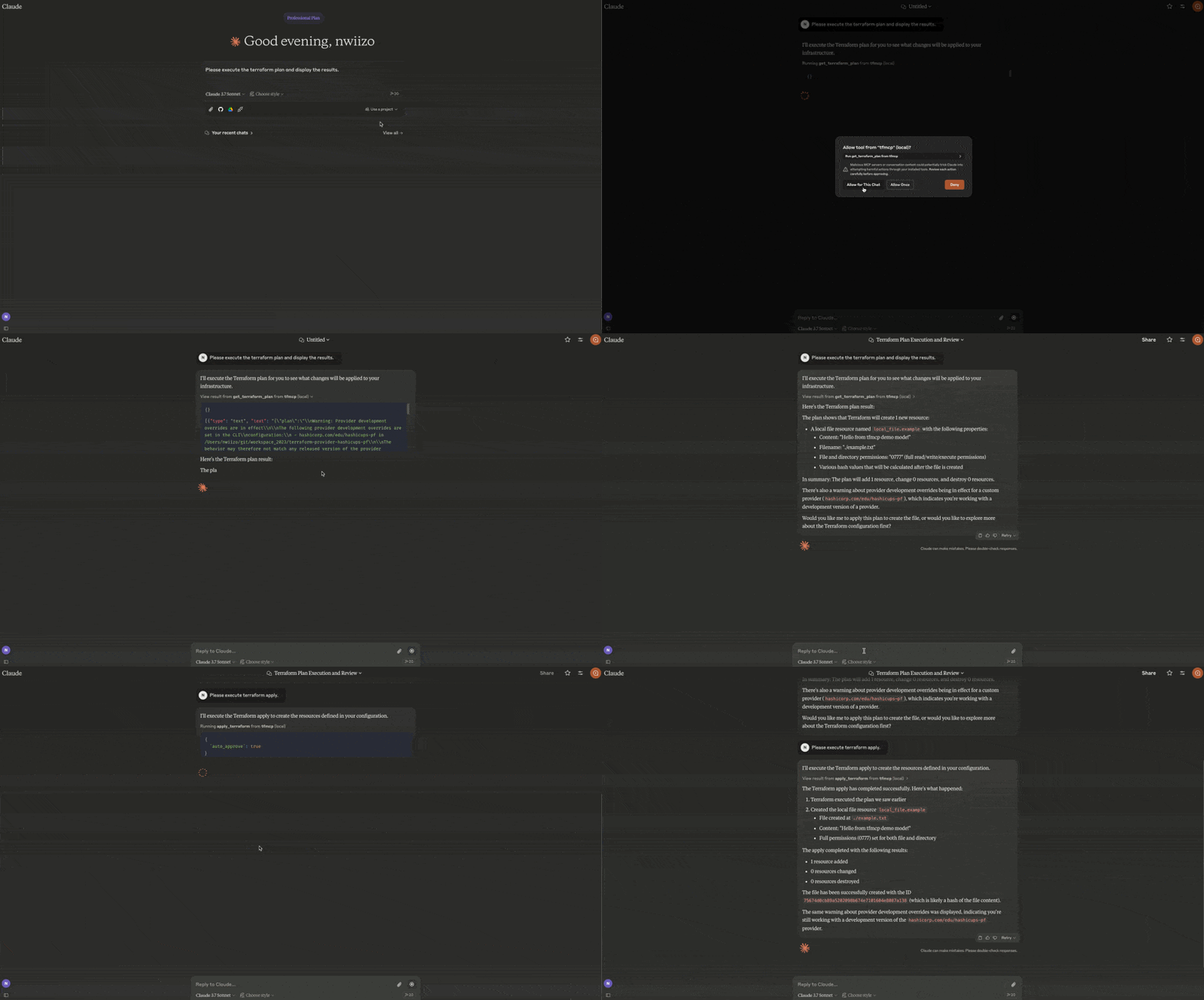
- Reading Terraform configuration files
- Analyzing Terraform plan outputs
- Applying Terraform configurations
- Managing Terraform state
- Creating and modifying Terraform configurations
🎉 Current Release
tfmcp v0.2.2 is the current release:
cargo install tfmcp --version 0.2.2What's new in v0.2.2
- RMCP 3.0.1 and MCP 2026-07-28 discovery support
- Structured JSON tool results with backward-compatible text content
- Five-minute public cache hints for tool and resource discovery
- Sessionless Streamable HTTP behavior for MCP 2026-07-28 clients
- Capability metadata aligned with the methods tfmcp implements
Features
| Area | Capabilities |
|---|---|
| Local Terraform | Validate, format, plan/apply workflows, import guidance, outputs, providers, dependency graphs, refresh-only flows, and guarded state operations |
| Repository intelligence | Entrypoint/project detection, configuration analysis, quality checks, security checks, module health, plan review, and drift/state-safety inspection |
| Registry | Public/private provider, module, and policy lookup with HashiCorp-compatible aliases |
| HCP Terraform / TFE | Organizations, projects, workspaces, runs, plans, applies, variables, policy sets, variable sets, tags, stacks, and gated operations |
| MCP deployment | stdio and Streamable HTTP, MCP 2026-07-28 discovery, structured tool results, cache hints, toolsets, resources, health/metrics, sessions, Host/Origin validation, rate limits, TLS wiring, and audit logging |
| Packaging | Cargo, Docker/OCI metadata, MCP Registry metadata, Rust Edition 2024 |
Installation
From Source
# Clone the repository
git clone https://github.com/nwiizo/tfmcp
cd tfmcp

# Build and install
cargo install --path .
From Crates.io
cargo install tfmcpUsing Docker
# Clone the repository
git clone https://github.com/nwiizo/tfmcp
cd tfmcp

# Build the Docker image
docker build -t tfmcp .

# Run the container
docker run -it tfmcp
Requirements
- Rust 1.88.0+ (Rust Edition 2024)
- Terraform CLI 1.15.8 installed and available in `PATH`
- Claude Desktop (for AI assistant integration)
- Docker (optional, for containerized deployment)
Usage
$ tfmcp --help
✨ A CLI tool to manage Terraform configurations and operate Terraform through the Model Context Protocol (MCP).

Usage: tfmcp [OPTIONS] [COMMAND]

Commands:
  mcp       Launch tfmcp as an MCP server
  analyze   Analyze Terraform configurations
  help      Print this message or the help of the given subcommand(s)

Options:
  -c, --config     Path to the configuration file
  -d, --dir        Terraform project directory
  -V, --version          Print version
  -h, --help             Print help
Using Docker
When using Docker, you can run tfmcp commands like this:
# Run as MCP server (default)
docker run -it tfmcp

# Run with specific command and options
docker run -it tfmcp analyze --dir /app/example

# Mount your Terraform project directory
docker run -it -v /path/to/your/terraform:/app/terraform tfmcp --dir /app/terraform

# Set environment variables
docker run -it -e TFMCP_LOG_LEVEL=debug tfmcp
Integrating with Claude Desktop
To use tfmcp with Claude Desktop:
1. If you haven't already, install tfmcp:
cargo install tfmcpAlternatively, you can use Docker:
docker build -t tfmcp .2. Find the path to your installed tfmcp executable:
which tfmcp3. Add the following configuration to `~/Library/Application\ Support/Claude/claude_desktop_config.json`:
{
  "mcpServers": {
    "tfmcp": {
      "command": "/path/to/your/tfmcp",  // Replace with the actual path from step 2
      "args": ["mcp"],
      "env": {
        "HOME": "/Users/yourusername",  // Replace with your username
        "PATH": "/usr/local/bin:/usr/bin:/bin:/usr/sbin:/sbin",
        "TERRAFORM_DIR": "/path/to/your/terraform/project"  // Optional: specify your Terraform project
      }
    }
  }
}
If you're using Docker with Claude Desktop, you can set up the configuration like this:
{
  "mcpServers": {
    "tfmcp": {
      "command": "docker",
      "args": ["run", "--rm", "-v", "/path/to/your/terraform:/app/terraform", "tfmcp", "mcp"],
      "env": {
        "TERRAFORM_DIR": "/app/terraform"
      }
    }
  }
}
4. Restart Claude Desktop and enable the tfmcp tool.
5. tfmcp will automatically create a sample Terraform project in `~/terraform` if one doesn't exist, ensuring Claude can start working with Terraform right away. The sample project is based on the examples included in the `example/demo` directory of this repository.
MCP Tools
tfmcp provides 82 MCP tools for AI assistants:
Core Terraform Operations
| Tool | Description |
|---|---|
| `init_terraform` | Initialize Terraform working directory |
| `get_terraform_plan` | Generate and show execution plan |
| `analyze_plan` | NEW Analyze plan with risk scoring and recommendations |
| `apply_terraform` | Apply Terraform configuration |
| `destroy_terraform` | Destroy Terraform-managed infrastructure |
| `validate_terraform` | Validate configuration syntax |
| `validate_terraform_detailed` | Detailed validation with guidelines |
| `get_terraform_state` | Show current state |
| `analyze_state` | NEW Analyze state with drift detection |
| `review_terraform_plan` | Review plan risk, blockers, destructive changes, and recommendations |
| `summarize_plan_for_pr` | Generate markdown plan summary for PR comments |
| `run_terraform_quality_checks` | Run CI-friendly validation, module health, guideline, and lockfile checks |
| `inspect_state_safety` | Inspect state readability, drift risk, lockfile status, and blockers |
| `detect_drift_candidates` | Detect drift candidates from readable state without modifying infrastructure |
| `prepare_terraform_change` | Generate blockers, warnings, and a recommended change sequence |
| `list_terraform_resources` | List all managed resources |
| `set_terraform_directory` | Change active project directory |
Workspace & State (v0.1.9)
| Tool | Description |
|---|---|
| `terraform_workspace` | NEW Manage workspaces (list, show, new, select, delete) |
| `terraform_import` | NEW Import existing resources |
| `terraform_taint` | NEW Taint/untaint resources |
| `terraform_refresh` | NEW Refresh state |
Code & Output (v0.1.9)
| Tool | Description |
|---|---|
| `terraform_fmt` | NEW Format code |
| `terraform_graph` | NEW Generate dependency graph |
| `terraform_output` | NEW Get output values |
| `terraform_providers` | NEW Get provider info with lock file |
| `check_provider_lockfile` | Check `.terraform.lock.hcl` for reproducible provider selections |
Analysis & Security
| Tool | Description |
|---|---|
| `analyze_terraform` | Analyze configuration |
| `inspect_terraform_project` | Inspect local Terraform directories, modules, and likely entrypoints |
| `detect_terraform_entrypoints` | Detect likely root module entrypoints |
| `analyze_module_health` | Module health with cohesion/coupling metrics |
| `get_resource_dependency_graph` | Resource dependencies visualization |
| `suggest_module_refactoring` | Refactoring suggestions |
| `get_security_status` | Security scan with secret detection |
Registry
| Tool | Description |
|---|---|
| `search_providers` | Search providers (HashiCorp-compatible alias) |
| `search_terraform_providers` | Search providers |
| `get_provider_details` | Provider details (HashiCorp-compatible alias) |
| `get_provider_info` | Provider details |
| `get_provider_docs` | Provider documentation |
| `get_provider_capabilities` | Provider resources, data sources, functions, and guides |
| `search_modules` | Search modules (HashiCorp-compatible alias) |
| `search_terraform_modules` | Search modules |
| `get_module_details` | Module details |
| `get_latest_module_version` | Latest module version |
| `get_latest_provider_version` | Latest provider version |
| `search_policies` | Search Sentinel/OPA policy libraries |
| `get_policy_details` | Policy library details |
HCP Terraform / Terraform Enterprise (Read-only)
| Tool | Description |
|---|---|
| `get_token_permissions` | Inspect configured token account details without exposing the token |
| `list_terraform_orgs` | List visible organizations |
| `list_terraform_projects` | List projects in an organization |
| `list_workspaces` | List workspaces in an organization |
| `get_workspace_details` | Get workspace details by ID or organization/name |
| `list_runs` | List workspace runs |
| `get_run_details` | Get run details |
| `get_plan_details` | Get plan details |
| `get_plan_logs` | Get plan logs |
| `get_plan_json_output` | Get Terraform JSON plan output |
| `get_apply_details` | Get apply details |
| `get_apply_logs` | Get apply logs |
| `get_workspace_policy_sets` | Get policy sets attached to a workspace |
| `list_workspace_variables` | List workspace variables |
| `list_variable_sets` | List organization variable sets |
| `read_workspace_tags` | Read workspace tags |
| `list_stacks` | List Terraform stacks |
| `get_stack_details` | Get Terraform stack details |
| `search_private_modules` | Search private registry modules |
| `get_private_module_details` | Get private registry module details |
| `search_private_providers` | Search private registry providers |
| `get_private_provider_details` | Get private registry provider details |
HCP Terraform / Terraform Enterprise (Gated Operations)
| Tool | Description |
|---|---|
| `create_workspace` | Create a workspace when `ENABLE_TF_OPERATIONS=true` |
| `update_workspace` | Update workspace settings when `ENABLE_TF_OPERATIONS=true` |
| `delete_workspace_safely` | Use the safe-delete workspace action when `ENABLE_TF_OPERATIONS=true` |
| `create_run` | Queue a run when `ENABLE_TF_OPERATIONS=true` |
| `action_run` | Apply, discard, cancel, force-cancel, or force-execute a run when `ENABLE_TF_OPERATIONS=true` |
| `create_workspace_variable` | Create a workspace variable when `ENABLE_TF_OPERATIONS=true` |
| `update_workspace_variable` | Update a workspace variable when `ENABLE_TF_OPERATIONS=true` |
| `attach_policy_set_to_workspace` | Attach a policy set to a workspace when `ENABLE_TF_OPERATIONS=true` |
| `create_variable_set` | Create a variable set when `ENABLE_TF_OPERATIONS=true` |
| `create_variable_in_variable_set` | Create a variable in a variable set when `ENABLE_TF_OPERATIONS=true` |
| `delete_variable_in_variable_set` | Delete a variable from a variable set when `ENABLE_TF_OPERATIONS=true` |
| `attach_variable_set_to_workspaces` | Attach a variable set to workspaces when `ENABLE_TF_OPERATIONS=true` |
| `detach_variable_set_from_workspaces` | Detach a variable set from workspaces when `ENABLE_TF_OPERATIONS=true` |
| `create_workspace_tags` | Create or attach workspace tags when `ENABLE_TF_OPERATIONS=true` |
MCP Resources
| URI | Description |
|---|---|
| `terraform://style-guide` / `/terraform/style-guide` | Terraform style guide |
| `terraform://module-development` / `/terraform/module-development` | Terraform module development guide |
| `terraform://best-practices` | tfmcp security and operational best practices |
| `/terraform/providers/{namespace}/name/{name}/version/{version}` | HashiCorp-compatible provider documentation template |
Logs and Troubleshooting
The tfmcp server logs are available at:
~/Library/Logs/Claude/mcp-server-tfmcp.logCommon issues and solutions:
- Claude can't connect to the server: Make sure the path to the tfmcp executable is correct in your configuration
- Terraform project issues: tfmcp automatically creates a sample Terraform project if none is found
- Method not found errors: tfmcp advertises and implements tools/list, resources/list, resources/templates/list, and resources/read
- Docker issues: If using Docker, ensure your container has proper volume mounts and permissions
Environment Variables
Core Configuration
- `TERRAFORM_DIR`: Set this to specify a custom Terraform project directory. If not set, tfmcp will use the directory provided by command line arguments, configuration files, or fall back to `~/terraform`. You can also change the project directory at runtime using the `set_terraform_directory` tool.
- `TFMCP_LOG_LEVEL`: Set to `debug`, `info`, `warn`, or `error` to control logging verbosity.
- `TFMCP_DEMO_MODE`: Set to `true` to enable demo mode with additional safety features.
Security Configuration
- `ENABLE_TF_OPERATIONS`: Set to `true` to enable gated HCP Terraform / Terraform Enterprise write tools (default: `false`)
- `TFMCP_ALLOW_DANGEROUS_OPS`: Set to `true` to enable apply/destroy operations (default: `false`)
- `TFMCP_ALLOW_AUTO_APPROVE`: Set to `true` to enable auto-approve for dangerous operations (default: `false`)
- `TFMCP_MAX_RESOURCES`: Set maximum number of resources that can be managed (default: 50)
- `TFMCP_AUDIT_ENABLED`: Set to `false` to disable audit logging (default: `true`)
- `TFMCP_AUDIT_LOG_FILE`: Custom path for audit log file (default: `~/.tfmcp/audit.log`)
- `TFMCP_AUDIT_LOG_SENSITIVE`: Set to `true` to include sensitive information in audit logs (default: `false`)
HCP Terraform / Terraform Enterprise
- `TFE_ADDRESS`: HCP Terraform or Terraform Enterprise base URL (default: `https://app.terraform.io`)
- `TFE_TOKEN`: API token for HCP Terraform / Terraform Enterprise tools
- `TFE_SKIP_TLS_VERIFY`: Set to `true` only for trusted private TFE installations with custom TLS
- `TFE_MAX_RESPONSE_BYTES`: Maximum HCP/TFE response bytes returned to MCP clients before truncation (default: `65536`)
HCP/TFE write tools are disabled by default and fail closed unless
`ENABLE_TF_OPERATIONS=true` is set. The `default` toolset keeps write tools
hidden; use `--toolsets operations` or `--toolsets all` to expose them.
MCP Transport
- `TRANSPORT_MODE`: MCP transport mode. Use `stdio` (default) for local desktop clients or `streamable-http` for remote/CI clients.
- `TRANSPORT_HOST`: HTTP bind host for streamable HTTP mode (default: `127.0.0.1`).
- `TRANSPORT_PORT`: HTTP bind port for streamable HTTP mode (default: `8080`).
- `MCP_ENDPOINT`: Streamable HTTP MCP endpoint path (default: `/mcp`).
- `MCP_HEALTH_ENDPOINT`: Health endpoint path (default: `/health`).
- `MCP_METRICS_ENDPOINT`: OTel-compatible JSON metrics snapshot endpoint path (default: `/metrics`).
- `MCP_SESSION_MODE`: `stateful` for normal MCP clients or `stateless` for CI-style JSON responses (default: `stateful`). Applies only to clients negotiating a protocol version before `2026-07-28`; that spec removed sessions, so those requests are always served statelessly.
- `MCP_HEARTBEAT_INTERVAL`: Streamable HTTP SSE keep-alive interval in seconds. Set to `0` to disable (default: `15`).
- `MCP_CORS_MODE`: Response CORS policy: `strict`, `development`, or `disabled` (default: `strict`). MCP request Origin validation remains enabled in all modes.
- `MCP_ALLOWED_ORIGINS`: Comma-separated allowed browser origins. Loopback origins are used by default.
- `MCP_ALLOWED_HOSTS`: Comma-separated HTTP `Host` / authority values accepted by Streamable HTTP. When unset, rmcp's loopback-only defaults apply.
- `MCP_ORGANIZATION_ALLOWLIST`: Comma-separated HCP/TFE organization names that remote requests may access.
- `MCP_RATE_LIMIT_GLOBAL`: Maximum HTTP requests per minute across the server (`0` or unset disables).
- `MCP_RATE_LIMIT_SESSION`: Maximum HTTP requests per minute per `Mcp-Session-Id` (`0` or unset disables). Clients negotiating `2026-07-28` send no session header, so only `MCP_RATE_LIMIT_GLOBAL` bounds them.
- `MCP_TLS_CERT_FILE`: PEM certificate file for HTTPS Streamable HTTP.
- `MCP_TLS_KEY_FILE`: PEM private key file for HTTPS Streamable HTTP.
HCP/TFE credentials and addresses are server configuration. tfmcp intentionally
does not accept request-scoped `TFE_TOKEN`, `Authorization`, or `TFE_ADDRESS`
overrides for downstream passthrough. When an organization allowlist is active,
account-wide and ID-only HCP/TFE requests fail closed because their owning
organization cannot be verified locally.
Example streamable HTTP launch:
TRANSPORT_MODE=streamable-http \
TRANSPORT_HOST=127.0.0.1 \
TRANSPORT_PORT=8080 \
tfmcp mcp --toolsets default
The MCP endpoint is `http://127.0.0.1:8080/mcp`, the health endpoint is
`http://127.0.0.1:8080/health`, and the metrics endpoint is
`http://127.0.0.1:8080/metrics`.
Security Considerations
tfmcp includes comprehensive security features designed for production use:
🔒 Built-in Security Features
- Access Controls: Automatic blocking of production/sensitive file patterns
- Operation Restrictions: Dangerous operations (apply/destroy) disabled by default
- Resource Limits: Configurable maximum resource count protection
- Audit Logging: Complete operation tracking with timestamps and user identification
- Directory Validation: Security policy enforcement for project directories
🛡️ Security Best Practices
- Default Safety: Apply/destroy operations are disabled by default - explicitly enable only when needed
- Review Plans: Always review Terraform plans before applying, especially AI-generated ones
- IAM Boundaries: Use appropriate IAM permissions and role boundaries in cloud environments
- Audit Monitoring: Regularly review audit logs at `~/.tfmcp/audit.log`
- File Patterns: Built-in protection against accessing `prod*`, `production*`, and `secret*` patterns
- Docker Security: When using containers, carefully consider volume mounts and exposed data
⚙️ Production Configuration
# Recommended production settings
export TFMCP_ALLOW_DANGEROUS_OPS=false    # Keep disabled for safety
export TFMCP_ALLOW_AUTO_APPROVE=false     # Require manual approval
export TFMCP_MAX_RESOURCES=10             # Limit resource scope
export TFMCP_AUDIT_ENABLED=true           # Enable audit logging
export TFMCP_AUDIT_LOG_SENSITIVE=false    # Don't log sensitive data
Contributing
Contributions are welcome! Please feel free to submit a Pull Request.
1. Fork the repository
2. Create your feature branch (`git checkout -b feature/amazing-feature`)
3. Enable the repository-managed fast pre-commit checks once per clone:
git config core.hooksPath .githooks4. Run the full correctness checks before pushing:
cargo fmt --all -- --check
   cargo clippy --all-targets --all-features -- -D warnings
   cargo test --locked --all-targets --all-features
5. Commit your changes (`git commit -m 'Add some amazing feature'`)
6. Push to the branch (`git push origin feature/amazing-feature`)
7. Open a Pull Request
The pre-commit hook always checks staged whitespace and conditionally runs
`cargo fmt`, `actionlint`, Registry metadata validation, module coupling, and
duplicate-code checks for affected files. The optional architecture tools are
still mandatory in `Release.sh`; install `cargo-coupling` and `similarity-rs`
to run the same fast feedback while developing.
Release Process
Releases are done manually after the local release gate passes:
1. Confirm `Cargo.toml`, `Cargo.lock`, `server.json`, `Dockerfile`, README, and `CHANGELOG.md` use the target version.
2. Run the local release gate: `./Release.sh v0.2.2`.
3. Review `CHANGELOG.md` and the generated package.
4. Commit and push `main`, then confirm CI passed for that exact commit.
5. From the clean commit, publish with `./Release.sh v0.2.2 --publish`.
Roadmap
Here are some planned improvements and future features for tfmcp:
For the consolidated v0.2.1 scope and future work, see
docs/releases/v0.2-roadmap.md. Release changes
are recorded in CHANGELOG.md.
Completed
- [x] Basic Terraform Integration
Core integration with Terraform CLI for analyzing and executing operations.
- [x] MCP Server Implementation
Initial implementation of the Model Context Protocol server for AI assistants.
- [x] Automatic Project Creation
Added functionality to automatically create sample Terraform projects when needed.
- [x] Claude Desktop Integration
Support for seamless integration with Claude Desktop.
- [x] Core MCP Methods
Implementation of essential MCP methods including tools/list, resources/list, resources/templates/list, and resources/read.
- [x] Error Handling Improvements
Better error handling and recovery mechanisms for robust operation.
- [x] Dynamic Project Directory Switching
Added ability to change the active Terraform project directory without restarting the service.
- [x] Crates.io Publication
Published the package to Crates.io for easy installation via Cargo.
- [x] Docker Support
Added containerization support for easier deployment and cross-platform compatibility.
- [x] Security Enhancements
Comprehensive security system with configurable policies, audit logging, access controls, and production-ready safety features.
- [x] Module Health Analysis (v0.1.6)
Whitebox approach to IaC with cohesion/coupling metrics, health scoring, and refactoring suggestions.
- [x] Resource Dependency Graph (v0.1.6)
Visualization of resource relationships including explicit and implicit dependencies.
- [x] Module Registry Integration (v0.1.6)
Search and explore Terraform modules from the registry.
- [x] Comprehensive Testing Framework
85+ tests including integration tests with real Terraform configurations.
- [x] RMCP SDK Migration (v0.1.8)
Migrated to official RMCP SDK with proper tool annotations for better MCP compliance.
- [x] Future Architect Guidelines (v0.1.8)
Terraform coding standards compliance checks with secret detection and variable quality validation.
In Progress
- [ ] Multi-Environment Support
Add support for managing multiple Terraform environments, workspaces, and modules.
Planned
- [ ] Expanded MCP Protocol Support
Implement additional MCP methods and capabilities for richer integration with AI assistants.
- [ ] Performance Optimization
Optimize resource usage and response times for large Terraform projects.
- [ ] Cost Estimation
Integrate with cloud provider pricing APIs to provide cost estimates for Terraform plans.
- [ ] Interactive TUI
Develop a terminal-based user interface for easier local usage and debugging.
- [ ] Integration with Other AI Platforms
Extend beyond Claude to support other AI assistants and platforms.
- [ ] Plugin System
Develop a plugin architecture to allow extensions of core functionality.
License
This project is licensed under the MIT License - see the LICENSE file for details.
Frequently asked questions
What is tfmcp?
tfmcp is 🌍 Terraform Model Context Protocol (MCP) Tool - An experimental CLI tool that enables AI assistants to manage and operate Terraform environments.
How do I install tfmcp?
Open the GitHub repository and follow its README. Most MCP servers are added to your client's MCP config, then called by your agent.
Is tfmcp open source?
Yes — it is hosted on GitHub at https://github.com/nwiizo/tfmcp and has 344 stars.
Related MCP tools
 goose
gooseAn open source, extensible AI agent that goes beyond code suggestions - install, execute, edit, and test with any LLM for the Model Context Protocol. Enhance AI
 MCPJungle
Self-hosted MCP Gateway and Registry for AI agents Go-based implementation. Trusted by 600+ developers. Trusted by 600+ developers.
 jadx-ai-mcp
Plugin for JADX to integrate MCP server Java-based implementation. Trusted by 600+ developers. Trusted by 600+ developers.
 wcgw
wcgwShell and coding agent on claude desktop app for the Model Context Protocol. Enhance AI assistants with powerful integrations. Python-based implementation.
 awesome-mcp-security
🔥🔒 Awesome MCP (Model Context Protocol) Security 🖥️ Trusted by 500+ developers. Trusted by 500+ developers. Trusted by 500+ developers.
 vibetest-use
Vibetest MCP - automated QA testing using Browser-Use agents Python-based implementation. Trusted by 500+ developers. Trusted by 500+ developers.
Run your own MCP server? See who uses it and what to fix.
Measure it with TrackMCP