
devserver-mcp
MCP server and a unified TUI for managing dev servers + Playwright
Documentation
DevServer MCP
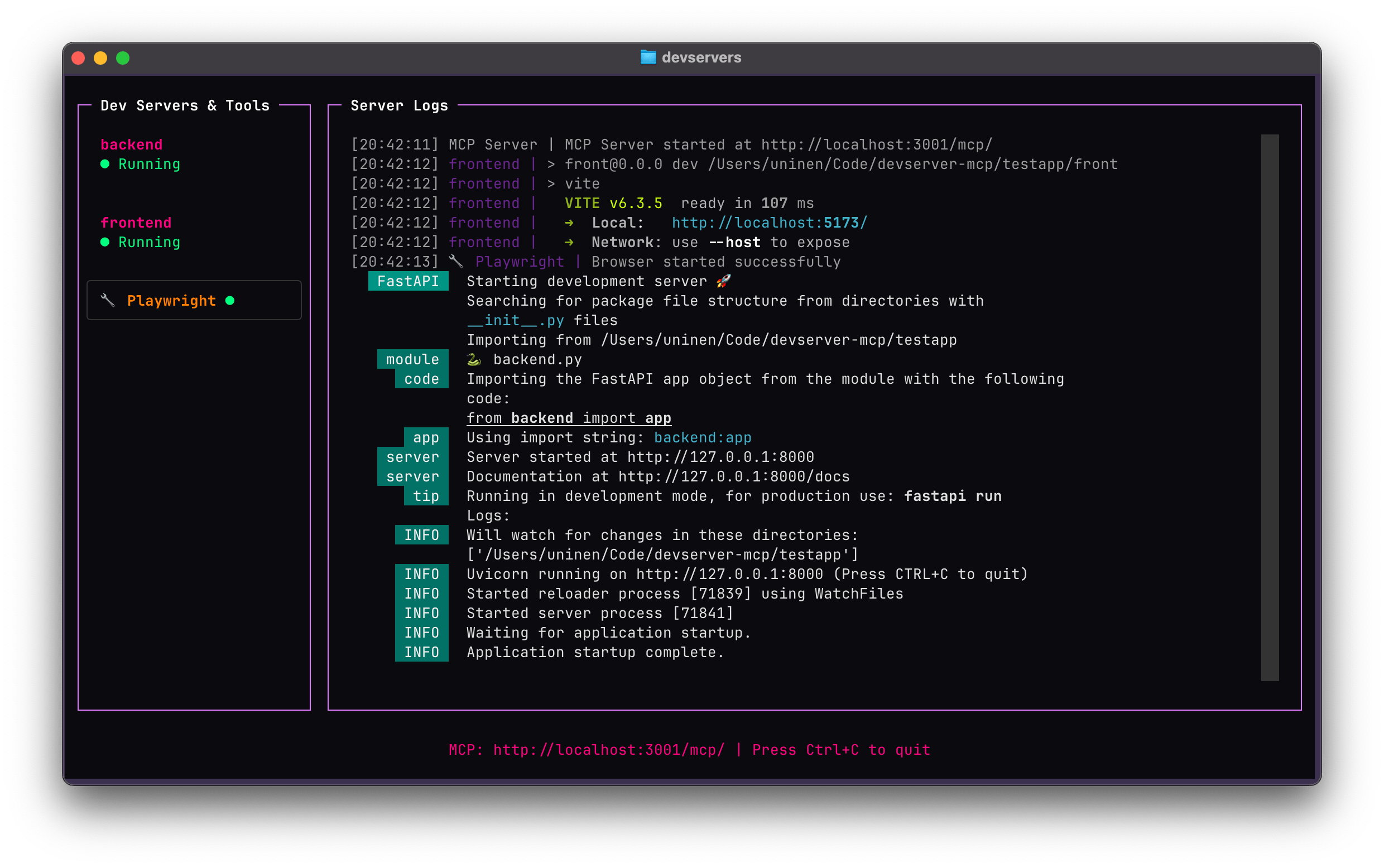
A Model Context Protocol (MCP) server that manages development servers for LLM-assisted workflows. Provides programmatic control over multiple development servers through a unified interface with a simple TUI, plus experimental browser automation via Playwright.
You can also turn the servers on and off by clicking via the TUI.
Project Status
This is both ALPHA software and an exercise in vibe coding; most of this codebase is written with the help of LLM tools.
The tests validate some of the functionality and the server is already useful if you happen to need the functionality but YMMV.
Features
- 🚀 Process Management: Start, stop, and monitor multiple development servers
- 📊 Rich TUI: Interactive terminal interface with real-time log streaming
- 🌐 Browser Automation: Experimental Playwright integration for web testing and automation
- 🔧 LLM Integration: Full MCP protocol support for AI-assisted development workflows
Installation
uv add --dev git+https://github.com/Uninen/devserver-mcp.git --tag v0.6.0Playwright (Optional)
If you want to use the experimental Playwright browser automation features, you must install Playwright manually:
# Install Playwright
uv add playwright

# Install browser drivers
playwright install
Quick Start
Create a `devservers.yml` file in your project root:
servers:
  backend:
    command: 'python manage.py runserver'
    working_dir: '.'
    port: 8000

  frontend:
    command: 'npm run dev'
    working_dir: './frontend'
    port: 3000
    autostart: true

  worker:
    command: 'celery -A myproject worker -l info'
    working_dir: '.'
    port: 5555
    prefix_logs: false

# Optional: Enable experimental Playwright browser automation
experimental:
  playwright: true
Configuration
VS Code
Add to `.vscode/mcp.json`:
{
  "servers": {
    "devserver": {
      "url": "http://localhost:3001/mcp/",
      "type": "http"
    }
  }
}
Then run the TUI in a separate terminal: `devservers`
Claude Code
Install the server locally:
claude mcp add --transport http devservers http://localhost:3001/mcp/..or for a project (which saves it to a `.mcp.json` in the project):
claude mcp add -s project --transport http devservers http://localhost:3001/mcp/Then run the TUI in a separate terminal: `devservers`
Gemini CLI
Add the server configuration in `settings.json` (`~/.gemini/settings.json` globally or `.gemini/settings.json` per project, see docs):
...
  "mcpServers": {
    "devservers": {
      "httpUrl": "http://localhost:3001/mcp",
      "timeout": 5000,
      "trust": true
    }
  },
...
Then run the TUI in a separate terminal: `devservers`
Zed
Zed doesn't yet support remote MCP servers natively so you need to use a proxy like mcp-proxy.
You can either use the UI in Assistant Setting -> Context Server -> Add Custom Server, and add name "Devservers" and
command `uvx mcp-proxy --transport streamablehttp http://localhost:3001/mcp/`, or, you can add this manually to Zed config:
"context_servers": {
    "devservers": {
      "command": {
        "path": "uvx",
        "args": ["mcp-proxy", "--transport", "streamablehttp", "http://localhost:3001/mcp/"]
      }
    }
  },
Then run the TUI in a separate terminal: `devservers`
Usage
Running the MCP Server TUI
Start the TUI in terminal:
devserversNow you can watch and control the devservers and see the logs while also giving LLMs full access to the servers and their logs.
MCP Tools Available
The server exposes the following tools for LLM interaction:
Server Management
1. start_server(name) - Start a configured server
2. stop_server(name) - Stop a server (managed or external)
3. get_devserver_statuses() - Get all server statuses
4. get_devserver_logs(name, offset, limit, reverse) - Get logs with pagination support
Browser Automation (Experimental)
When `experimental.playwright` is set in config:
1. browser_navigate(url, wait_until) - Navigate browser to URL with wait conditions
2. browser_snapshot() - Capture accessibility snapshot of current page
3. browser_console_messages(clear, offset, limit, reverse) - Get console messages with pagination
4. browser_click(ref) - Click an element on the page using a CSS selector or element reference
5. browser_type(ref, text, submit, slowly) - Type text into an element with optional submit (Enter key) and slow typing mode
6. browser_resize(width, height) - Resize the browser viewport to specified dimensions
7. browser_screenshot(full_page, name) - Take a screenshot of the current page
Developing
Using MCP Inspector
1. Start the server: `devservers`
2. Start MCP Inspector: `npx @modelcontextprotocol/inspector http://localhost:3001`
Scripting MCP Inspector
1. Start the server: `devservers`
2. Use MCP Inspector in CLI mode, for example: `npx @modelcontextprotocol/inspector --cli http://localhost:3001 --method tools/call --tool-name start_server --tool-arg name=frontend`
Elsewhere
- Follow unessa.net on Bluesky or @uninen on Twitter
- Read my continuously updating learnings from Vite / Vue / TypeScript and other Web development topics from my Today I Learned site
Contributing
Contributions are welcome! Please follow the code of conduct when interacting with others.
Frequently asked questions
What is devserver-mcp?
devserver-mcp is MCP server and a unified TUI for managing dev servers + Playwright
How do I install devserver-mcp?
Open the GitHub repository and follow its README. Most MCP servers are added to your client's MCP config, then called by your agent.
Is devserver-mcp open source?
Yes — it is hosted on GitHub at https://github.com/Uninen/devserver-mcp and has 1 stars.
Related MCP tools
 jcodemunch-mcp
Cut AI token costs 95%+ on code exploration. The leading MCP server for precise, symbol-level GitHub code retrieval via tree-sitter AST. Works with Claude Code, Cursor & any MCP client. 313B+ tokens saved.
 idea-reality-mcp
Pre-build reality check for AI coding agents. Scans GitHub, HN, npm, PyPI, Product Hunt. MCP server. 290+ stars.
 projectmem
Open-source coding agent memory. Records issues, attempts, fixes and decisions, then warns your agent before it repeats an approach that already failed. Native MCP server for Claude Code, Cursor, Antigravity and Codex. 100% local, no cloud, no telemetry. MIT.
 semble
Fast and Accurate Code Search for Agents. Uses 99% fewer tokens than grep+read
 google_workspace_mcp
Control Gmail, Google Calendar, Docs, Sheets, Slides, Chat, Forms, Tasks, Search & Drive with AI - Comprehensive Google Workspace MCP Server & CLI Tool
 paperbanana
Open source implementation and extension of Google Research’s PaperBanana for automated academic figures, diagrams, and research visuals, expanded to new domains like slide generation.
Run your own MCP server? See who uses it and what to fix.
Measure it with TrackMCP