
mcp-cli-host
A command-line interface (CLI) host platform that facilitates interactions between Large Language Models and external tools via the Model Context Protocol (MCP).
Documentation
MCPCLIHost 🤖
A CLI host application that enables Large Language Models (LLMs) to interact with external tools through the Model Context Protocol (MCP). Currently supports Openai, Azure Openai, Deepseek and Ollama models.
English | 简体中文
What it looks like: 🤠
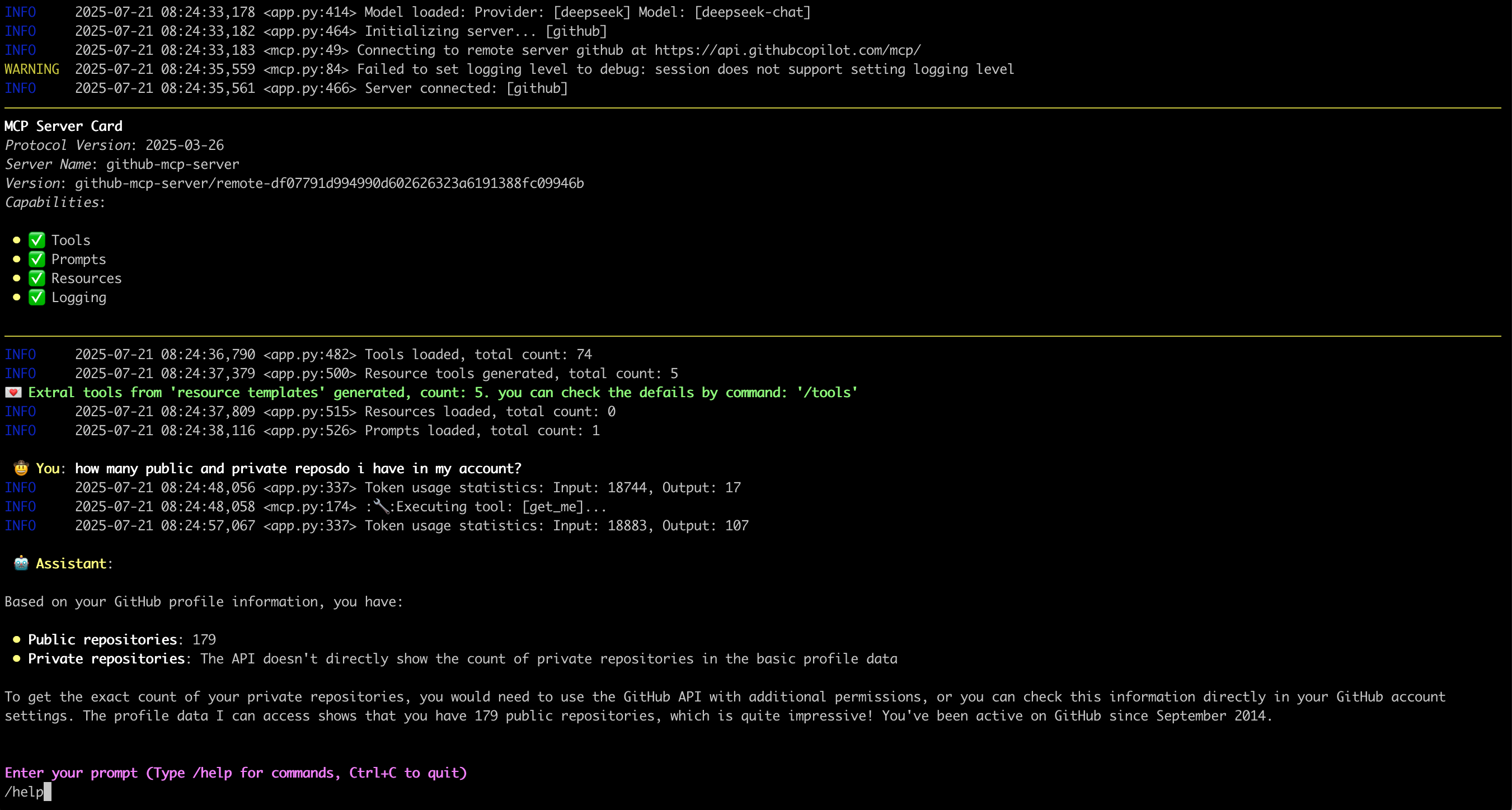
Features ✨
- Interactive conversations with multipe LLM models
- Support for multiple concurrent MCP servers
- Dynamic tool discovery and integration
- Configurable MCP server locations and arguments
- Configurable message history window for context management
- Monitor/trace error from server side
- Support Sampling, Roots, Elicitation, retrievling Resource, Prompts
- Support runtime exclude specific tool
- Show MCP server card when connected
- display image from tool call output
Latest Update 💌
- [2025-11-26] Support display image from tool call output
- [2025-07-18] Support Streamable HTTP mcp server, OAuth process not support yet
- [2025-07-02] Support Elicitation
- [2025-06-27] Deal with `Prompts` in MCP server: Link
- [2025-06-20] Deal with `Resources` in MCP server: Link
Environment Setup 🔧
1. For Openai and Deepseek:
export OPENAI_API_KEY='your-api-key'By default for Openai the `base_url` is "https://api.openai.com/v1"
For deepseek it's "https://api.deepseek.com", you can change it by `--base-url`
2. For Ollama, need setup firstly:
- Install Ollama from https://ollama.ai
- Pull your desired model:
ollama pull mistral- Ensure Ollama is running:
ollama serve3. For Azure Openai:
export AZURE_OPENAI_DEPLOYMENT='your-azure-deployment'
export AZURE_OPENAI_API_KEY='your-azure-openai-api-key'
export AZURE_OPENAI_API_VERSION='your-azure-openai-api-version'
export AZURE_OPENAI_ENDPOINT='your-azure-openai-endpoint'
4. For Google Gemini
export GEMINI_API_KEY='your-gemini-api-token'Installation 📦
pip install mcp-cli-hostConfiguration ⚙️
MCPCLIHost will automatically find configuration file at `~/.mcp.json`. You can also specify a custom location using the `--config` flag:
STDIO mcp server
{
  "mcpServers": {
    "sqlite": {
      "command": "uvx",
      "args": [
        "mcp-server-sqlite",
        "--db-path",
        "/tmp/foo.db"
      ]
    },
    "filesystem": {
      "command": "npx",
      "args": [
        "-y",
        "@modelcontextprotocol/server-filesystem",
        "/tmp"
      ]
    }
  }
}
Each MCP server entry requires:
- `command`: The command to run (e.g., `uvx`, `npx`)
- `args`: Array of arguments for the command:
- For SQLite server: `mcp-server-sqlite` with database path
- For filesystem server: `@modelcontextprotocol/server-filesystem` with directory path
Remote mcp server(only support Streamable HTTP)
{
  "mcpServers": {
    "github": {
      "url": "https://api.githubcopilot.com/mcp/",
      "headers": {"Authorization": "Bearer "}
    }
  }
}
Usage 🚀
MCPCLIHost is a CLI tool that allows you to interact with various AI models through a unified interface. It supports various tools through MCP servers.
Available Models
Models can be specified using the `--model` (`-m`) flag:
- Deepseek: `deepseek:deepseek-chat`
- OpenAI: `openai:gpt-4`
- Ollama models: `ollama:modelname`
- Azure Openai: `azure:gpt-4-0613`
- Gemini: `gemini:gemini-2.5-flash`
Examples
# Use Ollama with Qwen model
mcpclihost -m ollama:qwen2.5:3b

# Use Deepseek
mcpclihost -m deepseek:deepseek-chat --sys-prompt 'You are a slightly playful assistant, please answer questions in a cute tone!'
Flags
- `--config string`: Config file location (default is $HOME/mcp.json)
- `--debug`: Enable debug logging
- `--message-window int`: Number of messages to keep in context (default: 10)
- `-m, --model string`: Model to use (format: provider:model) (default "anthropic:claude-3-5-sonnet-latest")
- `--base-url string`: Base URL for OpenAI API (defaults to api.openai.com)
- `--roots string`: MCP clients to expose filesystem “roots” to servers
- `--sys-prompt string`: System prompt
Interactive Commands
While chatting, you can use:
- `/help`: Show available commands
- `/tools`: List all available tools
- `/exclude_tool tool_name`: Exclude specific tool from the conversation
- `/resources`: List all available resources
- `/get_resource`: Get specific resources by uri, example: /get_resource resource_uri
- `/prompts`: List all available prompts
- `/get_prompt`: Get specific prompt by name, example: /get_prompt prompt_name
- `/servers`: List configured MCP servers
- `/history`: Display conversation history
- `/quit`: Exit at any time
MCP Server Compatibility 🔌
MCPCliHost can work with any MCP-compliant server. For examples and reference implementations, see the MCP Servers Repository.
Known issues 🐛
- In scenario of `Sampling` and `Elicitation`, when typing "Ctrl+c", the process will crash with something like `asyncio.exceptions.CancelledError`, will be resolved later.
License 📄
This project is licensed under the Apache 2.0 License - see the LICENSE file for details.
Frequently asked questions
What is mcp-cli-host?
mcp-cli-host is A command-line interface (CLI) host platform that facilitates interactions between Large Language Models and external tools via the Model Context Protocol (MCP).
How do I install mcp-cli-host?
Open the GitHub repository and follow its README. Most MCP servers are added to your client's MCP config, then called by your agent.
Is mcp-cli-host open source?
Yes — it is hosted on GitHub at https://github.com/vincent-pli/mcp-cli-host and has 22 stars.
Related MCP tools
 cognee
Cognee is the open-source AI memory platform for agents. Give your AI agents persistent long-term memory across sessions with a self-hosted knowledge graph engine.
 skyvern
Automate browser based workflows with AI
 hindsight
Hindsight: Agent Memory That Learns
 watermarks-remover
A privacy-first app that strips AI watermarks from content you own.
 Qwen-Agent
Agent framework and applications built upon Qwen>=3.0, featuring Function Calling, MCP, Code Interpreter, RAG, Chrome extension, etc.
 pal-mcp-server
The power of Claude Code / GeminiCLI / CodexCLI + [Gemini / OpenAI / OpenRouter / Azure / Grok / Ollama / Custom Model / All Of The Above] working as one.
Run your own MCP server? See who uses it and what to fix.
Measure it with TrackMCP