
vscode-mcp
Documentation
VSCode MCP
This monorepo contains the VSCode MCP Server and its companion VSCode Extension, which together enable AI agents and assistants, like Goose or Claude, to interact with VSCode through the Model Context Protocol.
Project Structure
vscode-mcp/
├── server/    # MCP server implementation
└── extension/ # VS Code extension
Quick Start
1. Install the MCP Server
npx vscode-mcp-server install2. Install the MCP Extension
Configuration
Goose Desktop Setup
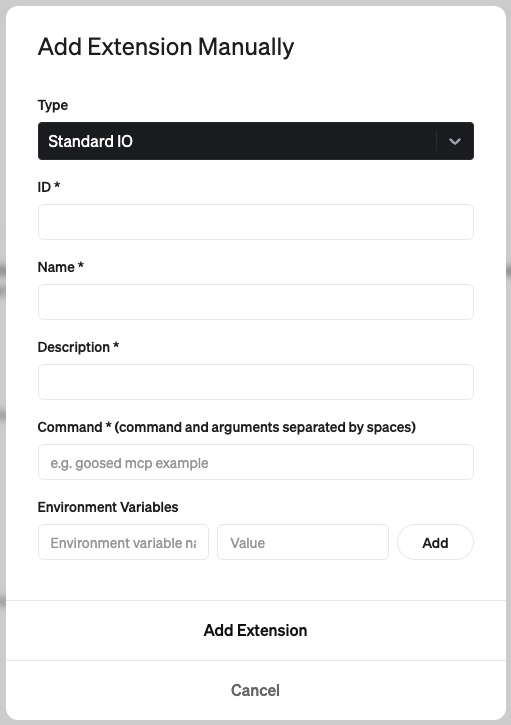
- ID: `code-mcp`
- Name: `VS Code`
- Description: `Allows interaction with VS Code through the Model Context Protocol`
- Command: `npx vscode-mcp-server`
Claude Desktop Setup
Add this to your Claude Desktop config file (`~/Library/Application Support/Claude/claude_desktop_config.json`):
{
  "mcpServers": {
    "vscode-mcp-server": {
      "command": "npx",
      "args": ["vscode-mcp-server"],
      "env": {}
    }
  }
}
Available Tools
The Code MCP server provides the following tools for AI agents to interact with VS Code:
`create_diff`
Creates and shows a diff for modifying existing files:
- Shows changes preview before applying
- Requires user approval
- Only works with existing files
`open_file`
Opens files in the VS Code editor:
- Used for viewing new or modified files
`open_project`
Opens a project folder in VS Code:
- Sets up working directory for AI agent
`check_extension_status`
Checks if extension is installed and responding
`get_extension_port`
Gets the port number for VS Code MCP Extension
`list_available_projects`
Shows projects from port registry file
License
This project is licensed under the Apache License 2.0 - see the LICENSE file for details.
Copyright 2025 Block, Inc.
This product includes software developed at Block, Inc.
Frequently asked questions
What is vscode-mcp?
vscode-mcp is a Model Context Protocol (MCP) server listed in the TrackMCP directory.
How do I install vscode-mcp?
Open the GitHub repository and follow its README. Most MCP servers are added to your client's MCP config, then called by your agent.
Is vscode-mcp open source?
Yes — it is hosted on GitHub at https://github.com/block/vscode-mcp and has 75 stars.
Related MCP tools
 mcp-remote
Connect an MCP Client that only supports local (stdio) servers to a Remote MCP Server, with auth support: TypeScript-based implementation.
 mcp-get
- Discover available MCP servers from our curated registry TypeScript-based implementation.
 cherry-studio
🍒 Cherry Studio is a desktop client that supports for multiple LLM providers. Built for the Model Context Protocol to enhance AI capabilities.
 librechat
Enhanced ChatGPT Clone: Features Agents, MCP, DeepSeek, Anthropic, AWS, OpenAI, Responses API, Azure, Groq, o1, GPT-5, Mistral, OpenRouter, Vertex AI, Gemini...
 fastgpt
FastGPT is a knowledge-based platform built on the LLMs, offers a comprehensive suite of out-of-the-box capabilities such as data processing, RAG retrieval, ...
 composio
Composio equips your AI agents & LLMs with 100+ high-quality integrations via function calling for the Model Context Protocol. Enhance AI assistants with powerf
Run your own MCP server? See who uses it and what to fix.
Measure it with TrackMCP