
mcp_query_table
query table from some websites, support MCP
Documentation
mcp_query_table
1. 基于`playwright`实现的财经网页表格爬虫,支持`Model Context Protocol (MCP) `。目前可查询来源为
实盘时,如果某网站宕机或改版,可以立即切换到其他网站。(注意:不同网站的表格结构不同,需要提前做适配)
2. 基于`playwright`实现的大语言模型调用爬虫。目前可用来源为
`RooCode`提供了`Human Reply`功能。但发现`纳米搜索`网页版复制时格式破坏,所以研发了此功能
安装
pip install -i https://pypi.org/simple --upgrade mcp_query_table
pip install -i https://pypi.tuna.tsinghua.edu.cn/simple --upgrade mcp_query_table
使用
import asyncio

from mcp_query_table import *

async def main() -> None:
    async with BrowserManager(endpoint="http://127.0.0.1:9222", executable_path=None, devtools=True) as bm:
        # 问财需要保证浏览器宽度>768,防止界面变成适应手机
        page = await bm.get_page()
        df = await query(page, '收益最好的200只ETF', query_type=QueryType.ETF, max_page=1, site=Site.THS)
        print(df.to_markdown())
        df = await query(page, '年初至今收益率前50', query_type=QueryType.Fund, max_page=1, site=Site.TDX)
        print(df.to_csv())
        df = await query(page, '流通市值前10的行业板块', query_type=QueryType.Index, max_page=1, site=Site.TDX)
        print(df.to_csv())
        # TODO 东财翻页要提前登录
        df = await query(page, '今日涨幅前5的概念板块;', query_type=QueryType.Board, max_page=3, site=Site.EastMoney)
        print(df)

        output = await chat(page, "1+2等于多少?", provider=Provider.YuanBao)
        print(output)
        output = await chat(page, "3+4等于多少?", provider=Provider.YuanBao, create=True)
        print(output)

        print('done')
        bm.release_page(page)
        await page.wait_for_timeout(2000)

if __name__ == '__main__':
    asyncio.run(main())
注意事项
1. 浏览器最好是`Chrome`。如一定要使用`Edge`,除了关闭`Edge`所有窗口外,还要在任务管理器关闭`Microsoft Edge`
的所有进程,即`taskkill /f /im msedge.exe`
2. 浏览器要保证窗口宽度,防止部分网站自动适配成手机版,导致表格查询失败
3. 如有网站账号,请提前登录。此工具无自动登录功能
4. 不同网站的表格结构不同,同条件返回股票数量也不同。需要查询后做适配
工作原理
不同于`requests`,`playwright`是基于浏览器的,模拟用户在浏览器中的操作。
1. 不需要解决登录问题
2. 不需要解决请求构造、响应解析
3. 可以直接获取表格数据,所见即所得
4. 运行速度慢于`requests`,但开发效率高
数据的获取有:
1. 直接解析HTML表格
1. 数字文本化了,不利于后期研究
2. 适用性最强
2. 截获请求,获取返回的`json`数据
1. 类似于`requests`,需要做响应解析
2. 灵活性差点,网站改版后,需要重新做适配
此项目采用的是模拟点击浏览器来发送请求,使用截获响应并解析的方法来获取数据。
后期会根据不同的网站改版情况,使用更适合的方法。
无头模式
无头模式运行速度更快,但部分网站需要提前登录,所以,无头模式一定要指定`user_data_dir`,否则会出现需要登录的情况。
- `endpoint=None`时,`headless=True`可无头启动新浏览器实例。指定`executable_path`和`user_data_dir`,才能确保无头模式下正常运行。
- `endpoint`以`http://`开头,连接`CDP`模式启动的有头浏览器,参数必有`--remote-debugging-port`。`executable_path`为本地浏览器路径。
- `endpoint`以`ws://`开头,连接远程`Playwright Server`。也是无头模式,但无法指定`user_data_dir`,所以使用受限
`Chrome`新版的安全策略使用默认`user_data_dir`时将无法创建`CDP`服务,建议重新复制配置目录到其他地方
MCP支持
确保可以在控制台中执行`python -m mcp_query_table -h`。如果不能,可能要先`pip install mcp_query_table`
在`Cline`中可以配置如下。其中`command`是`python`的绝对路径,`timeout`是超时时间,单位为秒。 在各`AI`
平台中由于返回时间常需1分钟以上,所以需要设置大的超时时间。
STDIO方式
{
  "mcpServers": {
    "mcp_query_table": {
      "timeout": 300,
      "command": "D:\\Users\\Kan\\miniconda3\\envs\\py312\\python.exe",
      "args": [
        "-m",
        "mcp_query_table",
        "--format",
        "markdown",
        "--endpoint",
        "http://127.0.0.1:9222",
        "--executable_path",
        "C:\\Program Files\\Google\\Chrome\\Application\\chrome.exe"
      ]
    }
  }
}
SSE方式
先在控制台中执行如下命令,启动`MCP`服务
python -m mcp_query_table --format markdown --transport sse --port 8000 --endpoint http://127.0.0.1:9222 --user_data_dir "D:\user-data-dir"然后就可以连接到`MCP`服务了
{
  "mcpServers": {
    "mcp_query_table": {
      "timeout": 300,
      "url": "http://127.0.0.1:8000/sse"
    }
  }
}
Streamable HTTP方式
python -m mcp_query_table --format markdown --transport streamable-http --port 8000 --endpoint http://127.0.0.1:9222 --user_data_dir "D:\user-data-dir"连接的地址是`http://127.0.0.1:8000/mcp`
使用`MCP Inspector`进行调试
npx @modelcontextprotocol/inspector python -m mcp_query_table --format markdown --endpoint http://127.0.0.1:9222打开浏览器并翻页是一个比较耗时的操作,会导致`MCP Inspector`页面超时,可以`http://localhost:5173/?timeout=300000`
表示超时时间为300秒
第一次尝试编写`MCP`项目,可能会有各种问题,欢迎大家交流。
`MCP`使用技巧
1. 2024年涨幅最大的100只股票按2024年12月31日总市值排名。三个网站的结果都不一样
2. 大语言模型对问题拆分能力弱,所以要能合理的提问,保证查询条件不会被改动。以下推荐第2、3种
> 大语言模型非常有可能拆分这句,导致一步查询被分成了多步查询
> 用引号括起来,避免被拆分
> 分成两步查询,先查询板块,再查询股票。但最好不要全自动,因为第一步的结果它不理解“今日涨幅”和“区间涨幅”,需要交互修正
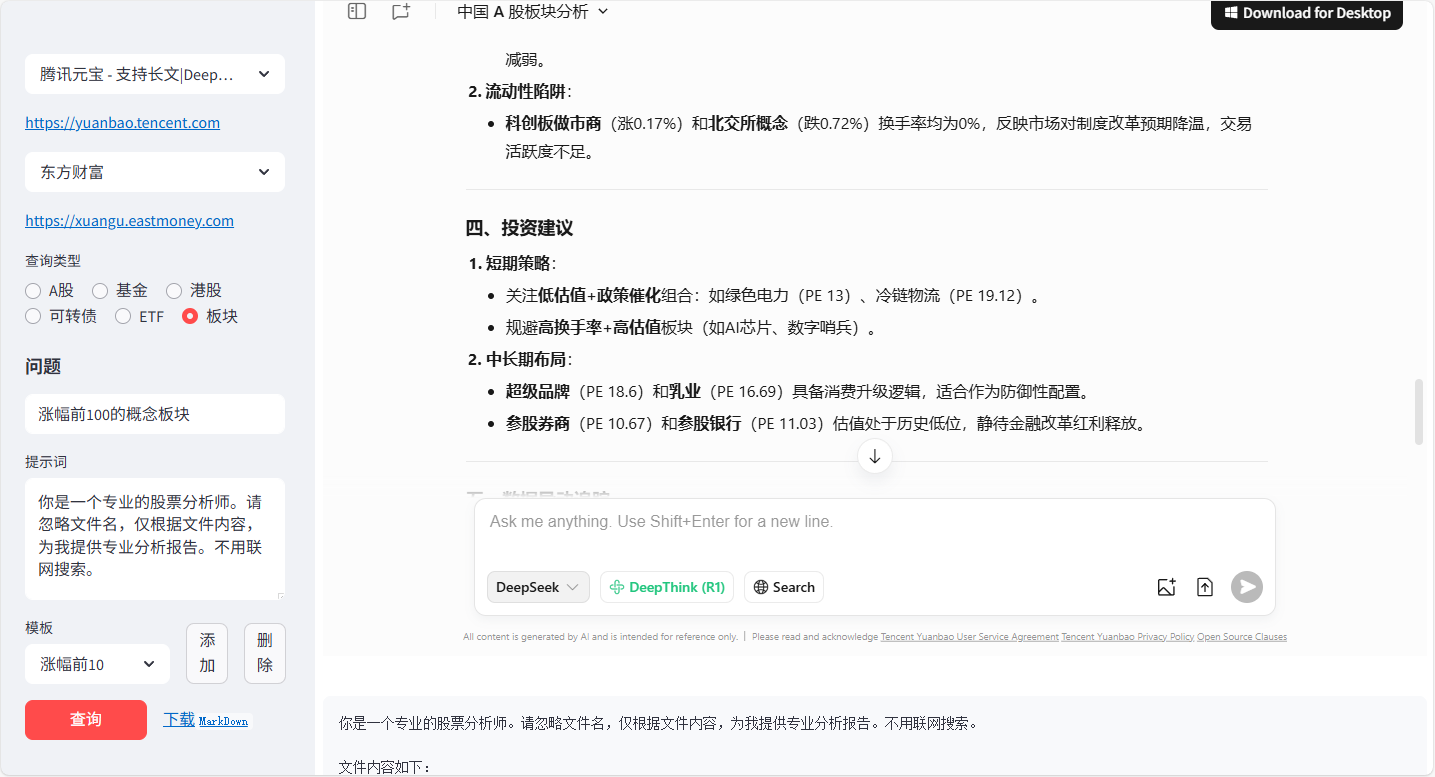
支持`Streamlit`
实现在同一页面中查询金融数据,并手工输入到`AI`中进行深度分析。参考`streamlit`目录下的`README.md`文件。
参考
- Selenium webdriver无法附加到edge实例,edge的--remote-debugging-port选项无效
- https://github.com/AtuboDad/playwright_stealth/issues/31
- https://github.com/browser-use/browser-use/issues/1520
Frequently asked questions
What is mcp_query_table?
mcp_query_table is query table from some websites, support MCP
How do I install mcp_query_table?
Open the GitHub repository and follow its README. Most MCP servers are added to your client's MCP config, then called by your agent.
Is mcp_query_table open source?
Yes — it is hosted on GitHub at https://github.com/wukan1986/mcp_query_table and has 57 stars.
Related MCP tools
 auto-browser
Give your AI agent a real browser — with a human in the loop. Open-source MCP-native browser agent.
 skyvern
Automate browser based workflows with AI
 Windows-MCP
MCP Server for Computer Use in Windows
 semble
Fast and Accurate Code Search for Agents. Uses 99% fewer tokens than grep+read
 zotero-mcp
Zotero MCP: Connects your Zotero research library with Claude and other AI assistants via the Model Context Protocol to discuss papers, get summaries, analyze citations, and more.
 mcp-context-forge
An AI Gateway, registry, and proxy that sits in front of any MCP, A2A, or REST/gRPC APIs, exposing a unified endpoint with centralized discovery, guardrails and management. Optimizes Agent & Tool calling, and supports plugins.
Run your own MCP server? See who uses it and what to fix.
Measure it with TrackMCP