
y-cli
A Tiny Terminal Chat App for AI Models with MCP Client Support Python-based implementation.
Documentation
y-agent
A personal AI agent system built on top of coding agents.
> Renamed from y-cli. y-cli wrapped model APIs; y-agent wraps coding agents.
Demo
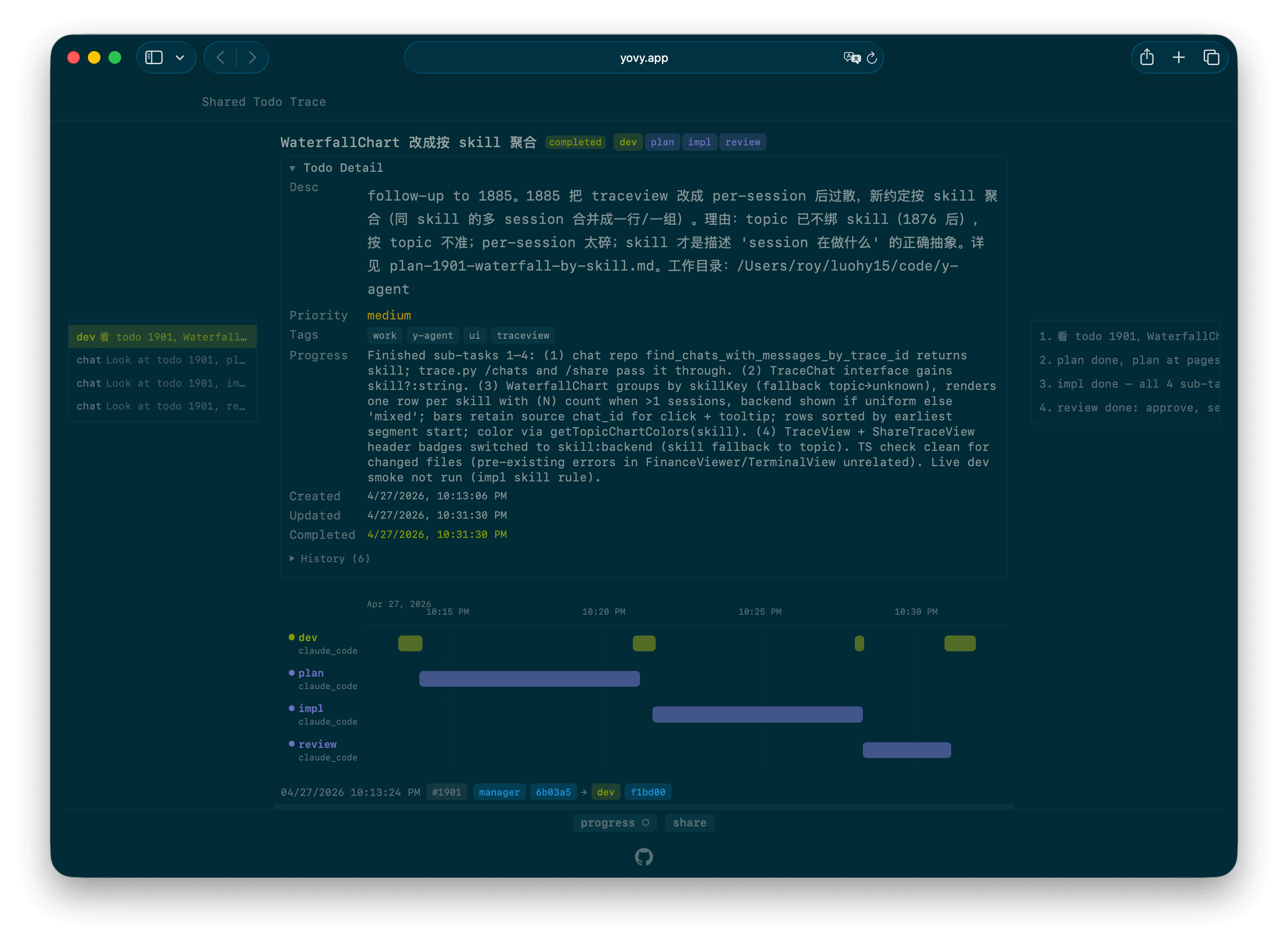
A real trace: https://yovy.app/t/6fc5c4
Web chat renders inline artifacts from assistant messages: Mermaid diagrams, Vega-Lite charts, and sanitized `artifact-svg` blocks.
Coding agents like Claude Code / Codex are great for code, but code is only part of my daily life. I also have ledgers, calendars, todos, notes, emails. I want the agent to handle those too.
Three things came up while extending a coding agent into a personal agent system:
1. How to give the agent context
2. How to keep the agent always-on
3. How to orchestrate multiple agents
Context
Same data for me and for the agent. Files go through `read` / `write` / `edit`. Anything I'd reach for a GUI to do, the agent reaches for a CLI — it's already happy in Bash. Rule: whatever I can do in the GUI, the agent can do via CLI. The underlying file or DB row is the same.
Always-on
I don't want to carry a laptop or open a terminal to use it. Coding agents run on a remote VM (EC2) inside `tmux`; a tail process parses their output into the database, so the web UI can chat with them directly. A Telegram bot covers mobile input. EC2 auto-hibernates when idle, so cost is near zero when nothing is running.
Orchestration
One session usually can't handle the whole thing — requests have to be routed to the right session. Claude Code ships sub-agents, but I wanted that layer outside, so sub-agent chats stay in my own DB and I can steer them mid-run.
user        ┌──────────────────┐
   input ────► │  skill: manager  │   dispatch only,
        │     └────────┬──────────┘   no execution
        │              │   y chat --skill dev -m "..."
        │              ▼
        │     ┌──────────────────┐
        ├───► │  skill: dev      │   coordinator,
        │     │                  │   runs lower-level skill sessions
        │     └──┬──────┬──────┬─┘
        │        │      │      │   y chat --skill {plan,impl,review}
        │        ▼      ▼      ▼
        │     ┌──────┐ ┌──────┐ ┌────────┐
        └───► │ plan │ │ impl │ │ review │   anonymous, ephemeral;
              └──────┘ └──────┘ └────────┘   skill loaded per dispatch
A `trace_id` (= `todo_id` when the task is tracked) threads the whole tree, so TraceView renders the chain as a waterfall.
Docs
Two paths, split by whether you run the server or just use one. Each page opens with a `client` or `server` tag so you always know which side you're on.
Client — use a hosted instance (`y login` against `yovy.app` and go; no infra needed):
- docs/getting-started.md — the web GUI after sign-in, built around the four showcased capabilities (chat, todo & trace, note, link).
- docs/cli.md — install the CLI, sign in, every command group.
- docs/capabilities.md — client + server reference: what a running deployment ships.
Server — self-host (you run the API + worker yourself):
- docs/self-host.md — prerequisites, install, run, deploy, config keys.
- docs/provider-status.md — manually configure the Anthropic Statuspage webhook without storing credentials or failure-notification email in source.
Hot-loadable modules
A module is a user-owned, versioned domain at the fixed `code/y-module//`
(standalone repo `/Users/roy/luohy15/code/y-module`). It can hold local CLI, a
lazy-loaded API half, a published React UI half, and module-owned data/migrations.
`y module publish` ships API+UI atomically; `y module rollback` repoints code only;
`y module schema-sql` prints DDL and never runs it. UI claims `panel` / `detail` /
`shell` slots. Publish and backend dispatch require
`Y_AGENT_MODULE_MAINTAINER_USER_ID` (fail-closed); a version may opt into
`authenticated` dispatch.
Blog Post
Longer write-up, design rationale, and comparisons: full blog post.
CHANGELOG tracks weekly updates.
Frequently asked questions
What is y-cli?
y-cli is A Tiny Terminal Chat App for AI Models with MCP Client Support Python-based implementation.
How do I install y-cli?
Open the GitHub repository and follow its README. Most MCP servers are added to your client's MCP config, then called by your agent.
Is y-cli open source?
Yes — it is hosted on GitHub at https://github.com/luohy15/y-cli and has 189 stars.
Related MCP tools
 mcp-server-motherduck
MCP server for DuckDB and MotherDuck Python-based implementation.
 freecad-mcp
FreeCAD MCP(Model Context Protocol) server Python-based implementation.
 mcp-client-for-ollama
A text-based user interface (TUI) client for interacting with MCP servers using Ollama. Features include multi-server, dynamic model switching, streaming res...
 mcp-llm-bridge
MCP implementation that enables communication between MCP servers and OpenAI-compatible LLMs Python-based implementation.
 mcp-cn-a-stock
这是一个为大模型提供 A 股数据的的 MCP(Model Content Protocol) 服务。 Python-based implementation.
 mcp-teams-server
An MCP (Model Context Protocol) server implementation for Microsoft Teams integration, providing capabilities to read messages, create messages, reply to mes...
Run your own MCP server? See who uses it and what to fix.
Measure it with TrackMCP