
dta
Dev Tools for Android (DTA) MCP
Documentation
Development Tools for Android (DTA)



A toolkit that gives AI assistants direct access to Android devices through the Model Context Protocol. Your coding agent can see the screen, read network traffic, inspect layout trees, mock responses, and interact with the app — from Android Studio, the terminal, or any MCP client.
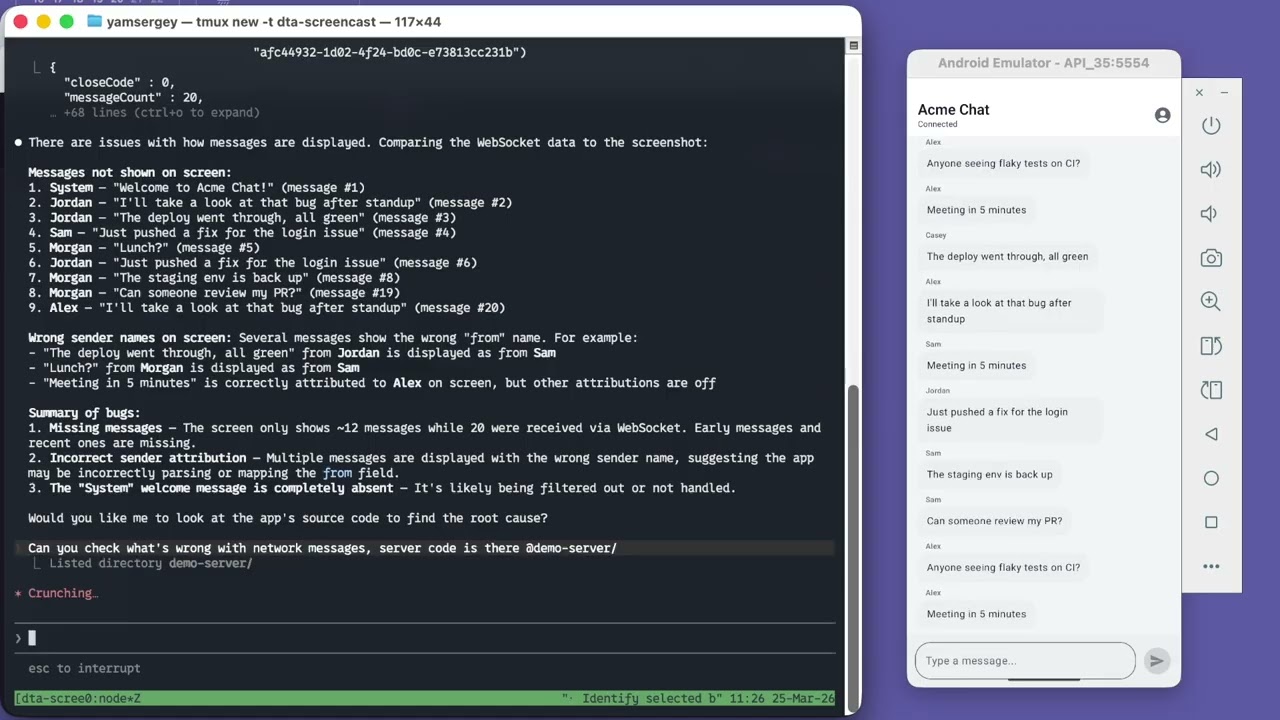
Article: Debugging Android Apps with AI
Quick Start
Option A: Android Studio Plugin
Or: Settings → Plugins → Marketplace → search "DTA"
The plugin embeds the daemon, auto-injects sidekick into debug builds, and provides a 4-tab inspector (Layout, Network, WebSocket, MCP) — no CLI or manual setup needed.
Option B: CLI
brew tap yamsergey/packages
brew install dta-cli
Requirements: Java 21+
Auto-inject (recommended)
No project changes needed. Use the CLI or the MCP `run_app` tool to build and launch your app with sidekick injected automatically:
dta-cli run --project /path/to/your/android/projectThis runs Gradle with an init script that adds `dta-sidekick` as a `debugImplementation` dependency, builds the APK, installs it on the device, and launches the main activity. Your AI assistant can do the same via the `run_app` MCP tool.
Manual (alternative)
If you prefer to add sidekick to your build files directly:
dependencies {
    debugImplementation 'io.github.yamsergey:dta-sidekick:0.9.36'
}
Sidekick auto-initializes via AndroidX Startup — no code changes beyond the dependency.
Connect your AI assistant
With the AS plugin: open the MCP tab, enable the server, pick your agent from the dropdown — it shows the exact config snippet to copy-paste. Works with Claude Code, Cursor, Android Studio Gemini, Claude Desktop, VS Code, and others.
Without the plugin (CLI only):
Claude Code
claude mcp add dta -- dta-cli mcpCursor

Claude Desktop
Add to `~/Library/Application Support/Claude/claude_desktop_config.json`
{
  "mcpServers": {
    "dta": {
      "command": "dta-cli",
      "args": ["mcp"]
    }
  }
}
What Can Your Agent Do?
Screen Analysis
DTA returns the real UI hierarchy — view classes, bounds, positions, layout parameters, Compose-specific data (composable names, recomposition counts), and DOM trees from WebViews and Chrome Custom Tabs. Unlike `adb shell uiautomator dump` which gives a semantic accessibility tree, your agent gets the full picture.
Network Analysis
Sidekick auto-records from app launch — HTTP requests (OkHttp), WebSocket connections, Chrome Custom Tab traffic, and WebView network requests. No "start recording" button, no missed requests. Your agent can query the full history at any point.
Mocking
Create mock rules for HTTP and WebSocket from captured data or from scratch. Plug in custom adapters for programmatic control:
Sidekick.configure(
    SidekickConfig.builder()
        .httpMockAdapter { transaction, proposedResponse ->
            proposedResponse.withBody("""{"message": "mocked"}""")
        }
        .build()
)
Build & Launch
The `run_app` tool builds an APK with sidekick auto-injected, installs it, and launches the main activity — all from a single MCP call. No manual Gradle setup. If the tool is blocked by your environment's sandbox, it returns the exact shell commands as a fallback.
Verification
The agent can tap, swipe, input text, and press keys — then check the screen state and network traffic to confirm behavior. A full inspect-mock-interact-verify loop without leaving the conversation.
Android Studio Plugin
The DTA Inspector tool window provides four tabs:
| Tab | Features |
|---|---|
| Layout | UI tree + device screenshot with hover highlighting, click-to-select, bidirectional selection sync |
| Network | HTTP request table with headers, bodies, timing; Custom Tab + WebView traffic |
| WebSocket | Connection list → message list → message detail |
| MCP | Enable HTTP server, pick port, per-agent config snippets with copy-to-clipboard |
The plugin auto-injects `dta-sidekick` into debug builds via a Gradle init script — no changes to your project files.
Inspector Web Interface
dta-cli inspector-webOpen http://localhost:8080 for visual inspection with the same capabilities — layout tree, network, WebSocket, mock rule editor.
The web inspector enables bidirectional communication between developer and agent — select elements with a click instead of describing them in words.
MCP Transports
| Transport | Command | Use case |
|---|---|---|
| stdio | `dta-cli mcp` | Claude Desktop, Cursor, any stdio MCP client |
| HTTP | `dta-cli mcp serve --http --port 12321` | AS Gemini, Claude Code HTTP, any Streamable HTTP client |
| Plugin | Enable in MCP tab | HTTP server embedded in AS, no CLI needed |
Modules
| Module | Description |
|---|---|
| dta-plugin | Android Studio plugin (4-tab inspector + embedded daemon + MCP server) |
| dta-cli | CLI interface (`mcp`, `inspector-web`, `run`, `inspect` commands) |
| dta-mcp | MCP server (stdio + HTTP transport, tool definitions) |
| dta-daemon | Javalin HTTP daemon (sidekick connection, CDP watcher, layout enrichment) |
| dta-sidekick | In-app inspection library (Android AAR, auto-init via AndroidX Startup) |
| tools-android | Core Gradle Tooling API integration |
| workspace-kotlin | workspace.json converter for Kotlin Language Server |
CLI Reference
dta-cli --help
dta-cli  --help
License
Apache License 2.0 — see LICENSE.txt
Frequently asked questions
What is dta?
dta is Dev Tools for Android (DTA) MCP
How do I install dta?
Open the GitHub repository and follow its README. Most MCP servers are added to your client's MCP config, then called by your agent.
Is dta open source?
Yes — it is hosted on GitHub at https://github.com/yamsergey/dta and has 51 stars.
Related MCP tools
 ghidramcp
MCP Server for Ghidra Java-based implementation. Trusted by 6400+ developers. Trusted by 6400+ developers. Trusted by 6400+ developers.
 java-sdk
The official Java SDK for Model Context Protocol servers and clients. Maintained in collaboration with Spring AI Trusted by 2800+ developers.
 mcprotocollib
A library for communication with a Minecraft client/server. Built for the Model Context Protocol to enhance AI capabilities. Java-based implementation.
serversModel Context Protocol Servers
 codegraph
Pre-indexed code knowledge graph, auto syncs on code changes, for Claude Code, Codex, Gemini, Cursor, OpenCode, AntiGravity, Kiro, CoPilot, and Hermes Agent — fewer tokens, fewer tool calls, 100% local
 goose
goosean open source, extensible AI agent that goes beyond code suggestions - install, execute, edit, and test with any LLM
Run your own MCP server? See who uses it and what to fix.
Measure it with TrackMCP