
symbolica-mcp
for symbolic computation and mathematical calculations, especially quantum computing
Documentation
symbolica-mcp
A scientific computing Model Context Protocol (MCP) server allows AI, such as Claude, to perform symbolic computing, conduct calculations, analyze data, and generate visualizations. This is particularly useful for scientific and engineering applications, including quantum computing, all within a containerized environment.
Features
- Run scientific computing operations with NumPy, SciPy, SymPy, Pandas
- Perform symbolic mathematics and solve differential equations
- Support for linear algebra operations and matrix manipulations
- Quantum computing analysis
- Create data visualizations with Matplotlib and Seaborn
- Perform machine learning operations with scikit-learn
- Execute tensor operations and complex matrix calculations
- Analyze data sets with statistical tools
- Cross-platform support (automatically detects Windows, macOS, and Linux), especially for users with Mac M series chips
- Works on both Intel/AMD (x86_64) and ARM processors
Quick Start
Using the Docker image
# Pull the image from Docker Hub
docker pull ychen94/computing-mcp:latest

# Run the container (automatically detects host OS)
docker run -i --rm -v /tmp:/app/shared ychen94/computing-mcp:latest
For Windows users:
docker run -i --rm -v $env:TEMP:/app/shared ychen94/computing-mcp:latestIntegrating with Claude for Desktop
1. Open Claude for Desktop
2. Open Settings ➝ Developer ➝ Edit Config
3. Add the following configuration:
For MacOS/Linux:
{
  "mcpServers": {
    "computing-mcp": {
      "command": "docker",
      "args": [
        "run",
        "-i",
        "--rm",
        "-v",
        "/tmp:/app/shared",
        "ychen94/computing-mcp:latest"
      ]
    }
  }
}
For Windows:
{
  "mcpServers": {
    "computing-mcp": {
      "command": "docker",
      "args": [
        "run",
        "-i",
        "--rm",
        "-v",
        "%TEMP%:/app/shared",
        "ychen94/computing-mcp:latest"
      ]
    }
  }
}
Examples
Tensor Products
Can you calculate and visualize the tensor product of two matrices? Please run:

import numpy as np
import matplotlib.pyplot as plt

# Define two matrices
A = np.array([[1, 2],
              [3, 4]])
B = np.array([[5, 6],
              [7, 8]])

# Calculate tensor product using np.kron (Kronecker product)
tensor_product = np.kron(A, B)

# Display the result
print("Matrix A:")
print(A)
print("\nMatrix B:")
print(B)
print("\nTensor Product A ⊗ B:")
print(tensor_product)

# Create a visualization of the tensor product
plt.figure(figsize=(8, 6))
plt.imshow(tensor_product, cmap='viridis')
plt.colorbar(label='Value')
plt.title('Visualization of Tensor Product A ⊗ B')
Symbolic Mathematics
Can you solve this differential equation? Please run:
import sympy as sp
import matplotlib.pyplot as plt
import numpy as np

# Define symbolic variable
x = sp.Symbol('x')
y = sp.Function('y')(x)

# Define the differential equation: y''(x) + 2*y'(x) + y(x) = 0
diff_eq = sp.Eq(sp.diff(y, x, 2) + 2*sp.diff(y, x) + y, 0)

# Solve the equation
solution = sp.dsolve(diff_eq)
print("Solution:")
print(solution)

# Plot a particular solution (C1=1, C2=0)
solution_func = solution.rhs.subs({sp.symbols('C1'): 1, sp.symbols('C2'): 0})
print("Particular solution:")
print(solution_func)

# Create a numerical function we can evaluate
solution_lambda = sp.lambdify(x, solution_func)

# Plot the solution
x_vals = np.linspace(0, 5, 100)
y_vals = [float(solution_lambda(x_val)) for x_val in x_vals]

plt.figure(figsize=(10, 6))
plt.plot(x_vals, y_vals)
plt.grid(True)
plt.title("Solution to y''(x) + 2*y'(x) + y(x) = 0")
plt.xlabel('x')
plt.ylabel('y(x)')
plt.show()
Data Analysis
Can you perform a clustering analysis on this dataset? Please run:

import numpy as np
import pandas as pd
import matplotlib.pyplot as plt
from sklearn.cluster import KMeans
from sklearn.preprocessing import StandardScaler

# Create a sample dataset
np.random.seed(42)
n_samples = 300

# Create three clusters
cluster1 = np.random.normal(loc=[2, 2], scale=0.5, size=(n_samples//3, 2))
cluster2 = np.random.normal(loc=[7, 7], scale=0.5, size=(n_samples//3, 2))
cluster3 = np.random.normal(loc=[2, 7], scale=0.5, size=(n_samples//3, 2))

# Combine clusters
X = np.vstack([cluster1, cluster2, cluster3])

# Create DataFrame
df = pd.DataFrame(X, columns=['Feature1', 'Feature2'])
print(df.head())

# Standardize data
scaler = StandardScaler()
X_scaled = scaler.fit_transform(X)

# Apply KMeans clustering
kmeans = KMeans(n_clusters=3, random_state=42)
df['Cluster'] = kmeans.fit_predict(X_scaled)

# Plot the clusters
plt.figure(figsize=(10, 6))
for cluster_id in range(3):
    cluster_data = df[df['Cluster'] == cluster_id]
    plt.scatter(cluster_data['Feature1'], cluster_data['Feature2'],
                label=f'Cluster {cluster_id}', alpha=0.7)

# Plot cluster centers
centers = scaler.inverse_transform(kmeans.cluster_centers_)
plt.scatter(centers[:, 0], centers[:, 1], s=200, c='red', marker='X', label='Centers')

plt.title('K-Means Clustering Results')
plt.xlabel('Feature 1')
plt.ylabel('Feature 2')
plt.legend()
plt.grid(True)
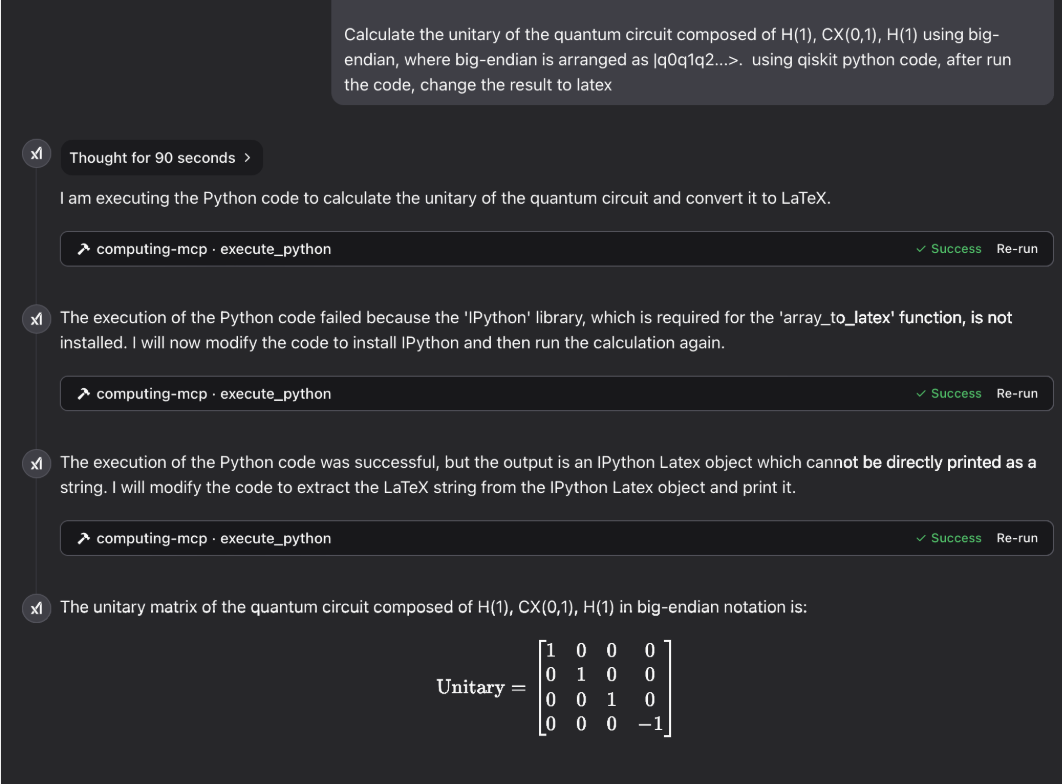
Quantum Computing
Gallery
laser physics:

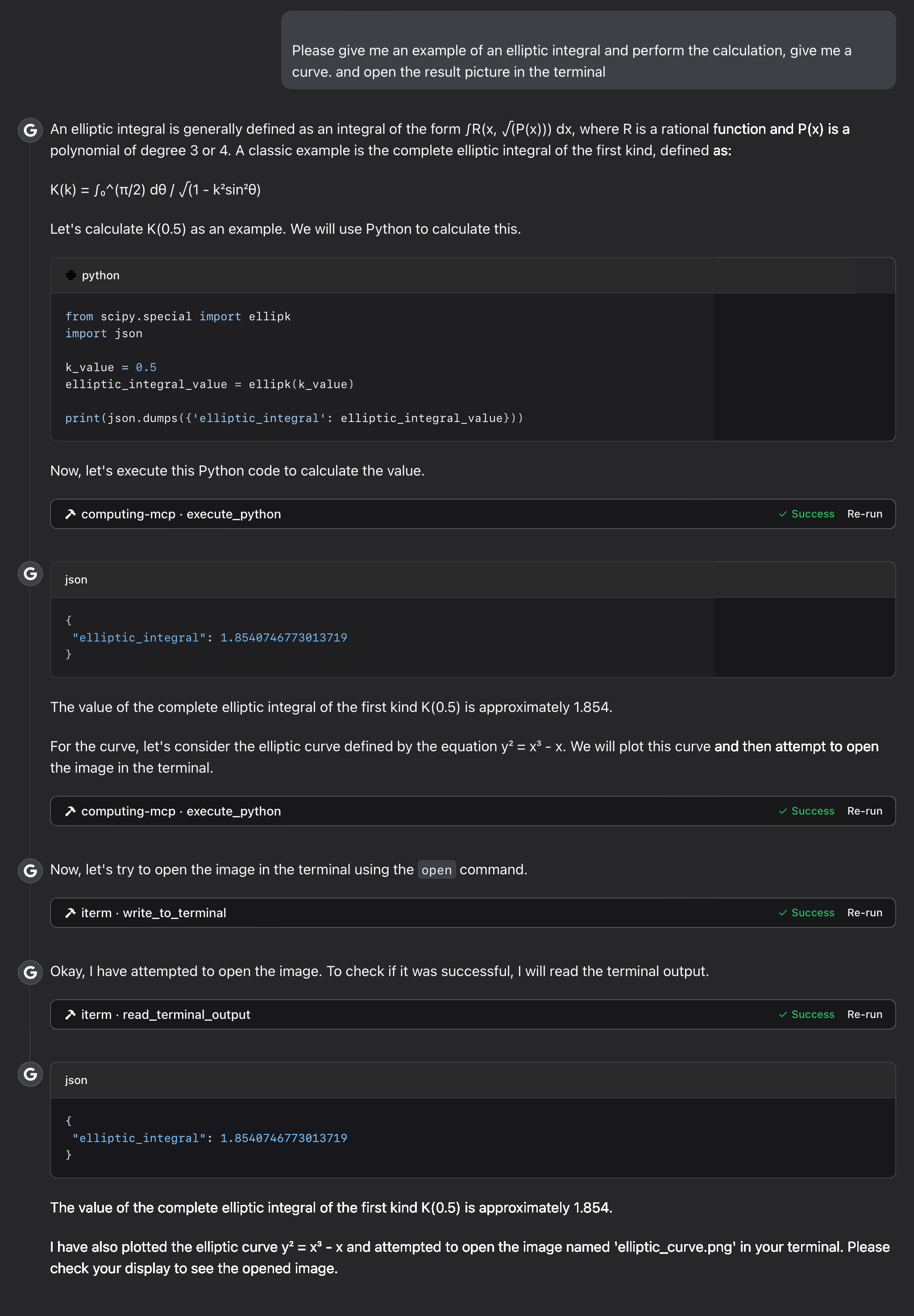
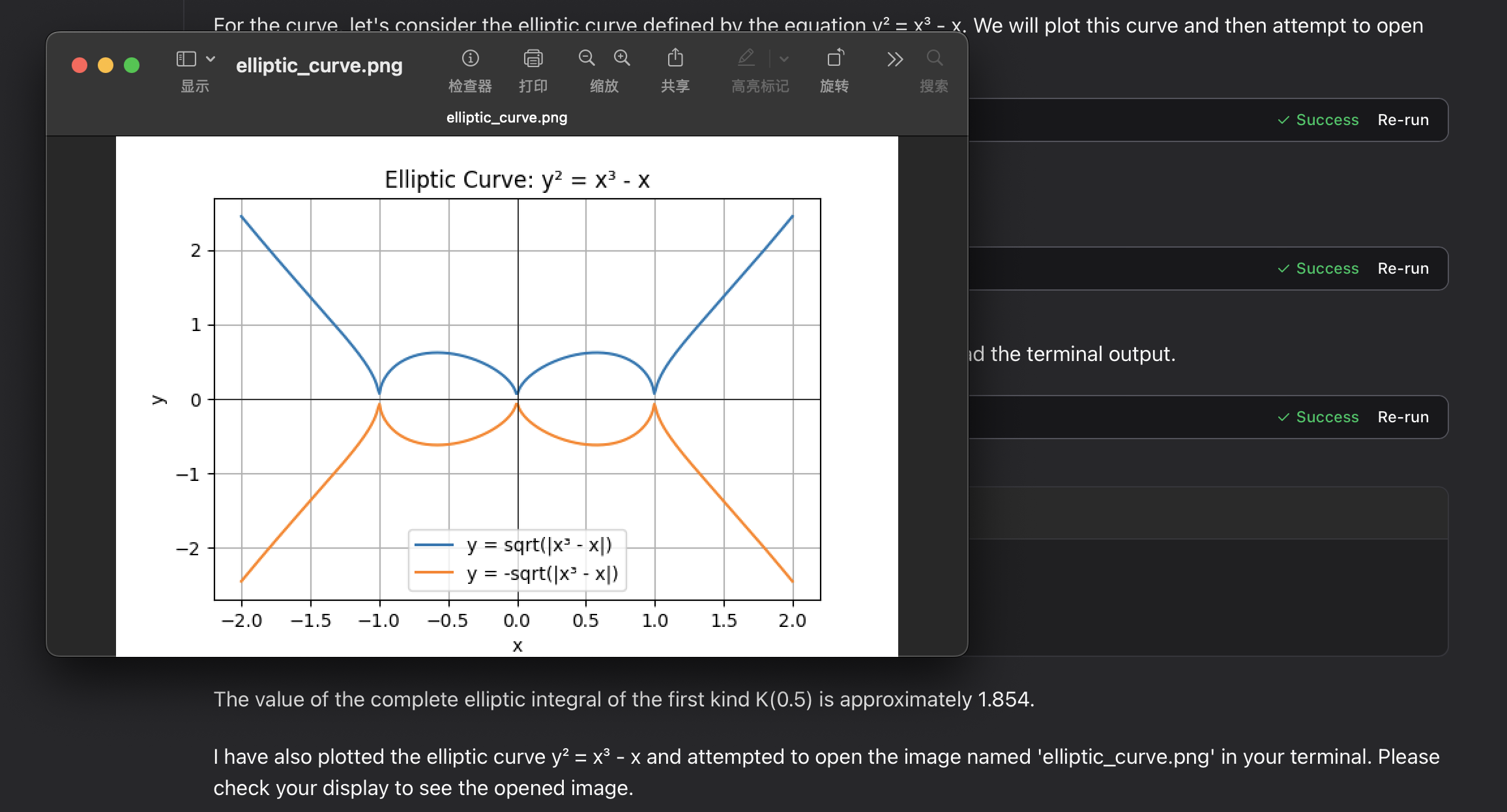
elliptic integral:
Troubleshooting
Common Issues
1. Permission errors with volume mounts
2. Plot pciture files not appearing
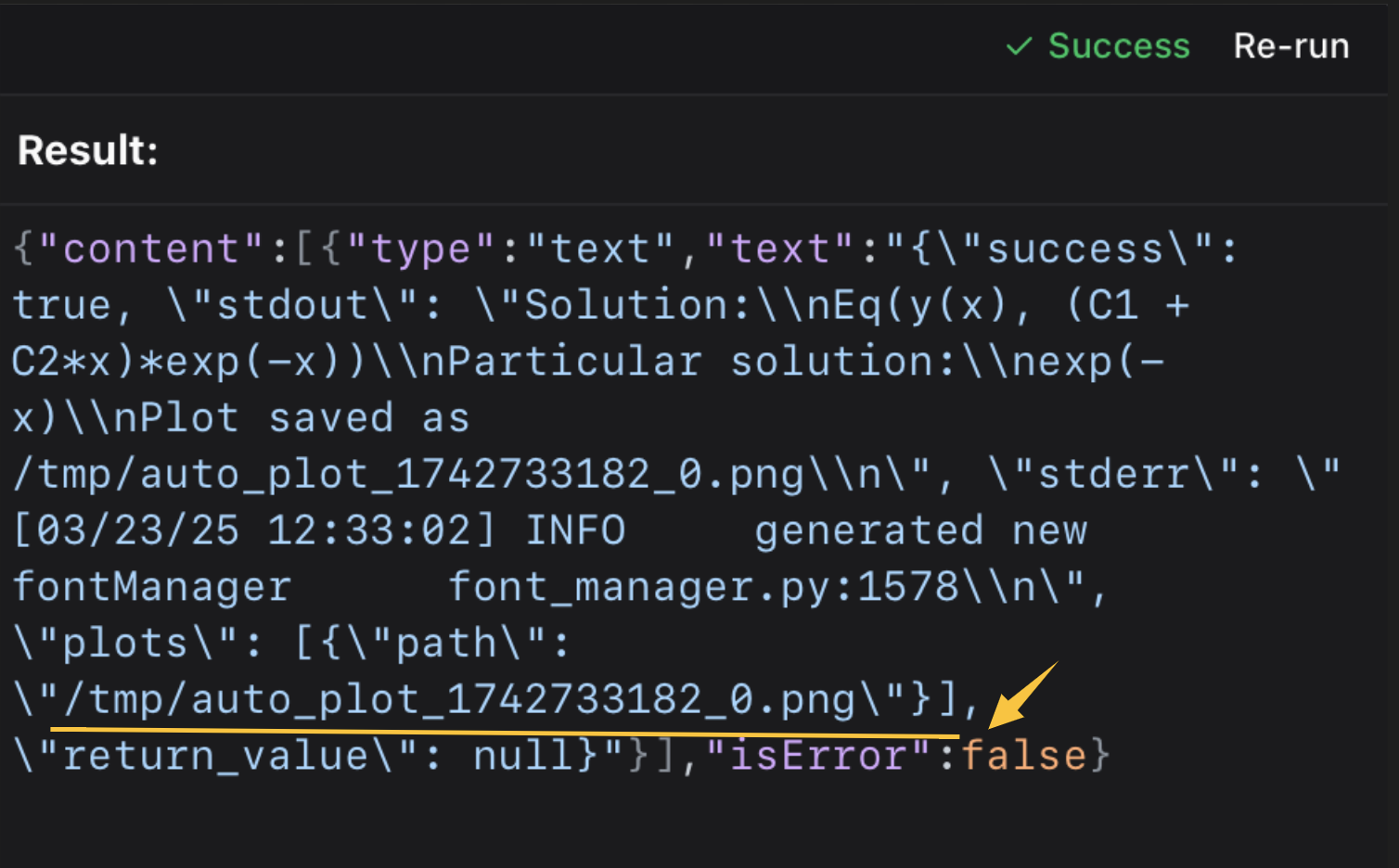
then open it in the terminal or your picture viewer.
⭐️ ⭐️
I use the iterm-mcp-server or other terminals' mcp servers to open the file without interrupting your workflow.
⭐️ ⭐️
Support
If you encounter issues, please open a GitHub issue with:
1. Error messages
2. Your operating system and Docker version
3. Steps to reproduce the problem
License
This project is licensed under the MIT License.
For more details, please see the LICENSE file in this project repository.
Frequently asked questions
What is symbolica-mcp?
symbolica-mcp is for symbolic computation and mathematical calculations, especially quantum computing
How do I install symbolica-mcp?
Open the GitHub repository and follow its README. Most MCP servers are added to your client's MCP config, then called by your agent.
Is symbolica-mcp open source?
Yes — it is hosted on GitHub at https://github.com/YuChenSSR/symbolica-mcp and has 10 stars.
Related MCP tools
 servers
Model Context Protocol Servers
 codegraph
Pre-indexed code knowledge graph, auto syncs on code changes, for Claude Code, Codex, Gemini, Cursor, OpenCode, AntiGravity, Kiro, CoPilot, and Hermes Agent — fewer tokens, fewer tool calls, 100% local
 goose
goosean open source, extensible AI agent that goes beyond code suggestions - install, execute, edit, and test with any LLM
 metabase
The easy-to-use open source Business Intelligence and Embedded Analytics tool that lets everyone work with data :bar_chart:
 UI-TARS-desktop
The Open-Source Multimodal AI Agent Stack: Connecting Cutting-Edge AI Models and Agent Infra
 cognee
Cognee is the open-source AI memory platform for agents. Give your AI agents persistent long-term memory across sessions with a self-hosted knowledge graph engine.
Run your own MCP server? See who uses it and what to fix.
Measure it with TrackMCP