
jadx-ai-mcp
Plugin for JADX to integrate MCP server Java-based implementation. Trusted by 600+ developers. Trusted by 600+ developers.
Documentation
Read The Docs
🤖 What is JADX-AI-MCP?
JADX-AI-MCP is a plugin for the JADX decompiler that integrates directly with Model Context Protocol (MCP) to provide live reverse engineering support with LLMs like Claude.
Think: "Decompile → Context-Aware Code Review → AI Recommendations" — all in real time.
High Level Sequence Diagram
sequenceDiagram
LLM CLIENT->>JADX MCP SERVER: INVOKE MCP TOOL
JADX MCP SERVER->>JADX AI MCP PLUGIN: INVOKE HTTP REQUEST
JADX AI MCP PLUGIN->>REQUEST HANDLERS: INVOKE HTTP REQUEST HANDLER
REQUEST HANDLERS->>JADX GUI: PERFORM ACTION/GATHER DATA
JADX GUI->>REQUEST HANDLERS: ACTION PERFORMED/DATA GATHERED
REQUEST HANDLERS->>JADX AI MCP PLUGIN: CRAFT HTTP RESPONSE
JADX AI MCP PLUGIN->>JADX MCP SERVER:HTTP RESPONSE
JADX MCP SERVER->>LLM CLIENT: MCP TOOL RESULT
Watch the demos!
- Perform quick analysis
https://github.com/user-attachments/assets/b65c3041-fde3-4803-8d99-45ca77dbe30a
- Quickly find vulnerabilities
https://github.com/user-attachments/assets/c184afae-3713-4bc0-a1d0-546c1f4eb57f
- Multiple AI Agents Support
https://github.com/user-attachments/assets/6342ea0f-fa8f-44e6-9b3a-4ceb8919a5b0
- Run with your favorite LLM Client
https://github.com/user-attachments/assets/b4a6b280-5aa9-4e76-ac72-a0abec73b809
- Analyze The APK Resources
https://github.com/user-attachments/assets/f42d8072-0e3e-4f03-93ea-121af4e66eb1
- Your AI Assistant during debugging of APK using JADX
https://github.com/user-attachments/assets/2b0bd9b1-95c1-4f32-9b0c-38b864dd6aec
It is combination of two tools:
1. JADX-AI-MCP
🤖 What is JADX-MCP-SERVER?
JADX MCP Server is a standalone Python server that interacts with a `JADX-AI-MCP` plugin (see: jadx-ai-mcp) via MCP (Model Context Protocol). It lets LLMs communicate with the decompiled Android app context live.
Other projects in Zin MCP Suite
Current MCP Tools
The following MCP tools are available:
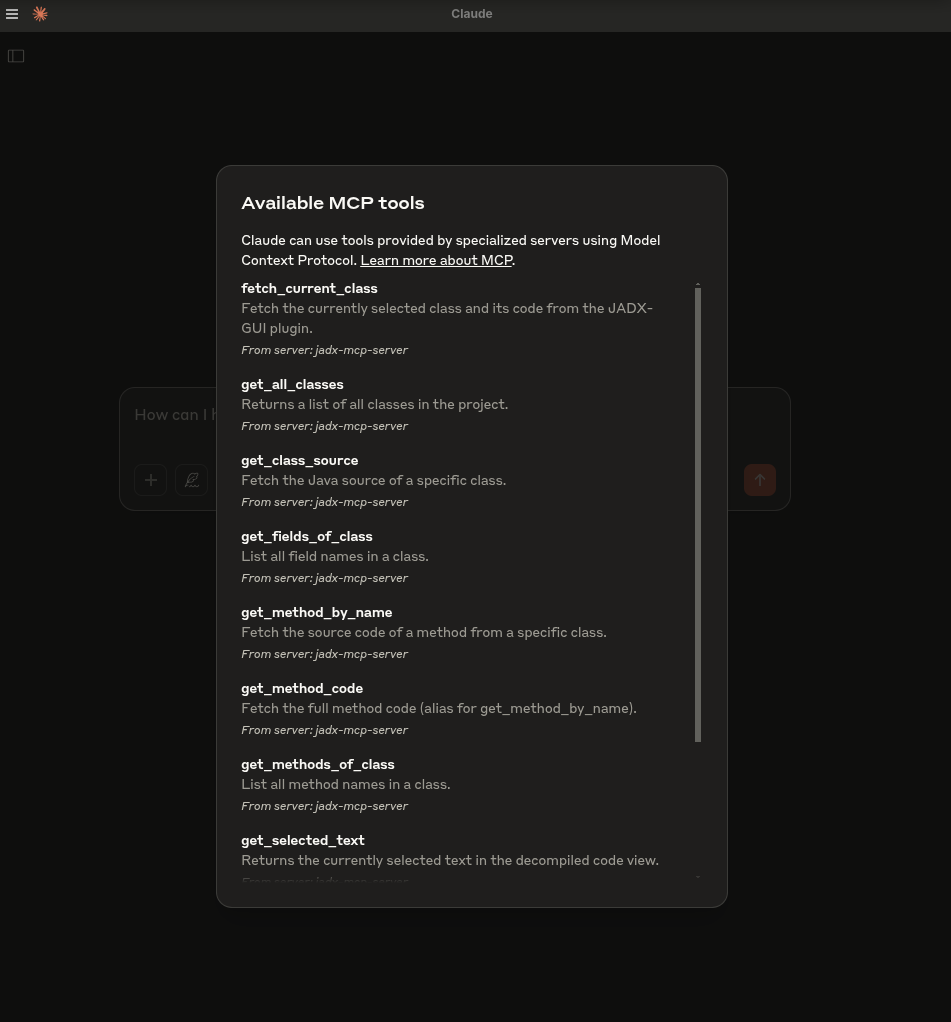
- `fetch_current_class()` — Get the class name and full source of selected class
- `get_selected_text()` — Get currently selected text
- `get_all_classes()` — List all classes in the project
- `get_class_source()` — Get full source of a given class
- `get_method_by_name()` — Fetch a method's source
- `search_method_by_name()` — Search method across classes
- `search_classes_by_keyword()` — Search for classes whose source code contains a specific keyword (supports pagination)
- `get_methods_of_class()` — List methods in a class
- `get_fields_of_class()` — List fields in a class
- `get_smali_of_class()` — Fetch smali of class
- `get_main_activity_class()` — Fetch main activity from jadx mentioned in AndroidManifest.xml file.
- `get_main_application_classes_code()` — Fetch all the main application classes' code based on the package name defined in the AndroidManifest.xml.
- `get_main_application_classes_names()` — Fetch all the main application classes' names based on the package name defined in the AndroidManifest.xml.
- `get_android_manifest()` — Retrieve and return the AndroidManifest.xml content.
- `get_manifest_component` - Retrieve specific manifest component instead of whole manifest file
- `get_strings()` : Fetches the strings.xml file
- `get_all_resource_file_names()` : Retrieve all resource files names that exists in application
- `get_resource_file()` : Retrieve resource file content
- `rename_class()` : Renames the class name
- `rename_method()` : Renames the method
- `rename_field()` : Renames the field
- `rename_package()` : Renames whole package
- `rename_variable()` : Renames the variable within a method
- `debug_get_stack_frames()` : Get the stack frames from jadx debugger
- `debug_get_threads()` : Get the insights of threads from jadx debugger
- `debug_get_variables()` : Get the variables from jadx debugger
- `xrefs_to_class()` : Find all references to a class (returns method-level and class-level references, supports pagination)
- `xrefs_to_method()` : Find all references to a method (includes override-related methods, supports pagination)
- `xrefs_to_field()` : Find all references to a field (returns methods that access the field, supports pagination)
🗒️ Sample Prompts
🔍 Basic Code Understanding
"Explain what this class does in one paragraph."
"Summarize the responsibilities of this method."
"Is there any obfuscation in this class?"
"List all Android permissions this class might require."
🛡️ Vulnerability Detection
"Are there any insecure API usages in this method?"
"Check this class for hardcoded secrets or credentials."
"Does this method sanitize user input before using it?"
"What security vulnerabilities might be introduced by this code?"
🛠️ Reverse Engineering Helpers
"Deobfuscate and rename the classes and methods to something readable."
"Can you infer the original purpose of this smali method?"
"What libraries or SDKs does this class appear to be part of?"
"Tell me which classes contains code related to 'encryption'?"
📦 Static Analysis
"List all network-related API calls in this class."
"Identify file I/O operations and their potential risks."
"Does this method leak device info or PII?"
🤖 AI Code Modification
"Refactor this method to improve readability."
"Add comments to this code explaining each step."
"Rewrite this Java method in Python for analysis."
📄 Documentation & Metadata
"Generate Javadoc-style comments for all methods."
"What package or app component does this class likely belong to?"
"Can you identify the Android component type (Activity, Service, etc.)?"
🐞 Debugger Assistant
"Fetch stack frames, varirables and threads from debugger and provide summary"

   "Based the stack frames from debugger, explain the execution flow of the application"

   "Based on the state of variables, is there security threat?"
🛠️ Getting Started
1. Download from Releases: https://github.com/zinja-coder/jadx-ai-mcp/releases
> [!NOTE]
>
> Download both `jadx-ai-mcp-.jar` and `jadx-mcp-server-.zip` files.
# 0. Download the jadx-ai-mcp-.jar and jadx-mcp-server-.zip
https://github.com/zinja-coder/jadx-ai-mcp/releases

# 1.
unzip jadx-ai-mcp-.zip

├jadx-mcp-server/
  ├── jadx_mcp.py
  ├── requirements.txt
  ├── README.md
  ├── LICENSE

├jadx-ai-mcp-.jar

# 2. Install the plugin

# For this you can follow two approaches:

## 1. One liner - execute below command in your shell
jadx plugins --install "github:zinja-coder:jadx-ai-mcp"

## The above one line code will install the latest version of the plugin directly into the jadx, no need to download the jadx-ai-mcp's .jar file.
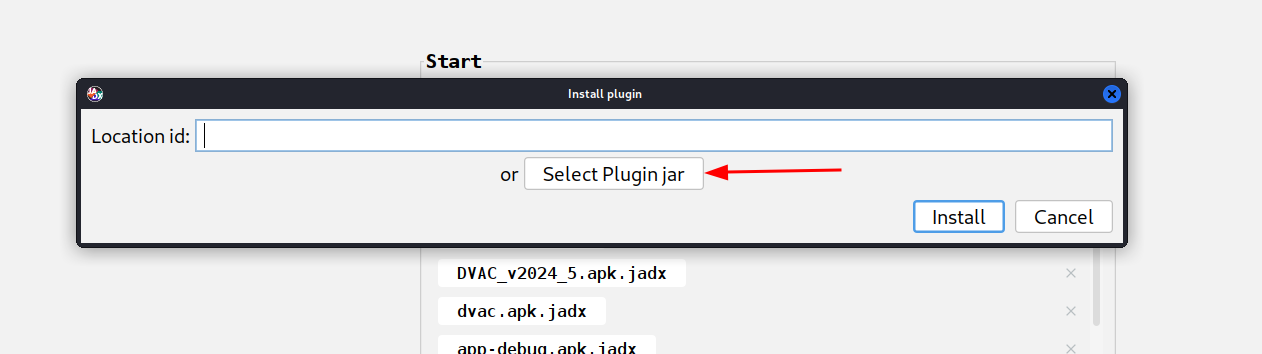
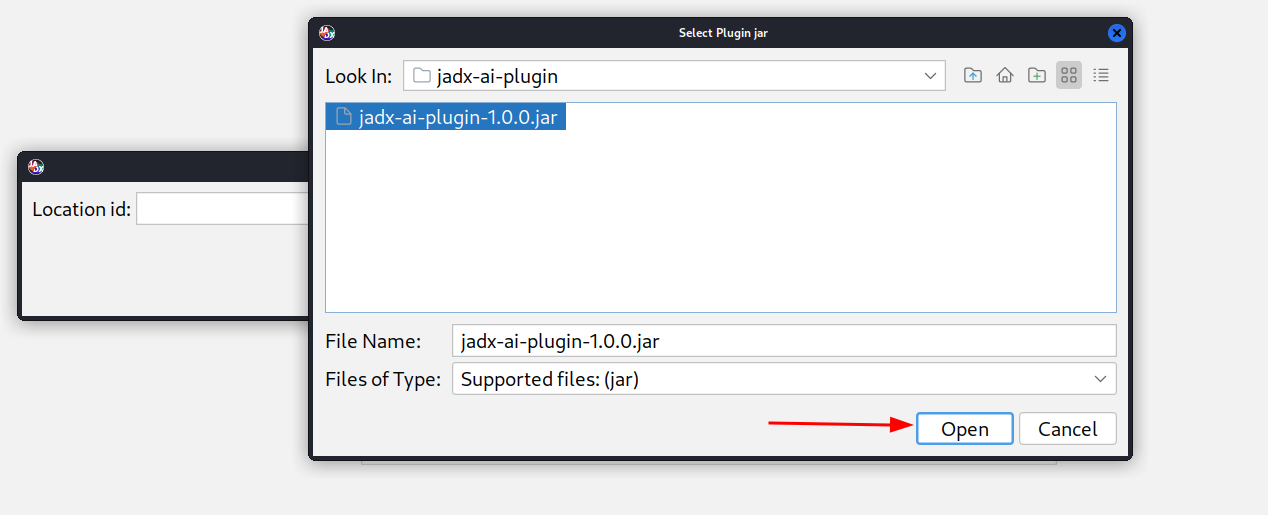
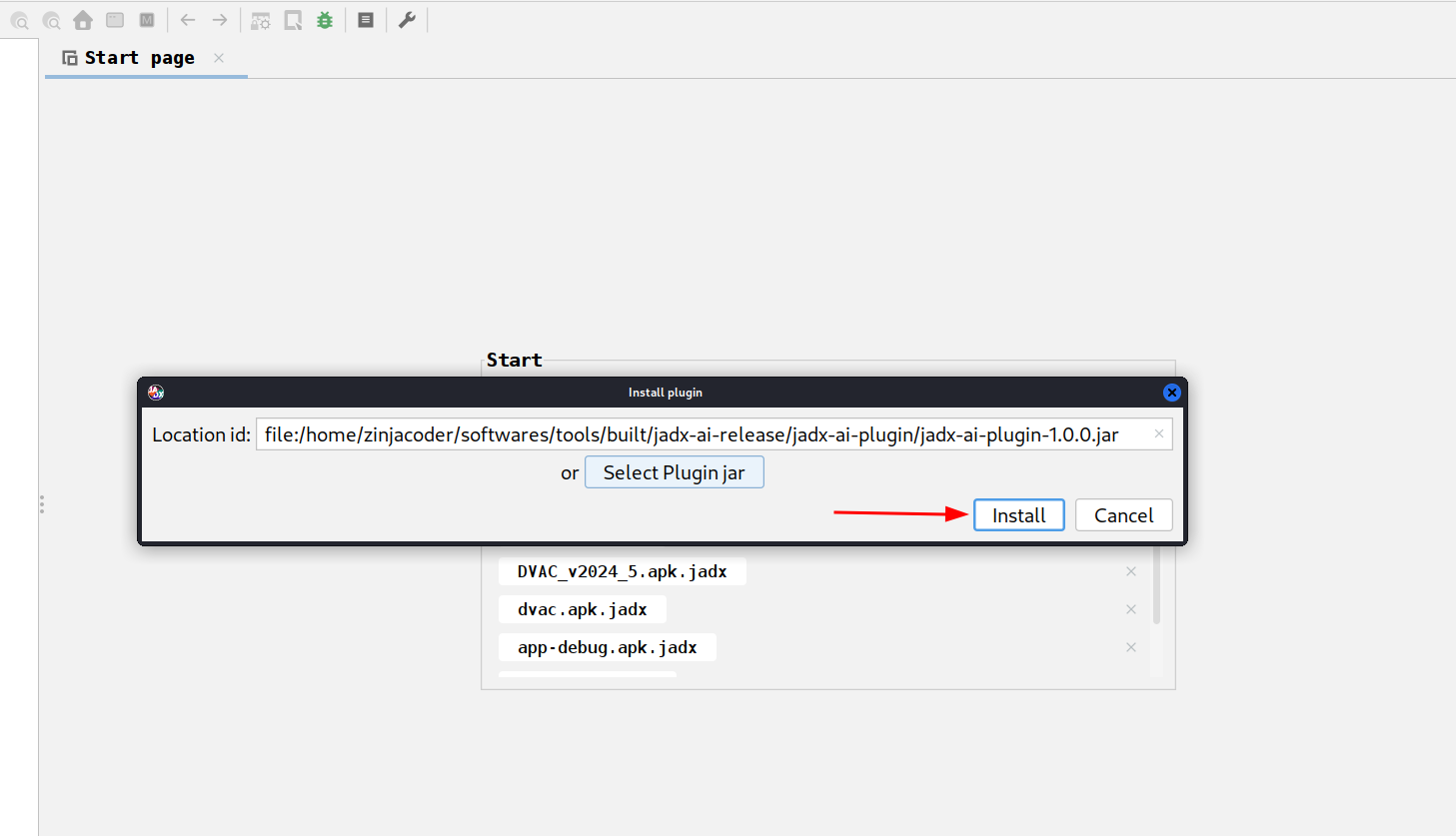
## 2. Or you can use JADX-GUI to install it by following images as shown below:## 3. GUI method, download the .jar file and follow below steps shown in images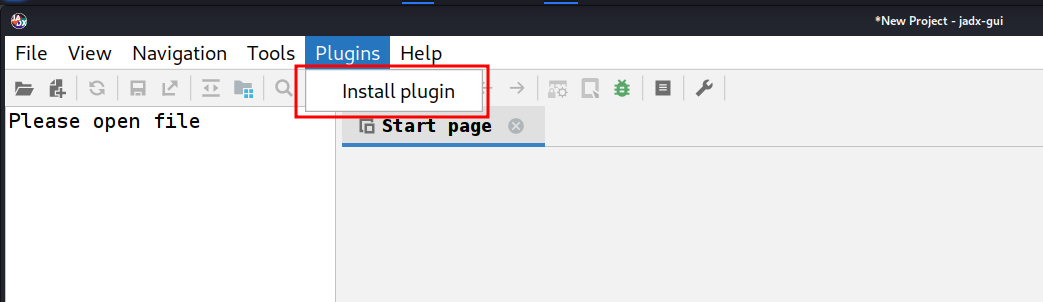
# 3. Navigate to jadx-mcp-server directory
cd jadx-mcp-server

# 4. This project uses uv - https://github.com/astral-sh/uv instead of pip for dependency management.
    ## a. Install uv (if you dont have it yet)
curl -LsSf https://astral.sh/uv/install.sh | sh
    ## b. OPTIONAL, if for any reasons, you get dependecy errors in jadx-mcp-server, Set up the environment
uv venv
source .venv/bin/activate  # or .venv\Scripts\activate on Windows
    ## c. OPTIONAL Install dependencies
uv pip install httpx fastmcp

# The setup for jadx-ai-mcp and jadx_mcp_server is done.
🤖 2. Use Claude Desktop
Make sure Claude Desktop is running with MCP enabled.
For instance, I have used following for Kali Linux: https://github.com/aaddrick/claude-desktop-debian
Configure and add MCP server to LLM file:
nano ~/.config/Claude/claude_desktop_config.jsonFor:
And following content in it:
{
    "mcpServers": {
        "jadx-mcp-server": {
            "command": "///uv",
            "args": [
                "--directory",
                "jadx-mcp-server/",
                "run",
                "jadx_mcp_server.py"
            ]
        }
    }
}
Replace:
- `path/to/uv` with the actual path to your `uv` executable
- `path/to/jadx-mcp-server` with the absolute path to where you cloned this
repository
Then, navigate code and interact via real-time code review prompts using the built-in integration.
OR
or you can install the jadx_mcp_server directly as executable directly using below command:
uv tool install git+https://github.com/zinja-coder/jadx-mcp-serverand then you can just provide `jadx_mcp_server` in `command` section of mcp configuration.
3. Use Cherry Studio
If you want to configure the MCP tool in Cherry Studio, you can refer to the following configuration.
- Type: stdio
- command: uv
- argument:
--directory
path/to/jadx-mcp-server
run
jadx_mcp_server.py- `path/to/jadx-mcp-server` with the absolute path to where you cloned this
repository
4. Using LMStudio
You can also use JADX AI MCP Server with LM Studio by configuring it's mcp.json file. Here's the video guide.
https://github.com/user-attachments/assets/b4a6b280-5aa9-4e76-ac72-a0abec73b809
5. Running in HTTP Stream Mode
You can also use Jadx in HTTP Stream Mode using `--http` option with `jadx_mcp_server.py` as shown in following:
uv run jadx_mcp_server.py --http

OR

uv run jadx_mcp_server.py --http --port 9999
Advanced CLI Options — Understanding the Flags
There are two separate connections and each has its own host/port:
┌─────────────┐    --host / --port     ┌──────────────────┐   --jadx-host / --jadx-port   ┌──────────────────┐
│  LLM Client │ ◄──────────────────►   │  jadx-mcp-server │ ──────────────────────────►   │  JADX-GUI Plugin │
│  (Claude,   │   Where the MCP server │                  │   Where the MCP server looks  │  (jadx-ai-mcp)   │
│   Codex..)  │   LISTENS for clients  │                  │   for the JADX plugin         │                  │
└─────────────┘ └──────────────────┘ └──────────────────┘| Flag | Default | Controls |
|---|---|---|
| `--http` | off | Use HTTP transport instead of stdio |
| `--host` | `127.0.0.1` | Where the MCP server listens (bind address for LLM clients) |
| `--port` | `8651` | Which port the MCP server listens on |
| `--jadx-host` | `127.0.0.1` | Where to find the JADX plugin (the target JADX-GUI machine) |
| `--jadx-port` | `8650` | Which port the JADX plugin is on |
Usage Examples
Scenario 1 — Everything on the same machine (most common):
# Default: MCP server on localhost:8651, connects to JADX plugin on localhost:8650
uv run jadx_mcp_server.py --http
Scenario 2 — Docker container or WSL (MCP server accessible from host network):
# MCP server listens on ALL interfaces so the host can reach it
# JADX plugin is still on the same machine
uv run jadx_mcp_server.py --http --host 0.0.0.0
Scenario 3 — JADX-GUI running on a different machine (e.g., remote VM):
# MCP server runs locally, but connects to JADX plugin on a remote machine
uv run jadx_mcp_server.py --http --jadx-host 192.168.1.100
Scenario 4 — Full remote setup (everything on different machines):
# MCP server listens on all interfaces on port 9999
# JADX plugin is on a different machine at 192.168.1.100:8652
uv run jadx_mcp_server.py --http --host 0.0.0.0 --port 9999 --jadx-host 192.168.1.100 --jadx-port 8652
> [!CAUTION]
> ### ⚠️ Security Warning — Remote Binding
>
> When using `--host 0.0.0.0` (or any non-localhost address), the MCP server binds to all network interfaces over plain HTTP with no authentication. This means:
>
> - Anyone on the network can connect and invoke all MCP tools
> - There is no TLS encryption — traffic can be intercepted
> - An attacker can use the server to read decompiled code, rename classes/methods, and access debug info
>
> Mitigations:
> - Only bind to `0.0.0.0` on trusted, isolated networks (e.g., Docker bridge, local VM)
> - Use a firewall to restrict access to the MCP port
> - Consider an SSH tunnel instead: `ssh -L 8651:127.0.0.1:8651 remote-host`
Stdio Mode Compatibility
> [!NOTE]
> When running in stdio mode (the default, without `--http`), all human-readable output (banner, health check) is written to stderr to keep stdout reserved for the MCP JSON-RPC stream. This ensures compatibility with Codex, Claude Desktop, and other stdio-based MCP clients.
6. Custom port and host configuration for JADX AI MCP Plugin
1. Configure Port: Configure the port on which the JADX AI MCP Plugin will listen on.
2. Default Port: Revert back the changes and listen on default port.
3. Restart Server: Force restart the JADX AI MCP Plugin server.
4. Server Status: Check the status of JADX AI MCP Plugin server.
To connect with JADX AI MCP Plugin running on custom port, the `--jadx-port` option will be used as shown in following:
uv run jadx_mcp_server.py --jadx-port 8652If the JADX AI MCP Plugin is running on a different machine (e.g., JADX on a remote VM, MCP server on your local host), use the `--jadx-host` option:
# Connect to JADX plugin on a remote host
uv run jadx_mcp_server.py --jadx-host 192.168.1.100 --jadx-port 8650
CLI Reference — Understanding the Flags
There are two separate connections and each has its own host/port:
┌─────────────┐    --host / --port     ┌──────────────────┐   --jadx-host / --jadx-port   ┌──────────────────┐
│  LLM Client │ ◄──────────────────►   │  jadx-mcp-server │ ──────────────────────────►   │  JADX-GUI Plugin │
│  (Claude,   │   Where the MCP server │                  │   Where the MCP server looks  │  (jadx-ai-mcp)   │
│   Codex..)  │   LISTENS for clients  │                  │   for the JADX plugin         │                  │
└─────────────┘ └──────────────────┘ └──────────────────┘| Flag | Default | Controls |
|---|---|---|
| `--http` | off | Use HTTP transport instead of stdio |
| `--host` | `127.0.0.1` | Where the MCP server listens (bind address for LLM clients) |
| `--port` | `8651` | Which port the MCP server listens on |
| `--jadx-host` | `127.0.0.1` | Where to find the JADX plugin (the target JADX-GUI machine) |
| `--jadx-port` | `8650` | Which port the JADX plugin is on |
Usage Examples
Scenario 1 — Everything on the same machine (most common):
# Default: MCP server on localhost:8651, connects to JADX plugin on localhost:8650
uv run jadx_mcp_server.py --http
Scenario 2 — Docker container or WSL (MCP server accessible from host network):
# MCP server listens on ALL interfaces so the host can reach it
# JADX plugin is still on the same machine
uv run jadx_mcp_server.py --http --host 0.0.0.0
Scenario 3 — JADX-GUI running on a different machine (e.g., remote VM):
# MCP server runs locally, but connects to JADX plugin on a remote machine
uv run jadx_mcp_server.py --http --jadx-host 192.168.1.100
Scenario 4 — Full remote setup (everything on different machines):
# MCP server listens on all interfaces on port 9999
# JADX plugin is on a different machine at 192.168.1.100:8652
uv run jadx_mcp_server.py --http --host 0.0.0.0 --port 9999 --jadx-host 192.168.1.100 --jadx-port 8652
The MCP Configuration for custom jadx port will be as follows for claude:
{
  "mcpServers": {
    "jadx-mcp-server": {
      "command": "/path/to/uv",
      "args": [
        "--directory",
        "/path/to/jadx-mcp-server/",
        "run",
        "jadx_mcp_server.py",
        "--jadx-port",
        "8652"
      ]
    }
  }
}
Give it a shot
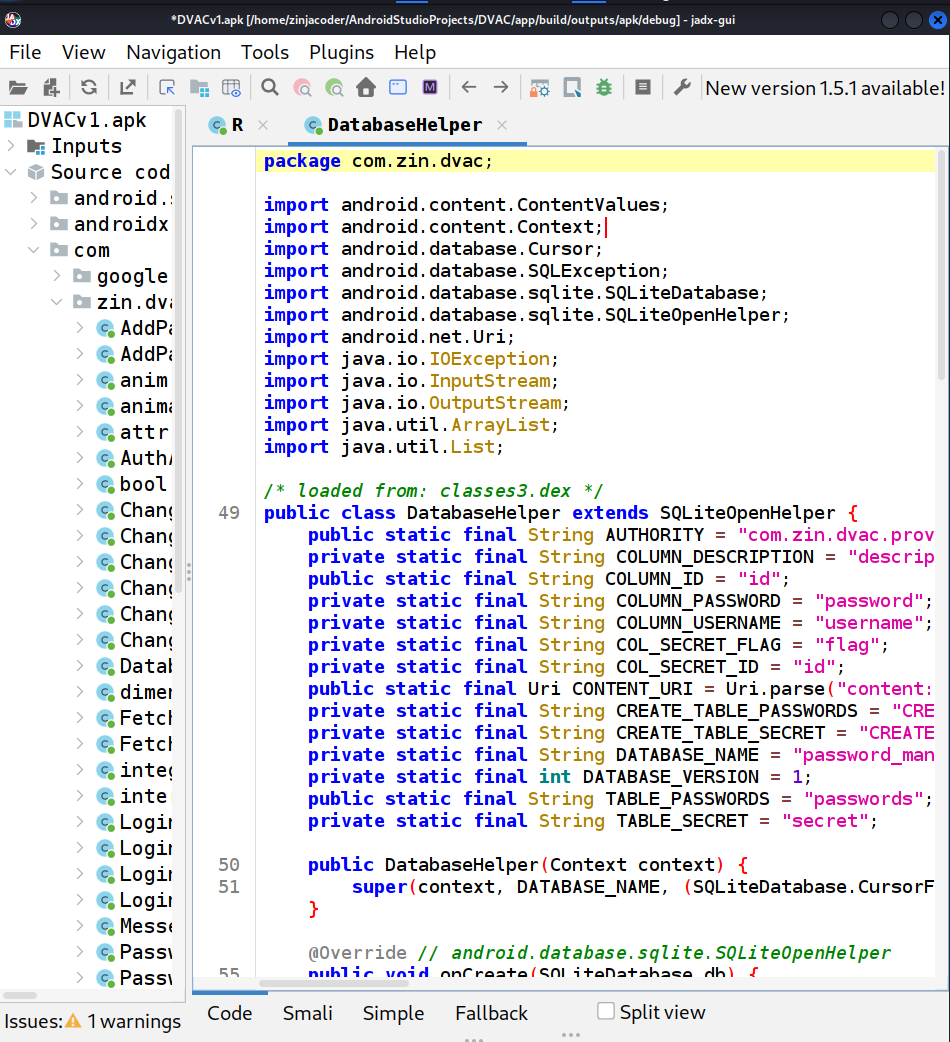
1. Run jadx-gui and load any .apk file
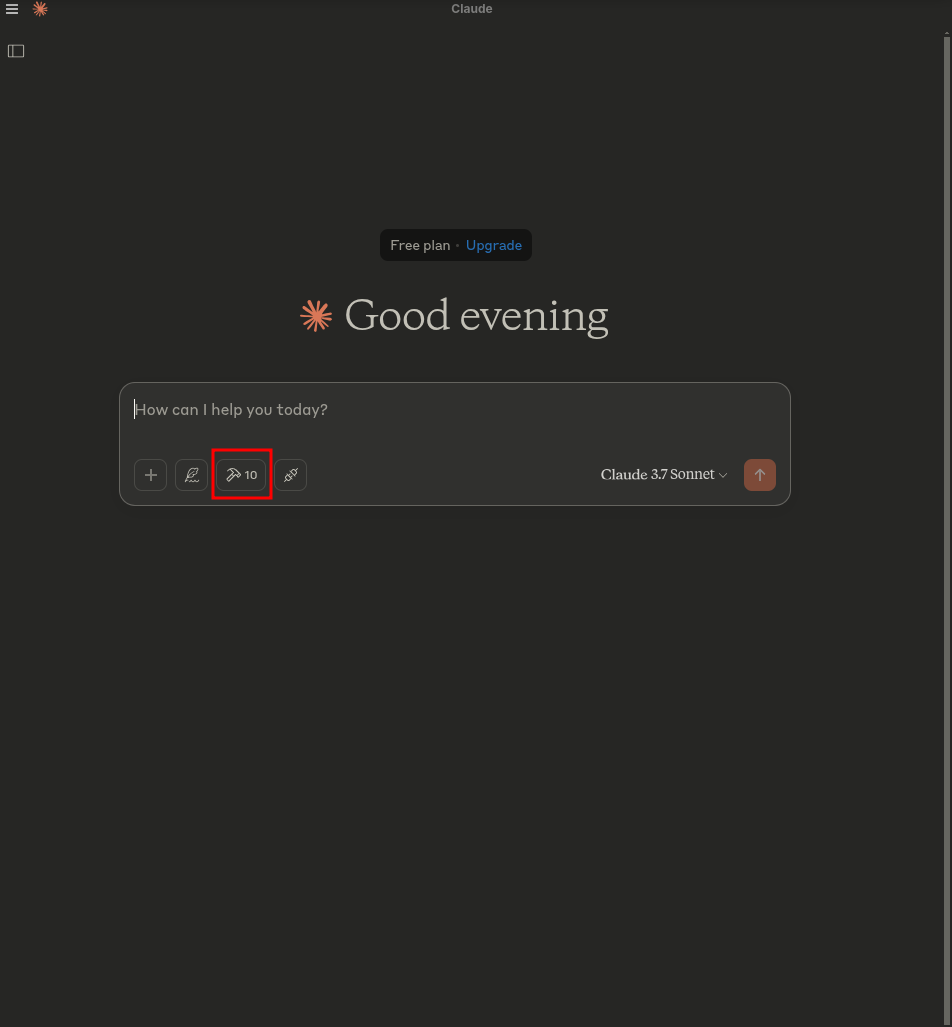
2. Start claude - You must see hammer symbol
3. Click on the `hammer` symbol and you should you see somthing like following:
4. Run following prompt:
fetch currently selected class and perform quick sast on it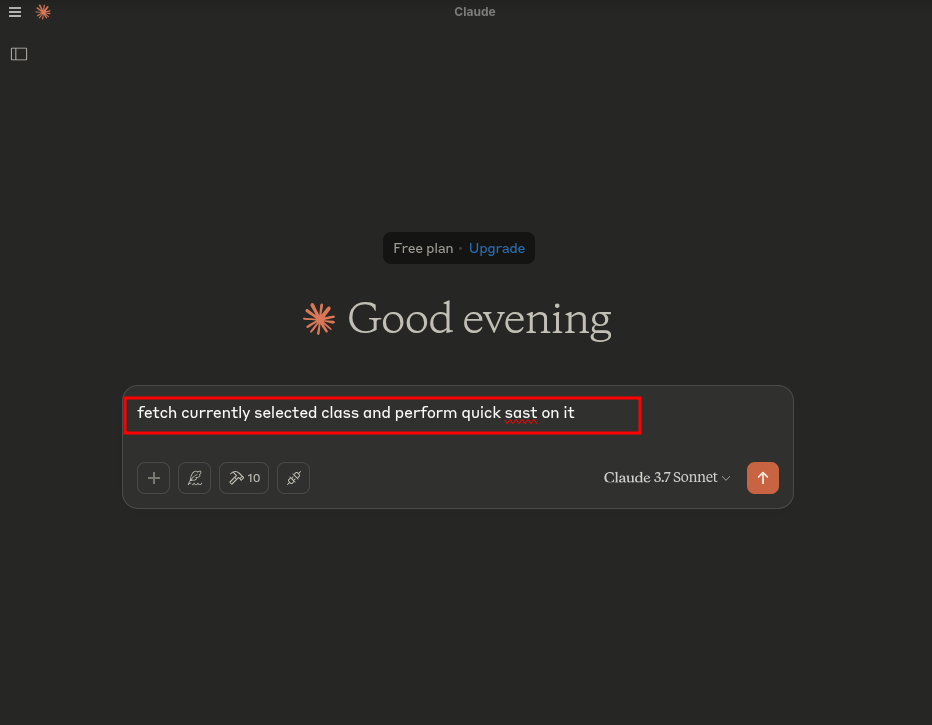
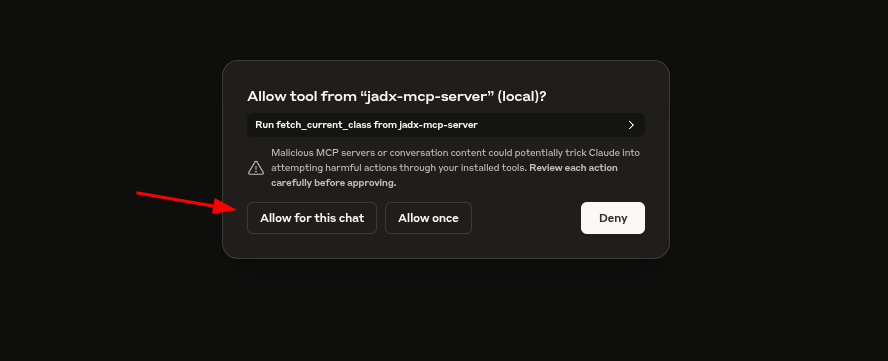
5. Allow access when prompted:
6. HACK!
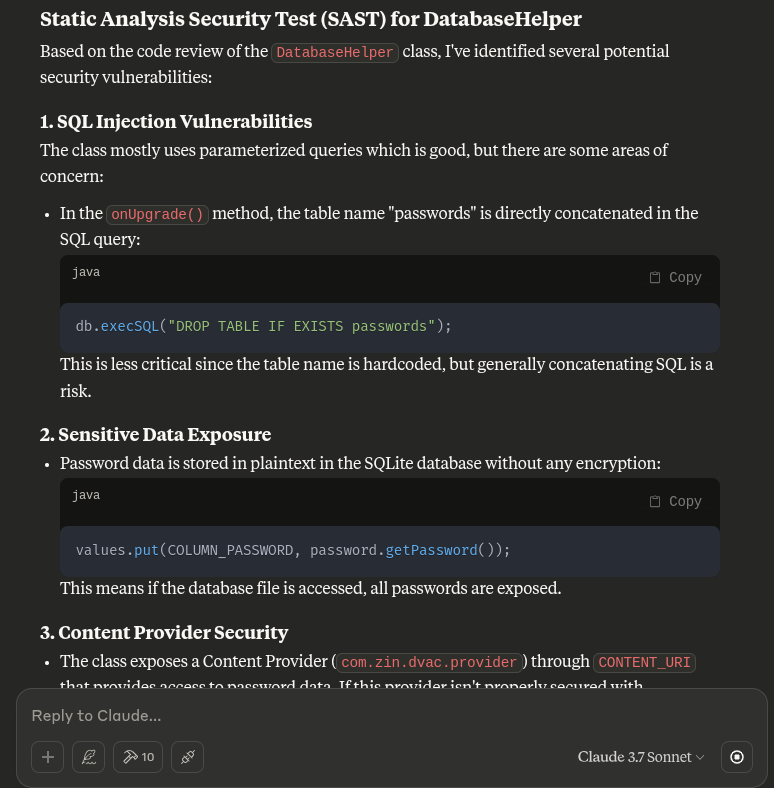
This plugin allows total control over the GUI and internal project model to support deeper LLM integration, including:
- Exporting selected class to MCP
- Running automated Claude analysis
- Receiving back suggestions inline
Troubleshooting
NOTE For Contributors
To report bugs, issues, feature suggestion, Performance issue, general question, Documentation issue.
🙏 Credits
This project is a plugin for JADX, an amazing open-source Android decompiler created and maintained by @skylot. All core decompilation logic belongs to them. I have only extended it to support my MCP server with AI capabilities.
The original README.md from jadx is included here in this repository for reference and credit.
This MCP server is made possible by the extensibility of JADX-GUI and the amazing Android reverse engineering community.
Also huge thanks to @aaddrick for developing Claude desktop for Debian based linux.
And in last thanks to @anthropics for developing the Model Context Protocol and @FastMCP team
Apart from this, huge thanks to all open source projects which serve as a dependencies for this project and which made this possible.
Dependencies
This project uses following awesome libraries.
- Plugin - Java
- Javalin - https://javalin.io/ - Apache 2.0 License
- SLF4J - https://slf4j.org/ - MIT License
- org.w3c.dom - https://mvnrepository.com/artifact/org.w3c.dom - W3C Software and Document License
- MCP Server - Python
- FastMCP - https://github.com/jlowin/fastmcp - Apache 2.0 License
- httpx - https://www.python-httpx.org - BSD-3-Clause (“BSD licensed”)
📄 License
JADX-AI-MCP and all related projects inherits the Apache 2.0 License from the original JADX repository.
⚖️ Legal Warning
Disclaimer
The tools `jadx-ai-mcp` and `jadx_mcp_server` are intended strictly for educational, research, and ethical security assessment purposes. They are provided "as-is" without any warranties, expressed or implied. Users are solely responsible for ensuring that their use of these tools complies with all applicable laws, regulations, and ethical guidelines.
By using `jadx-ai-mcp` or `jadx_mcp_server`, you agree to use them only in environments you are authorized to test, such as applications you own or have explicit permission to analyze. Any misuse of these tools for unauthorized reverse engineering, infringement of intellectual property rights, or malicious activity is strictly prohibited.
The developers of `jadx-ai-mcp` and `jadx_mcp_server` shall not be held liable for any damage, data loss, legal consequences, or other consequences resulting from the use or misuse of these tools. Users assume full responsibility for their actions and any impact caused by their usage.
Use responsibly. Respect intellectual property. Follow ethical hacking practices.
🙌 Contribute or Support
- Found it useful? Give it a ⭐️
- Got ideas? Open an issue or submit a PR
- Built something on top? DM me or mention me — I’ll add it to the README!
- Do you like my work and keep it going? Sponsor this project.
Built with ❤️ for the reverse engineering and AI communities.
Frequently asked questions
What is jadx-ai-mcp?
jadx-ai-mcp is Plugin for JADX to integrate MCP server Java-based implementation. Trusted by 600+ developers. Trusted by 600+ developers.
How do I install jadx-ai-mcp?
Open the GitHub repository and follow its README. Most MCP servers are added to your client's MCP config, then called by your agent.
Is jadx-ai-mcp open source?
Yes — it is hosted on GitHub at https://github.com/zinja-coder/jadx-ai-mcp and has 613 stars.
Related MCP tools
 wren-engine
🤖 The Semantic Engine for Model Context Protocol(MCP) Clients and AI Agents 🔥 Java-based implementation.
 mcp-bridge
A middleware to provide an openAI compatible endpoint that can call MCP tools Python-based implementation. Trusted by 800+ developers.
 mcp-client-for-ollama
A text-based user interface (TUI) client for interacting with MCP servers using Ollama. Features include multi-server, dynamic model switching, streaming res...
 fastapi_mcp
Expose your FastAPI endpoints as Model Context Protocol (MCP) tools, with Auth! Python-based implementation. Trusted by 11000+ developers.
 mcphub.nvim
An MCP client for Neovim that seamlessly integrates MCP servers into your editing workflow with an intuitive interface for managing, testing, and using MCP s...
 mcp-unity
Model Context Protocol (MCP) plugin to connect with Unity Editor — designed for OpenAI, Gemini, Claude, Deepseek and Grok interoperability
Run your own MCP server? See who uses it and what to fix.
Measure it with TrackMCP