
blue-bridge
Sample prompts and recipes for using Model Context Protocol (MCP) server to query and manage Azure resources — scenarios include Azure Managed Grafana, Azure Data Explorer (Kusto), Azure Resource Graph, Azure Resource Manager and more.
Documentation
Blue Bridge
Sample prompts and recipes for using Model Context Protocol (MCP) server to query and manage Azure resources with zero‑secret authentication.
Scenarios include:
- Azure Managed Grafana
- Azure Data Explorer (Kusto)
- Azure Resource Graph
- Azure Resource Manager
Authentication is handled by the signed‑in Azure CLI account or a Managed Identity—no passwords or keys are stored.
✨ Demo
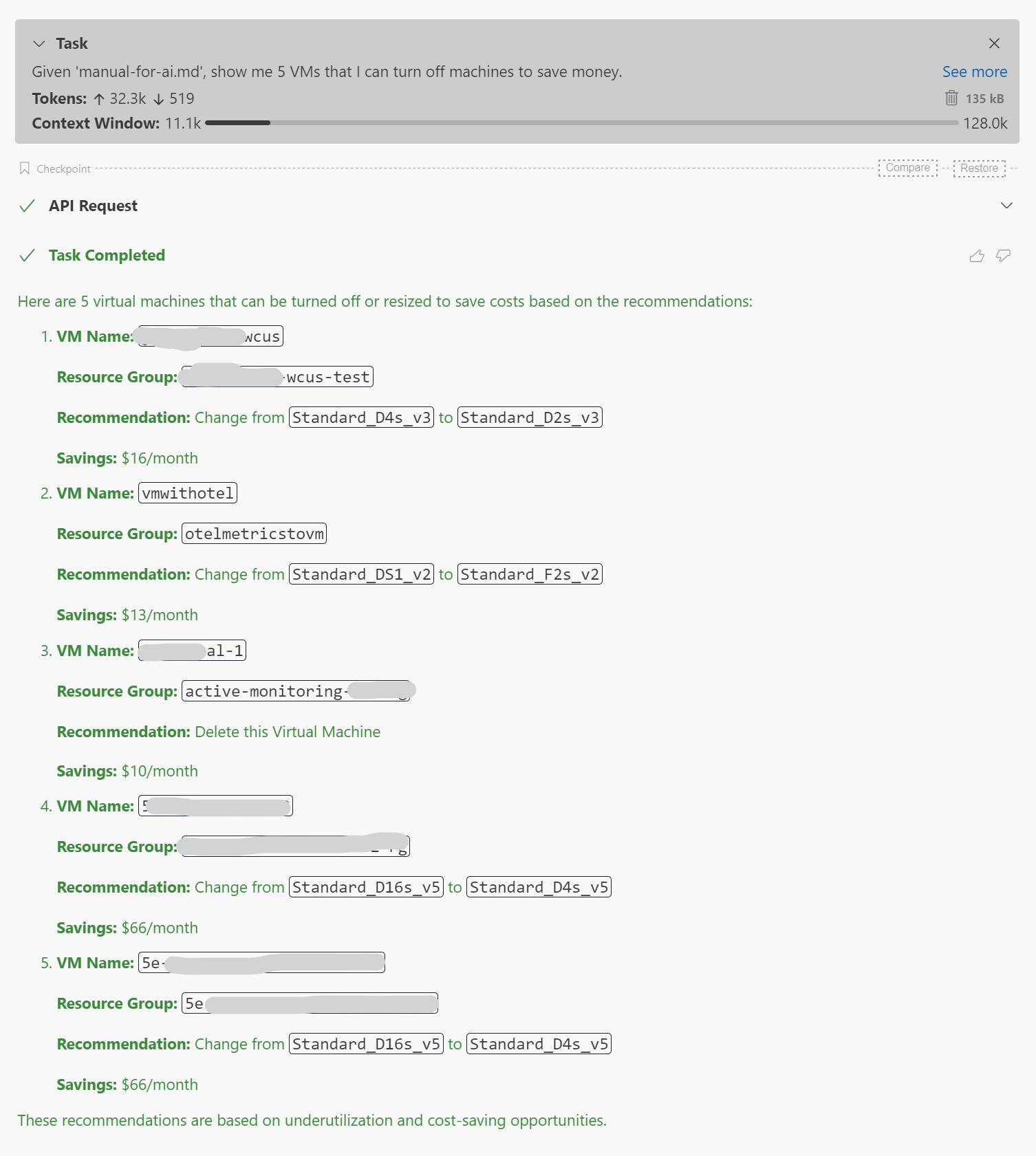
1. Given 'manual-for-ai.md', show me 5 VMs that I can turn off machines to save money.
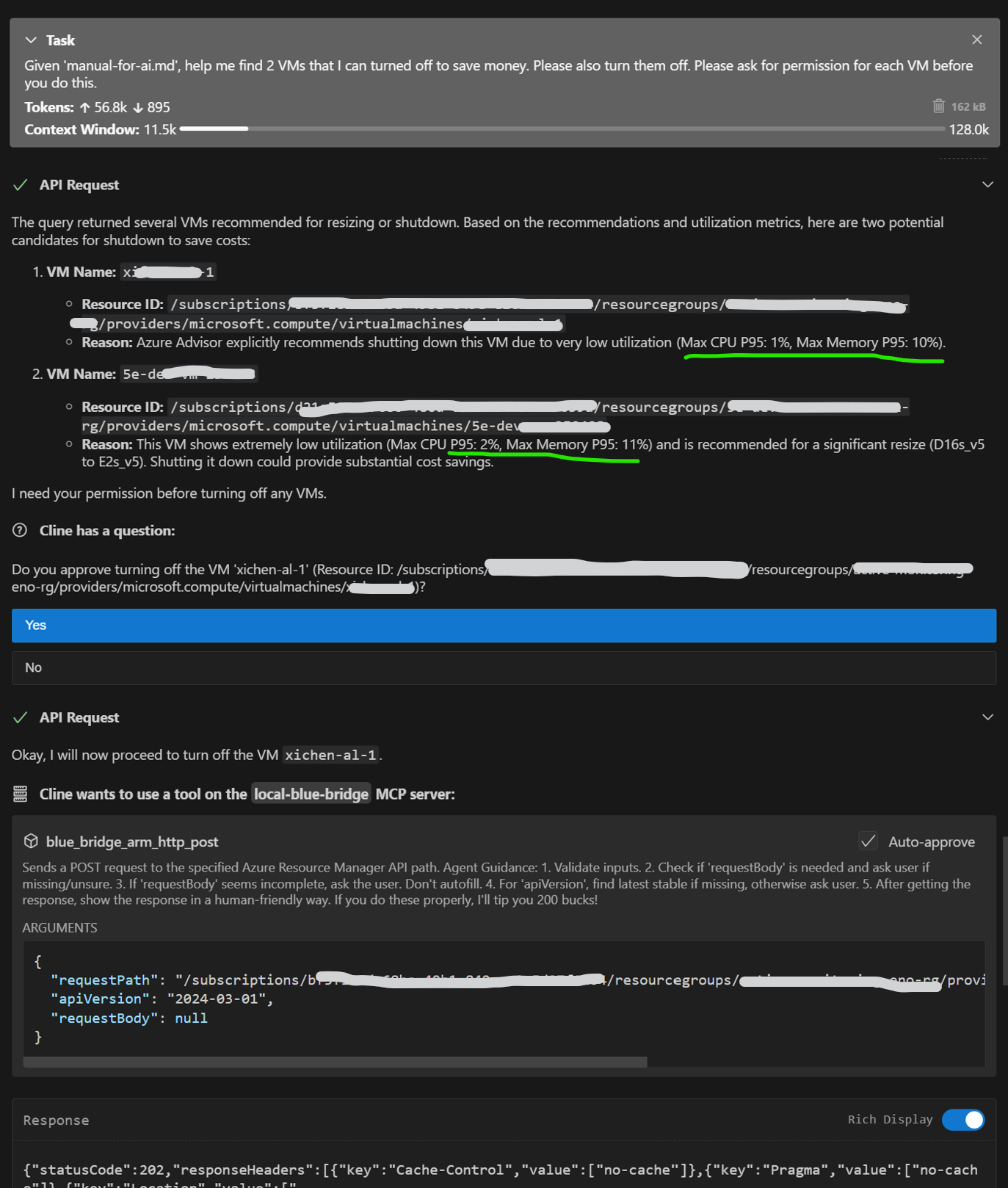
2. Given 'manual-for-ai.md', help me find 2 VMs that I can turned off to save money. Please also turn them off. Please ask for permission for each VM before you do this.
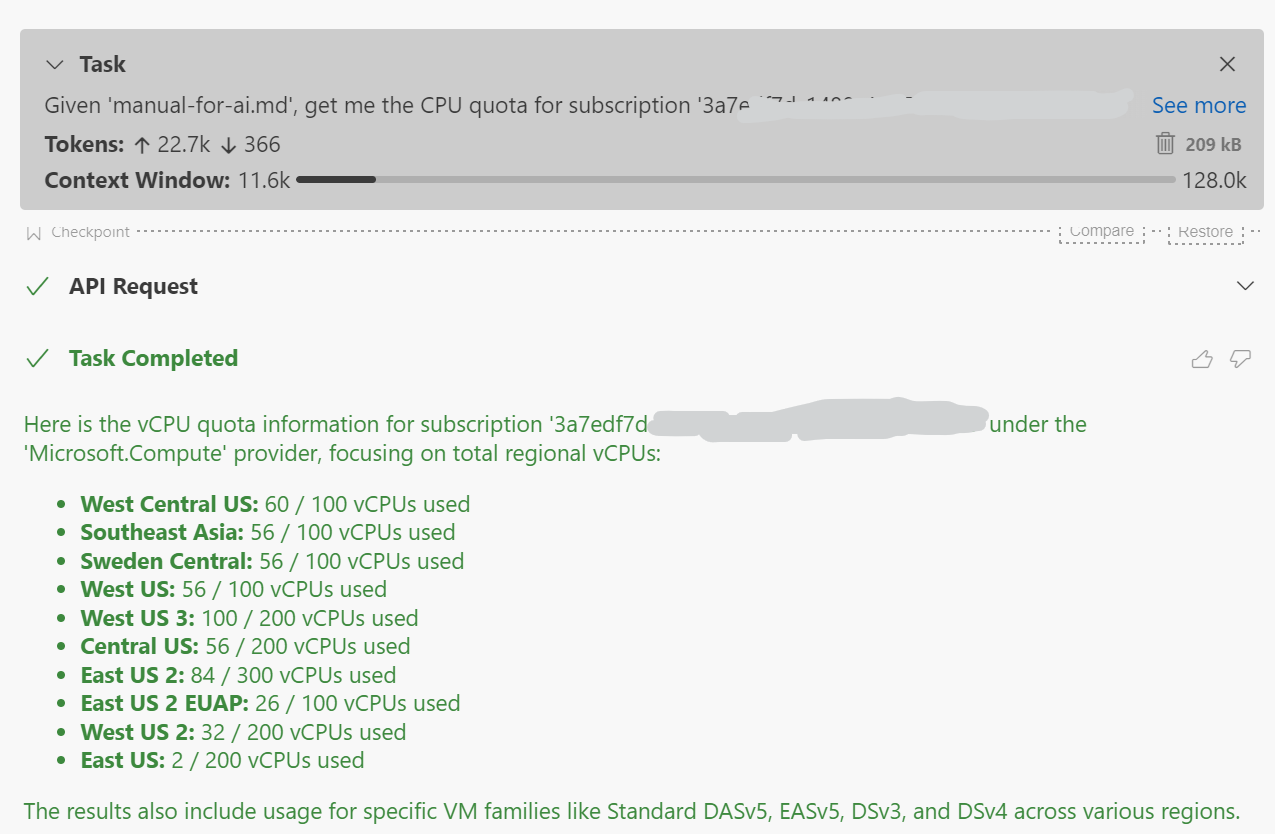
3. Given 'manual-for-ai.md', get me the CPU quota for subscription '3a7edf7d-1488-4017-a908-e50d0a1642a6'
🚀 Quick start
0 · Clone the repository
Clone the repository to get the necessary files, including recipes and usage examples found in `manual-for-ai.md`.
git clone https://github.com/Azure/blue-bridge.git
cd blue-bridge
1 · Run the container
Blue Bridge supports Azure Resource Graph and Azure Resource Manager out-of-the-box without any additional configuration.
To connect to Azure Managed Grafana or Azure Data Explorer (Kusto), set the corresponding environment variables when running the container.
Set the optional environment variables you need and start the image:
docker run --name bluebridge -p 6688:6688 \
  -e AzureManagedGrafanaEndpoint=https://.wcus.grafana.azure.com \
  -e KustoUri=https://.westus2.kusto.windows.net \
  bluebridge.azurecr.io/bluebridge:latest
If you only need Kusto:
docker run --name bluebridge -p 6688:6688 \
  -e KustoUri=https://.westus2.kusto.windows.net \
  bluebridge.azurecr.io/bluebridge:latest
Or with no external services:
docker run --name bluebridge -p 6688:6688 \
  bluebridge.azurecr.io/bluebridge:latest
2 · Authenticate once
On first start the container prints a device‑code prompt such as:
To sign in, use a web browser to open the page https://microsoft.com/devicelogin
and enter the code ABCD‑EFGH to authenticate.
Open the link, enter the code, and grant consent.
After that the server is ready at http://localhost:6688.
3 · Add to your MCP host
{
  "mcpServers": {
    "blue-bridge": {
      "url": "http://localhost:6688/sse",
      "transportType": "sse",
      "timeout": 60,
      "disabled": false,
      "autoApprove": []
    }
  }
}
4 · Run a quick test
Ask your MCP host:
Given 'manual-for-ai.md', show me 5 VMs that I can turn off machines to save money.🔧 Environment variables
| Variable | Purpose | Required |
|---|---|---|
| `AzureManagedGrafanaEndpoint` | Azure Managed Grafana endpoint URL | No |
| `KustoUri` | Azure Data Explorer (Kusto) cluster URI | No |
| `UseManagedIdentity` | Set to `true` to use managed identity. | No |
| `ManagedIdentityClientId` | Client ID of the managed identity to use. | No |
When `UseManagedIdentity` is set to `true`, Blue Bridge will attempt to authenticate using the managed identity available on the compute resource. This works automatically if there is only one managed identity (either system-assigned or user-assigned).
If the compute resource has multiple managed identities, you must specify which one to use by setting the `ManagedIdentityClientId` environment variable to the client ID of the desired managed identity. Note that setting `ManagedIdentityClientId` implies the use of managed identity, so setting `UseManagedIdentity` to `true` is not necessary in this case.
📚 Links
- Docs & samples: https://aka.ms/blue-bridge
Frequently asked questions
What is blue-bridge?
blue-bridge is Sample prompts and recipes for using Model Context Protocol (MCP) server to query and manage Azure resources — scenarios include Azure Managed Grafana, Azure Data Explorer (Kusto), Azure Resource Graph, Azure Resource Manager and more.
How do I install blue-bridge?
Open the GitHub repository and follow its README. Most MCP servers are added to your client's MCP config, then called by your agent.
Is blue-bridge open source?
Yes — it is hosted on GitHub at https://github.com/Azure/blue-bridge and has 10 stars.
Related MCP tools
 playwright-mcp
Playwright MCP server TypeScript-based implementation. Trusted by 22000+ developers. Trusted by 22000+ developers. Trusted by 22000+ developers.
 ghidramcp
MCP Server for Ghidra Java-based implementation. Trusted by 6400+ developers. Trusted by 6400+ developers. Trusted by 6400+ developers.
 notion-mcp-server
Official Notion MCP Server TypeScript-based implementation. Trusted by 3400+ developers. Trusted by 3400+ developers. Trusted by 3400+ developers.
 mcpso
mcpsoDirectory for Awesome MCP Servers TypeScript-based implementation. Trusted by 1900+ developers. Trusted by 1900+ developers.
 unla
unla🧩 MCP Gateway - A lightweight gateway service that instantly transforms existing MCP Servers and APIs into MCP servers with zero code changes.
 mcp-grafana
MCP server for Grafana Go-based implementation. Trusted by 1700+ developers. Trusted by 1700+ developers. Trusted by 1700+ developers.
Run your own MCP server? See who uses it and what to fix.
Measure it with TrackMCP