
hanabi
A local cli to start a conversation with LLM instantly, with MCP support.
Documentation
hanabi-cli
> ⟡ A terminal AI chat interface for any LLM model, with file context, MCP and deployment support.
- Local multi skilled agent with files, clipboard & MCP support
- Project folder scoped - different agent per project
- Host your agent web chat UI (Next.js) from command line in seconds and ready for deployment
- Create a multi-agent cluster with predefind strategies.
- Checkout Hanabi Config File for full list of features.
Command line interface
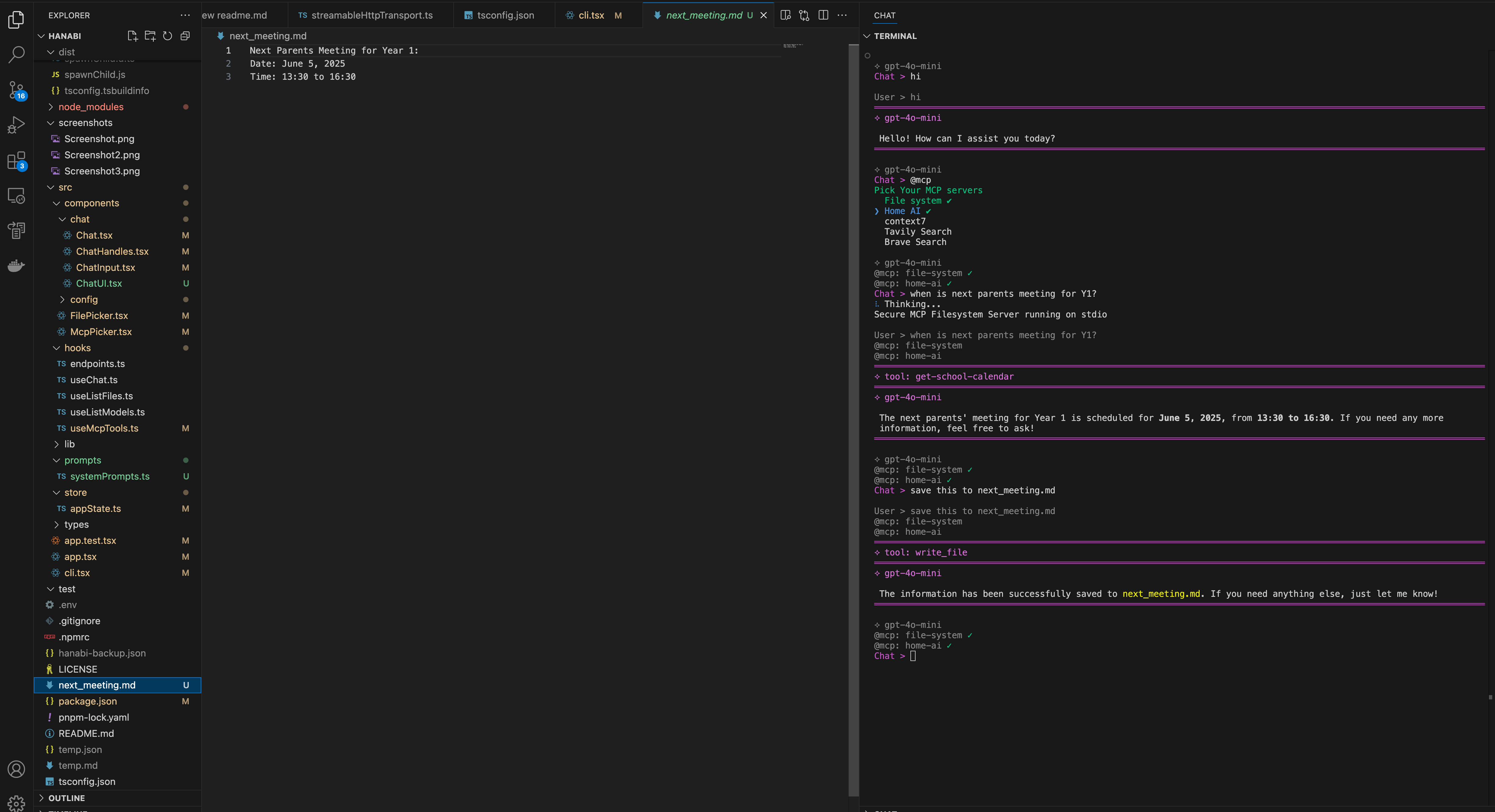
Web Chat UI
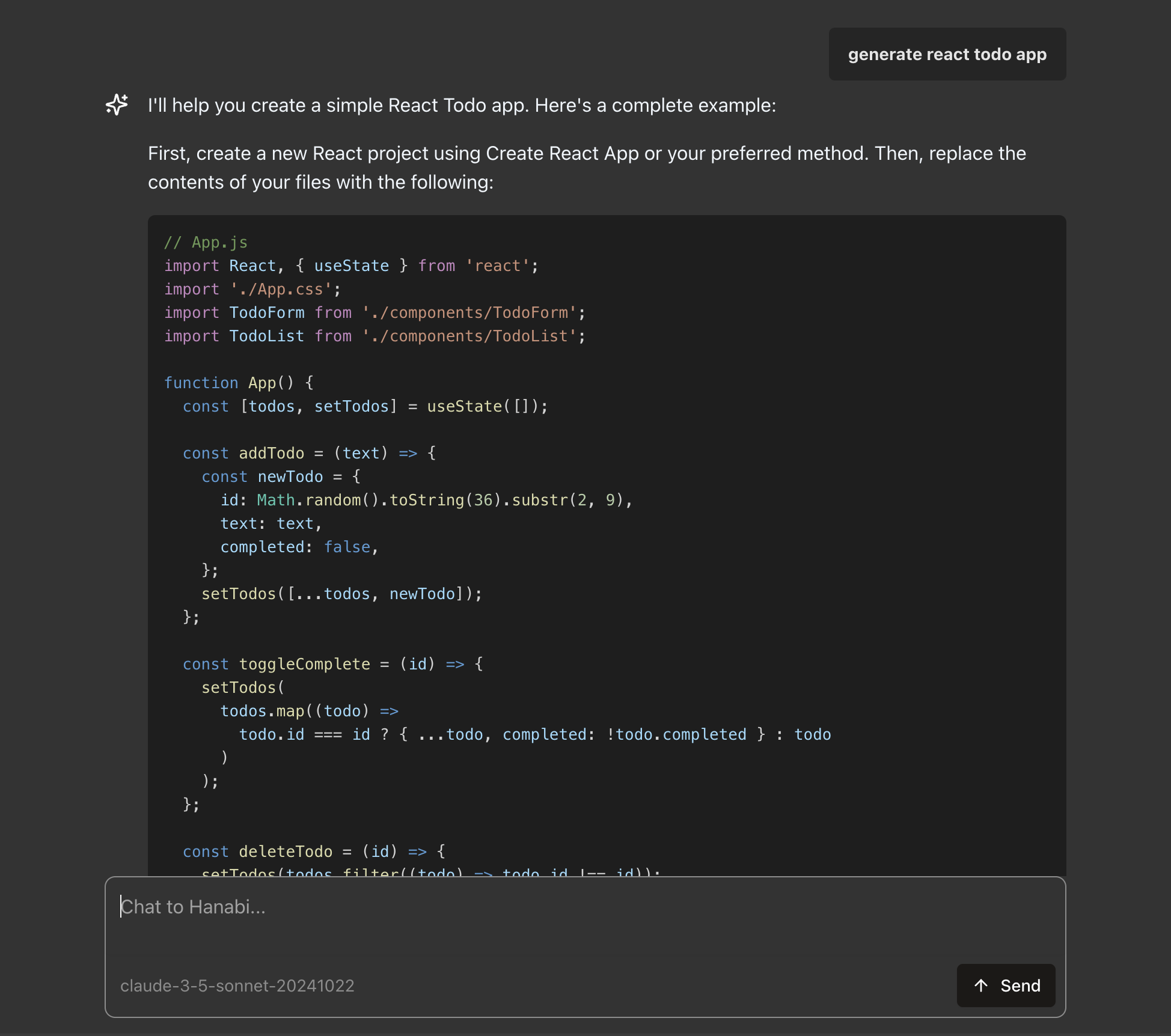
Table of Contents
- Install
- CLI
- Default Model
- MCP Servers
- Exclude files
- Local envs
- Custom System Prompt
- Local config file override
- Streaming Mode
- Answer Schema (Deterministic Output Format)
- Web Chat UI Server (with APIs)
- Advanced - Multi Agents System
- Advanced - Deploy Your Agent
- TODOs
Install
$ npm install -g hanabi-cliCLI
Get Help
$ hanabi --helpStart hanabi chat session
$ hanabiReset config file
$ hanabi resetAsk single question and print result. (Yes Hanabi auto injects today's date and timezone for you as context)
$ hanabi ask "how's the weather tomorrow?"
$ hanabi ask "generate a react todo app" > ./todo-app-instructions.md
Default Model
The default model is the active model to be used by `hanabi-cli`. This should be set up for you via CLi interface. Please note the default temperature is `0.5`. Some models like GPT-5 requires temperature to be set to `1`. Temperature config is added in `hanabi-cli` in version `1.4.6`.
You can also modify the model directly. In your `/.hanabi.json`, add or modify the `defaultModel` object:
{
	"llms": [
		{
      "id": "fdd1abc5-6791-4c29-b754-4f1174692c22",
      "provider": "OpenAI",
      "apiKey": "your-api-key",
      "apiVersion": "2025-01-01-preview"
    },
	],
	"defaultModel": {
		"provider": "openai",
		"model": "gpt-4",
		"temperature": 0.7
	}
}
MCP Servers
In your `/.hanabi.json`, add `mcpServers` config.
{
	"llms": [
		// ...
	],
	"defaultModel": {
		// ...
	},
	"mcpServers": {
		"home-ai": {
			"name": "Home AI",
			"transport": "stdio",
			"command": "node",
			"args": ["c:/folder/home-mcp.js"]
		},
		"context7": {
			"name": "context7",
			"transport": "stdio",
			"command": "npx",
			"args": ["-y", "@upstash/context7-mcp@latest"]
		},
		"browser-use": {
			"name": "Browser-use automation",
			"transport": "sse",
			"url": "http://172.17.0.1:3003/sse",
			"headers": {
				"authentication": "Bearer api-token"
			}
		},
		// npx stdio approach is flaky & slow. highly recommend
		// to npm install -g  and use the following.
		// see https://github.com/modelcontextprotocol/servers/issues/64
        // "file-system": {
        // 	"name": "file system",
        // 	"transport": "stdio",
        // 	"command": "path/to/your/node.exe",
        // 	"args": [
		// "path/to/global/node_modules/@modelcontextprotocol/server-filesystem/dist/index.js", "."]
        // },
		"tavily": {
			"name": "Tavily Search",
			"transport": "stdio",
			"command": "npx",
			"env": {
				"TAVILY_API_KEY": "your-api-key"
			},
			"args": ["-y", "tavily-mcp@0.1.4"]
		},
		// npx is slow! use above recommendation
		"file-system": {
			"name": "file system",
			"transport": "stdio",
			"command": "npx",
			"args": ["-y", "@modelcontextprotocol/server-filesystem", "."]
		},
		"my-calendar": {
			"name": "My Calendar",
			"transport": "streamable_http",
			"url": "http://172.17.0.1:3001/mcp",
			"headers": {
				"authentication": "Bearer my-auth-token"
			}
		}
	}
}
Exclude files
To prevent files from being accessed, add globby patterns in the config
All files included in the .gitignore will also be auto excluded.
// /.hanabi.json
{
	"exclude": ["certificates", "screenshots/**/*", "passwords/*", "*.pid"],
	"llms": [
		// ...
	],
	"defaultModel": {
		// ...
	}
}
Local Envs
Hanabi supports local dot env files (`.env`).
You can also add `envs` field to `.hanabi.json`.
use `file://` prefix URL to inject file content as env variable
Supports only plain text files e.g. `*.json`,`*.txt`, `*.html` etc.
To inject PDF file content into process.env, convert them to text files by using something like `pdf2json`.
add `ALLOWED_ORIGIN` env to add cors protection for the API server.
// .hanabi.json
{
	"envs": {
		"FOO": "bar",
		"MY_DOC: "file://./README.md",
		"ALLOWED_ORIGIN": "http://localhost:3042"
	},
	"llms": [
		// ...
	],
	"defaultModel": {
		// ...
	}
}
If you do not want to store provider api key or any other tokens in `.hanabi.json`, delete the `apiKey` fields and save them inside working directly `.env` instead. Key names are as below. see Providers or .env.example for api key env names.
OPENAI_API_KEY=xxx
GOOGLE_GENERATIVE_AI_API_KEY=xxx
DEEPSEEK_API_KEY=xxx
ANTHROPIC_API_KEY=xxx
GROQ_API_KEY=xxx
XAI_API_KEY=xxx

# MCP keys
TAVILY_API_KEY=xxx
Custom System Prompt
Hanabi comes with predefined simple system prompt to show docs on terminal commands and provide date & timezone context. You can provide extra system prompt in `hanabi.system.prompt.md` at working directory. Use `/gen` handle or `hanabi gen` to generate one for you.
Variables are supported via `${VAR_NAME}` syntax, they are read from process.env. see Local envs.
example `hanabi.system.prompt.md`
# act as a polite chat bot collecting user feedback via conversational loop.

## context

Product name is ${PRODUCT_NAME}

## ask user the follwing questions one by one and prints a well formatted report

- What is your name
- How do you feel about our product? (classify answer as "Bad" | "OK" | "great")
- What is your company
Local config file override
You can copy `/.hanabi.json` to your working directly (e.g. project level) to override user level config. LLMs are merged by provider name. Use `/gen` or `hanabi gen` handle to generate one for you.
Streaming mode
Toggle `"streaming":true` at `/.hanabi.json` or the one at working directory.
Answer Schema
It's quite important for workflow agent to output answer in a deterministic schema, e.g when asking agent to generate API call payload. To achieve that, define `answerSchema` that's Zod schema compliant in the config file.
- `answerSchema` will be applied in
- cli chat answers when @schema handle is active
- cli single question mode `hanabi ask "list top 10 movies in 2023" > output.json`
- Web UI chat with toggle
- server APIs e.g. `/api/generate`
- Use `/gen` handle or `hanabi gen` to generate one for you.
- for more details:
- https://ai-sdk.dev/docs/reference/ai-sdk-core/json-schema
- https://v4.zod.dev/json-schema#metadata
// .hanabi.json
{
	"answerSchema": {
		"type": "object",
		"required": ["answer"],
		"properties": {
			"reason": {
				"type": "string",
				"description": "detailed reasoning for the final output."
			},
			"answer": {
				"type": "string",
				"description": "the final output without reasoning details. For math related question, this is the final output number."
			}
		}
	},
	"serve": {
 		...
	},
	"llms": [
		// ...
	],
	"defaultModel": {
		// ...
	}
}
Web Chat UI Server
It's recommended to create a local `.hanabi.json` for independent chat server
In Hanabi cli, use `/serve` to start the web server with current context (MCPs & system prompt). This will save `serve` config to your `.hanabi.json`.
Use `hanabi serve` to start the web UI server directly - useful for deployments.
Use `apiOnly` to disable chat UI.
See server API details here
// .hanabi.json
{
	"serve": {
 		"mcpKeys": ["home-ai"],
    	"port": 3041,
		/** name of the agent */
		name?: string;
		/** disable chat UI and only expose API endpoints */
		apiOnly?: boolean;
	},
	"llms": [
		// ...
	],
	"defaultModel": {
		// ...
	}
}
Multi Agents System
You can orchestrade multiple (remote) agents in various strategies or patterns
Please note:
- In the cli chat, use `@agents` handle to activate.
- In web UI chat, multi agents mode is always enabled if set in `.hanabi.json`
- Only the final worker agent's response will be streamed to the UI.
Currently hanabi supports the following strategy types
routing (i.e. query classification)
see Hanabi Config File for more details on this strategy.
- Use `/gen` handle or `hanabi gen` to generate one for you.
// .hanabi.json
{
	"multiAgents": {
		"strategy": "routing",
		/** default false - question with no classification
		* will be passed through to routing agent */
		"force": false,
		"agents": [
			{
				"name": "calendars",
				"apiUrl": "http://localhost:3051/api",
				"classification": "school calendar events and UK public holiday"
			},
			{
				"name": "math",
				"apiUrl": "http://localhost:3052/api",
				"classification": "math problem"
			},
			{
				"name": "api-doc",
				"apiUrl": "http://localhost:3053/api",
				"classification": "API document"
			}
		]
	},
	"llms": [
		// ...
	],
	"defaultModel": {
		// ...
	}
}
workflow (i.e. run worker agents sequentially)
see Hanabi Config File for more details on this strategy.
- in this mode, chat history is ignored. Each user message triggers a new, independent workflow.
- Use `/gen` handle or `hanabi gen` to generate one for you.
// .hanabi.json
{
	"multiAgents": {
		"strategy": "workflow",
		"steps": [
			{
				"apiUrl": "http://localhost:3051/api",
				"name": "process user email into trade instruction"
			},
			{
				"apiUrl": "http://localhost:3052/api",
				"name": "trade booking with payload"
			}
		]
	},
	"llms": [
		// ...
	],
	"defaultModel": {
		// ...
	}
}
parallel (i.e. multi-tasking)
see Hanabi Config File for more details on this strategy.
- send user query to multiple agents for different types of tasks in parallel and output aggregated summary.
- Use `/gen` handle or `hanabi gen` to generate one for you.
// .hanabi.json
{
	"multiAgents": {
		strategy: 'parallel',
		agents: [
			{
				name: 'code quality agent',
				apiUrl: 'http://localhost:3051/api',
				prompt:
					'Review code structure, readability, and adherence to best practices.',
			},
			{
				name: 'code performance agent',
				apiUrl: 'http://localhost:3052/api',
				prompt: 'Identify performance bottlenecks & memory leaks.',
			},
			{
				name: 'code security agent',
				apiUrl: 'http://localhost:3053/api',
				prompt:
					'Identify security vulnerabilities, injection risks, and authentication issues',
			},
		],
	},
	"llms": [
		// ...
	],
	"defaultModel": {
		// ...
	}
}
Docker deployment
See docker-agent-example folder to see how to deployment your agent as a docker image.
TODOs
- [x] include local files in chat
- [x] mcp support
- [x] add config to exclude custom files pattern
- [x] support for custom system prompt (via local .md file)
- [x] support working dir level `.hanabi.json` override, smililar to how .npmrc works
- [x] streaming mode
- [x] add web server chat bot mode (ie api and web interface)
- [x] improve web server mode (API keys, UX improvements, Update UI mode readme)
- [x] Multi Agent System (WIP)
- [ ] web ui file support
Frequently asked questions
What is hanabi?
hanabi is A local cli to start a conversation with LLM instantly, with MCP support.
How do I install hanabi?
Open the GitHub repository and follow its README. Most MCP servers are added to your client's MCP config, then called by your agent.
Is hanabi open source?
Yes — it is hosted on GitHub at https://github.com/cashsun/hanabi and has 7 stars.
Related MCP tools
 servers
Model Context Protocol Servers
 UI-TARS-desktop
The Open-Source Multimodal AI Agent Stack: Connecting Cutting-Edge AI Models and Agent Infra
 n8n-mcp
A MCP for Claude Desktop / Claude Code / Windsurf / Cursor to build n8n workflows for you
 Figma-Context-MCP
MCP server to provide Figma layout information to AI coding agents like Cursor
 inbox-zero
The world's best AI personal assistant for email. Open source app to help you reach inbox zero fast.
 instant
Instant is the best backend for AI-coded apps. You get auth, permissions, storage, presence, and streams — everything you need to ship apps your users will love.
Run your own MCP server? See who uses it and what to fix.
Measure it with TrackMCP