
Notion-MCP-Server-SSE
Notion MCP Server
Documentation
Deploy and get started in minutes on ContexaAI
Important Note
This repository is a fork of the official Notion MCP server available on NPM.
The primary modification is the replacement of the transport mechanism from Stdio to Server-Sent Events (SSE).
Notion MCP Server
This project implements an MCP server for the Notion API.
Installation
1. Setting up Integration in Notion:
Go to https://www.notion.so/profile/integrations and create a new internal integration or select an existing one.
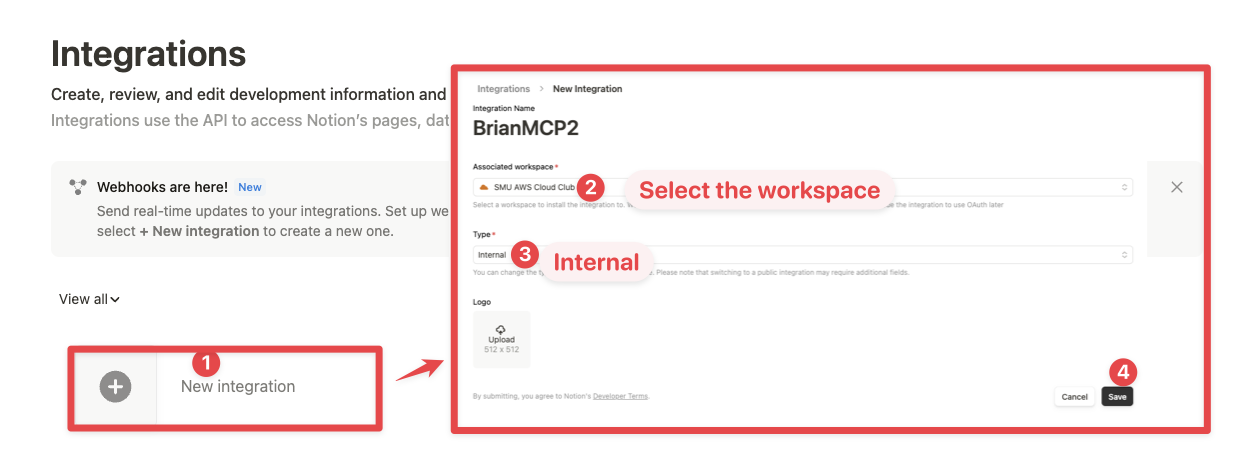
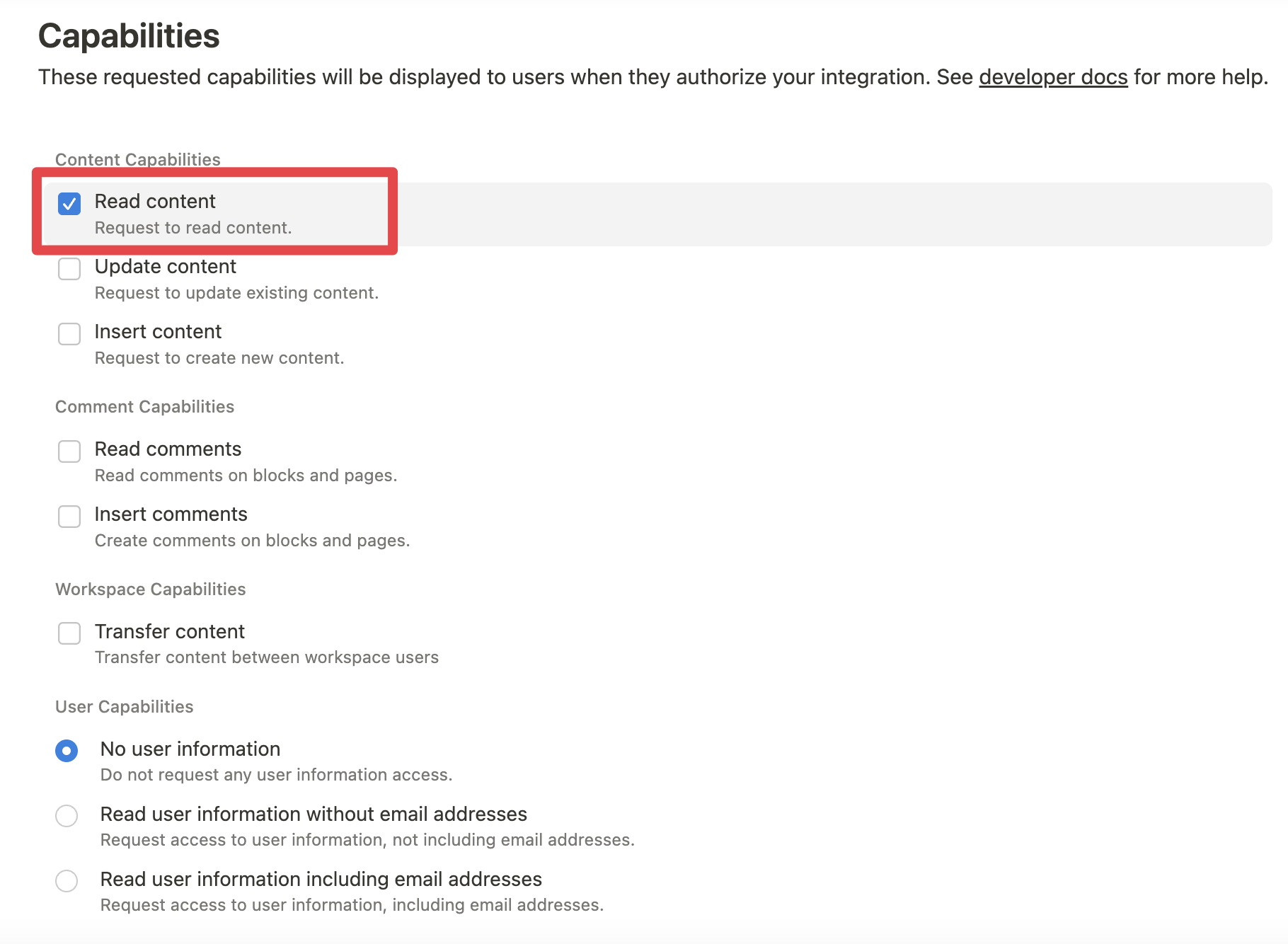
While we limit the scope of Notion API's exposed (for example, you will not be able to delete databases via MCP), there is a non-zero risk to workspace data by exposing it to LLMs. Security-conscious users may want to further configure the Integration's _Capabilities_.
For example, you can create a read-only integration token by giving only "Read content" access from the "Configuration" tab:
2. Connecting content to integration:
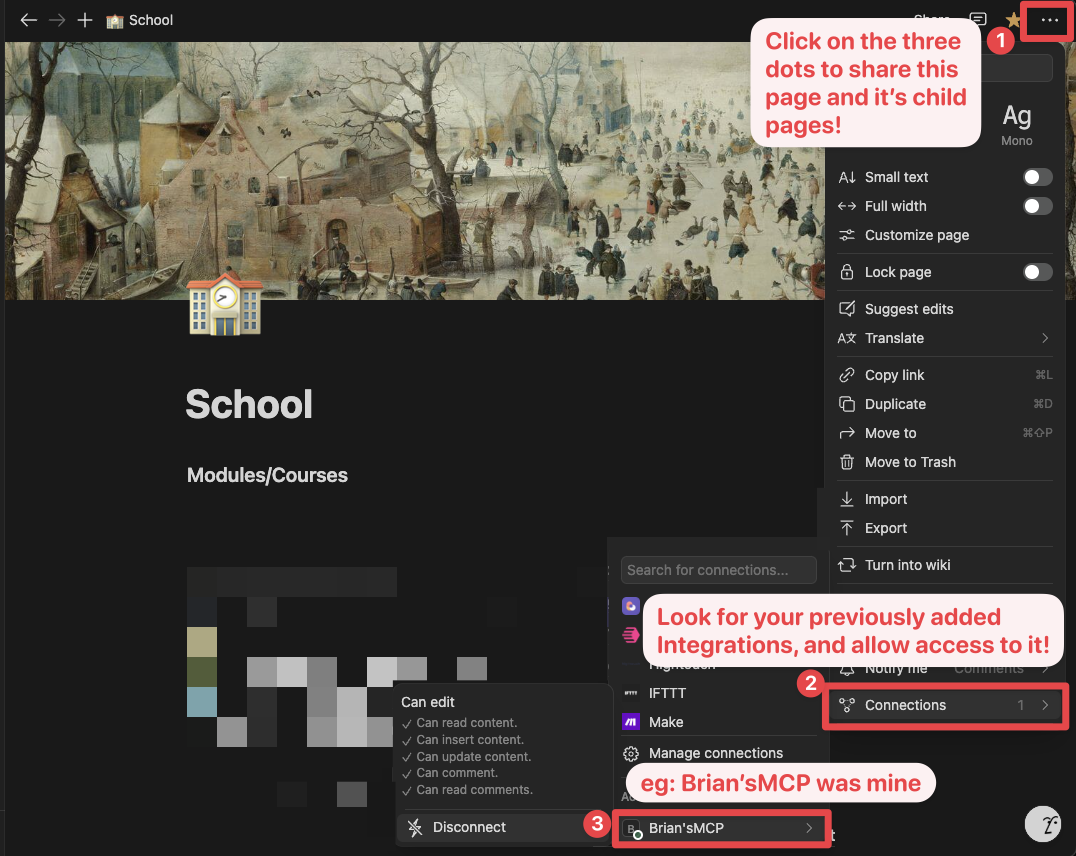
Ensure relevant pages and databases are connected to your integration.
To do this, you'll need to visit that page, and click on the 3 dots, and select "Connect to integration".
3. Adding MCP config to your client:
Using npm:
Add the following to your `.cursor/mcp.json` or `claude_desktop_config.json` (MacOS: `~/Library/Application\ Support/Claude/claude_desktop_config.json`)
{
  "mcpServers": {
    "notionApi": {
      "command": "npx",
      "args": ["-y", "@notionhq/notion-mcp-server"],
      "env": {
        "OPENAPI_MCP_HEADERS": "{\"Authorization\": \"Bearer ntn_****\", \"Notion-Version\": \"2022-06-28\" }"
      }
    }
  }
}
Using Docker:
There are two options for running the MCP server with Docker:
Option 1: Using the official Docker Hub image:
Add the following to your `.cursor/mcp.json` or `claude_desktop_config.json`:
{
  "mcpServers": {
    "notionApi": {
      "command": "docker",
      "args": [
        "run",
        "--rm",
        "-i",
        "-e", "OPENAPI_MCP_HEADERS",
        "mcp/notion"
      ],
      "env": {
        "OPENAPI_MCP_HEADERS": "{\"Authorization\":\"Bearer ntn_****\",\"Notion-Version\":\"2022-06-28\"}"
      }
    }
  }
}
This approach:
- Uses the official Docker Hub image
- Properly handles JSON escaping via environment variables
- Provides a more reliable configuration method
Option 2: Building the Docker image locally:
You can also build and run the Docker image locally. First, build the Docker image:
docker-compose buildThen, add the following to your `.cursor/mcp.json` or `claude_desktop_config.json`:
{
  "mcpServers": {
    "notionApi": {
      "command": "docker",
      "args": [
        "run",
        "--rm",
        "-i",
        "-e",
        "OPENAPI_MCP_HEADERS={\"Authorization\": \"Bearer ntn_****\", \"Notion-Version\": \"2022-06-28\"}",
        "notion-mcp-server"
      ]
    }
  }
}
Don't forget to replace `ntn_****` with your integration secret. Find it from your integration configuration tab:
Examples
1. Using the following instruction
Comment "Hello MCP" on page "Getting started"AI will correctly plan two API calls, `v1/search` and `v1/comments`, to achieve the task
2. Similarly, the following instruction will result in a new page named "Notion MCP" added to parent page "Development"
Add a page titled "Notion MCP" to page "Development"3. You may also reference content ID directly
Get the content of page 1a6b35e6e67f802fa7e1d27686f017f2Development
Build
npm run buildExecute
npx -y --prefix /path/to/local/notion-mcp-server @notionhq/notion-mcp-serverPublish
npm publish --access publicFrequently asked questions
What is Notion-MCP-Server-SSE?
Notion-MCP-Server-SSE is Notion MCP Server
How do I install Notion-MCP-Server-SSE?
Open the GitHub repository and follow its README. Most MCP servers are added to your client's MCP config, then called by your agent.
Is Notion-MCP-Server-SSE open source?
Yes — it is hosted on GitHub at https://github.com/ContexaAI/Notion-MCP-Server-SSE.
Related MCP tools
 servers
Model Context Protocol Servers
 UI-TARS-desktop
The Open-Source Multimodal AI Agent Stack: Connecting Cutting-Edge AI Models and Agent Infra
 n8n-mcp
A MCP for Claude Desktop / Claude Code / Windsurf / Cursor to build n8n workflows for you
 Figma-Context-MCP
MCP server to provide Figma layout information to AI coding agents like Cursor
 inbox-zero
The world's best AI personal assistant for email. Open source app to help you reach inbox zero fast.
 instant
Instant is the best backend for AI-coded apps. You get auth, permissions, storage, presence, and streams — everything you need to ship apps your users will love.
Run your own MCP server? See who uses it and what to fix.
Measure it with TrackMCP