
mcp-geo
An MCP service for getting user geolocation information
Documentation
MCP with Pages Functions :Geo Location Demo
This project demonstrates how to use EdgeOne Pages Functions to retrieve user geolocation information and integrate it with large language models through MCP (Model Context Protocol).
Demo
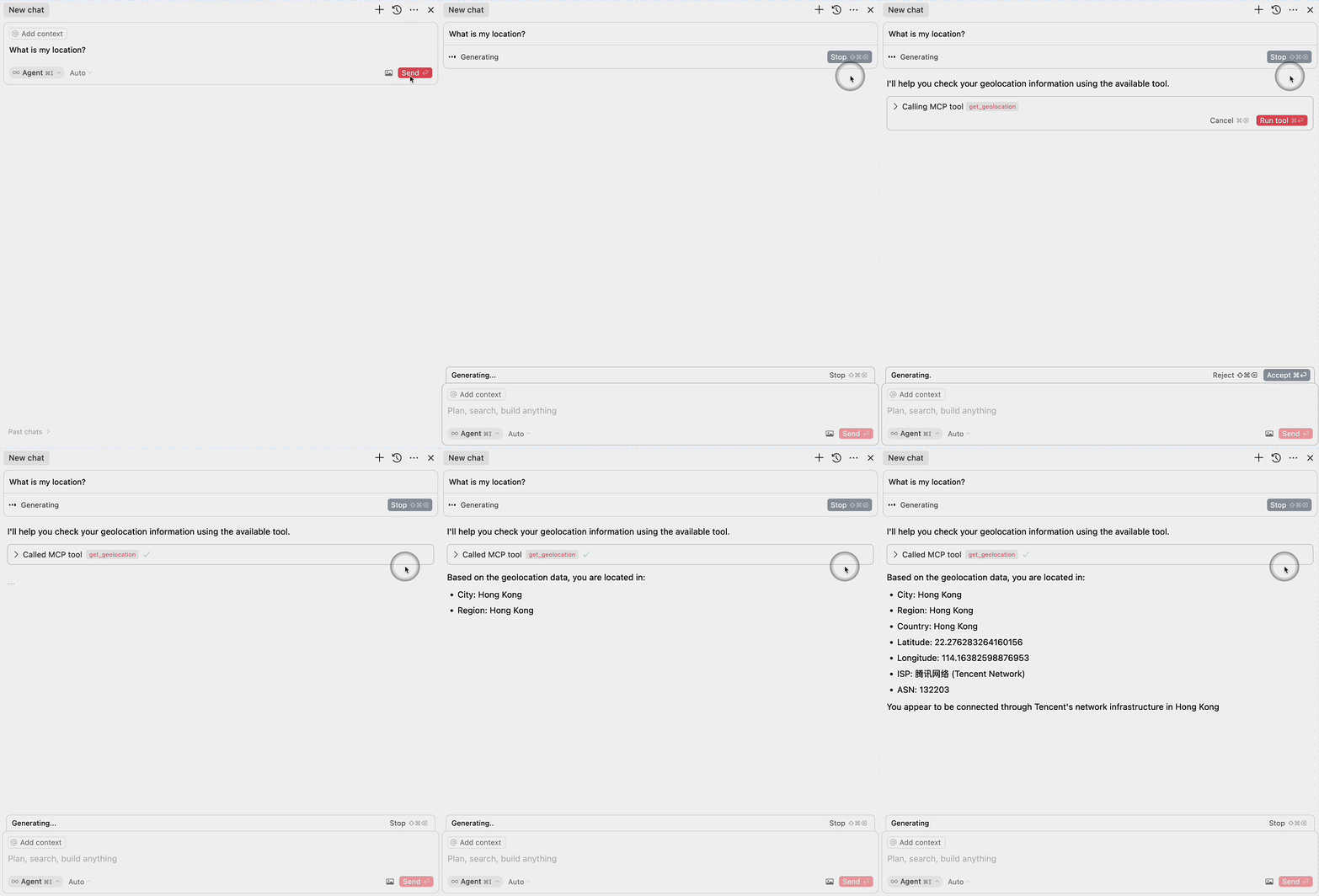
Deploy

More Templates: EdgeOne Pages
Components
1. EdgeOne Pages Functions: Geolocation
The project includes an EdgeOne Pages Function that retrieves user geolocation information:
- Uses the EdgeOne request context to access geolocation data
- Returns location information in a JSON format
- Located in `functions/get_geo.ts`
2. MCP Server Integration
The MCP server component provides an interface for large language models to access geolocation data:
- Implements the Model Context Protocol (MCP)
- Exposes a `get_geolocation` tool that can be used by AI models
- Uses the EdgeOne Pages Function to fetch geolocation data
- Located in `mcp-server/index.ts`
MCP Configuration
To use the MCP server with large language models, add the following configuration:
{
  "mcpServers": {
    "edgeone-geo-mcp-server": {
      "command": "tsx",
      "args": ["path/to/mcp-server/index.ts"]
    }
  }
}
Learn More
- EdgeOne Pages
- EdgeOne Pages Functions documentation
- Model Context Protocol (MCP) - Learn about integrating AI models with external tools and services
Frequently asked questions
What is mcp-geo?
mcp-geo is An MCP service for getting user geolocation information
How do I install mcp-geo?
Open the GitHub repository and follow its README. Most MCP servers are added to your client's MCP config, then called by your agent.
Is mcp-geo open source?
Yes — it is hosted on GitHub at https://github.com/HolleIvan/mcp-geo.
Related MCP tools
 servers
Model Context Protocol Servers
 UI-TARS-desktop
The Open-Source Multimodal AI Agent Stack: Connecting Cutting-Edge AI Models and Agent Infra
 n8n-mcp
A MCP for Claude Desktop / Claude Code / Windsurf / Cursor to build n8n workflows for you
 Figma-Context-MCP
MCP server to provide Figma layout information to AI coding agents like Cursor
 inbox-zero
The world's best AI personal assistant for email. Open source app to help you reach inbox zero fast.
 instant
Instant is the best backend for AI-coded apps. You get auth, permissions, storage, presence, and streams — everything you need to ship apps your users will love.
Run your own MCP server? See who uses it and what to fix.
Measure it with TrackMCP