
custom-cloudflare-mcp-server
Cloudflare MCP Server
Documentation
MCP Memory
MCP Memory is a MCP Server that gives MCP Clients (Cursor, Claude, Windsurf and more) the ability to remember information about users (preferences, behaviors) across conversations. It uses vector search technology to find relevant memories based on meaning, not just keywords. It's built with Cloudflare Workers, D1, Vectorize (RAG), Durable Objects, Workers AI and Agents.
📺 Video
🚀 Try It Out
https://memory.mcpgenerator.com/
🛠️ How to Deploy Your Own MCP Memory
Option 1: One-Click Deploy Your Own MCP Memory to Cloudflare
In Create Vectorize section choose:
- Dimensions: 1024
- Metric: cosine
Click button "Create and Deploy"
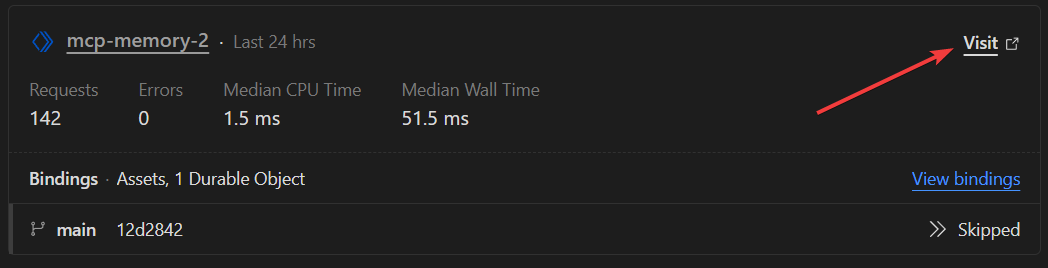
In Cloudflare dashboard, go to "Workers & Pages" and click on Visit
Option 2: Use this template
1. Click the "Use this template" button at the top of this repository
2. Clone your new repository
3. Follow the setup instructions below
Option 3: Create with CloudFlare CLI
npm create cloudflare@latest --git https://github.com/puliczek/mcp-memory🔧 Setup (Only Option 2 & 3)
1. Install dependencies:
npm install2. Create a Vectorize index:
npx wrangler vectorize create mcp-memory-vectorize --dimensions 1024 --metric cosine3. Install Wrangler:
npm run dev4. Deploy the worker:
npm run deploy🧠 How It Works
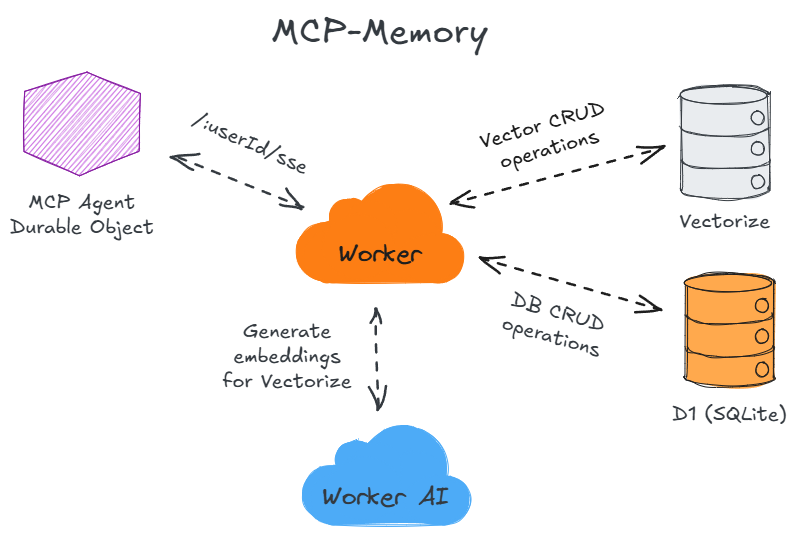
1. Storing Memories:
2. Retrieving Memories:
This architecture enables:
- Fast vector similarity search through Vectorize
- Persistent storage with D1
- Stateful operations via Durable Objects
- Standardized AI interactions through Workers AI
- Protocol compliance via the Agents framework
The system finds conceptually related information even when the exact words don't match.
🔒 Security
MCP Memory implements several security measures to protect user data:
- Each user's memories are stored in isolated namespaces within Vectorize for data separation
- Built-in rate limiting prevents abuse (100 req/min - you can change it in wrangler.jsonc)
- Authentication is based on userId only
- While this is sufficient for basic protection due to rate limiting
- Additional authentication layers (like API keys or OAuth) can be easily added if needed
- All data is stored in Cloudflare's secure infrastructure
- All communications are secured with industry-standard TLS encryption (automatically provided by Cloudflare's SSL/TLS certification)
💰 Cost Information - FREE for Most Users
MCP Memory is free to use for normal usage levels:
- Free tier allows 1,000 memories with ~28,000 queries per month
- Uses Cloudflare's free quota for Workers, Vectorize, Worker AI and D1 database
For more details on Cloudflare pricing, see:
❓ FAQ
1. Can I use memory.mcpgenerator.com to store my memories?
2. Can I host it?
3. Can I run it locally?
4. Can I use different hosting?
5. Why did you build it?
6. Can I use it for more than one person?
7. Can I use it to store things other than memories?
Cloudflare Browser Rendering Experiments & MCP Server
This project demonstrates how to use Cloudflare Browser Rendering to extract web content for LLM context. It includes experiments with the REST API and Workers Binding API, as well as an MCP server implementation that can be used to provide web context to LLMs.
Project Structure
cloudflare-browser-rendering/
├── examples/                   # Example implementations and utilities
│   ├── basic-worker-example.js # Basic Worker with Browser Rendering
│   ├── minimal-worker-example.js # Minimal implementation
│   ├── debugging-tools/        # Tools for debugging
│   │   └── debug-test.js       # Debug test utility
│   └── testing/                # Testing utilities
│       └── content-test.js     # Content testing utility
├── experiments/                # Educational experiments
│   ├── basic-rest-api/         # REST API tests
│   ├── puppeteer-binding/      # Workers Binding API tests
│   └── content-extraction/     # Content processing tests
├── src/                        # MCP server source code
│   ├── index.ts                # Main entry point
│   ├── server.ts               # MCP server implementation
│   ├── browser-client.ts       # Browser Rendering client
│   └── content-processor.ts    # Content processing utilities
├── puppeteer-worker.js         # Cloudflare Worker with Browser Rendering binding
├── test-puppeteer.js           # Tests for the main implementation
├── wrangler.toml               # Wrangler configuration for the Worker
├── cline_mcp_settings.json.example # Example MCP settings for Cline
├── .gitignore                  # Git ignore file
└── LICENSE                     # MIT License
Prerequisites
- Node.js (v16 or later)
- A Cloudflare account with Browser Rendering enabled
- TypeScript
- Wrangler CLI (for deploying the Worker)
Installation
1. Clone the repository:
git clone https://github.com/yourusername/cloudflare-browser-rendering.git
cd cloudflare-browser-rendering
2. Install dependencies:
npm installCloudflare Worker Setup
1. Install the Cloudflare Puppeteer package:
npm install @cloudflare/puppeteer2. Configure Wrangler:
# wrangler.toml
name = "browser-rendering-api"
main = "puppeteer-worker.js"
compatibility_date = "2023-10-30"
compatibility_flags = ["nodejs_compat"]

[browser]
binding = "browser"
3. Deploy the Worker:
npx wrangler deploy4. Test the Worker:
node test-puppeteer.jsRunning the Experiments
Basic REST API Experiment
This experiment demonstrates how to use the Cloudflare Browser Rendering REST API to fetch and process web content:
npm run experiment:restPuppeteer Binding API Experiment
This experiment demonstrates how to use the Cloudflare Browser Rendering Workers Binding API with Puppeteer for more advanced browser automation:
npm run experiment:puppeteerContent Extraction Experiment
This experiment demonstrates how to extract and process web content specifically for use as context in LLMs:
npm run experiment:contentMCP Server
The MCP server provides tools for fetching and processing web content using Cloudflare Browser Rendering for use as context in LLMs.
Building the MCP Server
npm run buildRunning the MCP Server
npm startOr, for development:
npm run devMCP Server Tools
The MCP server provides the following tools:
1. `fetch_page` - Fetches and processes a web page for LLM context
2. `search_documentation` - Searches Cloudflare documentation and returns relevant content
3. `extract_structured_content` - Extracts structured content from a web page using CSS selectors
4. `summarize_content` - Summarizes web content for more concise LLM context
Configuration
To use your Cloudflare Browser Rendering endpoint, set the `BROWSER_RENDERING_API` environment variable:
export BROWSER_RENDERING_API=https://YOUR_WORKER_URL_HEREReplace `YOUR_WORKER_URL_HERE` with the URL of your deployed Cloudflare Worker. You'll need to replace this placeholder in several files:
1. In test files: `test-puppeteer.js`, `examples/debugging-tools/debug-test.js`, `examples/testing/content-test.js`
2. In the MCP server configuration: `cline_mcp_settings.json.example`
3. In the browser client: `src/browser-client.ts` (as a fallback if the environment variable is not set)
Integrating with Cline
To integrate the MCP server with Cline, copy the `cline_mcp_settings.json.example` file to the appropriate location:
cp cline_mcp_settings.json.example ~/Library/Application\ Support/Code/User/globalStorage/saoudrizwan.claude-dev/settings/cline_mcp_settings.jsonOr add the configuration to your existing `cline_mcp_settings.json` file.
Key Learnings
1. Cloudflare Browser Rendering requires the `@cloudflare/puppeteer` package to interact with the browser binding.
2. The correct pattern for using the browser binding is:
import puppeteer from '@cloudflare/puppeteer';

   // Then in your handler:
   const browser = await puppeteer.launch(env.browser);
   const page = await browser.newPage();
3. When deploying a Worker that uses the Browser Rendering binding, you need to enable the `nodejs_compat` compatibility flag.
4. Always close the browser after use to avoid resource leaks.
cloudflare-api-mcp
This is a lightweight Model Control Protocol (MCP) server bootstrapped with create-mcp and deployed on Cloudflare Workers.
This MCP server allows agents (such as Cursor) to interface with the Cloudflare REST API.
It's still under development, I will be adding more tools as I find myself needing them.
Available Tools
See src/index.ts for the current list of tools. Every method in the class is an MCP tool.
Installation
1. Run the automated install script to clone this MCP server and deploy it to your Cloudflare account:
bun create mcp --clone https://github.com/zueai/cloudflare-api-mcp2. Open `Cursor Settings -> MCP -> Add new MCP server` and paste the command that was copied to your clipboard.
3. Upload your Cloudflare API key and email to your worker secrets:
bunx wrangler secret put CLOUDFLARE_API_KEY
bunx wrangler secret put CLOUDFLARE_API_EMAIL
Local Development
Add your Cloudflare API key and email to the `.dev.vars` file:
CLOUDFLARE_API_KEY=
CLOUDFLARE_API_EMAIL=
Deploying
1. Run the deploy script:
bun run deploy2. Reload your Cursor window to see the new tools.
How to Create New MCP Tools
To create new MCP tools, add methods to the `MyWorker` class in `src/index.ts`. Each function will automatically become an MCP tool that your agent can use.
Example:
/**
 * Create a new DNS record in a zone.
 * @param zoneId {string} The ID of the zone to create the record in.
 * @param name {string} The name of the DNS record.
 * @param content {string} The content of the DNS record.
 * @param type {string} The type of DNS record (CNAME, A, TXT, or MX).
 * @param comment {string} Optional comment for the DNS record.
 * @param proxied {boolean} Optional whether to proxy the record through Cloudflare.
 * @return {object} The created DNS record.
 */
createDNSRecord(zoneId: string, name: string, content: string, type: string, comment?: string, proxied?: boolean) {
    // Implementation
}
The JSDoc comments are important:
- First line becomes the tool's description
- `@param` tags define the tool's parameters with types and descriptions
- `@return` tag specifies the return value and type
Learn More
Frequently asked questions
What is custom-cloudflare-mcp-server?
custom-cloudflare-mcp-server is Cloudflare MCP Server
How do I install custom-cloudflare-mcp-server?
Open the GitHub repository and follow its README. Most MCP servers are added to your client's MCP config, then called by your agent.
Is custom-cloudflare-mcp-server open source?
Yes — it is hosted on GitHub at https://github.com/jmbish04/custom-cloudflare-mcp-server.
Related MCP tools
 servers
Model Context Protocol Servers
 UI-TARS-desktop
The Open-Source Multimodal AI Agent Stack: Connecting Cutting-Edge AI Models and Agent Infra
 n8n-mcp
A MCP for Claude Desktop / Claude Code / Windsurf / Cursor to build n8n workflows for you
 Figma-Context-MCP
MCP server to provide Figma layout information to AI coding agents like Cursor
 inbox-zero
The world's best AI personal assistant for email. Open source app to help you reach inbox zero fast.
 instant
Instant is the best backend for AI-coded apps. You get auth, permissions, storage, presence, and streams — everything you need to ship apps your users will love.
Run your own MCP server? See who uses it and what to fix.
Measure it with TrackMCP