
mcp-dockmaster
MCP Dockmaster allows you to easily install and manage MCP servers. Available for Mac, Windows and Linux as a Desktop App, CLI and a library.
Documentation
🚀 MCP Dockmaster
> The Ultimate AI Tool Manager - Install, manage, and supercharge your AI assistants with the power of Model Context Protocol (MCP)
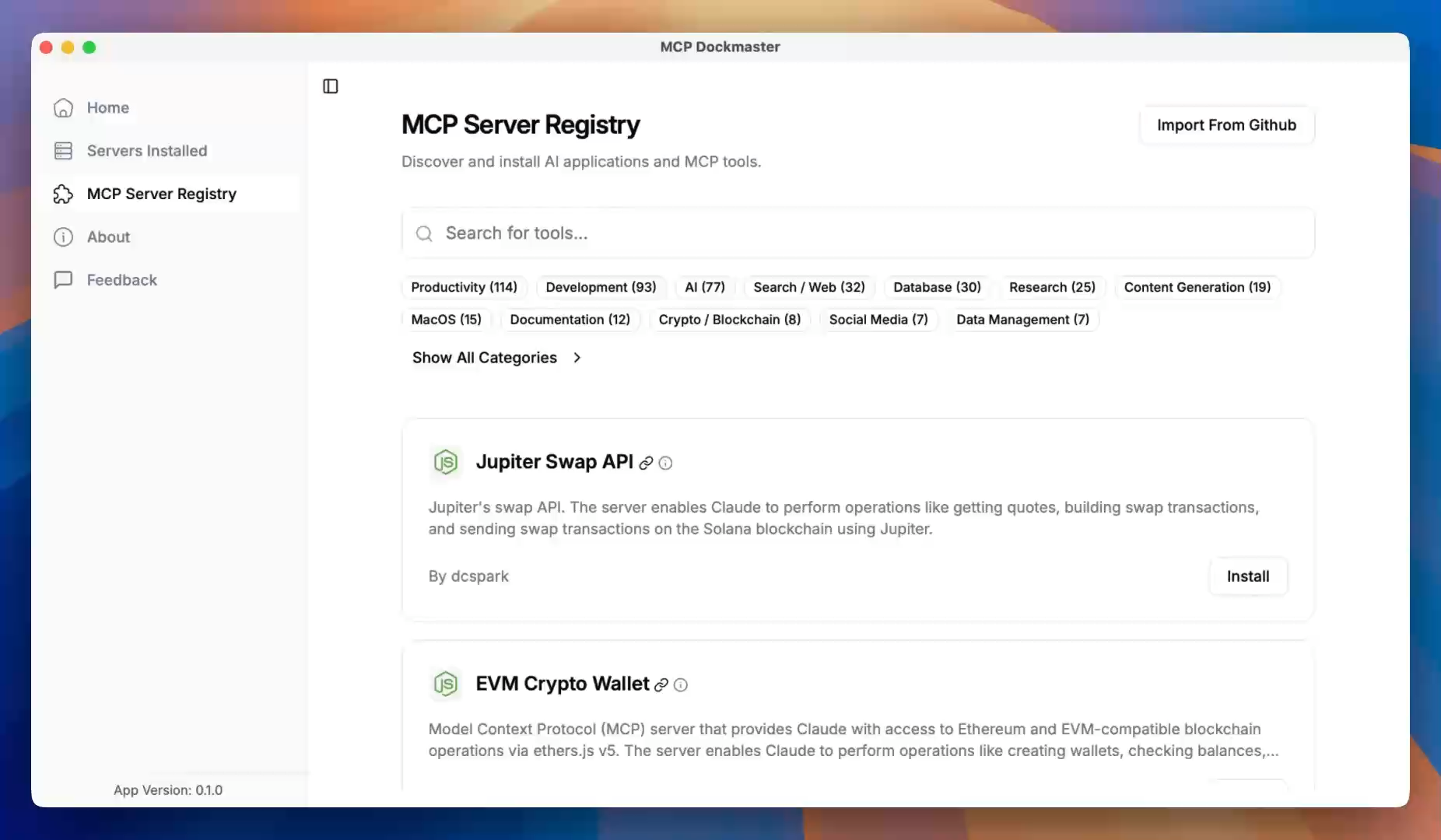
✨ What is MCP Dockmaster?
MCP Dockmaster transforms how you work with AI assistants like Claude by giving them superpowers through Model Context Protocol (MCP) servers. Think of it as an App Store for AI tools that seamlessly integrates with your favorite AI assistants.
🎯 One-Click Installation → Browse, install, and manage MCP servers
🔗 Auto-Integration → Automatically connects with Claude and other MCP-compatible AI assistants
🌐 Multi-Platform → Available as Desktop App, CLI, and library for Mac, Windows, and Linux
⚡ Zero Config → Works out of the box with automatic setup and updates
🔥 Key Features
- 🛍️ AI Tool Marketplace - Discover and install powerful MCP servers from our curated store
- 🔧 Smart Management - Install, update, and remove AI tools with a simple click
- 🎨 Beautiful Interface - Modern, intuitive desktop app built with Tauri + React
- 🚀 Lightning Fast - Rust-powered backend for blazing performance
- 🔌 Universal Compatibility - Supports Node.js, Python, and Docker-based AI tools
- ⚙️ Advanced Configuration - Fine-tune settings for power users
🎬 See It In Action
Experience how MCP Dockmaster transforms your AI workflow in under 2 minutes!
🚀 Quick Start
💻 Desktop App (Recommended)
1. Download the latest release for your platform from mcp-dockmaster.com
2. Install and launch MCP Dockmaster
3. Browse the AI Tool Store and install your first MCP server
4. Integrate Follow the integration steps at home to connect the app with Claude, Cursor, or any other supported app—and enjoy you AI with superpowers!
🔨 Development Setup
Want to contribute or run from source? Here's how:
Prerequisites
- Node.js v18+
- Rust (for Tauri development)
- Git
Get Started
# Clone the repository
git clone https://github.com/your-username/mcp-dockmaster.git
cd mcp-dockmaster

# Install dependencies
npm ci

# Start the desktop app in development mode
npx nx serve mcp-dockmaster
Available Commands
# 🖥️ Desktop App Development
npx nx serve mcp-dockmaster               # Start desktop app with hot reload

# 🧪 Testing & Quality
npx nx run-many -t test                   # Run all tests
🏗️ Architecture
MCP Dockmaster is built as a modern monorepo with multiple specialized applications:
📦 mcp-dockmaster/
├── 🖥️ apps/mcp-dockmaster/        # Main desktop app (Tauri + React)
├── 💻 apps/mcp-dockmaster-cli/    # Command-line interface
├── 🔄 apps/mcp-proxy-server/      # MCP proxy server
├── 🌐 apps/mcp-server-hello-world/ # Example MCP server
└── 📚 libs/mcp-core/              # Shared Rust libraries
🤝 Contributing
We love contributions! Whether you're:
- 🐛 Reporting bugs
- 💡 Suggesting features
- 📝 Improving documentation
- 🔧 Writing code
Check out our Contributing Guide to get started!
📖 Learn More
📄 License
This project is licensed under the MIT License - see the file for details.
Frequently asked questions
What is mcp-dockmaster?
mcp-dockmaster is MCP Dockmaster allows you to easily install and manage MCP servers. Available for Mac, Windows and Linux as a Desktop App, CLI and a library.
How do I install mcp-dockmaster?
Open the GitHub repository and follow its README. Most MCP servers are added to your client's MCP config, then called by your agent.
Is mcp-dockmaster open source?
Yes — it is hosted on GitHub at https://github.com/dcSpark/mcp-dockmaster and has 76 stars.
Related MCP tools
 aci
aciACI.dev is the open source tool-calling platform that hooks up 600+ tools into any agentic IDE or custom AI agent through direct function calling or a unifie...
 markdownify-mcp
A Model Context Protocol server for converting almost anything to Markdown TypeScript-based implementation. Trusted by 2200+ developers.
 jupyter-mcp-server
🪐 ✨ Model Context Protocol (MCP) Server for Jupyter. Python-based implementation. Trusted by 700+ developers. Trusted by 700+ developers.
 goose
gooseAn open source, extensible AI agent that goes beyond code suggestions - install, execute, edit, and test with any LLM for the Model Context Protocol. Enhance AI
 tfmcp
tfmcp🌍 Terraform Model Context Protocol (MCP) Tool - An experimental CLI tool that enables AI assistants to manage and operate Terraform environments.
 chatgpt-on-wechat
基于大模型搭建的聊天机器人,同时支持 微信公众号、企业微信应用、飞书、钉钉 等接入,可选择ChatGPT/Claude/DeepSeek/文心一言/讯飞星火/通义千问/ Gemini/GLM-4/Kimi/LinkAI,能处理文本、语音和图片,访问操作系统和互联网,支持基于自有知识库进行定制企业智能客服。
Run your own MCP server? See who uses it and what to fix.
Measure it with TrackMCP