
miro-mcp-server
Miro MCP Server
Documentation
Miro MCP Server
Overview
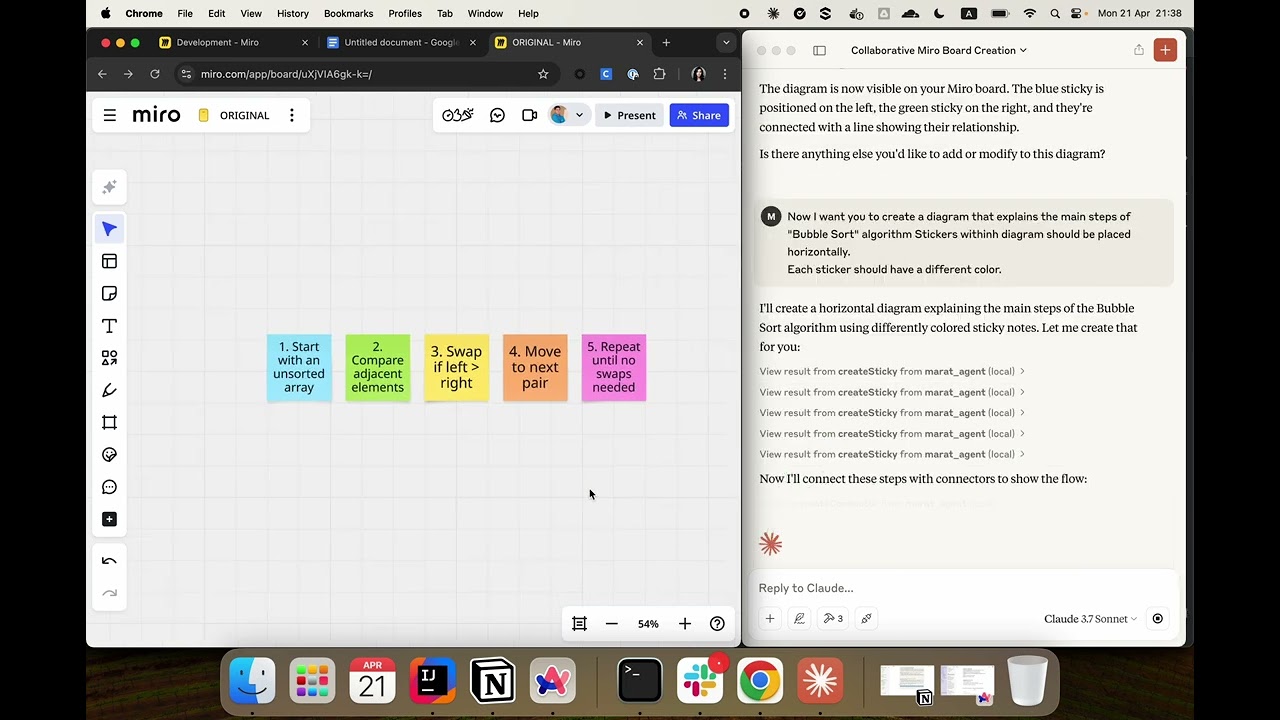
Miro MCP Server is an implementation of the Model Context Protocol (MCP) that integrates with Miro's REST API. It enables AI systems to collaborate with users directly on Miro boards by interacting with board widgets. This server provides tools that AI models can use to build visual diagrams and perform real-time collaboration.
Use Cases
- Board Collaboration: Automating collaboration on Miro boards.
- Data Analysis: Analyze the current state of a Miro board and extract useful information from visual layouts.
- AI-Powered Tools: Use large language models to assist with structured diagram creation, brainstorming, and visual task planning using the MCP protocol.
Installation
You can either download a precompiled JAR file from the Releases page or build the project yourself.
Option 0: Use public docker image
Add the following configuration to your file:
{
  "mcpServers": {
    "miro-mcp-server": {
      "command": "docker",
      "args": [
        "run",
        "-i",
        "--rm",
        "-e", "MIRO_TOKEN=your_miro_token_here",
        "maratmingazovr/miro-mcp-server:1.0"
      ]
    }
  }
}
Option 1: Use prebuilt JAR
1. Download the latest release from the Releases page.
2. Place the `.jar` file in a desired location.
Option 2: Build from source
git clone https://github.com/MaratMingazov/miro-mcp-server.git
cd miro-mcp-server
./gradlew build
The resulting `.jar` file will be located in `build/libs/miro-mcp-server-1.0.jar`.
Connecting the MCP Server
If you are using the Claude Desktop app with MacOS or Linux, you can find the configuration file at:
~/Library/Application\ Support/Claude/claude_desktop_config.jsonAdd the following configuration to your file:
{
  "mcpServers": {
    "miro-mcp-server": {
      "command": "java",
      "args": [
        "-jar",
        "/path/to/miro-mcp-server-1.0.jar",
        "--MIRO_TOKEN=miroToken"
      ]
    }
  }
}
Replace `/path/to/miro-mcp-server-1.0.jar` with the actual path to your `.jar` file and replace `miroToken` with your personal access token from Miro.
You can generate a personal access token by following this guide.
Tools
Items
- getWidgets - Get the widgets on a miro board
Sticky Notes
- createSticky - Create a sticky note widget (sticker) on a miro board
Connectors
- createConnector - Create a connector (line) widget between 2 specified widgets
Example Usage
Here’s a sample prompt you can use to instruct Claude or another LLM agent to interact with Miro board:
I want you to create a simple diagram on a Miro board.
Please follow the next steps:
1 - Create a sticky note with some text.
2 - Create the second sticky with a different text.
3 - Now create a line between the two sticky notes using the id's of previously created stickers.
Feel free to contribute or report issues on the Issues page.
Frequently asked questions
What is miro-mcp-server?
miro-mcp-server is Miro MCP Server
How do I install miro-mcp-server?
Open the GitHub repository and follow its README. Most MCP servers are added to your client's MCP config, then called by your agent.
Is miro-mcp-server open source?
Yes — it is hosted on GitHub at https://github.com/MaratMingazov/miro-mcp-server.
Related MCP tools
 peopleinspace
Kotlin Multiplatform sample with SwiftUI, Jetpack Compose, Compose for Wear, Compose for Desktop, and Compose for Web clients along with Ktor backend.
 kotlin-sdk
The official Kotlin SDK for Model Context Protocol servers and clients. Maintained in collaboration with JetBrains Trusted by 1100+ developers.
climatetracekmpKotlin/Compose Multiplatform project to show climate related emission data from https://climatetrace.org/data. Built for the Model Context Protocol to enhance A
 playwright-mcp
Playwright MCP server TypeScript-based implementation. Trusted by 22000+ developers. Trusted by 22000+ developers. Trusted by 22000+ developers.
 ghidramcp
MCP Server for Ghidra Java-based implementation. Trusted by 6400+ developers. Trusted by 6400+ developers. Trusted by 6400+ developers.
 notion-mcp-server
Official Notion MCP Server TypeScript-based implementation. Trusted by 3400+ developers. Trusted by 3400+ developers. Trusted by 3400+ developers.
Run your own MCP server? See who uses it and what to fix.
Measure it with TrackMCP