
xiyan_mcp_server
A Model Context Protocol (MCP) server that enables natural language queries to databases Python-based implementation.
Documentation
XiYan MCP Server
A Model Context Protocol (MCP) server that enables natural language queries to databases
powered by , SOTA of text-to-sql on open benchmarks
| 💻 |
|---|
| 🌐 |
| 📖 |
| 🏆 |
📄
| 🤗 |
|---|
| 🤖 |
🌕
| |
|
Table of Contents
Features
- 🌐 Fetch data by natural language through XiYanSQL
- 🤖 Support general LLMs (GPT,qwenmax), Text-to-SQL SOTA model
- 💻 Support pure local mode (high security!)
- 📝 Support MySQL and PostgreSQL.
- 🖱️ List available tables as resources
- 🔧 Read table contents
Preview
Architecture
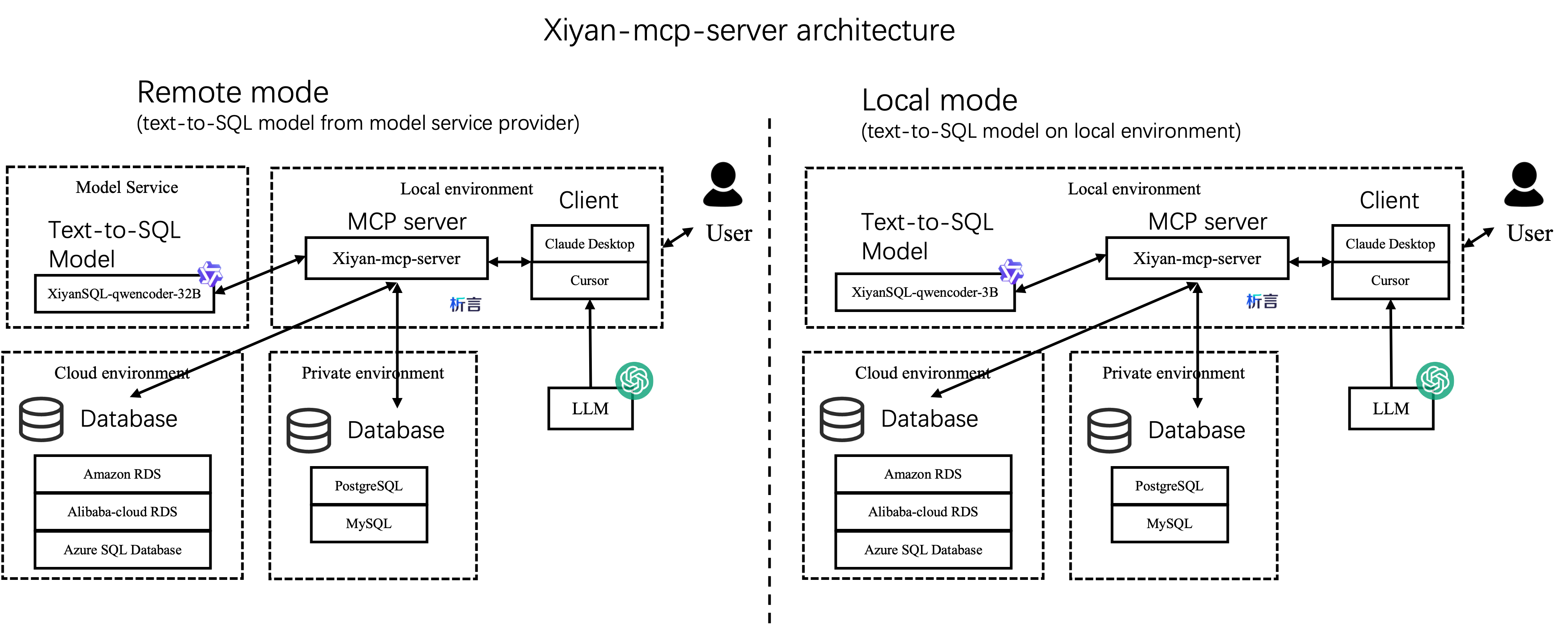
There are two ways to integrate this server in your project, as shown below:
The left is remote mode, which is the default mode. It requires an API key to access the xiyanSQL-qwencoder-32B model from service provider (see Configuration).
Another mode is local mode, which is more secure. It does not require the API key.
Best practice and reports
Evaluation on MCPBench
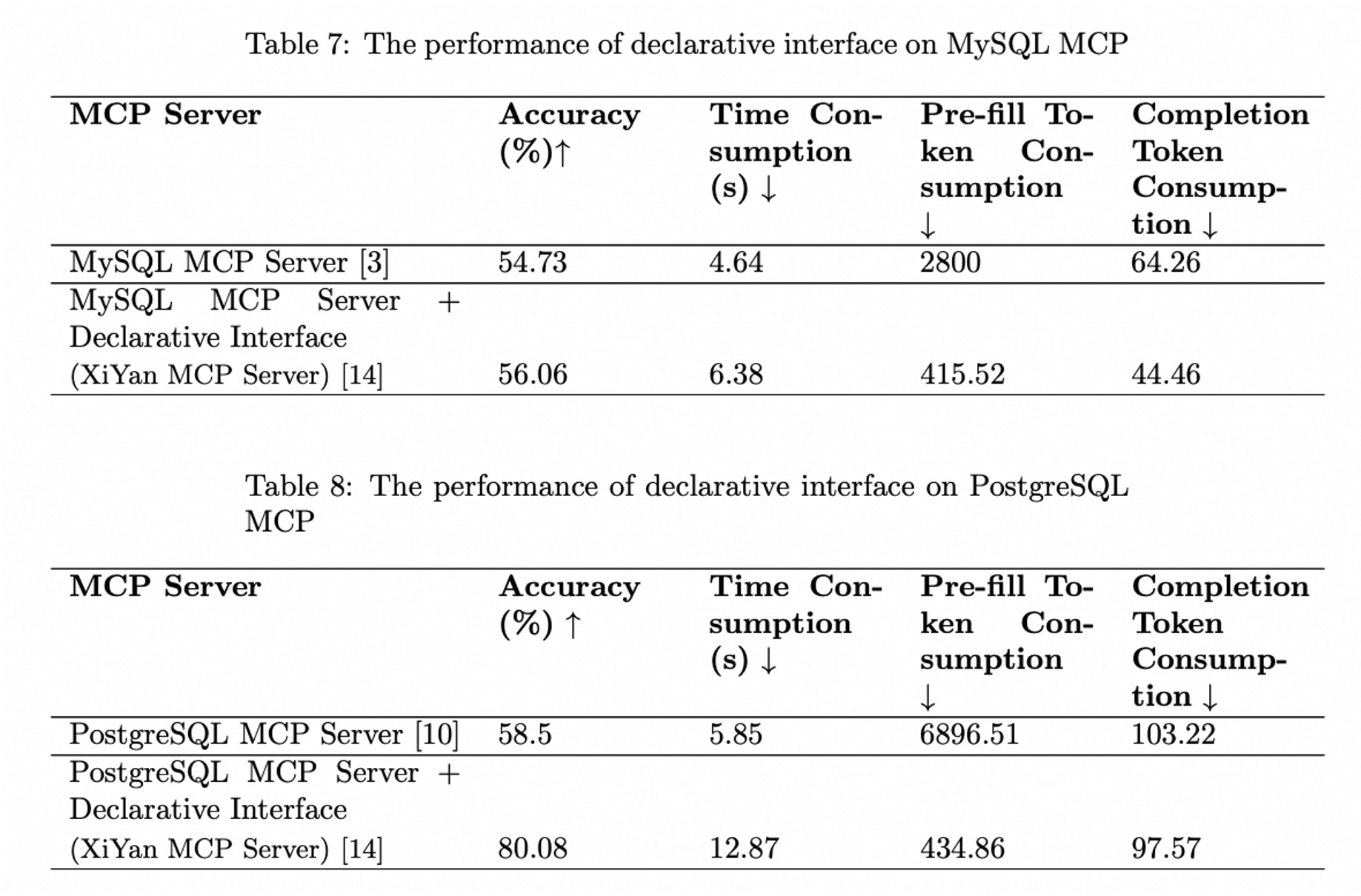
The following figure illustrates the performance of the XiYan MCP server as measured by the MCPBench benchmark. The XiYan MCP server demonstrates superior performance compared to both the MySQL MCP server and the PostgreSQL MCP server, achieving a lead of 2-22 percentage points. The detailed experiment results can be found at MCPBench and the report "Evaluation Report on MCP Servers".
Tools Preview
- The ``{dialect}://`` resource will list the names of the current databases
Installation
Installing from pip
Python 3.11+ is required.
You can install the server through pip, and it will install the latest version:
pip install xiyan-mcp-serverIf you want to install the development version from source, you can install from source code on github:
pip install git+https://github.com/XGenerationLab/xiyan_mcp_server.gitInstalling from Smithery.ai
See @XGenerationLab/xiyan_mcp_server
Not fully tested.
Configuration
You need a YAML config file to configure the server.
A default config file is provided in config_demo.yml which looks like this:
mcp:
  transport: "stdio"
model:
  name: "XGenerationLab/XiYanSQL-QwenCoder-32B-2412"
  key: ""
  url: "https://api-inference.modelscope.cn/v1/"
database:
  host: "localhost"
  port: 3306
  user: "root"
  password: ""
  database: ""
MCP Configuration
You can set the transport protocol to ``stdio`` or ``sse``.
STDIO
For stdio protocol, you can set just like this:
mcp:
  transport: "stdio"
SSE
For sse protocol, you can set mcp config as below:
mcp:
  transport: "sse"
  port: 8000
  log_level: "INFO"
The default port is `8000`. You can change the port if needed.
The default log level is `ERROR`. We recommend to set log level to `INFO` for more detailed information.
Other configurations like `debug`, `host`, `sse_path`, `message_path` can be customized as well, but normally you don't need to modify them.
LLM Configuration
``Name`` is the name of the model to use, ``key`` is the API key of the model, ``url`` is the API url of the model. We support following models.
| versions | general LLMs(GPT,qwenmax) | SOTA model by Modelscope | SOTA model by Dashscope | Local LLMs |
|---|---|---|---|---|
| description | basic, easy to use | best performance, stable, recommand | best performance, for trial | slow, high-security |
| name | the official model name (e.g. gpt-3.5-turbo,qwen-max) | XGenerationLab/XiYanSQL-QwenCoder-32B-2412 | xiyansql-qwencoder-32b | xiyansql-qwencoder-3b |
| key | the API key of the service provider (e.g. OpenAI, Alibaba Cloud) | the API key of modelscope | the API key via email | "" |
| url | the endpoint of the service provider (e.g."https://api.openai.com/v1") | https://api-inference.modelscope.cn/v1/ | https://xiyan-stream.biz.aliyun.com/service/api/xiyan-sql | http://localhost:5090 |
General LLMs
If you want to use the general LLMs, e.g. gpt3.5, you can directly config like this:
model:
  name: "gpt-3.5-turbo"
  key: "YOUR KEY "
  url: "https://api.openai.com/v1"
database:
If you want to use Qwen from Alibaba, e.g. Qwen-max, you can use following config:
model:
  name: "qwen-max"
  key: "YOUR KEY "
  url: "https://dashscope.aliyuncs.com/compatible-mode/v1"
database:
Text-to-SQL SOTA model
We recommend the XiYanSQL-qwencoder-32B (https://github.com/XGenerationLab/XiYanSQL-QwenCoder), which is the SOTA model in text-to-sql, see Bird benchmark.
There are two ways to use the model. You can use either of them.
(1) Modelscope, (2) Alibaba Cloud DashScope.
(1) Modelscope version
You need to apply a ``key`` of API-inference from Modelscope, https://www.modelscope.cn/docs/model-service/API-Inference/intro
Then you can use the following config:
model:
  name: "XGenerationLab/XiYanSQL-QwenCoder-32B-2412"
  key: ""
  url: "https://api-inference.modelscope.cn/v1/"
Read our model description for more details.
(2) Dashscope version
We deployed the model on Alibaba Cloud DashScope, so you need to set the following environment variables:
Send me your email to get the ``key``. ( godot.lzl@alibaba-inc.com )
In the email, please attach the following information:
name: "YOUR NAME",
email: "YOUR EMAIL",
organization: "your college or Company or Organization"
We will send you a ``key`` according to your email. And you can fill the ``key`` in the yml file.
The ``key`` will be expired by 1 month or 200 queries or other legal restrictions.
model:
  name: "xiyansql-qwencoder-32b"
  key: "KEY"
  url: "https://xiyan-stream.biz.aliyun.com/service/api/xiyan-sql"
Note: this model service is just for trial, if you need to use it in production, please contact us.
(3) Local version
Alternatively, you can also deploy the model XiYanSQL-qwencoder-32B on your own server.
See Local Model for more details.
Database Configuration
``host``, ``port``, ``user``, ``password``, ``database`` are the connection information of the database.
You can use local or any remote databases. Now we support MySQL and PostgreSQL(more dialects soon).
MySQL
database:
  host: "localhost"
  port: 3306
  user: "root"
  password: ""
  database: ""
PostgreSQL
Step 1: Install Python packages
pip install psycopg2Step 2: prepare the config.yml like this:
database:
  dialect: "postgresql"
  host: "localhost"
  port: 5432
  user: ""
  password: ""
  database: ""
Note that ``dialect`` should be ``postgresql`` for postgresql.
Launch
Server Launch
If you want to launch server with `sse`, you have to run the following command in a terminal:
YML=path/to/yml python -m xiyan_mcp_serverThen you should see the information on http://localhost:8000/sse in your browser. (Defaultly, change if your mcp server runs on other host/port)
Otherwise, if you use `stdio` transport protocol, you usually declare the mcp server command in specific mcp application instead of launching it in a terminal.
However, you can still debug with this command if needed.
Client Setting
Claude Desktop
Add this in your Claude Desktop config file, ref
{
    "mcpServers": {
        "xiyan-mcp-server": {
            "command": "/xxx/python",
            "args": [
                "-m",
                "xiyan_mcp_server"
            ],
            "env": {
                "YML": "PATH/TO/YML"
            }
        }
    }
}
Please note that the Python command here requires the complete path to the Python executable (`/xxx/python`); otherwise, the Python interpreter cannot be found. You can determine this path by using the command `which python`. The same applies to other applications as well.
Claude Desktop currently does not support the SSE transport protocol.
Cline
Prepare the config like Claude Desktop
Goose
If you use `stdio`, add following command in the config, ref
env YML=path/to/yml /xxx/python -m xiyan_mcp_serverOtherwise, if you use `sse`, change Type to `SSE` and set the endpoint to `http://127.0.0.1:8000/sse`
Cursor
Use the similar command as follows.
For `stdio`:
{
  "mcpServers": {
    "xiyan-mcp-server": {
      "command": "/xxx/python",
      "args": [
        "-m",
        "xiyan_mcp_server"
      ],
      "env": {
        "YML": "path/to/yml"
      }
    }
  }
}
For `sse`:
{
  "mcpServers": {
    "xiyan_mcp_server_1": {
      "url": "http://localhost:8000/sse"
    }
  }
}
Witsy
Add following in command:
/xxx/python -m xiyan_mcp_serverAdd an env: key is YML and value is the path to your yml file.
Ref
Contact us:
If you are interested in our research or products, please feel free to contact us.
Contact Information:
Yifu Liu, zhencang.lyf@alibaba-inc.com
Join Our DingTalk Group
Other Related Links
Citation
If you find our work helpful, feel free to give us a cite.
@article{XiYanSQL,
      title={XiYan-SQL: A Novel Multi-Generator Framework For Text-to-SQL},
      author={Yifu Liu and Yin Zhu and Yingqi Gao and Zhiling Luo and Xiaoxia Li and Xiaorong Shi and Yuntao Hong and Jinyang Gao and Yu Li and Bolin Ding and Jingren Zhou},
      year={2025},
      eprint={2507.04701},
      archivePrefix={arXiv},
      primaryClass={cs.CL},
      url={https://arxiv.org/abs/2507.04701},
}Frequently asked questions
What is xiyan_mcp_server?
xiyan_mcp_server is A Model Context Protocol (MCP) server that enables natural language queries to databases Python-based implementation.
How do I install xiyan_mcp_server?
Open the GitHub repository and follow its README. Most MCP servers are added to your client's MCP config, then called by your agent.
Is xiyan_mcp_server open source?
Yes — it is hosted on GitHub at https://github.com/XGenerationLab/xiyan_mcp_server and has 217 stars.
Related MCP tools
 dbt-mcp
A MCP (Model Context Protocol) server for interacting with dbt. Python-based implementation.
 freecad-mcp
FreeCAD MCP(Model Context Protocol) server Python-based implementation.
 mcp-client-for-ollama
A text-based user interface (TUI) client for interacting with MCP servers using Ollama. Features include multi-server, dynamic model switching, streaming res...
 mcp-teams-server
An MCP (Model Context Protocol) server implementation for Microsoft Teams integration, providing capabilities to read messages, create messages, reply to mes...
 chatgpt-on-wechat
基于大模型搭建的聊天机器人,同时支持 微信公众号、企业微信应用、飞书、钉钉 等接入,可选择ChatGPT/Claude/DeepSeek/文心一言/讯飞星火/通义千问/ Gemini/GLM-4/Kimi/LinkAI,能处理文本、语音和图片,访问操作系统和互联网,支持基于自有知识库进行定制企业智能客服。
 gpt-researcher
An LLM agent that conducts deep research (local and web) on any given topic and generates a long report with citations. Built for the Model Context Protocol to
Run your own MCP server? See who uses it and what to fix.
Measure it with TrackMCP